
1. Introducció
This manual provides essential information for setting up, operating, maintaining, and troubleshooting your HP G9 Laptop. This device is equipped with an Processador Intel Core i3-1315U, a 15.6-inch Full HD (FHD) LED display, and runs on Windows 11 Pro. It features comprehensive connectivity options including Wi-Fi 6, Bluetooth 5.3, USB Type-C, USB 3.2 Type-A, HDMI, RJ-45 Ethernet, and an SD card reader.
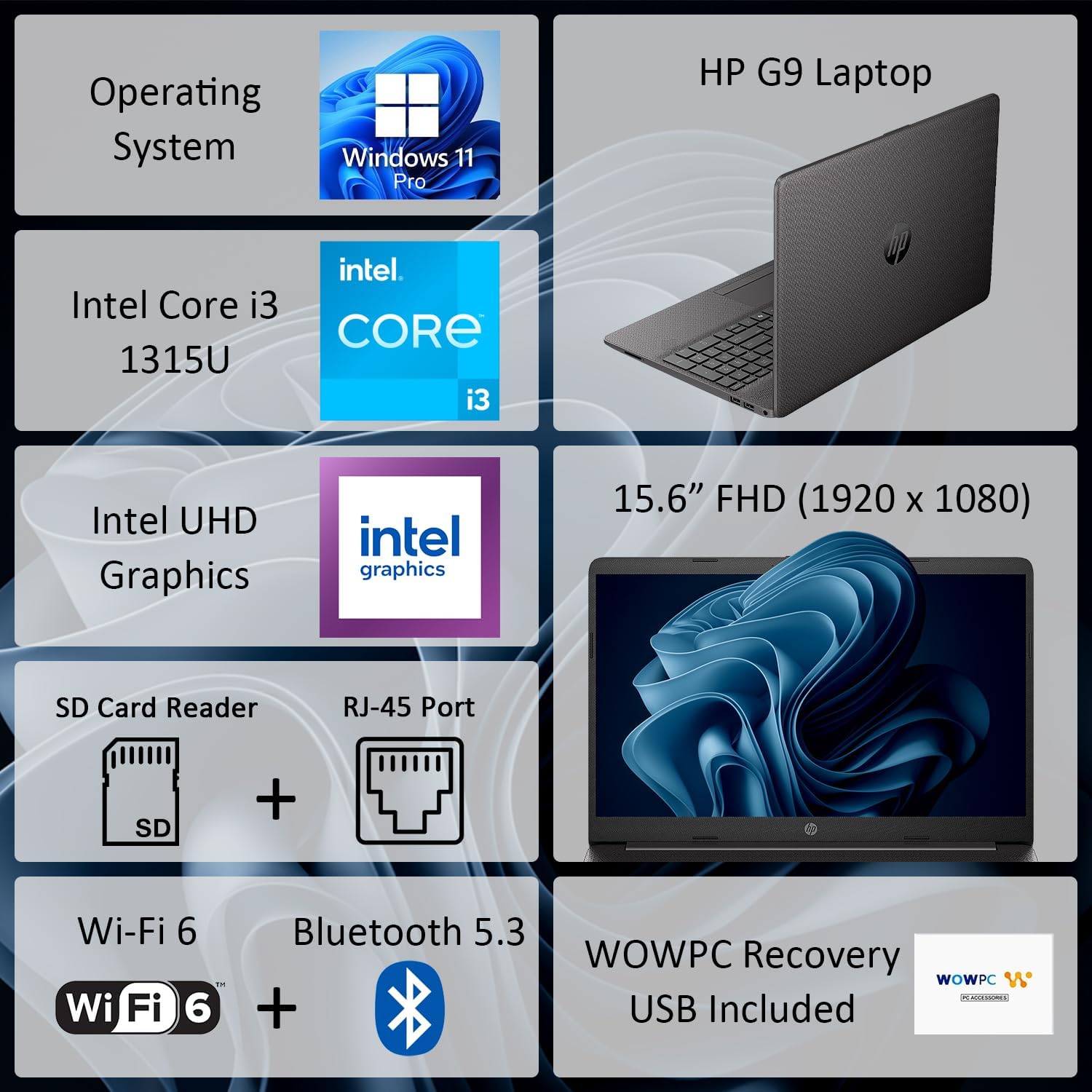
Figura 1: Mésview of HP G9 Laptop key features. This image highlights the operating system, processor, graphics, display size, and various connectivity options including Wi-Fi 6 and Bluetooth 5.3.
2. Configuració
2.1 Unboxing
Carefully remove the laptop and all accessories from the packaging. Ensure the following items are present:
- HP G9 Laptop
- Adaptador de corrent altern i cable d'alimentació
- WOWPC Recovery USB
- Documentació (Guia d'inici ràpid, Informació de garantia)
2.2 Connexió de potència
Connect the AC power adapter to the laptop's power port and then plug the power cord into a wall outlet. The laptop can be used while charging, and it is recommended to fully charge the battery before first use.
2.3 Arrencada inicial i configuració de Windows
Press the power button located on the keyboard deck to turn on the laptop. Follow the on-screen instructions to complete the Windows 11 Pro initial setup, which includes selecting your region, language, connecting to a network, and creating a user account.
2.4 Connexió de perifèrics
Utilize the available ports to connect external devices such as a mouse, keyboard, or external monitor. Refer to the image below for port locations.

Figura 2: lateral view illustrating the various connectivity ports on the HP G9 Laptop. This includes Ethernet, USB Type-C, HDMI, headset jack, SD card reader, USB Type-A ports, and the AC power input.
3. Instruccions de funcionament
3.1 Gestió de l'energia
- Encès: Premeu el botó d'encesa.
- Mode de repòs: Tanqueu la tapa o seleccioneu "Repos" al menú Inici.
- Apagar: Seleccioneu "Apagar" al menú Inici.
3.2 Using the Touchpad and Keyboard
The laptop features a responsive touchpad for navigation and a full-size, island-style keyboard for typing. Familiarize yourself with common Windows gestures for the touchpad and function keys on the keyboard.
3.3 Connectivitat de xarxa
Your HP G9 Laptop supports Wi-Fi 6 i Bluetooth 5.3 for wireless connectivity.
- Wi-Fi: Access network settings via the Windows taskbar icon to connect to available wireless networks.
- Bluetooth: Activa el Bluetooth a la configuració de Windows per emparellar-lo amb dispositius compatibles com ara auriculars o ratolins.
- Ethernet: For a wired connection, plug an Ethernet cable into the RJ-45 port.

Figure 3: The HP G9 Laptop supports Wi-Fi 6 and Bluetooth 5.3 for robust wireless connections.
3.4 Ús de dispositius externs
El portàtil inclou diversos ports per connectar dispositius externs:
- USB Ports (Type-C, Type-A): For connecting USB drives, external hard drives, and other USB peripherals.
- HDMI: Connecteu-vos a pantalles o projectors externs.
- Lector de targetes SD: Insert SD cards for data transfer.
- Conector d'auriculars: Connecteu uns auriculars o uns auriculars amb micròfon.
4. Manteniment
4.1 Neteja del portàtil
Per mantenir un rendiment i un aspecte òptims:
- Utilitzeu un drap suau i sense pelusa dampNetegeu la pantalla amb aigua o amb un netejador de pantalles.
- Use compressed air to clear dust from keyboard keys and vents.
- Eviteu productes químics o materials abrasius.
4.2 Cura de la bateria
Per allargar la durada de la bateria:
- Eviteu temperatures extremes.
- No deixeu el portàtil connectat al 100% de càrrega durant períodes prolongats si no l'esteu fent servir.
- Perform occasional full discharge and recharge cycles.
4.3 Actualitzacions de programari
Regularly update your Windows operating system and device drivers to ensure security, stability, and optimal performance. Access Windows Update through the Settings menu.
4.4 Ús de la memòria USB de recuperació de WOWPC
El inclòs WOWPC Recovery USB can be used to restore your system to its factory default state in case of severe software issues. Refer to the instructions provided with the USB for detailed steps.
5. Solució De Problemes
This section addresses common issues you might encounter with your HP G9 Laptop.
5.1 No hi ha alimentació o el portàtil no s'encén
- Assegureu-vos que l'adaptador de CA estigui connectat correctament tant al portàtil com a una presa de corrent que funcioni.
- Verifiqueu que la presa de corrent funciona connectant-hi un altre dispositiu.
- Prova de mantenir premut el botó d'engegada durant 15-20 segons per fer un restabliment complet.
5.2 Problemes de visualització
- If the screen is blank, try connecting an external monitor to the HDMI port to check if the issue is with the laptop's display.
- Adjust display brightness using the function keys (F2/F3 or similar, check keyboard icons).
- Ensure display drivers are up to date via Windows Update or HP's support weblloc.
5.3 Problemes de connectivitat de xarxa
- Wi-Fi: Restart your router and modem. Ensure Wi-Fi is enabled in Windows settings. Run the Windows Network Troubleshooter.
- Bluetooth: Assegureu-vos que el Bluetooth estigui activat i que el dispositiu estigui en mode d'emparellament. Traieu el dispositiu i torneu-lo a emparellar.
- Ethernet: Check the cable connection. Verify network adapter settings in Windows Device Manager.
5.4 Rendiment lent
- Tanca les aplicacions innecessàries que s'executen en segon pla.
- Check Task Manager for processes consuming high CPU, memory, or disk resources.
- Assegureu-vos que Windows i els controladors estiguin actualitzats.
- Executeu una neteja i desfragmentació del disc (per a discs durs, no cal per a discs SSD).
- Consider running a malware scan.
6. Especificacions
Detailed technical specifications for the HP G9 Laptop.

Figure 4: The 15.6-inch Full HD (1920 x 1080) display provides clear visuals.
| Característica | Especificació |
|---|---|
| Marca | HP |
| Nom del model | HP G9 |
| Processador | Intel Core i3-1315U (up to 4.5 GHz, 6 cores, 8 threads) |
| Gràfics | Gràfics Intel UHD integrats |
| Sistema operatiu | Windows 11 Pro |
| Mostra | 15.6" FHD (1920 x 1080) LED |
| Memòria RAM | 16 GB DDR4-3200 MHz (expandable up to 64GB) |
| Emmagatzematge | 1 TB SSD M.2 PCIe NVMe (expandable up to 2TB) |
| Connectivitat sense fil | Realtek Wi-Fi 6 RTL8852BE (1x1) and Bluetooth 5.3 |
| Ports | 1x RJ-45 Ethernet, 1x SD Card Reader, 1x USB Type-C, 2x USB 3.2 Type-A, 1x HDMI, 1x AC Power, 1x Stereo Headphone/Microphone Combo Jack |
| Càmera | Càmera HD de 720p |
| Àudio | Altaveus estèreo duals, micròfons de matriu dual |
| Bateria | 3 cel·les, 41 Wh Li-ion |
| Dimensions (L x A x A) | 14.09 x 9.52 x 0.78 polzades |
| Pes | A partir de 3.84 lliures |
7. Garantia i Suport
7.1 Garantia limitada
Your HP G9 Laptop comes with a Garantia limitada. Please refer to the warranty documentation included in your product packaging for specific terms, conditions, and duration of coverage. This warranty typically covers manufacturing defects and hardware failures under normal use.
7.2 Suport tècnic
Per obtenir assistència tècnica, descàrregues de controladors o més suport, visiteu el lloc web oficial de suport d'HP. website. You will typically need your product's serial number or model number to access specific support resources.