Introducció
Thank you for choosing the Generic M113 AI Intelligent Translation Bluetooth Headset. This manual provides detailed instructions on how to set up, operate, and maintain your new headset. Designed for convenience and high-quality audio, these true wireless earbuds feature a multi-function screen display and long battery life, making them ideal for various uses including entertainment and communication.
Informació de seguretat
- No exposeu el dispositiu a temperatures o humitat extremes.
- Keep the device away from water and liquids, as it is not water resistant.
- Eviteu deixar caure o sotmetre el dispositiu a forts impactes.
- No intenteu desmuntar ni reparar el dispositiu vosaltres mateixos. Poseu-vos en contacte amb personal de servei qualificat.
- Feu servir només els cables i adaptadors de càrrega proporcionats o aprovats.
- L'escolta prolongada a nivells de volum elevats pot causar danys auditius.
Contingut del paquet
Si us plau, comproveu el paquet per veure si hi ha els elements següents:
- Generic M113 AI Intelligent Translation Bluetooth Headset (Left and Right Earbuds)
- Estoig de càrrega
- Coixinets per a les orelles
- Manual d'usuari
- Cable de càrrega
Producte acabatview
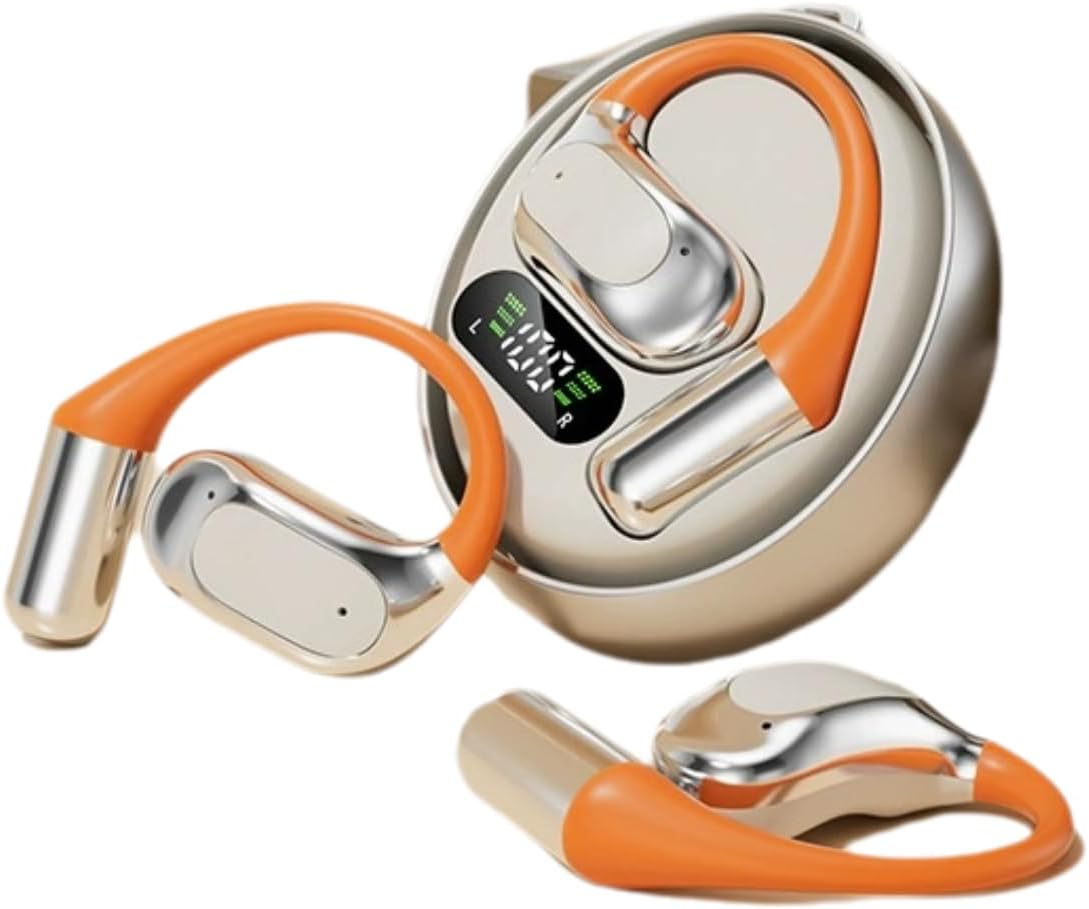
Figura 1: M113 Headset and Charging Case. This image displays the two earbuds alongside their charging case, which features a digital display indicating battery levels for both the case and individual earbuds.

Figura 2: Earbud in Charging Case. This image shows one earbud partially inserted into its charging slot within the case, highlighting the design and charging contacts.
Components:
- Auriculars: Left (L) and Right (R) earbuds with in-ear design.
- Estoig de càrrega: Portable case with a multi-function screen display for battery status.
- Àrea de control tàctil: For playback, calls, and AI translation activation.
- Contactes de càrrega: Located on earbuds and inside the charging case.
Configuració
1. Càrrega dels auriculars
- Place both earbuds into the charging case. Ensure they are correctly seated, and the charging indicators on the case's screen light up.
- Connect the charging case to a power source using the provided charging cable. The screen display will show the charging progress.
- A full charge typically takes approximately 1-2 hours for the earbuds and 2-3 hours for the charging case.
- The digital display on the case indicates the battery level of the case and each earbud (L and R).
2. Emparellament Bluetooth
- Assegureu-vos que els auriculars estiguin completament carregats.
- Open the charging case. The earbuds will automatically enter pairing mode, and an indicator light (if present) will flash.
- Al dispositiu (telèfon intel·ligent, tauleta, etc.), activeu el Bluetooth.
- Cerca available Bluetooth devices. Select "M113" from the list.
- Once connected, a voice prompt will confirm the successful pairing, and the indicator light will turn off or change color.
- If pairing fails, place the earbuds back into the case, close it, and repeat the steps.
Instruccions de funcionament
Encès/Apagat
- Encès: Obriu l'estoig de càrrega i els auriculars s'encendran automàticament. Si no, premeu i manteniu premuda la zona de control tàctil d'ambdós auriculars durant 3 segons.
- Apagar: Torneu a col·locar els auriculars a l'estoig de càrrega i tanqueu la tapa. S'apagaran automàticament i començaran a carregar-se. Si no, premeu i manteniu premuda la zona de control tàctil dels dos auriculars durant 5 segons.
Reproducció de música
- Reproduir/pausa: Toqueu una vegada la zona de control tàctil de qualsevol dels auriculars.
- Pista següent: Double-tap the touch control area on the Right earbud.
- Pista anterior: Double-tap the touch control area on the Left earbud.
- Pujar el volum: Triple-tap the touch control area on the Right earbud.
- Baixar el volum: Triple-tap the touch control area on the Left earbud.
Gestió de trucades
- Respondre/Finalitzar la trucada: Toqueu una vegada la zona de control tàctil de qualsevol dels auriculars.
- Rebutja la trucada: Premeu i manteniu premuda la zona de control tàctil de qualsevol dels auriculars durant 2 segons.
AI Intelligent Translation Function
The M113 headset features AI intelligent translation capabilities. To utilize this function, you may need to download a dedicated application on your smartphone. Please refer to the app's instructions for language selection and real-time translation usage.
Manteniment
- Neteja: Feu servir un drap suau, sec i sense borrissol per netejar els auriculars i l'estoig de càrrega. No utilitzeu productes de neteja abrasius ni dissolvents.
- Emmagatzematge: When not in use, store the headset in its charging case to protect it from dust and damage. Store in a cool, dry place.
- Cura de la bateria: Per allargar la durada de la bateria, eviteu descarregar-la completament amb freqüència. Carregueu el dispositiu regularment, fins i tot si no l'utilitzeu durant períodes prolongats.
- Exposició a l'aigua: The device is not water resistant. Avoid exposure to rain, sweat, or other liquids.
Resolució de problemes
| Problema | Causa possible | Solució |
|---|---|---|
| Els auriculars no s'encenen. | Bateria baixa. | Carregueu completament els auriculars i l'estoig de càrrega. |
| No es pot emparellar amb el dispositiu. | El Bluetooth està desactivat; els auriculars no estan en mode d'emparellament; el dispositiu està massa lluny. | Ensure Bluetooth is enabled on your device. Place earbuds in case, close, then open to re-enter pairing mode. Keep devices within 10 meters. |
| No hi ha so d'un auricular. | Auriculars no connectats; bateria baixa; contactes de càrrega bruts. | Place both earbuds back in the case, close, then open. Ensure both are charged. Clean charging contacts. |
| Mala qualitat de so. | Weak Bluetooth signal; earbud placement; dirty ear cushions. | Move closer to your device. Adjust earbud fit. Clean or replace ear cushions. |
Especificacions
| Característica | Detall |
|---|---|
| Nom del model | M113 |
| Marca | Genèric |
| Col·locació de l'orella | A l'orella |
| Factor de forma | A l'orella |
| Tecnologia de connectivitat | Bluetooth (sense fil) |
| Tipus de control | Control d'aplicacions / Control tàctil |
| Material | Alumini |
| Nivell de resistència a l'aigua | No resistent a l'aigua |
| Pes de l'article | 200 grams (7.1 unces) |
| Dimensions del paquet | 4 x 4 x 1.58 polzades |
| Components inclosos | Coixinets per a les orelles |
Garantia i Suport
Per obtenir informació sobre la garantia i assistència tècnica, consulteu la documentació que s'inclou amb la compra o poseu-vos en contacte directament amb el venedor. Conserveu el comprovant de compra per a qualsevol reclamació de garantia.
For further assistance, you may visit the Generic brand's official support channels if available, or contact the retailer where the product was purchased.


