
1. Producte acabatview
The HYVOHEX C2 Portable Air Compressor is a versatile and compact device designed for quick and efficient inflation of various items, including car tires, bicycle tires, motorcycle tires, and sports balls. It features a digital pressure gauge, automatic shut-off, and an integrated LED light for convenience and safety.
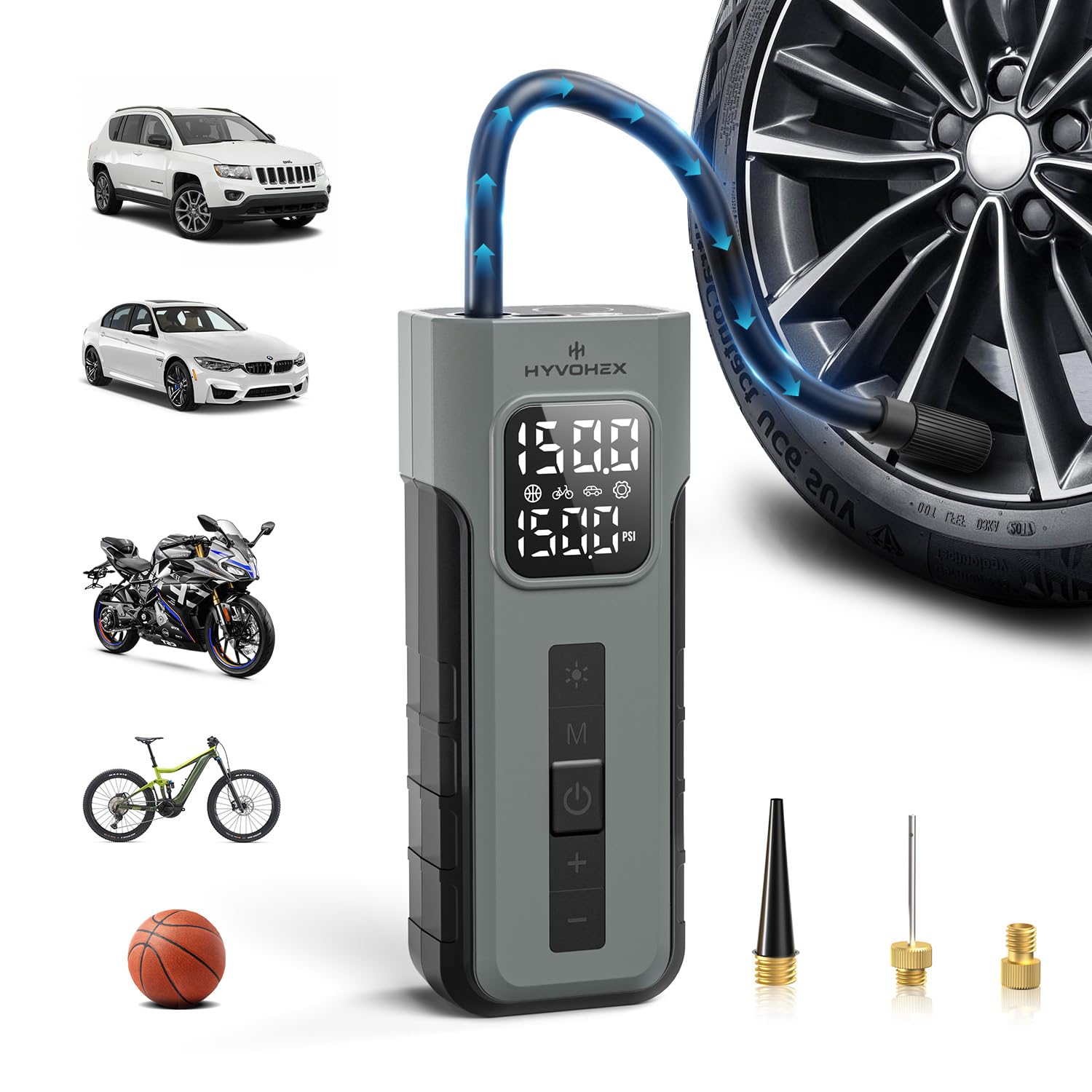
Figure 1: HYVOHEX C2 Portable Air Compressor main unit with hose attached.
2. Contingut del paquet
Upon unboxing your HYVOHEX C2 Portable Air Compressor, please ensure all the following items are present:
- Tire Inflator (x1)
- Air Hose with Schrader Adapter Attached (x1)
- General Nozzle Cone (x1)
- Needle Adapter (x1)
- Presta Adapter (x1)
- Cable de càrrega USB-C (x1)
- Storage Pouch (x1)
- Manual d'usuari (x1)
Vídeo 1: Desempaquetatge i més enllàview of the air pump and its accessories.
3. Especificacions
| Característica | Descripció |
|---|---|
| Marca | HYVOHEX |
| Número de model | C2 |
| Font d'alimentació | Alimentat per piles (2 piles de liti-ió incloses) |
| Pressió màxima | 150 PSI |
| Capacitat de cabal d'aire | 19 litres per minut |
| Nivell de so | 78 decibels |
| Pes de l'article | 530 g (0.53 quilograms) |
| Característiques especials | Automatic Shut-Off, Pressure Detection, Quick Inflation, Portable, Cordless, Built-in Gauge, LCD Display, Digital, LED Light, Lightweight, Memory Function |
| Material | Plàstic |
4. Configuració i càrrega
Before first use, fully charge the device using the provided USB-C charging cable. The digital display will indicate the battery level.
- Connecteu el cable USB-C al port de càrrega del dispositiu.
- Connecteu l'altre extrem del cable USB-C a un adaptador de corrent USB compatible (no inclòs).
- Allow the device to charge until the battery indicator on the digital display shows a full charge.
The device also features a retractable hose design for convenient storage. Simply pull out the hose when needed and store it back in its designated slot when finished.

Figure 2: Retractable hose design for easy storage.
5. Instruccions de funcionament
5.1 Engegada/Apagada i Selecció de Mode
- Press and hold the power button (usually the 'OK' button) to turn on the device.
- The digital display will show the current pressure and battery level.
- Press the 'M' button to cycle through the preset inflation modes: Car, Bicycle, Ball, and Custom. Each mode has a default PSI setting.
- Use the '+' and '-' buttons to adjust the target pressure in the selected mode.

Figure 3: Digital display showing different inflation modes and pressure settings.
5.2 Inflat dels pneumàtics
- Screw the air hose onto the device's air outlet.
- Attach the appropriate nozzle (Schrader adapter for car/motorcycle/bicycle, needle for balls, cone for inflatables) to the item you wish to inflate.
- Assegureu-vos que la connexió sigui segura per evitar fuites d'aire.
- Select the desired inflation mode and set the target pressure using the '+' and '-' buttons.
- Press the power button (OK) to start inflation. The device will display the real-time pressure.
- El compressor s'aturarà automàticament un cop s'assoleixi la pressió preestablerta.
- Carefully disconnect the nozzle from the item. Note that the nozzle may be warm after use.

Figure 4: Inflating a car tire with the auto shut-off feature.
Video 2: Demonstration of using the portable air compressor for tire inflation.
Video 3: Detailed guide on operating the tire inflator.
5.3 Funció de la llum LED
The built-in LED light provides illumination for nighttime or low-light situations.
- Press the light button (usually the sun icon) once for a steady light.
- Press again for a flashing light (emergency signal).
- Press a third time for an SOS signal.
- Premeu una quarta vegada per apagar la llum.

Figure 5: Using the integrated LED light for visibility in dark conditions.
5.4 Funció de bateria externa
The device can also function as a power bank to charge other electronic devices via its USB output port.
- Connect your device's charging cable to the USB output port on the air compressor.
- The air compressor's battery will provide power to charge your device.
6. Manteniment
- Mantingueu el dispositiu net i lliure de pols i residus.
- Guardeu el dispositiu en un lloc fresc i sec, allunyat de la llum solar directa i de temperatures extremes.
- Ensure the air hose and nozzles are clean before and after each use.
- Comproveu regularment el nivell de la bateria i recarregueu-la segons sigui necessari per mantenir un rendiment òptim.
7. Solució De Problemes
- El dispositiu no s'encén: Ensure the device is fully charged. Connect it to the USB-C charging cable and allow it to charge for at least 2-3 hours.
- No air coming out: Check if the air hose is securely connected to both the device and the item being inflated. Ensure the correct inflation mode is selected and the target pressure is set above the current pressure.
- Lectura de pressió incorrecta: Ensure the nozzle is firmly attached to the valve stem. Slight air leakage can cause inaccurate readings.
- Sobreescalfament del dispositiu: The device is designed with advanced cooling, but continuous operation for extended periods (e.g., over 20 minutes) may cause it to warm up. Allow it to cool down before further use.
8. Garantia i Suport
The HYVOHEX C2 Portable Air Compressor comes with a 1 any de garantia des de la data de compra.
For any questions, concerns, or technical assistance, please contact HYVOHEX’s dedicated 12-hour customer response service. Refer to the contact information provided in your purchase documentation or on the official HYVOHEX weblloc.