
Introducció
Thank you for choosing the WOSPORTS Mini Trail Camera and Trail Camera Viewer. This manual provides detailed instructions for setting up, operating, and maintaining your devices. The Mini Trail Camera is designed for capturing high-quality photos and videos of wildlife with its 24MP camera and 1080P HD video capabilities, featuring motion activation and IR night vision. The accompanying Trail Camera Viewer allows for real-time management of your captured media.
Contingut del paquet
Si us plau, reviseu el paquet per assegurar-vos que hi ha tots els elements:
- WOSPORTS Mini Trail Camera
- WOSPORTS Trail Camera Viewer
- Mounting Strap (for trail camera)
- USB Cable (for data transfer/power)
- Manual d'usuari
- Note: 4x AAA batteries and an SD card are not included and must be purchased separately.
Producte acabatview
Mini Trail Camera Features
- Disseny compacte: Significantly smaller and lighter than traditional trail cameras, allowing for discreet placement.
- Imatges d'alta resolució: Captures 24 Megapixel still images and Full HD 1080P video.
- Moviment activat: Equipped with a fast trigger speed (0.3-1.1 seconds) to capture movement effectively.
- Visió nocturna per infrarojos: Automatic IR filter ensures clear images and videos in low-light conditions or complete darkness.
- Baix consum d'energia: Operates efficiently on 4 AAA batteries, extending standby time.
- Resistent a la intempèrie: Designed for outdoor use (IP54 rated).

Image: The WOSPORTS Mini Trail Camera, camouflaged and mounted on a tree, demonstrating its discreet design and IP54 weather resistance.

Image: The compact dimensions of the Mini Trail Camera (101mm x 102mm x 63mm) are shown in comparison to a laptop and smartphone, emphasizing its portability.
Càmera Trail Viewer Característiques
- En temps real File Gestió: Allows instant viewing, saving, sharing, and deleting of photos and videos.
- Compatibilitat amb diversos dispositius: Effortlessly manage data between iPhone, iPad, Android devices, and computers.
- Plug & Play: No application required for operation, offering direct access to media files.
- Disseny portàtil: Small and lightweight, designed for easy transport.
Configuració
1. Battery Installation (Mini Trail Camera)
- Obre la c de la càmeraasing desenganxant els clips laterals.
- Localitzeu el compartiment de la bateria.
- Insert 4 new AAA batteries (not included) according to the polarity markings (+/-) inside the compartment.
- Tanqueu bé la tapa del compartiment de la bateria.

Image: The open trail camera revealing the battery compartment, indicating the placement of 4 AAA batteries for low power consumption.
2. SD Card Insertion (Mini Trail Camera)
- Assegureu-vos que la càmera estigui apagada.
- Locate the SD card slot, typically on the side or bottom of the camera.
- Insert a formatted SD card (up to 32GB, not included) into the slot until it clicks into place.
- Per treure-la, premeu suaument la targeta fins que surti.
3. Mounting the Trail Camera
- Select a suitable location, such as a tree or post, that provides a clear view de la zona que voleu controlar.
- Passeu la corretja de muntatge proporcionada per les ranures de la part posterior de la càmera.
- Securely fasten the camera to the desired object using the strap. Adjust the camera's angle as needed.
Operating the Mini Trail Camera
Engegada/Apagada i Selecció de Mode
- Localitzeu l'interruptor d'engegada dins de la càmera casing.
- Slide the switch to "ON" to power on the camera. The camera will enter setup mode or monitoring mode.
- Slide the switch to "OFF" to power off the camera.
- The camera typically has modes like "OFF", "SETUP", and "ON" (monitoring). Use "SETUP" to adjust settings and "ON" for active recording.
Basic Settings (in SETUP mode)
While in SETUP mode, use the camera's internal buttons (usually MENU, UP, DOWN, OK) to navigate and adjust settings such as:
- Mode: Seleccioneu entre Foto, Vídeo o Foto+Vídeo.
- Resolució fotogràfica: Set image quality (e.g., 24MP, 12MP).
- Resolució de vídeo: Set video quality (e.g., 1080P, 720P).
- Interval PIR: Adjust the delay between motion detections.
- Sensibilitat: Set the motion sensor's sensitivity (High, Medium, Low).
- Data i hora: Estableix la data i l'hora actuals per obtenir una hora precisaamps en les gravacions.
- Format de la targeta SD: It is recommended to format the SD card within the camera before first use and periodically thereafter.
Captura d'imatges i vídeos
Once settings are configured, switch the camera to "ON" mode. The camera will then automatically detect motion and capture photos or videos according to your settings. The fast trigger speed ensures minimal delay.

Image: The camera's fast trigger speed (0.3-1.1 seconds) is depicted capturing a moving deer, ensuring no moment is missed.
Operació de visió nocturna
The camera automatically switches to infrared night vision mode in low-light conditions. The built-in IR illuminators provide illumination for clear black and white images and videos without disturbing wildlife.

Imatge: Un example of the camera's Super Night Vision, showing two zebras clearly captured in complete darkness, with timestamp i la temperatura.
Using the Trail Camera Viewer
Connectant el Viewer
- Remove the SD card from the Mini Trail Camera.
- Insert the SD card into the appropriate slot on the Trail Camera Vieweh.
- Connecteu el viewer to your smartphone (iPhone, Android) or computer using the appropriate connector (USB-C, Lightning, USB-A). The viewer is designed for "Plug & Play" operation, requiring no additional apps.

Image: Illustration of the two-way transfer capability, showing how to connect the card viewer to a smartphone to transfer media from the trail camera.

Image: The Trail Camera Viewer connected to a smartphone, demonstrating its "Plug & Play" functionality for viewing i gestionar files without needing an app.
Gestionant Files
Once connected, your device's file manager or photo application will recognize the SD card. You can then:
- View: Browse through captured photos and videos.
- Desa: Transfer selected files to your smartphone or computer's internal storage.
- Comparteix: Easily share media via email, social media, or messaging apps.
- Suprimeix: Elimina els no desitjats files from the SD card to free up space.
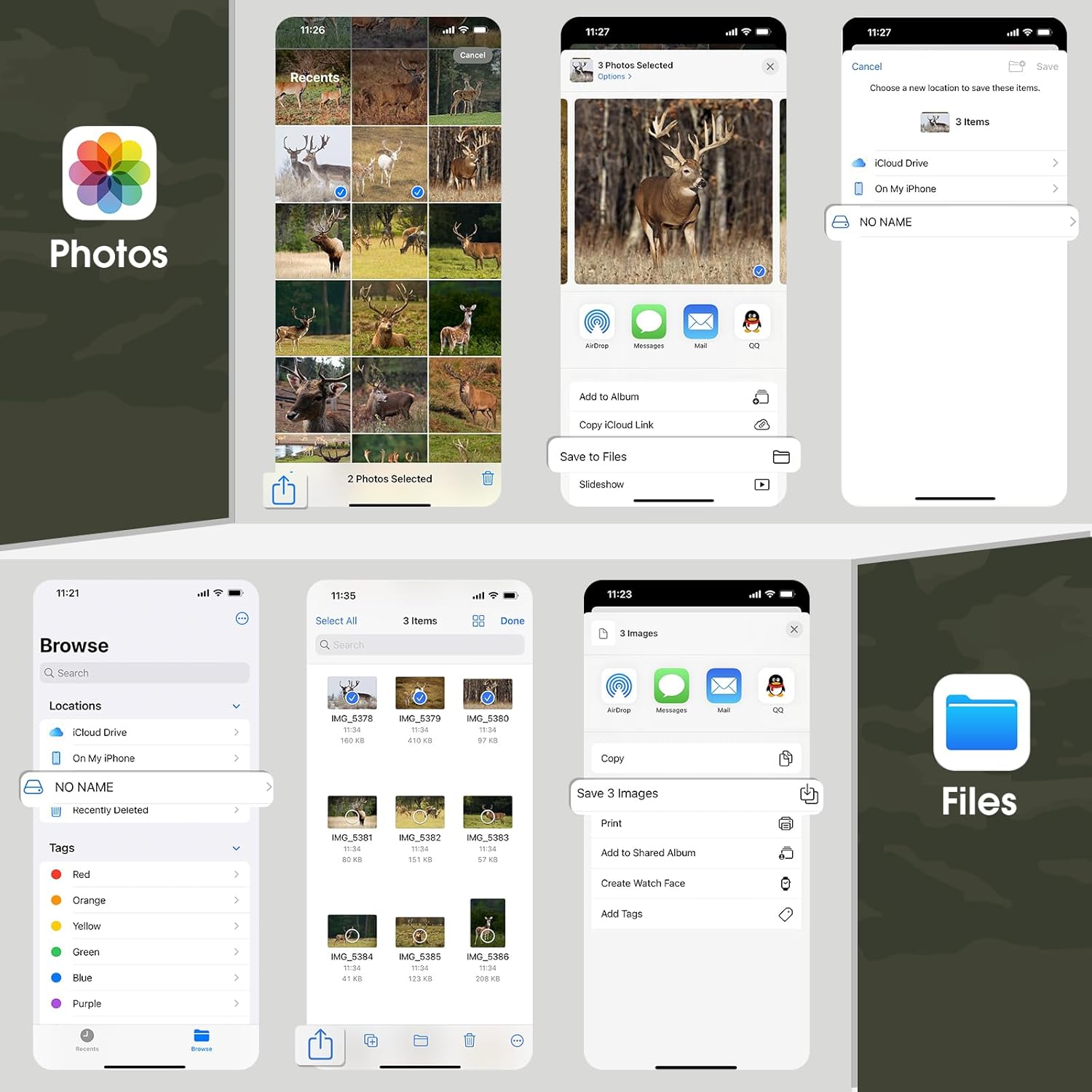
Image: A visual guide demonstrating how to manage files (select, save, share, delete) on a smartphone using the native Photos and Files applications after connecting the vieweh.
Manteniment
Neteja
- Lent de la càmera: Gently wipe the lens with a soft, lint-free cloth. For stubborn dirt, use a lens cleaning solution designed for optics.
- Cos de la càmera: Netegeu l'exterior amb anunciamp tela. Eviteu productes químics agressius o materials abrasius.
- Viewer: Keep the connectors free of dust and debris. Use a soft, dry cloth for cleaning.
Emmagatzematge
- When not in use for extended periods, remove batteries from the trail camera to prevent leakage.
- Store both devices in a cool, dry place, away from direct sunlight and extreme temperatures.
Resolució de problemes
| Problema | Causa possible | Solució |
|---|---|---|
| La càmera no s'encén | Piles baixes o esgotades; polaritat incorrecta de la pila; interruptor d'alimentació en posició OFF. | Replace batteries; check polarity; ensure switch is in ON or SETUP. |
| Camera not capturing images/videos | SD card full or not inserted correctly; incorrect mode selected; PIR sensor blocked; low battery. | Format/replace SD card; check mode settings; clear sensor path; replace batteries. |
| Mala qualitat d'imatge/vídeo | Dirty lens; low light conditions (for color images); incorrect resolution settings. | Clean lens; ensure adequate lighting or rely on night vision; adjust resolution settings. |
| Viewer not recognized by phone/computer | Incorrect connection; dirty connector; incompatible device; SD card issue. | Ensure secure connection; clean connectors; try another device; reinsert/format SD card. |
Especificacions
| Característica | Detall |
|---|---|
| Marca | WOSPORTS |
| Model | Mini Trail Camera, Trail Camera Viewer |
| Resolució fotogràfica | Fins a 24 megapíxels |
| Resolució de vídeo | Full HD 1080P |
| Velocitat de desencadenament | 0.3 - 1.1 segons |
| Visió nocturna | Infrarojos (IR) |
| Font d'alimentació | 4x piles AAA (no incloses) |
| Emmagatzematge | Targeta SD (fins a 32 GB, no inclosa) |
| Resistència a la intempèrie | IP54 |
| Viewer Compatibilitat | iPhone, iPad, Android, PC (via various connectors) |
Garantia i Suport
For warranty information and technical support, please refer to the official WOSPORTS weblloc web o contacteu directament amb el seu servei d'atenció al client. Normalment, els detalls es proporcionen a l'embalatge del producte o en una targeta de garantia independent.
WOSPORTS Official Weblloc: Visit WOSPORTS Store on Amazon