
1. Instruccions de seguretat importants
Si us plau, llegiu atentament totes les instruccions abans d'utilitzar aquesta cinta de córrer. Conserveu aquest manual per a futures consultes.
- Col·loqueu sempre la cinta de córrer sobre una superfície plana i estable.
- Ensure adequate clearance around the treadmill (at least 2 meters behind and 0.6 meters on each side).
- Mantingueu els nens i les mascotes lluny de la cinta de córrer durant el funcionament.
- Porteu calçat i roba esportiva adequats.
- No feu servir la cinta de córrer si té el cable o l'endoll danyats o si no funciona correctament.
- Capacitat màxima de pes de l'usuari: 130 kg.
- Always use the safety key. Attach it to your clothing before starting your workout.
2. Producte acabatview
The TOPUTURE 2-in-1 Treadmill is designed for both walking and light running, offering a versatile fitness solution for home or office use. It features a powerful yet quiet motor, manual incline adjustment, and smart app connectivity.

Image: Two individuals demonstrating the TOPUTURE 2-in-1 Treadmill in use, highlighting its dual functionality for walking while working and running.
3. Muntatge i muntatge
This TOPUTURE 2-in-1 Treadmill features a space-saving design that requires minimal assembly. It is ready for use almost immediately out of the box.
3.1 Desembalatge
- Traieu amb cura la cinta de córrer del seu embalatge.
- Check all components against the packing list to ensure everything is present.
3.2 Col·locació
- Place the treadmill on a firm, level surface.
- Assegureu-vos que el cable d'alimentació sigui fàcilment accessible i que no estigui obstruït.
3.3 Manual Incline Adjustment
The treadmill offers manual incline settings to increase workout intensity. The original incline is 2°, and can be adjusted to 4.7° (9% incline rate).
- Locate the incline adjustment bolts at the rear of the treadmill.
- Pull out the bolt and turn the slope block to the desired position.
- Insert the bolt into the upper hole to secure the incline.

Image: A visual guide illustrating the two-step process for manually adjusting the treadmill's incline.
4. Instruccions de funcionament
Your treadmill can be controlled via its LED display, remote control, or a smart application.
4.1 Encès/Apagat
- Connecteu el cable d'alimentació a una presa de corrent adequada.
- Flip the main power switch located on the treadmill base to the 'ON' position.
- To turn off, flip the main power switch to 'OFF' and unplug the unit.
4.2 Using the LED Display and Remote Control
The multi-functional LED display shows real-time data including speed, distance, time, and calories burned. The remote control allows for easy adjustment of speed and modes.

Image: The treadmill's clear LED display provides real-time workout metrics, complemented by a convenient remote control for adjustments.
- Inici/Parada: Press the 'Start' button on the display or remote to begin. Press 'Stop' to pause or end your workout.
- Ajust de velocitat: Use the '+' and '-' buttons on the remote or display to increase or decrease speed (1-10 km/h).
- Programes: Select from 12 preset programs for varied workout routines.
- Temporary Pause: Use the 'Pause' button to temporarily stop your workout without losing data.
4.3 Connectivitat d'aplicacions intel·ligents
Connect your treadmill to fitness apps like 'FITSHOW' via Bluetooth (Bluetooth name: TP3) for enhanced training courses and data tracking.
- Assegureu-vos que el Bluetooth estigui habilitat al vostre dispositiu mòbil.
- Open the 'FITSHOW' app (or compatible app) and search for 'TP3'.
- Pair your device with the treadmill.
- Follow the app's instructions to access various training courses and monitor your progress.

Image: The treadmill connects to fitness apps, allowing users to engage with virtual training courses and track their performance.
5. Manteniment
Un manteniment regular garanteix la longevitat i el rendiment òptim de la cinta de córrer.
5.1 Neteja
- Desendolla la cinta de córrer abans de netejar-la.
- Wipe down the display and exterior surfaces with a damp tela. Eviteu els netejadors abrasius.
- Regularly vacuum under the treadmill to prevent dust buildup.
5.2 Lubricació de la corretja
The running belt requires periodic lubrication to reduce friction and extend its lifespan. Use silicone-based treadmill lubricant.
- Aixeca la vora de la cinta de córrer.
- Apply a small amount of lubricant to the center of the deck, underneath the belt.
- Feu funcionar la cinta de córrer a baixa velocitat durant uns minuts per distribuir el lubricant uniformement.
- Refer to the lubricant manufacturer's instructions for frequency, typically every 3-6 months depending on usage.
5.3 Ajust del cinturó
Si la cinta de córrer es desplaça cap a un costat o rellisca, pot ser que calgui ajustar-la.
- Consult the detailed instructions in the full product manual for specific belt tension and alignment procedures.
6. Solució De Problemes
Si teniu problemes amb la cinta de córrer, consulteu els problemes i solucions més comuns següents.
| Problema | Causa possible | Solució |
|---|---|---|
| La cinta de córrer no s'encén. | Power cord not plugged in, main switch off, safety key not in place. | Check power connection, ensure main switch is ON, insert safety key. |
| El cinturó de running rellisca. | Corretja massa fluixa, lubricació insuficient. | Adjust belt tension (refer to full manual), lubricate the belt. |
| Soroll inusual durant el funcionament. | Loose parts, belt friction, motor issue. | Check for loose bolts, lubricate belt, contact customer support if motor noise persists. |
| Error de connexió de l'aplicació. | Bluetooth off, app not updated, incorrect pairing. | Ensure Bluetooth is on, update app, re-pair with 'TP3'. |
If the problem persists after attempting these solutions, please contact TOPUTURE customer support.
7. Especificacions
| Característica | Especificació |
|---|---|
| Marca | TOPUTURA |
| Potència del motor | 2.5 HP (Peak 3.0 HP) |
| Interval de velocitat | 1 - 10 km/h |
| Inclinació | Manual (0%, 5%, 10% equivalent to 2° and 4.7°/9%) |
| Superfície de córrer | 1000 x 400 mm (aprox. 39.4 x 15.7 polzades) |
| Pes màxim de l'usuari | 130 kg (aprox. 286 lliures) |
| Nivell de soroll | < 45 dB |
| Dimensions del producte | 120.8 x 52.6 x 12.5 cm (aprox. 47.6 x 20.7 x 4.9 polzades) |
| Pes del producte | 21.69 kg (aprox. 47.8 lliures) |
| Connectivitat | Bluetooth (TP3) for APP control |
| Programes | 12 programes predefinits |
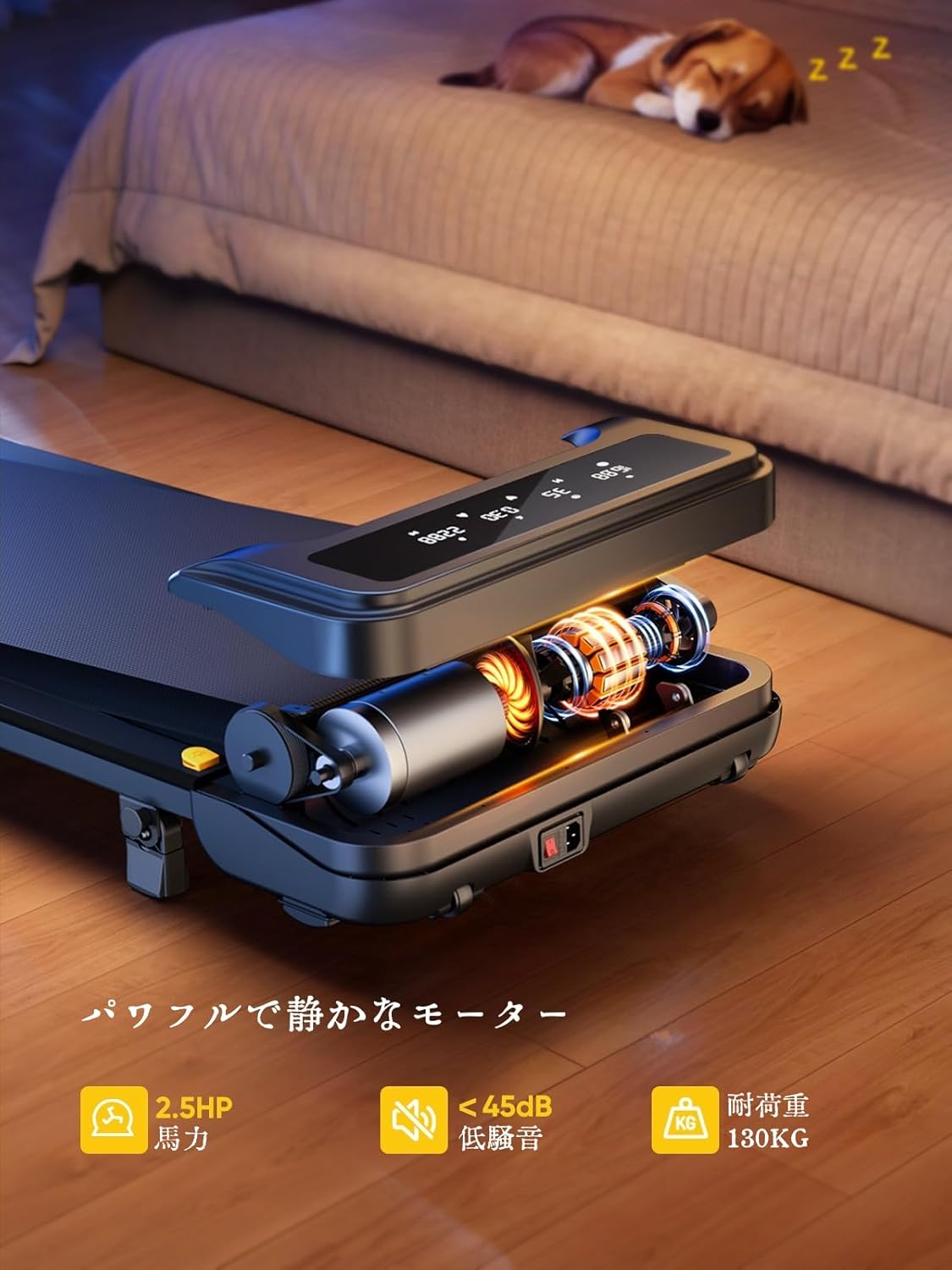
Image: The treadmill features a powerful 2.5 HP motor, operates quietly below 45dB, and supports users up to 130 kg.

Image: The compact design of the treadmill, highlighting its running surface dimensions for space efficiency.
8. Emmagatzematge i portabilitat
The TOPUTURE 2-in-1 Treadmill is designed for easy storage and portability, making it ideal for small spaces.
- The treadmill is lightweight (18.5 kg / 40.7 lbs) and features built-in wheels for effortless movement.
- It can be stored upright or flat under a bed or sofa when not in use, saving valuable space.
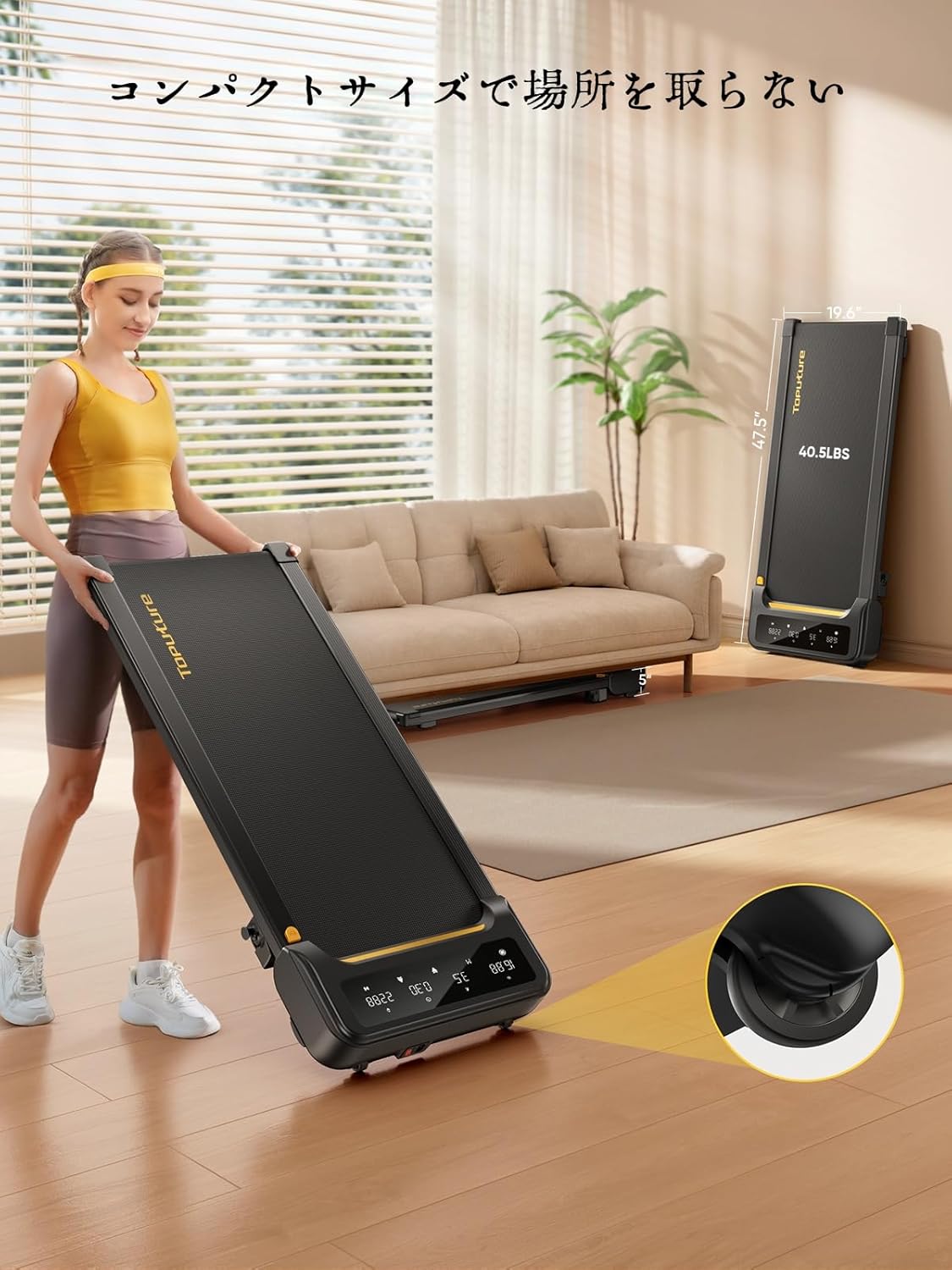
Image: A woman demonstrates the ease of moving the treadmill, highlighting its portability with integrated wheels.
9. Garantia i Suport
TOPUTURE provides a warranty for this product. Please refer to your purchase documentation for specific warranty terms and conditions.
9.1 Atenció al client
For any questions, technical assistance, or warranty claims, please contact TOPUTURE customer support through the retailer where you purchased the product or visit the official TOPUTURE weblloc.
- Assistència en línia: Visit the TOPUTURE brand store on Amazon or the official weblloc web amb preguntes freqüents i informació de contacte.
- Suport per correu electrònic: Consulteu l'embalatge del producte o la targeta de garantia per obtenir l'adreça de correu electrònic del servei d'atenció al client.