
Introducció
Thank you for choosing the Vibe Sound V8 Power AF 8 Amplified Speaker. This manual provides essential information for the safe and efficient operation of your device. Please read it thoroughly before use and retain it for future reference.
Instruccions importants de seguretat
- No exposeu l'altaveu a la pluja ni a la humitat per evitar incendis o descàrregues elèctriques.
- No bloquegeu cap obertura de ventilació. Instal·leu-ho d'acord amb les instruccions del fabricant.
- No instal·leu a prop de cap font de calor com ara radiadors, registres de calor, estufes o altres aparells (inclosos amplificadors) que produeixen calor.
- Eviteu que el cable d'alimentació sigui trepitjat o pessigat, especialment als endolls, els endolls i el punt on surten de l'aparell.
- Utilitzeu només accessoris/accessoris especificats pel fabricant.
- Desendolleu aquest aparell durant les tempestes amb llamps o quan no l'utilitzeu durant llargs períodes de temps.
- Demaneu tot el servei a personal de servei qualificat. Cal fer servei quan l'aparell s'hagi fet malbé d'alguna manera.
Contingut del paquet
Assegureu-vos que tots els elements siguin presents al paquet:
- Vibe Sound V8 Power AF 8 Amporador qualificat
- Micròfon
- Cable d'alimentació
- Manual d'usuari (aquest document)
Producte acabatview
The Vibe Sound V8 Power AF 8 is a versatile amplified speaker featuring 340W output, Bluetooth connectivity, USB and SD card playback, FM radio, and a wired microphone input for various audio needs.
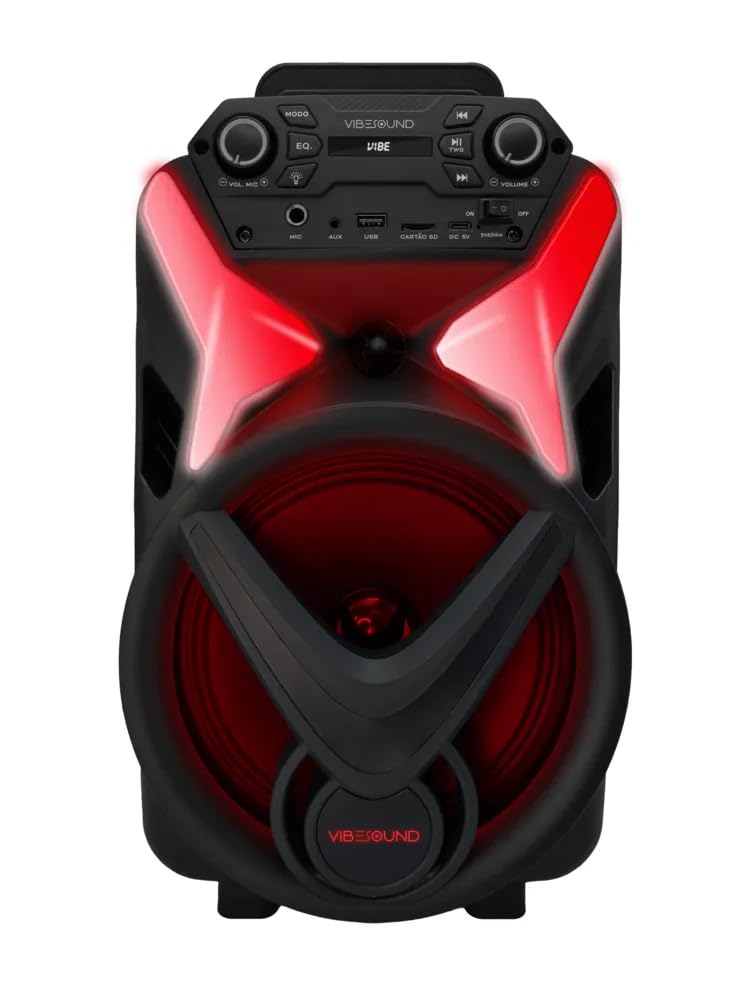
Figura 1: Davant view of the Vibe Sound V8 Power AF 8 Amplified Speaker. This image shows the speaker's main grille, the Vibe Sound logo at the bottom, and the control panel at the top. Red LED lights are visible around the speaker cone and on the top panel, indicating its illuminated design.
Tauler de control

Figura 2: En angle view of the Vibe Sound V8 Power AF 8 speaker, highlighting the top control panel. The panel includes buttons for MODE, EQ, playback controls (play/pause, skip), volume knobs, and input ports for MIC, AUX, USB, and SD card. The Vibe Sound logo is also visible on the panel.
The control panel located on the top of the speaker provides access to all functions. Key controls include:
- Botó MODE: Canvia entre els modes d'entrada Bluetooth, ràdio FM, USB, SD i AUX.
- Botó EQ: Adjusts equalization presets.
- Controls de reproducció: Play/Pause, Previous Track, Next Track.
- Botons de volum: Master Volume and Microphone Volume.
- Ports d'entrada: MIC (6.3mm jack), AUX (3.5mm jack), USB, SD Card slot.
- Interruptor d'alimentació: On/Off.
Panell posterior

Figura 3: posterior view of the Vibe Sound V8 Power AF 8 Amplified Speaker. This image shows the textured back panel with a label indicating the model "VS002 V8 Power" and a DC 9V power input port. A handle is visible at the top for portability.
The rear panel typically houses the main power input and possibly additional connectivity options or product information labels.
Configuració
1. Connexió d'alimentació
- Assegureu-vos que l'interruptor d'alimentació de l'altaveu estigui a la posició OFF posició.
- Connect the power cable to the DC 9V input port on the rear panel of the speaker.
- Plug the other end of the power cable into a suitable AC power outlet (100-240V, 50/60Hz).
- Flip the power switch to the ON position. The speaker will power on.
2. Connexió del micròfon

Figura 4: Wired microphone included with the Vibe Sound V8 Power AF 8 speaker. The microphone is black with a grille at the top and an ON/OFF switch on the side.
- Locate the MIC input jack on the control panel.
- Insert the microphone cable's plug into the MIC input jack.
- Adjust the microphone volume knob on the control panel to your desired level.
Instruccions de funcionament
1. Encendre/apagar
To power on the speaker, flip the power switch located on the control panel to the ON position. To power off, flip it to the OFF posició.
2. Selecció de mode
Premeu el botó MODE button repeatedly on the control panel to cycle through available input modes: Bluetooth, FM Radio, USB, SD Card, and AUX input.
3. Emparellament Bluetooth
- Canvieu l'altaveu al mode Bluetooth mitjançant el botó MODE button. The speaker will indicate it's in pairing mode (e.g., a voice prompt or flashing LED).
- Al dispositiu mòbil (telèfon intel·ligent, tauleta, etc.), activeu el Bluetooth i cerqueu els dispositius disponibles.
- Selecciona "VIBE SOUND" or a similar name from the list of devices.
- Once paired, the speaker will confirm the connection. You can now play audio from your device.
4. Reproducció des de targeta USB/SD
- Insert a USB flash drive or an SD card (with MP3 audio files) al port corresponent del tauler de control.
- Canvieu l'altaveu al mode USB o SD mitjançant el botó MODE button. The speaker will automatically begin playing audio files.
- Use the playback control buttons (Play/Pause, Previous, Next) to manage your music.
5. Funcionament de la ràdio FM
- Canvieu l'altaveu al mode de ràdio FM amb el botó MODE botó.
- Manteniu premut el botó Reproduir/Pausa per iniciar una cerca automàtica d'emissores FM. L'altaveu desarà totes les emissores trobades.
- Utilitza el Anterior i A continuació botons per navegar entre les emissores desades.
6. Entrada AUX
- Connect an external audio device (e.g., MP3 player, laptop) to the AUX input jack using a 3.5mm audio cable (not included).
- Canvieu l'altaveu al mode AUX amb el botó MODE botó.
- Controla la reproducció i el volum des del teu dispositiu extern.
7. Ús del micròfon
After connecting the microphone as described in the Setup section, ensure the microphone's ON/OFF switch is in the ON position. Adjust the dedicated microphone volume knob on the control panel to achieve the desired vocal level. The microphone can be used in any mode.
8. Volume and EQ Adjustment
- Volum mestre: Rotate the main volume knob on the control panel to increase or decrease the overall sound output.
- EQ: Premeu el botó EQ button to cycle through different equalizer presets (e.g., Pop, Rock, Jazz, Classic, Flat) to optimize the sound for your preference.
Manteniment
- Neteja: Use a soft, dry cloth to clean the exterior of the speaker. Do not use liquid cleaners or abrasive chemicals.
- Emmagatzematge: Quan no l'utilitzeu durant períodes prolongats, guardeu l'altaveu en un lloc fresc i sec, allunyat de la llum solar directa i de temperatures extremes.
- Ventilació: Assegureu-vos que les obertures de ventilació de l'altaveu no estiguin bloquejades per evitar el sobreescalfament.
Resolució de problemes
| Problema | Causa possible | Solució |
|---|---|---|
| Sense poder | Power cable not connected; Power switch OFF; Outlet malfunction. | Check power cable connection; Ensure power switch is ON; Try a different power outlet. |
| Sense so | Volum massa baix; Mode incorrecte seleccionat; Dispositiu no connectat correctament. | Increase master volume; Select correct input mode (Bluetooth, USB, FM, AUX); Reconnect Bluetooth device or AUX cable. |
| Bluetooth no emparellat | Speaker not in Bluetooth mode; Device too far; Bluetooth disabled on device. | Ensure speaker is in Bluetooth mode; Move device closer to speaker; Enable Bluetooth on your device. |
| El micròfon no funciona | Microphone OFF; Microphone volume too low; Microphone not connected. | Ensure microphone switch is ON; Increase microphone volume knob; Check microphone cable connection. |
| Mala recepció de la ràdio FM | Senyal feble; Interferències. | Relocate the speaker to an area with better reception; Try rescanning for stations. |
Especificacions
- Model: V8 Power AF 8 VS002
- Marca: Vibe Sound (Generic)
- Potència de sortida: 340 watts
- Tecnologia de connectivitat: Bluetooth, USB, SD, AUX, Ràdio FM
- Impedància: 3.6 ohms
- Font d'alimentació: AC/DC
- Dimensions (L x A x A): 33 x 33 x 70 centímetres
- Pes de l'article: 11 quilos
- Dispositius compatibles: Dispositius Bluetooth
- Tipus de muntatge: Muntatge al terra
- Color: Negre
- Usos recomanats: festa
Garantia i Suport
Aquest producte ve amb una garantia del fabricant de 3 mesos des de la data de compra. Si us plau, conserveu el comprovant de compra per a reclamacions de garantia.
For technical support or warranty inquiries, please contact your retailer or the manufacturer's customer service. Contact information may be available on the product packaging or the retailer's weblloc.