
1. Introducció
Thank you for choosing the Gevi Electric Burr Coffee Grinder. This manual provides essential information for the safe and efficient operation, maintenance, and troubleshooting of your new appliance. Please read it thoroughly before first use and keep it for future reference.
2. Instruccions de seguretat importants
- Llegiu totes les instruccions abans d'utilitzar l'aparell.
- No submergiu l'aparell, el cable o l'endoll en aigua o altres líquids.
- Desendolleu la presa de corrent quan no estigui en ús, abans de posar o treure peces i abans de netejar.
- Eviteu el contacte amb les peces mòbils.
- No feu servir cap aparell amb un cable o un endoll danyats, o després que l'aparell funcioni malament o s'hagi caigut o s'hagi danyat de cap manera.
- L'ús d'accessoris no recomanats o venuts pel fabricant pot provocar incendis, descàrregues elèctriques o lesions.
- No utilitzar a l'aire lliure.
- No deixeu que el cable pengi de la vora de la taula o del taulell, ni toqui superfícies calentes.
- Comproveu la tremuja de gransa per detectar la presència d'objectes estranys abans d'utilitzar-la.
- Aquest aparell només és per a ús domèstic.
3. Producte acabatview
The Gevi Electric Burr Coffee Grinder is designed for precision grinding, offering 35 settings for various brewing methods. It features a digital display for easy control and an anti-static design for mess-free operation.

Figure 1: Gevi Electric Burr Coffee Grinder with its main components visible.
Components:
- Bean Hopper (8.5 oz capacity)
- Rebava superior
- Grinds Container (4.6 oz capacity)
- Digital Control Panel (Cup Selection, Time Selection, Start/Stop)
- Portafilter Cradle (compatible with 51mm and 58mm portafilters)
- Raspall de neteja
- cullera de cafè
4. Configuració
- Unpack the Grinder: Traieu amb cura tots els materials d'embalatge i assegureu-vos que hi hagi tots els components.
- Components nets: Wash the bean hopper, grinds container, and lids with warm, soapy water. Rinse thoroughly and dry completely before assembly.
- Install Bean Hopper: Place the bean hopper onto the top of the grinder base. Rotate it clockwise until it locks securely into place.
- Afegir grans de cafè: Fill the bean hopper with your desired amount of whole coffee beans. Do not overfill.
- Tapa segura: Place the bean hopper lid firmly on top of the bean hopper.

Figure 2: Filling the bean hopper with coffee beans.
5. Funcionament
5.1 Selecting Grind Settings
The Gevi grinder offers 35 precise grind settings, allowing you to customize your coffee for various brewing methods. Rotate the bean hopper to adjust the grind size:
- Settings 1-10 (Espresso): For very fine grounds suitable for espresso machines.
- Settings 11-25 (Drip/Pour Over): For medium grounds ideal for drip coffee makers and pour-over brewing.
- Settings 26-35 (French Press): For coarse grounds best for French press and cold brew methods.

Figure 3: Grind setting dial on the bean hopper.
Video 1: Demonstrating the Gevi Integrated Burr Coffee Grinder with its 35 grind settings.
5.2 Panell de control digital
The digital display and control buttons allow for precise control over the grinding process.
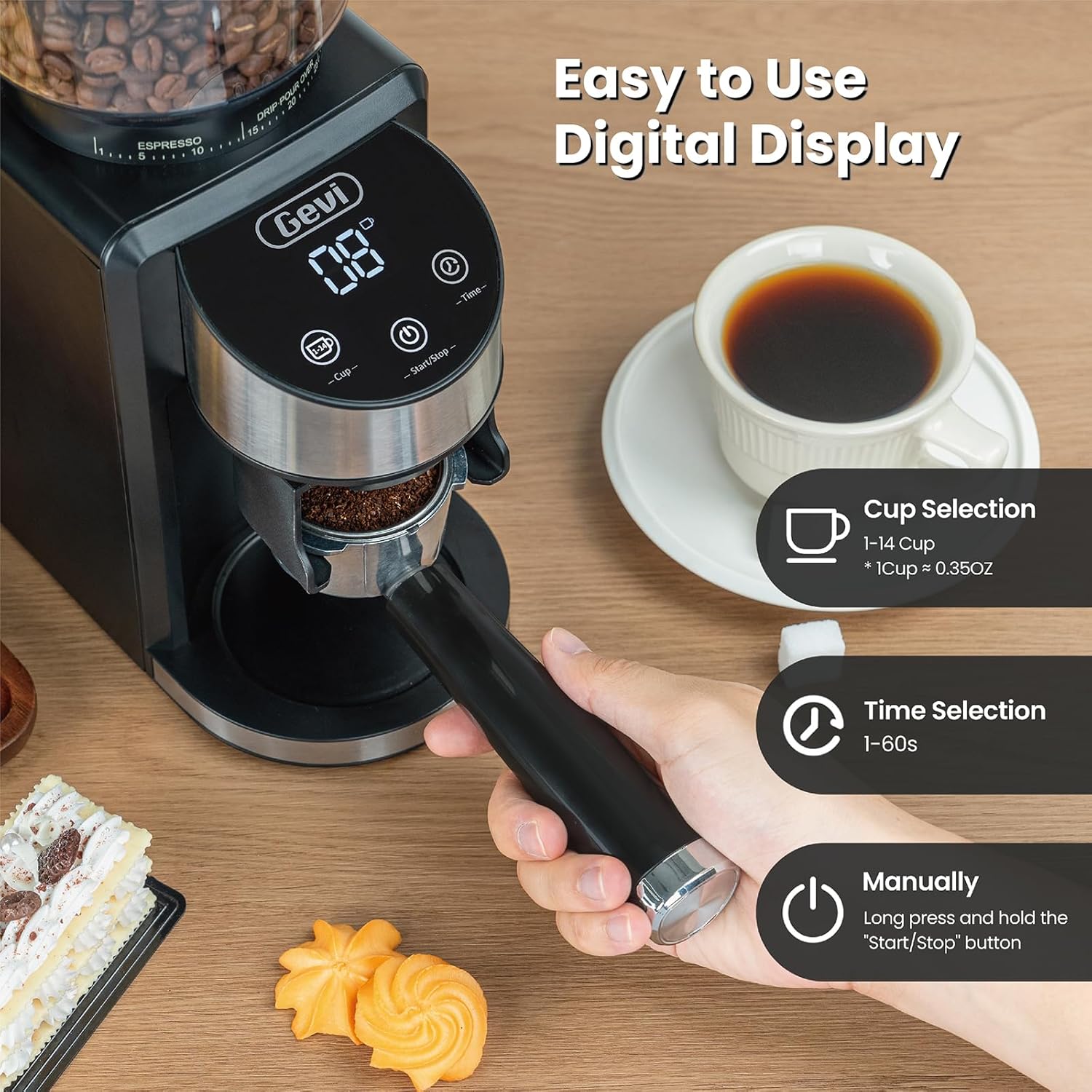
Figure 4: Digital control panel for cup and time selection.
- Cup Selection (1-14 cups): Press the 'Cup' button to select the desired number of cups. The grinder will automatically grind the appropriate amount of coffee.
- Time Selection (1-60 seconds): Press the 'Time' button to set the grinding duration in seconds. This allows for precise control over the amount of coffee ground.
- Inici/Parada: Press the 'Start/Stop' button to begin or end the grinding process. You can also long-press this button for manual grinding.
5.3 Using the Portafilter Cradle
The grinder includes a portafilter cradle for direct grinding into your espresso machine's portafilter.

Figure 5: Portafilter cradle for direct grinding.
- Select the appropriate portafilter cradle (51mm or 58mm) for your portafilter.
- Inseriu el vostre portafiltre al bressol.
- Place the portafilter with cradle under the grinding chute.
- Select your desired grind setting and cup/time, then press Start/Stop to begin grinding.
6. Manteniment
Regular cleaning ensures optimal performance and extends the life of your grinder. The anti-static design helps minimize mess.
6.1 Neteja diària
- Unplug the Grinder: Always ensure the grinder is unplugged before cleaning.
- Traieu la tremuja de mongetes: Rotate the bean hopper counter-clockwise until it stops, then lift it off. Empty any remaining beans into an airtight container to preserve freshness.
- Treure la rebava superior: Lift the upper conical burr straight out from the grinding chamber.
- Rebaves netes: Use the provided cleaning brush to remove coffee grounds from both the upper and lower burrs.
- Clean Grinds Container: Empty and wash the grinds container and its lid with warm, soapy water. Rinse and dry thoroughly.
- Netejar l'exterior: Netegeu l'exterior del molinet amb anunciamp tela. No utilitzeu netejadors abrasius.
- Torneu a muntar: Once all parts are dry, reassemble the grinder by reversing the removal steps.
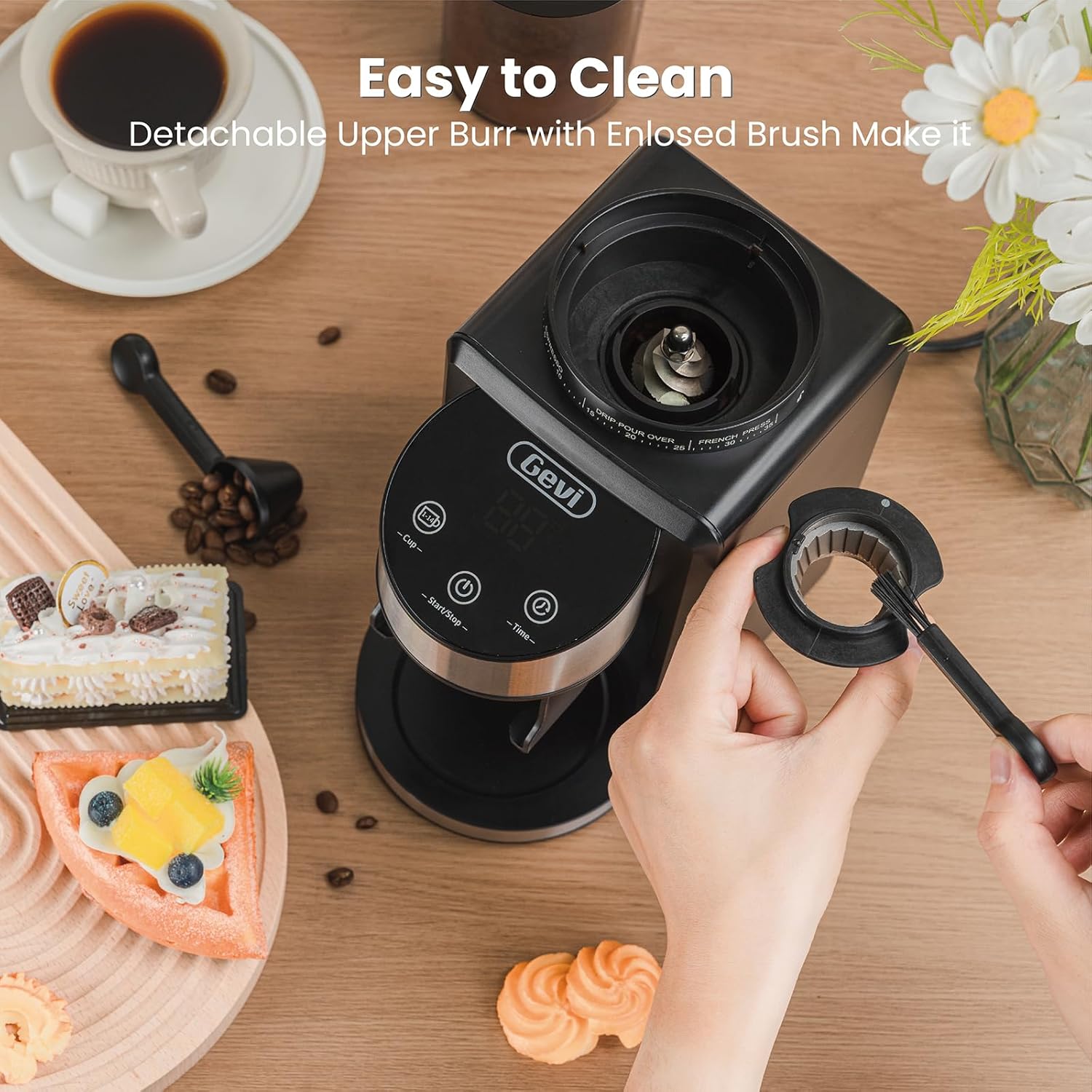
Figure 6: Detachable upper burr for easy cleaning.

Figure 7: Anti-static design for a cleaner grinding experience.
6.2 Cleaning Clogged Coffee Grounds
If you experience clogging, particularly with oily or dark roast beans, follow these steps:
Video 2: Instructions on how to clean clogged coffee grounds from the Gevi Coffee Grinder.
- Unplug the Grinder: Desconnecteu l'alimentació.
- Remove Bean Hopper and Upper Burr: Follow steps from Daily Cleaning.
- Clear Lower Burr: Use the cleaning brush to carefully dislodge any compacted coffee grounds around the lower burr.
- Tap the Grinder: Gently tap the back side of the grinder to help dislodge any remaining grounds from the chute into the grinds container.
- Remuntar i provar: Reassemble the grinder and run a small amount of beans through it to ensure proper function.
7. Solució De Problemes
If you encounter issues with your Gevi Electric Burr Coffee Grinder, refer to the following common problems and solutions:
- Grinder not turning on:
- Assegureu-vos que el cable d'alimentació estigui ben connectat a una presa de corrent.
- Check that the bean hopper is correctly installed and locked into place. The grinder has a safety mechanism that prevents operation if the hopper is not secured.
- Verify that the lid on the bean hopper is properly closed.
- No coffee grinding or inconsistent grind:
- Check if the bean hopper is empty.
- Inspect the burrs for any blockages or foreign objects. Clean the burrs as described in the Maintenance section.
- Ensure the grind setting is appropriate for the type of beans and desired fineness. Very fine settings with oily beans can sometimes cause clogging.
- Grinder stops during operation:
- The grinder may have an overheating protection feature. Allow it to cool down for a period before attempting to use it again.
- Check for clogs in the grinding chamber or chute.
- Excessive static or mess:
- While the grinder has an anti-static design, some static can still occur depending on environmental conditions and bean type. Ensure the grinds container is fully inserted.
- Lightly misting beans with water before grinding can help reduce static.
8. Especificacions
| Característica | Especificació |
|---|---|
| Marca | Gevi |
| Model | B0F31Z2HT7 |
| Color | Negre |
| Material | Plàstic, acer inoxidable |
| Pes de l'article | 5.92 lliures |
| Dimensions (L x A x A) | 7.8 cm de llargada x 4.72 cm d'amplada x 11.85 cm d'alçada |
| Capacitat de la tremuja de fesols | 8.5 unces (aprox. 240 g) |
| Grinds Container Capacity | Aprox. 130 g |
| Configuració de la mòlta | 35 (Espresso, Drip, French Press) |
| Selecció de Copa | 1-14 tasses |
| Selecció del temps | 1-60 segons |
| Wattage | 200 watts |
| Voltage | 120 Volts |
| UPC | 767791886878 |
9. Garantia i Suport
Gevi is committed to delivering high-quality products. For warranty information, technical support, or any inquiries regarding your Gevi Electric Burr Coffee Grinder, please refer to the warranty card included with your product or contact Gevi customer service directly. Keep your purchase receipt as proof of purchase.