
Introducció
The PWNAGE Stormbreaker Max CF is an ultralight wireless gaming mouse designed for high-performance esports. Featuring a carbon fiber composite construction, a custom XERO PAW3950 optical sensor with up to 36,000 DPI, and an 8000Hz polling rate, this mouse offers precision and responsiveness. Its ergonomic design and adjustable sensor position technology aim to enhance gaming accuracy and comfort.
Contingut del paquet
Verifiqueu que tots els elements siguin presents al vostre paquet:

Image: The Stormbreaker Max CF mouse in Solar Blitz color, along with its accessories including the USB receiver pyramid, USB-C paracord cable, black grips, extra 100% PTFE skates, universal dot skates, and universal grips.
- PWNAGE Stormbreaker Max CF Mouse (Solar Blitz)
- USB Receiver & Pyramid High-Speed Polling Rate Dongle
- USB Type-C Paracord Cable (Black)
- Black Grips
- Extra 100% PTFE Skates
- Universal Dot Skates (Rounded 100% PTFE)
- Grips universals
- Manual d'usuari
Configuració
1. Connexió inicial
The Stormbreaker Max CF can be used in both wireless and wired modes.
- Mode sense fil: Connect the USB Receiver Pyramid to an available USB port on your computer. Ensure the mouse is powered on. The mouse will automatically pair with the receiver. For optimal signal, place the receiver close to the mouse and away from other interfering devices.
- Mode per cable: Connect the provided USB Type-C Paracord Cable to the front port of the mouse and to an available USB port on your computer. The mouse will function immediately and begin charging.
2. Càrrega
The mouse is equipped with a rechargeable Lithium Ion battery. Connect the mouse via the USB Type-C cable to charge. The battery indicator will show charging status.
3. Software Installation (Pwnage Hub)
The Stormbreaker Max CF utilizes the Pwnage Hub, a web-based software platform for customization. No downloads are required. Access the Pwnage Hub via your web browser to configure settings such as DPI, polling rate, motion sync, macros, and key bindings. Settings are saved directly to the mouse's onboard memory.

Image: The Pwnage Hub web interface, illustrating the seamless customization options available for the Stormbreaker Max CF mouse without requiring software downloads.
Unboxing and Demo Video
Video: An unboxing and demonstration of the Pwnage Stormbreaker Max CF Solar Blitz mouse, showcasing its contents and initial setup.
Instruccions de funcionament
Funcions bàsiques
The Stormbreaker Max CF features 5 programmable buttons and a scroll wheel. Default functions are standard for a gaming mouse (left click, right click, scroll click, forward/back side buttons). These can be customized via the Pwnage Hub.
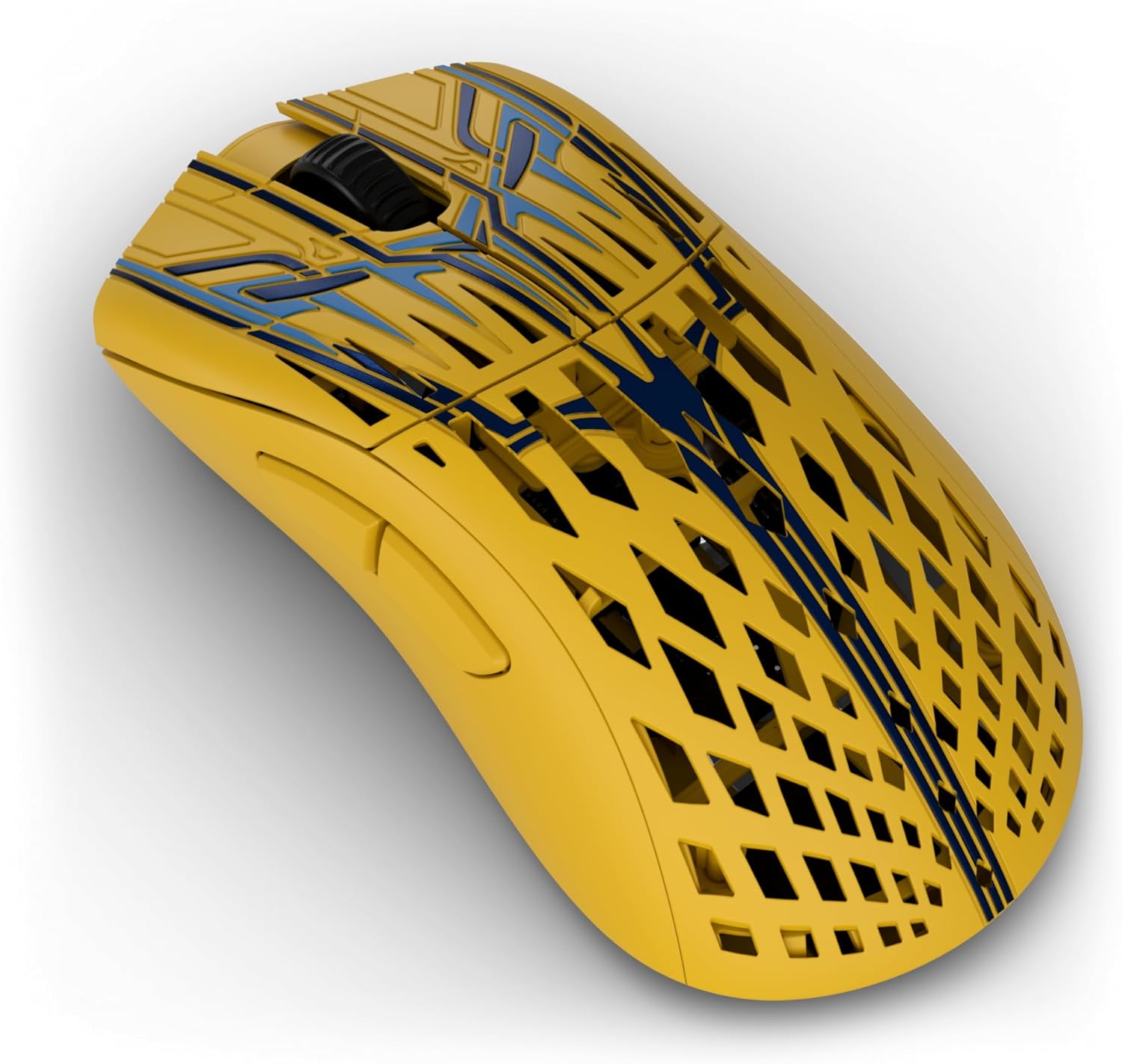
Imatge: Vista de dalt a baix view of the Stormbreaker Max CF mouse, showing the left and right click buttons, scroll wheel, and the intricate carbon fiber pattern.
Ajust de DPI i velocitat de sondeig
The mouse features a XERO PAW3950 optical sensor with a maximum sensitivity of 36,000 DPI and supports an 8000Hz polling rate in both wired and wireless modes. These settings are adjustable through the Pwnage Hub to suit your preferences and game requirements.

Image: A visual representation of the Pwnage XERO PixArt 3950 custom sensor, emphasizing its high tracking accuracy and DPI capabilities.

Image: A setup demonstrating the 8kHz wireless and wired polling rate, with the mouse on a mousepad and the receiver pyramid positioned for optimal signal.
Personalització
Adjustable Sensor Position Technology
The Stormbreaker Max CF features patented adjustable sensor position technology. This allows you to fine-tune the sensor's placement from front-to-back, optimizing it for your unique grip and aiming style. This customization can lead to increased speed and accuracy, and reduced path deviation while aiming.

Image: An illustration detailing the adjustable sensor position feature, explaining how different sensor placements can optimize aim for various hand sizes and grip styles, leading to improved throughput speed and reduced path deviation.
Grips and Skates
The mouse comes with interchangeable grips and PTFE skates. You can apply the included grips for enhanced control and comfort. The 100% PTFE skates provide a smooth glide, and extra sets are included for replacement.

Image: The underside of the Stormbreaker Max CF mouse, displaying the placement of the 100% PTFE skates for smooth movement.
Manteniment
Neteja
Per mantenir un rendiment òptim, netegeu el ratolí regularment. Feu servir un drap suau i sec per netejar la superfície. Per a la brutícia persistent, netegeu lleugerament.amp es pot fer servir un drap, assegurant-se que no entri humitat als components interns. Eviteu productes químics agressius o materials abrasius.
Skate Replacement
Over time, the PTFE skates may wear down. Replace them with the included extra skates for consistent glide performance. Carefully peel off the old skates and apply the new ones, ensuring a clean surface for adhesion.
Resolució de problemes
- El ratolí no respon:
- Assegureu-vos que el ratolí estigui carregat.
- Comproveu si el receptor USB està connectat correctament a un port USB que funcioni.
- Try connecting the mouse in wired mode to confirm functionality.
- Reinicieu l'ordinador.
- Connexió/retard intermitent:
- Ensure the USB receiver is placed close to the mouse and away from other wireless devices (e.g., Wi-Fi routers, other wireless peripherals) that might cause interference.
- Actualitza els controladors USB de l'ordinador.
- Problemes de seguiment:
- Netegeu el sensor del ratolí amb un drap suau i sec.
- Ensure you are using a clean, suitable mousepad.
- Adjust DPI settings via the Pwnage Hub.
- Els botons no funcionen:
- Check button assignments in the Pwnage Hub.
- Assegureu-vos que no hi hagi restes enganxades sota els botons.
For further assistance, please visit the official PWNAGE support weblloc.
Especificacions
| Marca | PWNAGE |
| Nom del model | Stormbreaker Max CF |
| Número de model | sbmax-cf-solar |
| Tecnologia de connectivitat | Lag Free 2.4GHz Wireless |
| Tecnologia de detecció de moviment | Optical (XERO PAW3950) |
| Mouse Maximum Sensitivity | 36,000 DPI |
| Taxa de votació | 8000Hz (Wired & Wireless) |
| Pes de l'article | 45 grams (aprox.) |
| Material de tancament | Compost de fibra de carboni |
| Quantitat de botons | 5 |
| Orientació de la mà | D'acord |
| Dispositius compatibles | Ordinador personal |
| Sistema operatiu | Windows, macOS |
| abast sense fils | 10 metres |
| Bateria | 1 bateria de ions de liti (inclosa) |
| UPC | 810178740215 |
Garantia i Suport
Informació de la garantia
The PWNAGE Stormbreaker Max CF Wireless Gaming Mouse comes with a 1 any de garantia des de la data de compra. Aquesta garantia cobreix els defectes de fabricació en condicions d'ús normal. Si us plau, conserveu el comprovant de compra per a reclamacions de garantia.
Atenció al client
For technical support, warranty claims, or general inquiries, please visit the official PWNAGE website or contact their customer service department. Detailed contact information can be found on the PWNAGE brand store page or the product packaging.
You can visit the PWNAGE Store for more information: PWNAGE Store