
1. Producte acabatview
The ThreeH Digital Alarm Clock is a compact and multifunctional LED desk clock designed for various environments such as bedrooms, home offices, and living rooms. It features a clear LED display that cycles through time, date, and temperature. Key functionalities include adjustable brightness, flexible time formats (12/24H), and selectable temperature units (Celsius/Fahrenheit).

Figure 1: ThreeH Digital Alarm Clock in a typical home setting, showcasing its compact design and clear display.
2. Configuració inicial
Follow these steps to set up your ThreeH Digital Alarm Clock for the first time.
2.1 Connexió d'alimentació
- Localitza el port d'entrada d'alimentació a la part posterior del rellotge.
- Connect the provided USB power cable to the clock.
- Plug the other end of the USB cable into a compatible USB power adapter (not included) and then into a wall outlet. The display will illuminate.

Figura 2: posterior view of the clock, highlighting the power input and control buttons.
2.2 Basic Settings (Time, Date, Temperature Unit)
Upon initial power-on, you may need to set the current time, date, and preferred temperature unit.
- Hora de configuració: Press the 'SET' button (refer to Figure 2 for button location) to enter time setting mode. Use the '+' and '-' buttons to adjust hours and minutes. Press 'SET' again to confirm and move to the next setting.
- Data de configuració: After setting the time, the display will show the date. Use '+' and '-' to adjust the year, month, and day. Press 'SET' to confirm each part.
- Unitat de temperatura: After setting the date, you can select between Celsius (℃) and Fahrenheit (℉). Use '+' or '-' to toggle and 'SET' to confirm.
- Format 12/24 hores: While in time display mode, press the '+' button to switch between 12-hour and 24-hour formats.
3. Instruccions de funcionament
This section details the daily operation of your ThreeH Digital Alarm Clock.
3.1 Modes de visualització
The clock automatically cycles through time, date, and temperature displays. The main display shows the time, with smaller indicators for the day of the week and active alarms.
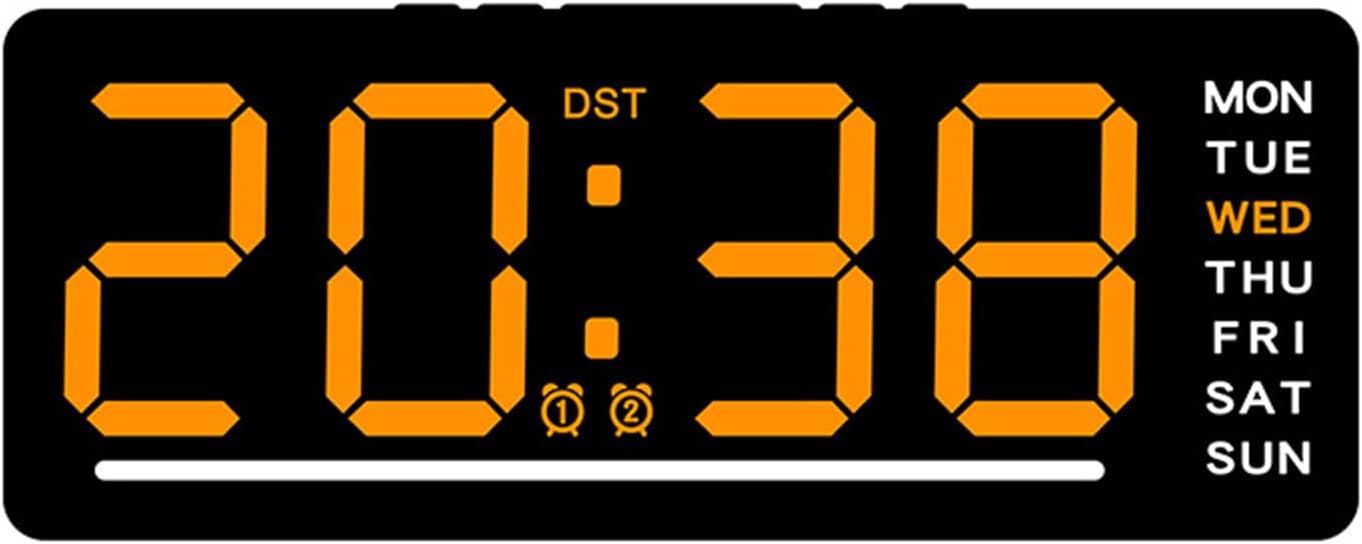
Figure 3: Clock display showing time, DST, alarm indicators, and day of the week.
3.2 Configuració d'alarmes
El rellotge admet dues alarmes independents.
- Press the 'ALARM' button (refer to Figure 2) to enter Alarm 1 setting mode. The Alarm 1 icon will flash.
- Utilitzeu els botons '+' i '-' per ajustar l'hora i els minuts de l'alarma desitjats.
- Press 'ALARM' again to confirm Alarm 1 and move to Alarm 2 setting mode.
- Repeat step 2 for Alarm 2.
- Press 'ALARM' a third time to exit alarm setting mode.
- To activate or deactivate an alarm, press the 'ALARM' button briefly while in normal time display mode. The corresponding alarm icon (🕑 or 🕒) will appear or disappear on the display.
3.3 Ajust de la brillantor
The clock features 5 adjustable brightness levels to suit different lighting conditions.
- In normal time display mode, press the 'BRIGHTNESS' button (refer to Figure 2) repeatedly to cycle through the 5 brightness levels.
- The clock also has a proprietary light sensor that can automatically adjust screen brightness.

Figure 4: Icons representing various features of the clock, including brightness control.
3.4 Horari d'estiu (DST)
If your region observes Daylight Saving Time, you can manually adjust the clock. The 'DST' indicator on the display (Figure 3) will show if DST is active.
- Consult your local regulations for DST changes.
- To adjust for DST, manually change the hour using the time setting procedure (Section 2.2).
4. Cura i Manteniment
Proper care ensures the longevity and optimal performance of your ThreeH Digital Alarm Clock.
- Neteja: Feu servir un drap suau i sec per netejar suaument la pantalla iasing. Eviteu netejadors o dissolvents abrasius.
- Medi ambient: This clock is not waterproof. Avoid placing it in humid environments such as bathrooms or kitchens to prevent damage.
- Potència: Always use the specified power cable. Disconnect power during thunderstorms or if the clock will be unused for extended periods.
5. Solució De Problemes
If you encounter issues with your ThreeH Digital Alarm Clock, refer to the following common problems and solutions.
| Problema | Causa possible | Solució |
|---|---|---|
| Display is blank or not turning on. | Sense corrent o connexió fluixa. | Ensure the USB power cable is securely connected to both the clock and a working power adapter/outlet. |
| La pantalla és massa tènue o massa brillant. | Cal ajustar el nivell de brillantor. | Press the 'BRIGHTNESS' button repeatedly to cycle through the 5 brightness levels until desired illumination is achieved. |
| L'hora és incorrecta. | L'hora no s'havia configurat correctament o hi havia hagut una interrupció del corrent. | Torneu a configurar l'hora seguint les instruccions de la secció 2.2. |
| L'alarma no sona. | L'alarma no està activada o està configurada incorrectament. | Ensure the alarm is activated (alarm icon visible on display) and the alarm time is set correctly (Section 3.2). |
6. Especificacions del producte
Detailed technical specifications for the ThreeH Digital Alarm Clock.

Figure 5: Dimensions of the ThreeH Digital Alarm Clock.
| Característica | Detall |
|---|---|
| Marca | Tres H |
| Model | B0F38C8MV5 |
| Color | Taronja |
| Tipus de visualització | LED |
| Estil | Modern |
| Característica especial | Cordat |
| Dimensions del producte | 15.5 cm d'amplada x 6.3 cm d'alçada |
| Font d'alimentació | Elèctric amb cable |
| Tipus d'habitació | Dormitori, despatx, sala d'estar |
| Forma | Rectangular |
| Material | Plàstic |
| Material del marc | Plàstics |
| Piles incloses | No |
| Pes de l'article | 4.9 unces |
7. Garantia i Suport
For warranty information and customer support, please refer to the documentation provided with your purchase or contact the seller directly. You can also visit the official ThreeH store for more information: