
Introducció
This manual provides detailed instructions for the installation, operation, and maintenance of your MekedeTech DUDUAUTO DUDU4 Android Screen. This 9.5-inch head unit is designed specifically for Dodge Charger models from 2016 to 2023, offering advanced features such as wireless CarPlay, Android Auto, and 4G LTE connectivity. Please read this manual thoroughly before using the product to ensure proper function and safety.
Informació de seguretat
- Always ensure the vehicle is parked and the engine is off before performing any installation or maintenance.
- Disconnect the vehicle's battery before starting installation to prevent electrical shorts and damage.
- Consulteu un instal·lador professional si teniu dubtes sobre alguna part del procés d'instal·lació.
- No feu servir el dispositiu de manera que us distregui de la conducció. Prioritzeu sempre la seguretat viària.
- Eviteu exposar la unitat a temperatures extremes, a la llum solar directa durant períodes prolongats o a una humitat excessiva.
Configuració i instal·lació
The DUDUAUTO DUDU4 Android Screen is designed for direct fitment in Dodge Charger models from 2016 to 2023. Professional installation is recommended.
Comprovació prèvia a la instal·lació
- Verify all components are present in the package.
- Assegureu-vos que el contacte del vehicle estigui apagat i que la bateria estigui desconnectada.
- Familiarize yourself with the vehicle's dashboard layout and existing wiring.
Passos d'instal·lació (Guia general)
- Carefully remove the existing factory radio and dashboard trim. Refer to your vehicle's service manual for specific instructions.
- Connect the main power harness, speaker wires, and antenna cable from the vehicle to the DUDUAUTO DUDU4 unit. Ensure all connections are secure.
- Connect any additional accessories such as the GPS antenna, USB cables, and external microphone.
- If using 4G LTE, insert a compatible SIM card into the designated slot on the unit.
- Carefully mount the DUDUAUTO DUDU4 unit into the dashboard opening.
- Torneu a connectar la bateria del vehicle i proveu el funcionament de la unitat abans de tornar a muntar completament el tauler de control.
- Reassemble the dashboard trim, ensuring no wires are pinched.
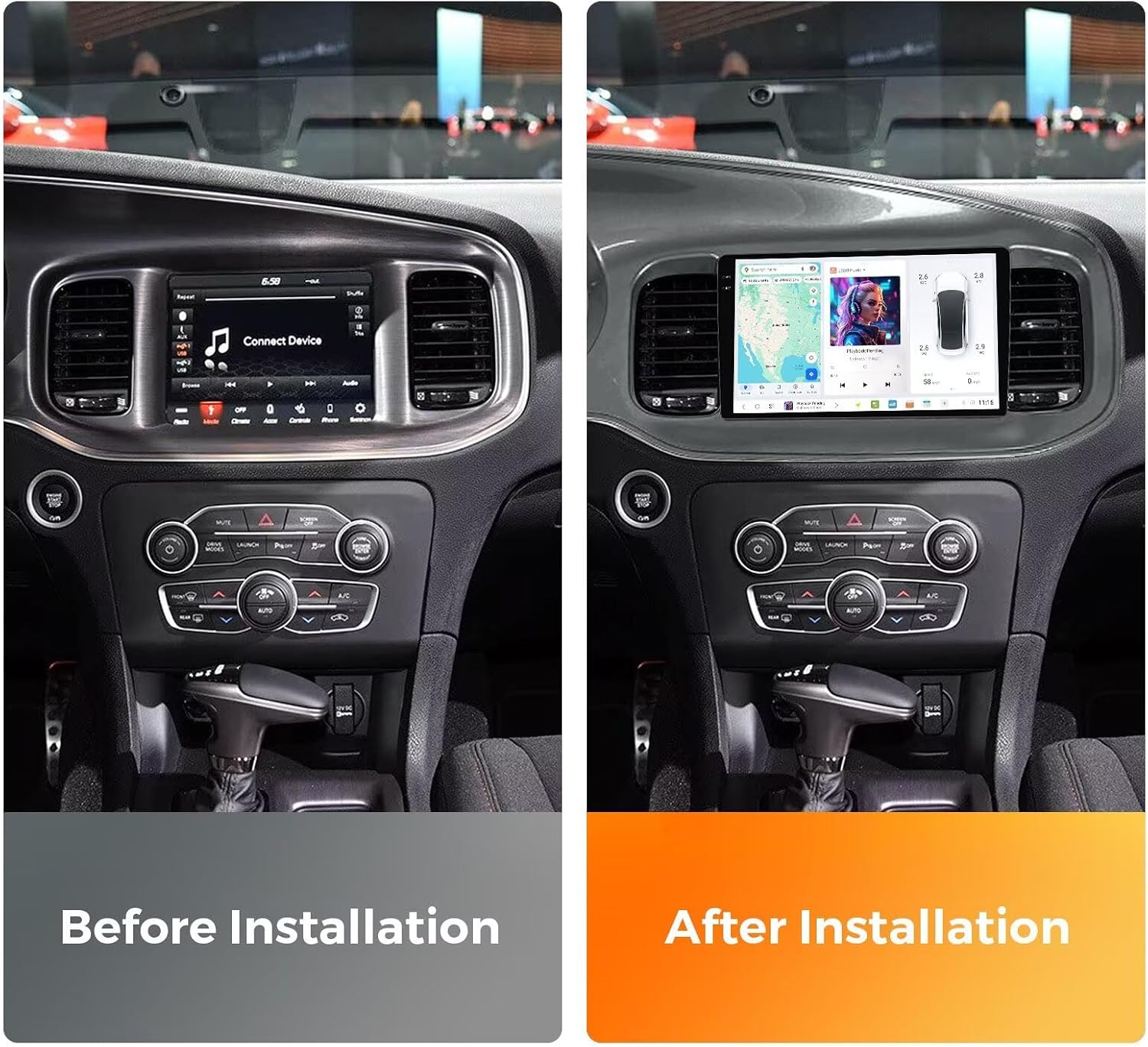
Figura 1: Comparison of the Dodge Charger dashboard before and after the installation of the MekedeTech DUDUAUTO DUDU4 Android Screen. The image on the left shows the original factory radio, while the image on the right displays the new 9.5-inch Android screen seamlessly integrated into the dashboard.
Instruccions de funcionament
Encès i configuració inicial
After installation, turn on your vehicle's ignition. The DUDUAUTO DUDU4 unit will boot up, displaying the DUDU OS 3.5 interface. Follow the on-screen prompts for initial setup, including language selection, time zone, and Wi-Fi connection.

Figura 2: The DUDU OS 3.5 interface, showcasing its simple and enthusiast modes with various applications, navigation, and vehicle information displays. This operating system focuses on intuitive operation and powerful functionality.
CarPlay sense fil i Android Auto
The unit supports both wireless CarPlay for iOS devices and wired/wireless Android Auto for Android devices.
- For Wireless CarPlay (iOS System):
- On the DUDUAUTO DUDU4 unit, navigate to the CarPlay application.
- On your iPhone, enable Bluetooth and connect to the DUDUAUTO unit's Bluetooth signal.
- Confirm the connection on both devices. CarPlay will launch automatically.
- For Wired Android Auto (Android System):
- Connect your Android phone to the DUDUAUTO DUDU4 unit using a USB cable.
- Ensure Android Auto is installed and enabled on your phone.
- The unit will prompt you to launch Android Auto.

Figura 3: Visual guide illustrating the connection process for Wireless CarPlay (iOS) via Bluetooth and Wired Android Auto (Android) via USB cable. The DUDUAUTO DUDU4 unit supports both functionalities.
4G LTE & Wi-Fi Connectivity
The unit supports 4G LTE via a SIM card (not included) and Wi-Fi connectivity. To access 4G internet, insert a compatible SIM card into the designated slot. For Wi-Fi, navigate to the settings menu, select Wi-Fi, and connect to an available network.
Comandaments del volant
The DUDUAUTO DUDU4 unit retains your vehicle's original steering wheel control functionality. This allows you to adjust volume, skip tracks, and switch channels without removing your hands from the steering wheel. Configuration may be required in the unit's settings menu.
Manteniment
- Neteja de pantalla: Utilitzeu un drap suau i sense pelusa lleugerament dampened with water or a screen cleaner. Do not use abrasive cleaners or solvents.
- Actualitzacions de programari: Periodically check for software updates through the unit's settings menu to ensure optimal performance and access to new features.
- Atenció general: Keep the unit free from dust and debris. Avoid placing heavy objects on the screen.
Resolució de problemes
- No Power / Unit Does Not Turn On:
- Comproveu totes les connexions d'alimentació per assegurar-vos que estiguin ben fixades.
- Verify the vehicle's fuse for the radio is not blown.
- Assegureu-vos que la bateria del vehicle estigui correctament connectada i carregada.
- Sense so:
- Comproveu les connexions dels cables de l'altaveu.
- Assegureu-vos que el volum no estigui silenciat ni al mínim.
- Verify audio output settings in the unit's menu.
- CarPlay/Android Auto no es connecta:
- For Wireless CarPlay, ensure Bluetooth is enabled on your iPhone and paired with the unit.
- For Wired Android Auto, try a different USB cable and ensure Android Auto is enabled on your phone.
- Reinicieu tant la unitat principal com el telèfon intel·ligent.
- Problemes amb el senyal GPS:
- Assegureu-vos que l'antena GPS estigui instal·lada correctament i que tingui una vista clara view del cel.
- Check GPS settings in the unit's menu.
Especificacions
The MekedeTech DUDUAUTO DUDU4 Android Screen features robust hardware for optimal performance.
- Nom del model: MKD-DUDU4-4-64
- Sistema operatiu: Android 13
- CPU: 8 Core UIS8581A
- RAM: 4 GB
- Emmagatzematge intern (ROM): 64 GB
- Mida de la pantalla: 9.5 polzades
- Resolució de visualització: 1280x720 (In-cell screen)
- Bluetooth: BT5.0 (Qualcomm 3031 chip)
- Wi-Fi: 802.11a/b/g/n/ac (Supports 5G WIFI)
- GPS: 3 mode L1 B1 E1
- USB: USB 2.0*2
- Poder Ampmés viu: TDA7851
- DSP: AK7604
- Radio IC: TDA7708
- Treball Voltage: 9 V ~ 16 V
- Característiques especials: Wireless CarPlay, Wired Android Auto, Touchscreen, 4G LTE Support

Figura 4: The powerful 8-Core UIS8581A Smart Cockpit chip, which powers the DUDUAUTO DUDU4 Android Screen, ensuring smooth performance and responsiveness.

Figura 5: The 1280x720 in-cell screen of the DUDUAUTO DUDU4 unit, designed to deliver clearer and more detailed images and videos for an enhanced user experience.

Figura 6: A detailed comparison table outlining key specifications for DUDU4, DUDU5, DUDU6, and DUDU7 models, including RAM/ROM, CPU, memory type, GPS, MIC, USB interface, power amplifier, DSP, Bluetooth chip, WiFi type, and radio IC.
Informació de la garantia
The MekedeTech DUDUAUTO DUDU4 Android Screen comes with a 1 anys de garantia from the date of purchase. This warranty covers manufacturing defects and malfunctions under normal use. It does not cover damage caused by improper installation, misuse, accidents, or unauthorized modifications. Please retain your proof of purchase for warranty claims.
Atenció al client
For technical assistance, troubleshooting, or warranty inquiries, please contact MekedeTech customer support. You can find contact information on the official MekedeTech weblloc web o a través de la vostra plataforma de compra.
Visit the official MekedeTech Store for more information and products: MekedeTech Store