
FREEWOLF T96
Manual d'usuari del combinació de teclat i ratolí sense fil per a jocs FREEWOLF T96
Model: T96
Introducció
This user manual provides detailed instructions for the FREEWOLF T96 Smart Display Wireless Gaming Keyboard and Mouse Combo. This combo is designed for a seamless and responsive experience across various devices and applications, from gaming to office work.
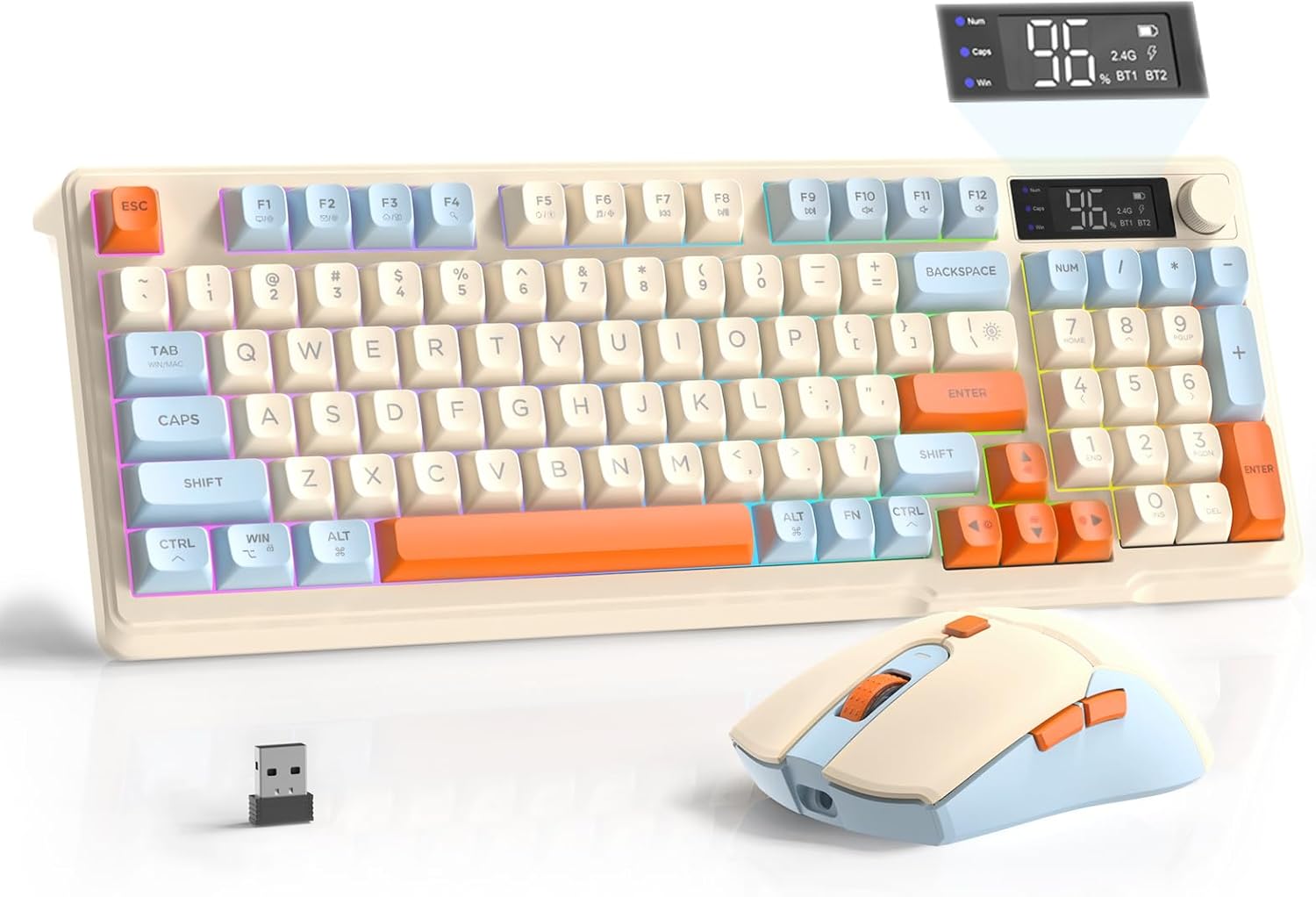
Image: The FREEWOLF T96 Wireless Gaming Keyboard and Mouse Combo, featuring the keyboard, mouse, and USB receiver.
Contingut del paquet
Assegureu-vos que tots els elements siguin presents al paquet:
- 1 x T96 Membrane Keyboard
- 1 x T96 Wireless Mouse
- 1 x cable USB-C
- 1 x USB Receiver (stored in mouse bottom slot)
- 1 x Manual d'usuari
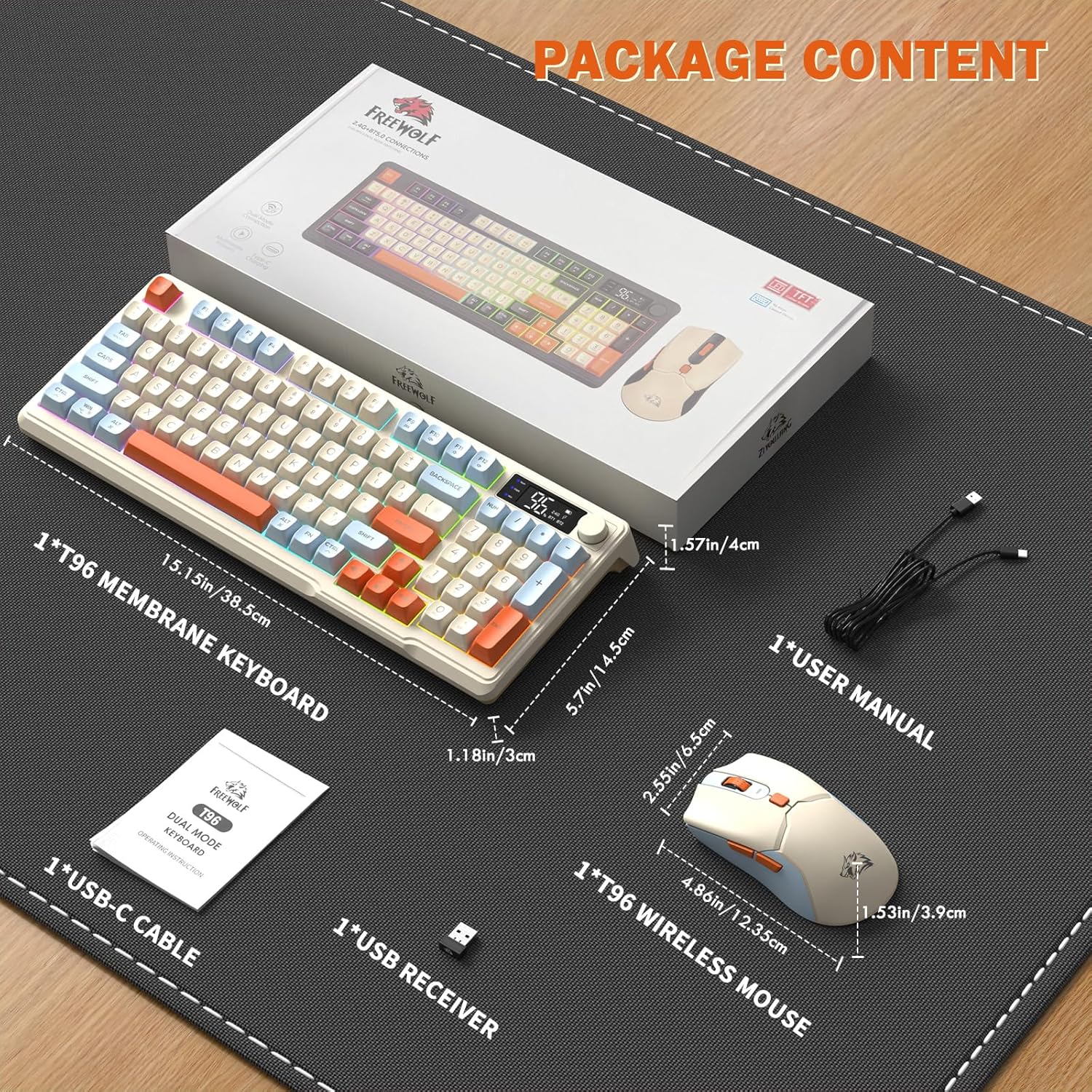
Image: A visual representation of the package contents, including the keyboard, mouse, USB-C cable, USB receiver, and user manual.
Configuració
Opcions de connectivitat
The T96 combo supports dual-mode wireless connectivity:
- Connexió sense fil 2.4G: Utilizes the included USB receiver for a stable, plug-and-play connection.
- Bluetooth Connections (BT1/BT2): Allows pairing with up to two Bluetooth-enabled devices, enabling seamless switching.
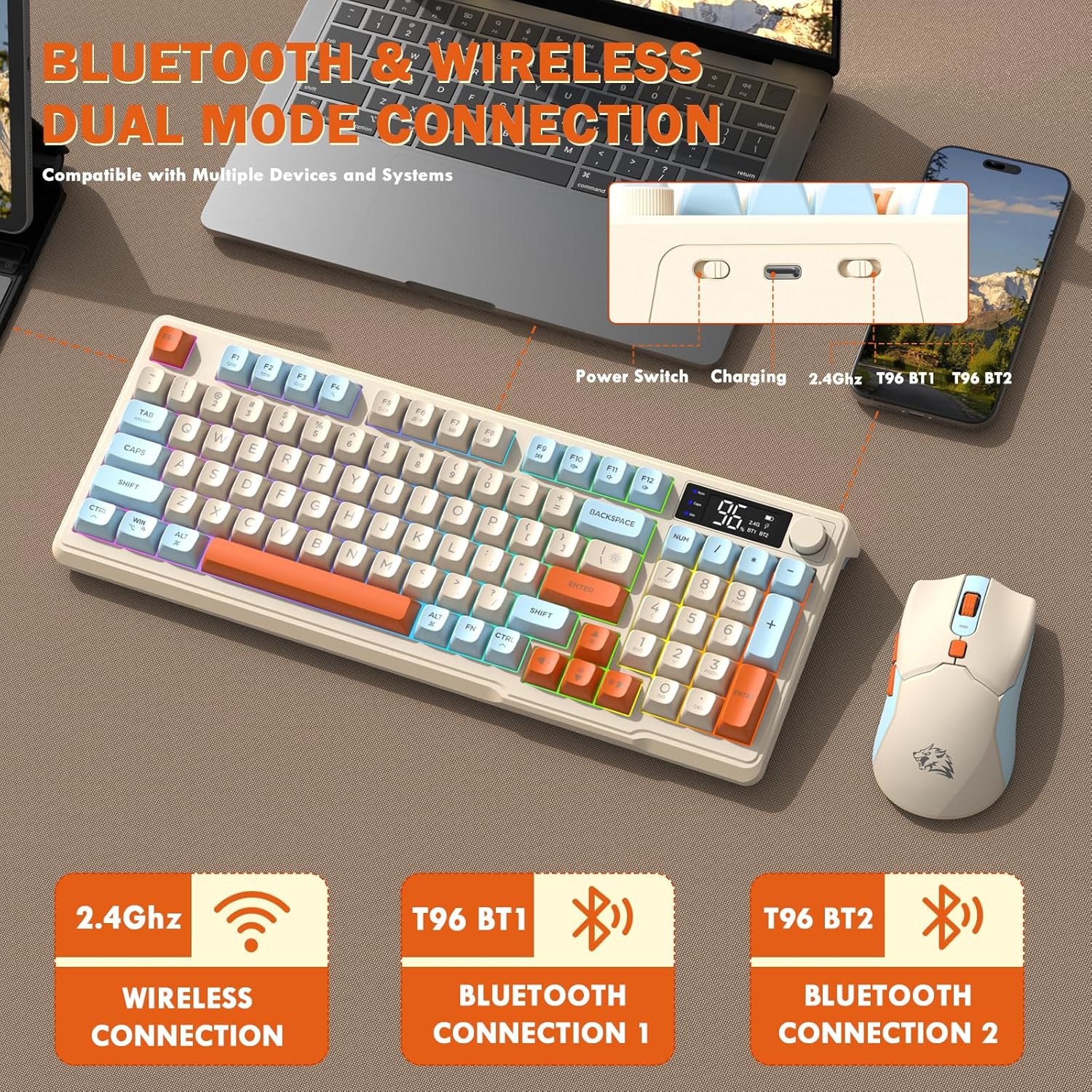
Image: Diagram illustrating the dual-mode connection options (2.4GHz, Bluetooth 1, Bluetooth 2) and the location of the power switch, charging port, and connection indicators on the keyboard.
Passos de configuració inicials
- Dispositius de càrrega: Before first use, fully charge both the keyboard and mouse using the provided USB-C cable. The keyboard has a 2000mAh battery, and the mouse has a 500mAh battery. The smart display on the keyboard will show charging progress.
- Localitza el receptor USB: The USB receiver for 2.4G wireless connection is stored in a slot on the bottom of the mouse. Remove it for use.
- Encès: Engegueu el teclat i el ratolí utilitzant els seus respectius interruptors d'alimentació.
- Connect via 2.4G Wireless:
- Inseriu el receptor USB en un port USB disponible de l'ordinador.
- Ensure the keyboard and mouse are set to 2.4G mode (indicated on the keyboard's smart display). They should connect automatically.
- Connecteu-vos mitjançant Bluetooth:
- Switch the keyboard and mouse to BT1 or BT2 mode.
- On your device (PC, laptop, tablet, smartphone), open Bluetooth settings.
- Cerca "T96 Keyboard" and "T96 Mouse" in the list of available devices and pair them.
- The smart display will indicate the active Bluetooth connection (BT1 or BT2).
Instruccions de funcionament
Funcionament del teclat
The T96 keyboard features a 94-key compact layout with various functions to enhance your experience.
Smart Display Functions
The intelligent LED display provides real-time information:
- Estat de la bateria: Mostra el percentatge de bateria restanttage.
- Mode de connexió: Indicates active connection (2.4G, BT1, BT2).
- Progrés de càrrega: Displays charging status when connected to power.
- Caps Lock/Num Lock/Win Lock Indicators: Shows status of these keys.
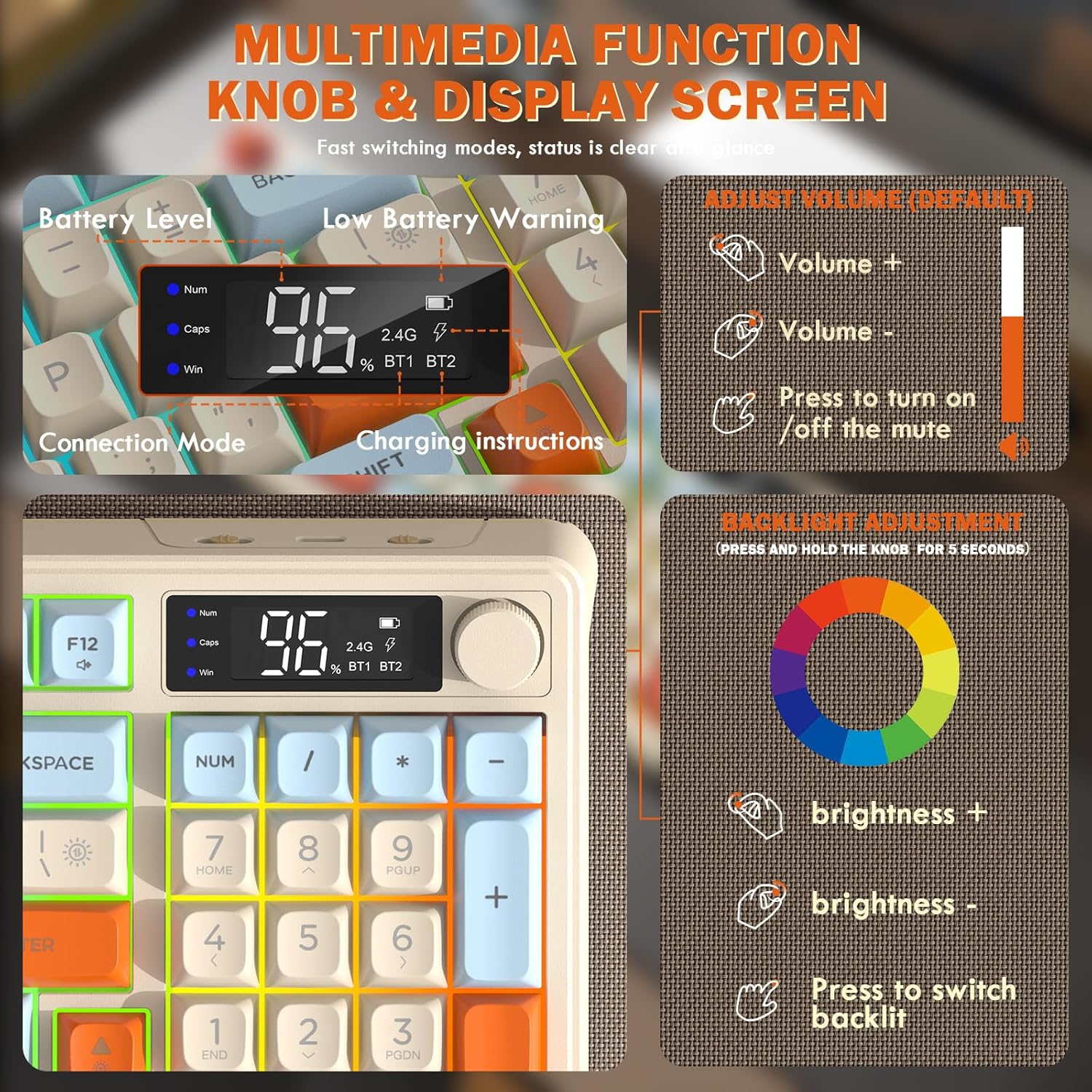
Image: Close-up of the keyboard's smart display showing battery level, connection mode, and charging instructions. Also details the multimedia knob's functions for volume and backlight control.
Botó de control multimèdia
Located on the top right of the keyboard, this knob offers quick control:
- Girar: Adjusts system volume (clockwise for volume up, counter-clockwise for volume down).
- Premsa: Toggles mute on/off.
- Premeu i manteniu premut (5 segons): Activates backlight adjustment mode. Rotate to change brightness, press to switch light effects.
Multimedia Hotkeys (FN Combinations)
The keyboard includes 12 dedicated multimedia hotkeys accessible via the FN clau:
- FN + F1-F12: Access various multimedia and system functions (e.g., media playback, volume, browser, email). Refer to keycap legends for specific functions.
Control de la llum de fons
The keyboard features vibrant rainbow LED backlighting. Control it using the following combinations:
- FN + fletxa amunt: Augmenta la brillantor de la retroiluminació.
- FN + fletxa avall: Reduir la brillantor de la retroiluminació.
- FN + fletxa dreta: Augmenta la velocitat de la retroiluminació.
- FN + Left Arrow: Disminueix la velocitat de la llum de fons.
- FN + \|: Switch between different lighting modes (e.g., always on, breathing, off).
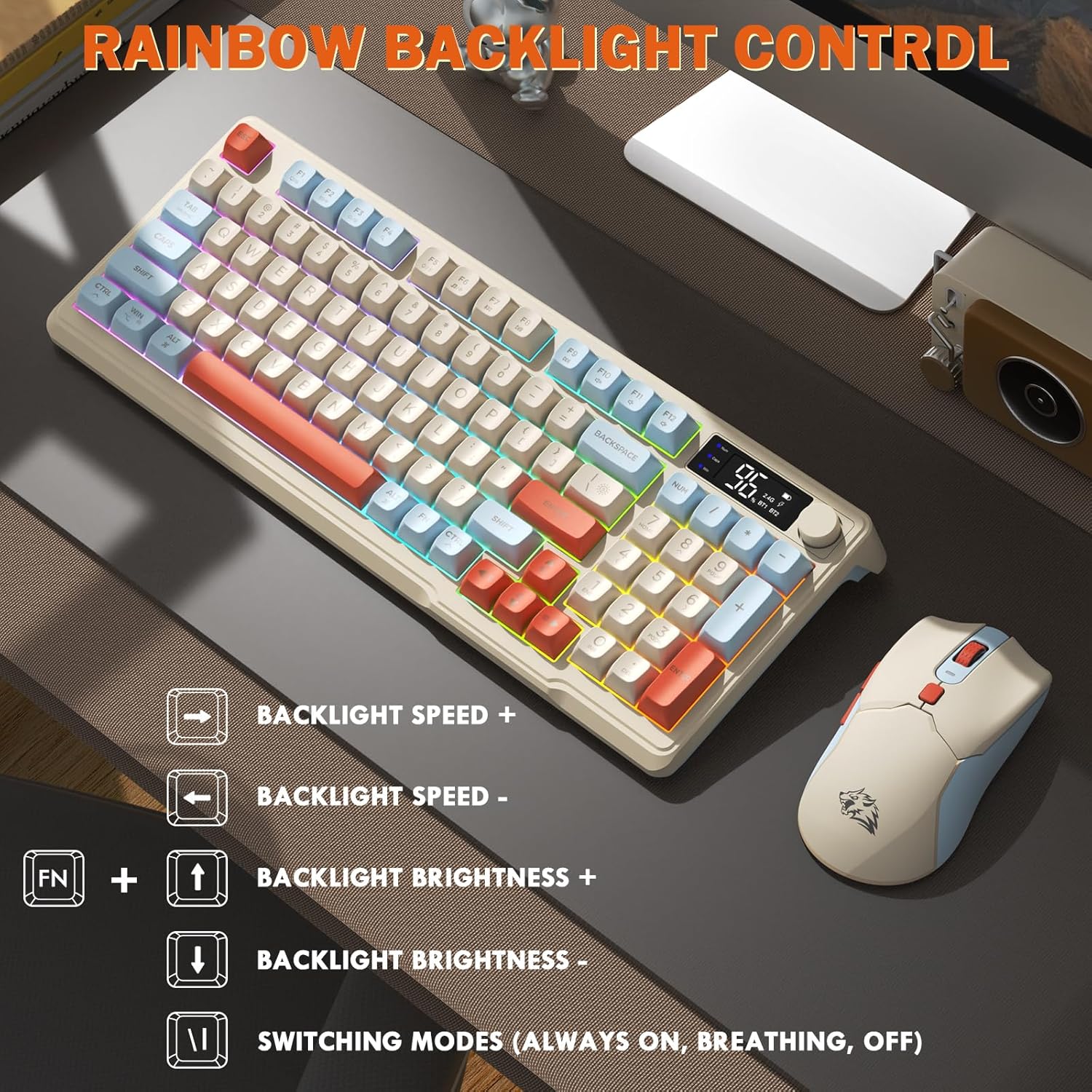
Image: Visual guide for controlling the rainbow LED backlight, showing key combinations for brightness, speed, and mode switching.
Anti-fantasma
The keyboard supports 26-key rollover anti-ghosting technology, ensuring accurate registration of multiple simultaneous key presses, crucial for gaming.
Funcionament del ratolí
The T96 gaming mouse is designed for precision and comfort.
Ajust de DPI
Adjust the mouse sensitivity (DPI) to suit your preference:
- Premeu el botó Botó DPI (located behind the scroll wheel) to cycle through available DPI settings: 800 / 1600 / 2400 / 4000 DPI.
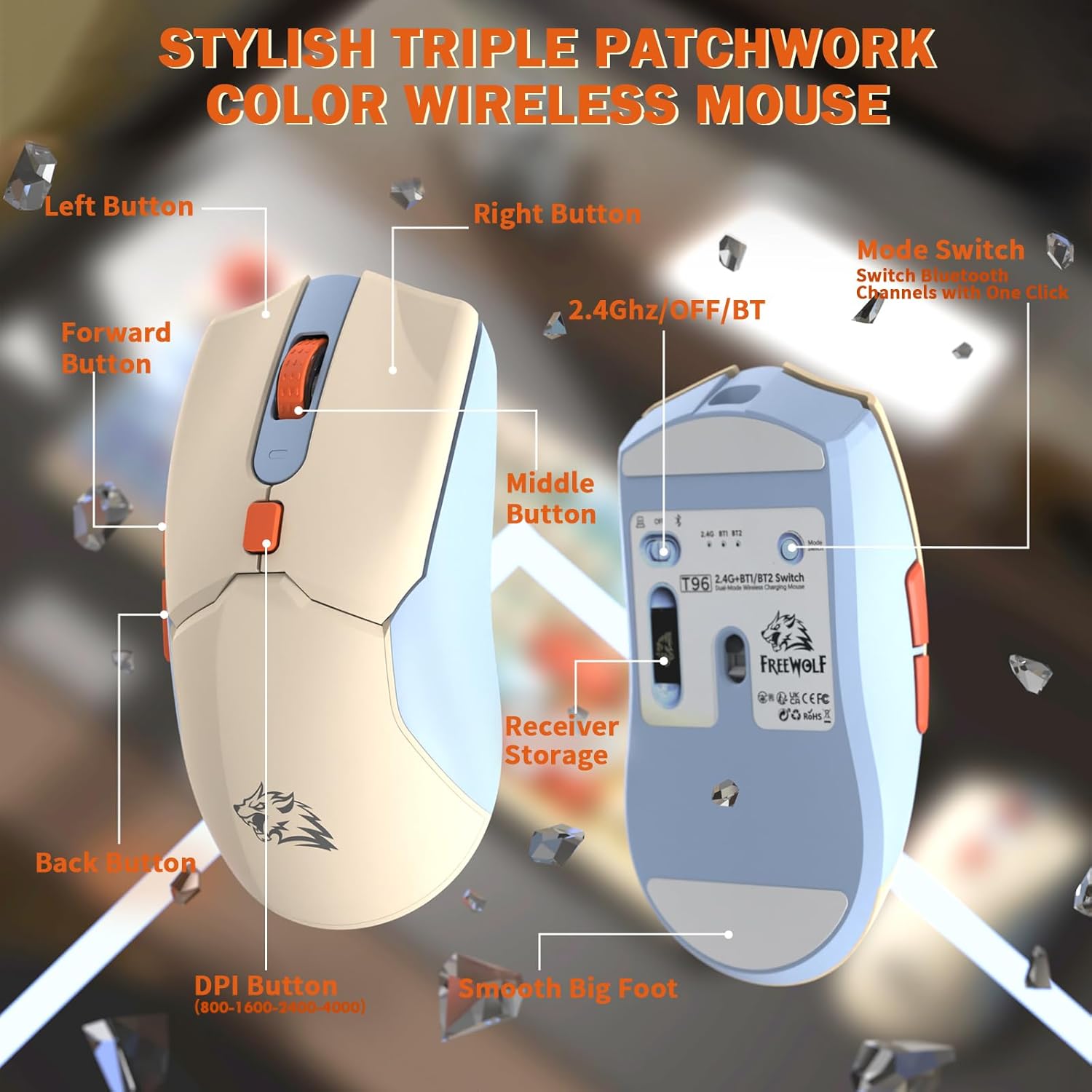
Imatge: Detallada view of the T96 wireless mouse, highlighting its buttons (Left, Right, Middle, Forward, Back, DPI) and the receiver storage compartment on the bottom.
Botons programables
The mouse features six programmable buttons. Refer to specific software (if applicable, not mentioned in data) or operating system settings for customization options.
Tarifes de votació
The mouse operates at different polling rates depending on the connection mode:
- Bluetooth (BT): 115 Hz
- Sense fil 2.4G: 125 Hz
Manteniment
Neteja
- Feu servir un drap suau i sec per netejar les superfícies del teclat i del ratolí.
- Per a la brutícia persistent, lleugerament dampal drap amb aigua o un netejador suau i no abrasiu.
- Avoid using harsh chemicals, solvents, or abrasive materials, as these can damage the finish.
- No submergiu els dispositius en aigua ni en cap líquid.
Cura de la bateria
Per maximitzar la durada i el rendiment de la bateria:
- Recharge the devices when the low battery indicator appears on the keyboard's smart display.
- Eviteu esgotar completament la bateria amb freqüència.
- Store the devices in a cool, dry place when not in use for extended periods.
- The devices feature smart power-saving modes: the keyboard enters sleep mode after 3 minutes of inactivity, and the mouse after 2 minutes. They wake instantly upon touch.

Image: Illustration showing the 2000mAh battery capacity of the keyboard and 500mAh battery capacity of the mouse, emphasizing long-lasting power.
Resolució de problemes
If you encounter issues with your T96 combo, refer to the following common solutions:
| Problema | Causa possible | Solució |
|---|---|---|
| El teclat/ratolí no respon | Low battery; Incorrect connection mode; USB receiver not connected (2.4G); Bluetooth not paired. |
|
| Connexió amb retard o intermitent | Interferències; Distància del receptor/dispositiu; Bateria baixa. |
|
| La retroiluminació no funciona o és tènue | Backlight turned off; Brightness set too low; Low battery. |
|
| Mouse DPI not changing | El botó DPI no s'ha premut correctament. |
|
Especificacions
| Característica | Detall |
|---|---|
| Marca | LLOP LLIURE |
| Model | T96 |
| Tecnologia de connectivitat | 2.4Ghz Wireless, Bluetooth (BT1, BT2) |
| Tipus de teclat | Membrane, 94-Key Compact Layout |
| Taps de claus | PBT Triple-Tone Spherical Keycaps |
| Llum de fons | Rainbow LED Backlight |
| Anti-fantasma | Rollover de 26 tecles |
| Capacitat de la bateria del teclat | 2000 mAh |
| DPI del ratolí | 800 / 1600 / 2400 / 4000 DPI (Adjustable) |
| Mouse Polling Rate (BT) | 115 Hz |
| Mouse Polling Rate (2.4G) | 125 Hz |
| Capacitat de la bateria del ratolí | 500 mAh |
| Dispositius compatibles | Laptop, Gaming Console, PC, Tablet, Smartphone |
| Sistemes operatius | Windows, macOS, Linux, iOS, Android |
| Pes de l'article | 2.12 lliures (aprox. 0.96 kg) |
| Dimensions del paquet | 16.26 x 8.78 x 1.85 polzades (aprox. 41.3 x 22.3 x 4.7 cm) |
Garantia i Suport
Information regarding product warranty and customer support was not provided in the available data. Please refer to the product packaging or the manufacturer's official website for details on warranty coverage and how to contact customer support for assistance.
Ask a question about this manual
Ask about setup, troubleshooting, compatibility, parts, safety, or missing instructions. Manuals+ will review the question and use this page’s manual context to help answer it.