
Infinity DM 56
Infiniity DM56 Sport Smartwatch User Manual
Model: DM 56
1. Introducció
Thank you for choosing the Infiniity DM56 Sport Smartwatch. This device is designed to enhance your active lifestyle with advanced fitness tracking, health monitoring, and smart connectivity features. Equipped with a vibrant 1.43-inch AMOLED display, built-in GPS, and comprehensive health sensors, the DM56 is your reliable companion for both daily wear and intense workouts.
This manual provides detailed instructions on how to set up, operate, maintain, and troubleshoot your smartwatch to ensure optimal performance and longevity.

Imatge 1.1: Frontal view of the Infiniity DM56 Sport Smartwatch, showcasing its round AMOLED display and rugged design.
2. Què hi ha a la caixa
Upon opening your Infiniity DM56 Sport Smartwatch package, please ensure all the following items are present:
- Infiniity DM56 Sport Smartwatch
- Cable de càrrega
- Manual d'usuari (aquest document)
3. Configuració
3.1 Càrrega del rellotge intel·ligent
Before first use, fully charge your DM56 smartwatch. A full charge typically takes approximately 2 hours.
- Connect the magnetic charging cable to the charging contacts on the back of the smartwatch. Ensure the pins align correctly.
- Connecteu l'extrem USB del cable de càrrega a un adaptador de corrent USB estàndard (es recomana 5 V/1 A) o al port USB d'un ordinador.
- The watch display will show a charging indicator. Once fully charged, the indicator will change or disappear.
3.2 Emparellament amb el telèfon intel·ligent
To unlock the full potential of your DM56 smartwatch, you need to pair it with your smartphone via Bluetooth using the dedicated companion application. The DM56 is compatible with Android 5.0+ and iOS 11 and above.
- Descarrega l'aplicació: Cerca the official Infiniity companion app (refer to the packaging or quick start guide for the exact app name) on the Google Play Store (for Android) or Apple App Store (for iOS) and install it.
- Activa el Bluetooth: Assegureu-vos que el Bluetooth estigui habilitat al vostre telèfon intel·ligent.
- Obriu l'aplicació: Launch the companion app on your smartphone and follow the on-screen instructions to create an account or log in.
- Afegeix un dispositiu: Within the app, navigate to the 'Add Device' or 'Pair Device' section. The app will search for available smartwatches.
- Select DM56: Select 'DM56' from the list of found devices. A pairing request may appear on both your phone and the watch. Confirm the pairing on both devices.
- Configuració completa: Once paired, the app will guide you through initial settings, such as profile information, notification permissions, and data synchronization.
4. Funcionament del rellotge intel·ligent
4.1 Navegació bàsica
The DM56 features a responsive touchscreen and physical buttons for intuitive control.
- Pantalla tàctil: Llisca amunt, avall, esquerra o dreta per navegar pels menús i les notificacions. Toca per seleccionar elements.
- Botons físics: The watch has multiple buttons, typically labeled 'SPORT', 'SEL', 'BACK', and a dedicated 'GPS' button. Their functions may vary depending on the current screen or mode.
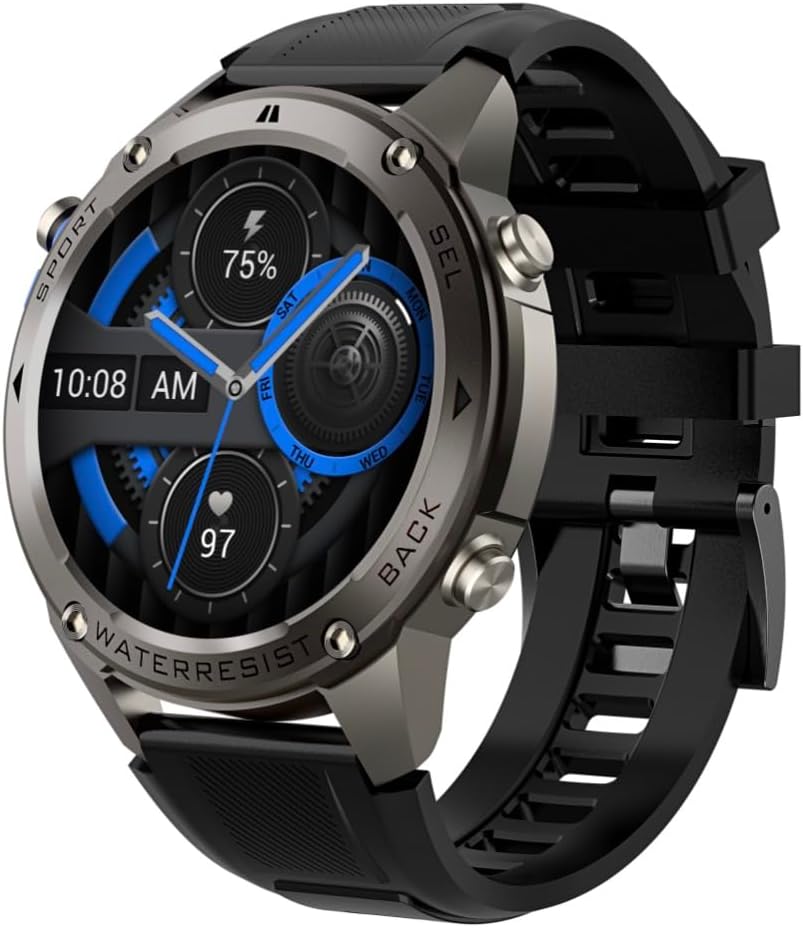
Imatge 4.1: Lateral view of the Infiniity DM56 Sport Smartwatch, highlighting the physical control buttons.
4.2 Característiques de visualització
The 1.43-inch AMOLED display offers vibrant colors and deep blacks with a resolution of 466x466 pixels.
- Pantalla sempre activa: The DM56 supports Always-On Display functionality, allowing you to see the time and essential information at a glance without needing to raise your wrist or press a button. This feature can be configured in the watch settings.

Image 4.2: The Infiniity DM56 Sport Smartwatch display, showcasing a typical watch face with various data points.
4.3 Built-in GPS & Compass
The DM56 features dual-frequency GPS (L1+L5) and supports multiple satellite systems (GPS, GLONASS, BDS, Galileo, NAVIC, QZSS) for precise outdoor tracking. A built-in compass further aids navigation.
- Seguiment GPS: When starting an outdoor activity (e.g., running, cycling), the watch will automatically attempt to acquire a GPS signal. Ensure you are in an open area for faster signal acquisition. Your route, distance, and pace will be recorded.
- Brúixola: Access the compass feature from the watch's menu to get real-time directional information.

Image 4.3: The Infiniity DM56 Sport Smartwatch from an angle, highlighting the dedicated GPS button on the side.

Imatge 4.4: Un primer pla view of the GPS button on the Infiniity DM56 Sport Smartwatch, indicating its function.
4.4 All-Day Health Monitoring
The DM56 is equipped with the VC30F sensor for continuous health monitoring.
- Monitorització de la freqüència cardíaca: Track your heart rate in real-time throughout the day. View your current heart rate on the watch face or in the dedicated heart rate app.
- Monitorització d'oxigen en sang (SpO2): Mesura els teus nivells de saturació d'oxigen a la sang.
- Seguiment del son: El rellotge controla automàticament els teus patrons de son, incloent-hi el son profund, el son lleuger i els horaris de vigília. View anàlisi detallada del son a l'aplicació complementària.
- Seguiment de l'estrès: Monitor your stress levels throughout the day.
- Podòmetre: Counts your daily steps, distance, and estimated calories burned.
Note: The Infiniity DM56 Smartwatch is NOT A MEDICAL DEVICE. All health monitoring data is for reference only and should not be used for medical diagnosis or treatment.
4.5 modes esportius
The DM56 offers over 170 customizable sports modes, with 14 built-in modes such as outdoor running, cycling, and swimming. You can add up to 10 additional modes manually via the companion app.
- Començar una activitat: Navigate to the 'Workout' or 'Sports' menu on the watch, select your desired activity, and tap to start.
- Durant l'activitat: The watch will display real-time metrics such as duration, distance, heart rate, and calories burned.
- Ending Activity: Swipe or press the designated button to pause or end the activity. Your workout data will be saved and synchronized with the app.
4.6 Smart Notifications & Calls
Once paired with your smartphone, the DM56 can receive notifications and handle calls directly on your wrist.
- Notificacions: Receive alerts for incoming calls, SMS messages, and app notifications (e.g., social media, email). Configure which app notifications you want to receive in the companion app.
- Make/Answer Call: The DM56 allows you to make and answer calls directly from the watch, utilizing its built-in microphone and speaker. Ensure the watch is connected to your phone via Bluetooth.
5. Manteniment
Classificació d'impermeabilitat 5.1
The DM56 has a 5ATM waterproof rating, meaning it can withstand water pressures equivalent to a depth of 50 meters. This makes it suitable for swimming, showering, and other water-based activities. However, it is not recommended for diving or high-pressure water activities.
- Eviteu exposar el rellotge a aigua calenta, vapor o detergents forts.
- Després de l'exposició a l'aigua salada, esbandiu el rellotge amb aigua fresca i eixugueu-lo bé.
5.2 Neteja i cura
Per mantenir l'aspecte i la funcionalitat del teu rellotge intel·ligent:
- Netegeu regularment la carcassa i la corretja del rellotge amb un drap suau i sec.amp tela.
- Assegureu-vos que els contactes de càrrega de la part posterior del rellotge estiguin nets i secs abans de carregar-lo.
- Eviteu utilitzar netejadors abrasius o dissolvents.
5.3 Optimització de la durada de la bateria
The DM56 is powered by a 500mAh high-voltage battery, offering extended usage. To maximize battery life:
- Adjust screen brightness to a lower level.
- Limit the use of Always-On Display if not essential.
- Desactiva les notificacions innecessàries.
- Desactiveu el monitoratge continu de la freqüència cardíaca si no és necessari les 24 hores del dia, els 7 dies de la setmana.
6. Solució De Problemes
If you encounter issues with your Infiniity DM56 smartwatch, try the following common solutions:
- El rellotge no s'encén: Assegureu-vos que el rellotge estigui completament carregat. Connecteu-lo al carregador i espereu uns minuts abans d'intentar tornar-lo a encendre.
- No es pot emparellar amb el telèfon:
- Assegura't que el Bluetooth estigui activat al telèfon i al rellotge.
- Assegureu-vos que el rellotge estigui dins de l'abast del Bluetooth del telèfon.
- Reinicia tant el rellotge com el telèfon.
- Esborra la memòria cau de Bluetooth del telèfon (Android) o oblida't del dispositiu i torna a emparellar-lo.
- Assegureu-vos que l'aplicació complementària estigui actualitzada a la darrera versió.
- Dades de salut inexactes:
- Assegureu-vos de portar el rellotge ben ajustat al canell, ni massa ajustat ni massa fluix.
- Netegeu el sensor de la part posterior del rellotge.
- Note that environmental factors and individual physiology can affect readings. Remember, it is not a medical device.
- Notificacions no rebudes:
- Comproveu la configuració de notificacions a l'aplicació complementària.
- Ensure the app has necessary permissions on your phone (e.g., notification access).
- Verifiqueu que el rellotge estigui connectat al telèfon.
- Autonomia curta de la bateria: Consulteu la secció 5.3 per obtenir consells d'optimització de la bateria.
If the issue persists after trying these steps, please contact customer support for further assistance.
7. Especificacions
| Característica | Especificació |
|---|---|
| Número de model | DM 56 |
| Mostra | 1.43-inch AMOLED, 466x466 pixels |
| Sensors | Heart Rate (VC30F), Accelerometer (STK8321), Magnetometer (Compass), Barometer+Altitude (SPL07-03) |
| Connectivitat | Bluetooth 5.3 |
| Capacitat de la bateria | 500 mAh |
| Nivell impermeable | 5ATM |
| Compatibilitat | Android 5.0+ and iOS 11 and above |
| Pes de l'article | 3 unces |
| Dimensions del paquet | 4.25 x 4.25 x 2.8 polzades |
| Sistema operatiu | Android Wear 2.7 (Note: This refers to the underlying OS, not necessarily full Android Wear functionality) |
| GPS | GPS integrat (L1+L5 de doble freqüència) |
| Forma | Ronda |
| Tipus de bateria | Nonstandard Battery, Lithium Ion |
8. Garantia i Suport
The Infiniity DM56 Sport Smartwatch comes with a standard manufacturer's warranty. Please refer to the warranty card included in your product packaging for specific terms and conditions, including warranty duration and coverage details.
For technical support, troubleshooting assistance beyond what is covered in this manual, or warranty claims, please contact Infiniity customer service through the contact information provided on the product packaging or the official Infiniity weblloc.
Si us plau, conserveu el comprovant de compra per motius de garantia.
Ask a question about this manual
Ask about setup, troubleshooting, compatibility, parts, safety, or missing instructions. Manuals+ will review the question and use this page’s manual context to help answer it.