
1. Introducció
This manual provides detailed instructions for the assembly, operation, and maintenance of your DEVAISE 55 Inch Electric Standing Desk. Designed for home and office use, this ergonomic desk features adjustable height, an LED touchscreen controller with memory presets, and a headphone hook for convenience. Please read this manual thoroughly before assembly and use to ensure proper function and safety.

Figure 1.1: The DEVAISE 55 Inch Electric Standing Desk, showcasing its spacious white desktop and sturdy frame, equipped with dual monitors, a laptop, and various office accessories.
2. Informació de seguretat
To prevent injury or damage to your desk, please observe the following safety precautions:
- Assegureu-vos que totes les connexions estiguin ben connectades abans de fer funcionar l'escriptori.
- Keep hands, feet, and objects clear of the moving parts (legs, crossbars) during height adjustments.
- No sobrecarregueu l'escriptori. La capacitat màxima de pes és de 81.6 kg.
- No permeteu que els nens facin servir l'escriptori sense supervisió.
- Use the desk only on a flat, stable surface.
- Desconnecteu l'alimentació abans de netejar o realitzar qualsevol manteniment.
- This product meets CA Prop 65 & federal safety requirements for toxin-free air quality.
3. Contingut del paquet
Si us plau, comproveu que tots els components siguin presents abans de començar el muntatge:
- Desktop (55"W x 28"D)
- Potes d'escriptori (2)
- Peus (2)
- Caixa de control
- LED Touchscreen Controller
- Ganxo per a auriculars
- All necessary hardware (screws, bolts, tools)
- Manual d'instruccions
4. Instruccions de muntatge
The DEVAISE Electric Standing Desk is designed for hassle-free installation with pre-drilled screw holes and labeled parts. Assembly typically takes less than 30 minutes. A Phillips head screwdriver (not included) is required.
- Desempaquetar components: Traieu amb cura totes les peces de l'embalatge i col·loqueu-les sobre una superfície neta i suau per evitar ratllades.
- Muntar el marc de l'escriptori: Attach the desk legs to the crossbar and feet using the provided hardware. Ensure all connections are tightened securely.
- Adjunta l'escriptori: Place the desktop upside down on the soft surface. Align the pre-drilled holes on the desktop with the frame. Secure the desktop to the frame using the provided screws. Note: The desktop may consist of two pieces joined by wooden dowel rods. For added stability, consider applying wood glue to these joints during assembly.
- Install Control Box and Controller: Mount the control box and LED touchscreen controller to the underside of the desktop in the designated areas. Connect all cables according to the wiring diagram in the detailed instructions.
- Fixeu el ganxo per als auriculars: Secure the headphone hook to the desired location on the side of the desk.
- Gestió de cables: Use the included cable ties or clips to manage and secure all power and control cables, preventing tangles and ensuring safe operation.
- Escriptori vertical abatible: Amb ajuda, gireu amb cura l'escriptori muntat cap amunt i col·loqueu-lo a la ubicació desitjada.

Figure 4.1: Simplified components for quick and easy assembly.
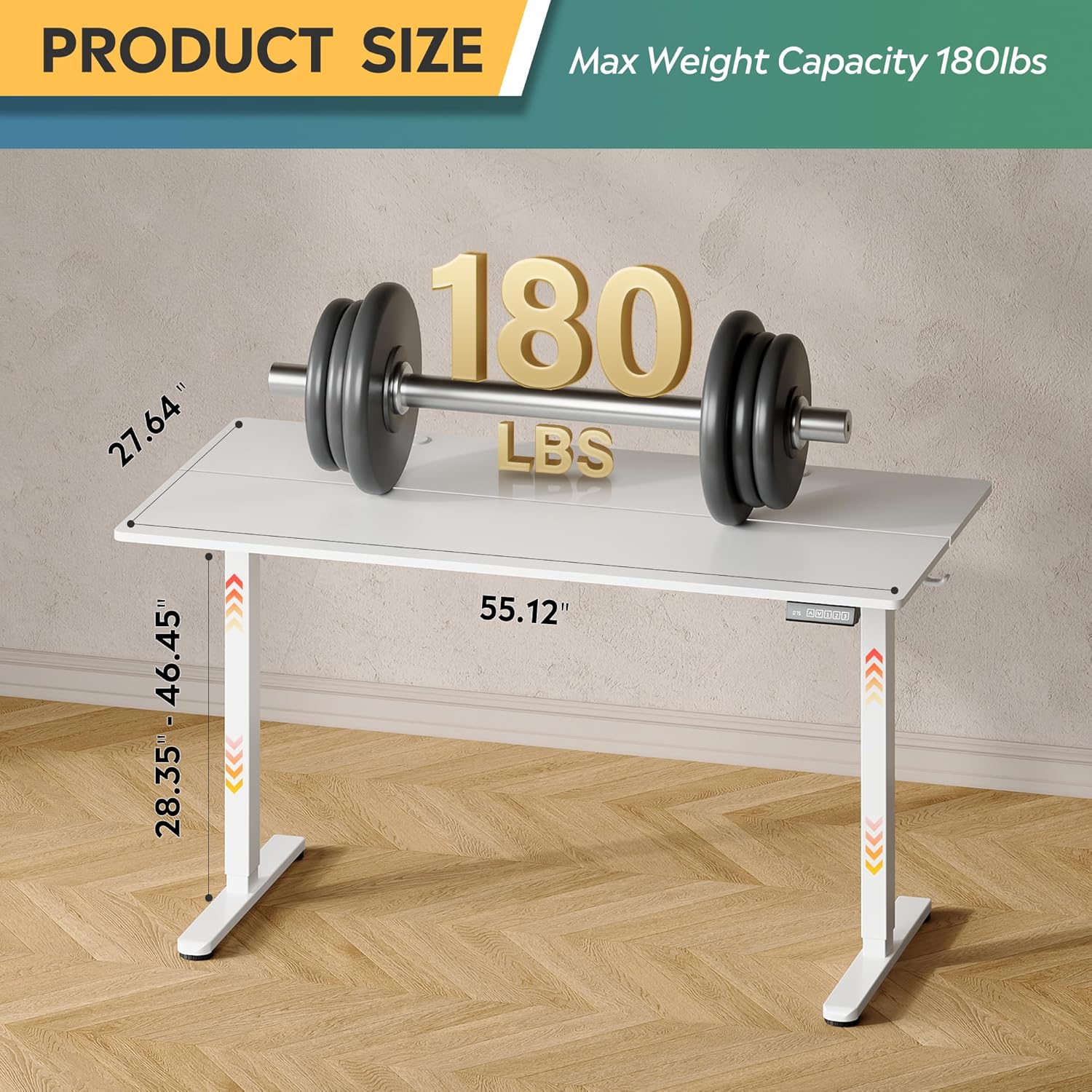
Figure 4.2: Desk dimensions and maximum weight capacity of 180 lbs.
5. Instruccions de funcionament
Your DEVAISE Electric Standing Desk features a tri-motor system for quiet and smooth height adjustments and an intuitive LED touchscreen controller.
5.1. Ajust d'alçada
The desk's height can be adjusted from 28.35 inches (sitting height) to 46.45 inches (standing height).
- Pujar escriptori: Manteniu premut el botó UP arrow button on the controller. The desk will move upwards. Release the button at your desired height.
- Escriptori inferior: Manteniu premut el botó ABAIX arrow button on the controller. The desk will move downwards. Release the button at your desired height.

Figure 5.1: Adjustable height range from 28.35" to 46.45".
5.2. Preajustos de memòria
The LED touchscreen controller allows you to store and recall up to three personalized height settings.
- Set a Memory Preset:
- Ajusteu l'escriptori a l'alçada desitjada amb els botons AMUNT/AVALL.
- Premeu el botó S button (Set). The LED display will flash.
- Press one of the memory buttons (1, 2, o 3) within 5 seconds. The height is now saved to that button.
- Recall a Memory Preset: Simplement premeu el botó de memòria corresponent (1, 2, o 3). L'escriptori es mourà automàticament a l'alçada desada.

Figure 5.2: Multi-function LED touchscreen control panel.
5.3. Funcionament silenciós
The desk's tri-motor system operates at a whisper-quiet level of less than 50dB, ensuring minimal disruption in your workspace.

Figure 5.3: The desk operates quietly, below 50dB.
6. Manteniment
Regular maintenance will help prolong the life of your DEVAISE Electric Standing Desk:
- Neteja: Netegeu l'escriptori i el marc amb un drap suauamp drap. Eviteu productes químics agressius o netejadors abrasius.
- Comproveu les connexions: Inspeccioneu periòdicament tots els cargols i connexions per assegurar-vos que romanen ajustats. Torneu a apretar-los si cal.
- Gestió de cables: Ensure cables are neatly organized and not pinched or stressed.
7. Solució De Problemes
Si teniu problemes amb el vostre escriptori, consulteu els següents problemes i solucions habituals:
| Problema | Causa possible | Solució |
|---|---|---|
| L'escriptori no es mou. | No power; loose connection; motor error. | Check power cord connection. Ensure all cables are securely plugged into the control box and motor. Unplug and replug the power cord to reset. |
| L'escriptori es mou de manera irregular o fa un soroll inusual. | Overload; obstruction; loose components. | Reduce weight on the desk. Check for any obstructions under or around the desk. Ensure all assembly screws are tightened. |
| La pantalla LED mostra un codi d'error. | Error específic del sistema. | Refer to the detailed error code list in the full product manual (if available) or contact customer support. Often, a power cycle (unplugging for 30 seconds and replugging) can resolve temporary errors. |
8. Especificacions
| Característica | Detall |
|---|---|
| Número de model | ASJZ023-new |
| Dimensions del producte (P x A x A) | 23.62 "P x 55" W x 28.34" H |
| Interval d'alçada ajustable | 28.35" a 46.45" |
| Nombre de posicions d'alçada | 3 (Preajustos de memòria) |
| Capacitat màxima de pes | 180 lliures |
| Pes de l'article | 37 lliures |
| Material d'escriptori | Fusta d'enginyeria |
| Material base | Iron / Steel |
| Color | Blanc |
| Nivell de soroll del motor | <50dB |
| Característiques especials | Adjustable Height, Electric, Ergonomic, LED Touchscreen, Headphone Hook |
9. Garantia i Suport
Your DEVAISE Electric Standing Desk comes with a limited warranty. For specific warranty terms and conditions, please refer to the documentation included with your purchase or contact DEVAISE customer support.
9.1. Devolucions
Aquest producte té dret a devolucions fàcils en 30 dies. Consulteu la política de devolucions del vostre venedor per obtenir més informació.
9.2. Plans de protecció
Optional 2-Year and 3-Year Protection Plans may be available for purchase separately to extend coverage beyond the standard limited warranty.
9.3. Atenció al client
If you have any questions regarding assembly, operation, troubleshooting, or product selection, please contact our U.S.-based product support team. Contact information can typically be found on the DEVAISE official weblloc web o al rebut de compra.
