
Introducció
The Prolink GK-6002MS is a compact, 68-key hot-swappable mechanical gaming keyboard designed for versatility and performance. It features customizable RGB backlighting, full N-Key Rollover, and durable doubleshot keycaps. This manual provides instructions for setup, operation, and maintenance of your keyboard.
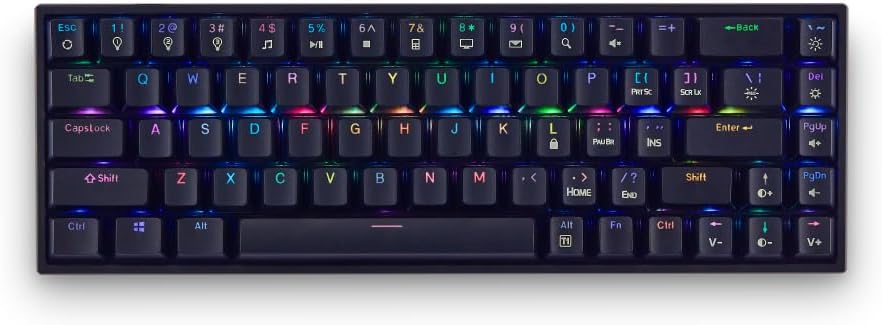
Imatge: Frontal view of the Prolink GK-6002MS keyboard showcasinel seu disseny compacte i la retroiluminació RGB.
Característiques principals:
- Interruptors intercanviables en calent: Compatible with 3-pin or 5-pin Outemu mechanical switches (Blue, Brown, Red) for personalized typing feel.
- Retroil·luminació RGB dinàmica: 12 preset RGB lighting effects and 3 customizable lighting profiles.
- Compact 68-Key Design: Space-saving layout while retaining full functionality.
- Full N-Key Rollover (NKRO): Ensures every keystroke is registered, even during simultaneous presses.
- Doubleshot Keycaps: Enhanced durability and resistance to wear.
- Plug & Play: Easy setup with a detachable 1.75m USB Type-C braided cable.
Vídeo: Producte oficial acabatview of the Prolink GK-6002MS Mechanical Gaming Keyboard, highlighting its features and design.
Configuració
The Prolink GK-6002MS keyboard is designed for simple plug-and-play operation.
- Connecteu el cable USB: Locate the USB Type-C port on the keyboard. Connect one end of the provided 1.75m USB Type-C braided cable to this port.
- Connexió a l'ordinador: Plug the other end of the USB cable into an available USB port on your computer (PC or Laptop).
- Instal·lació del controlador: The keyboard is plug-and-play and typically does not require additional drivers. Your operating system (Windows, Mac OS) will automatically detect and install the necessary drivers.

Image: Diagram illustrating the keyboard's dimensions, the detachable USB-C cable connection point, multimedia shortcuts, NKRO, and doubleshot keycaps.
The keyboard is compatible with both Windows and Mac OS operating systems.

Image: The Prolink GK-6002MS keyboard shown with Windows and Mac OS logos, indicating broad compatibility.
Instruccions de funcionament
Control de retroil·luminació RGB
The GK-6002MS features 12 dynamic RGB backlit presets and 3 customizable lighting profiles. Use the Function (Fn) key in combination with other keys to control the lighting effects.
- Canvi de valors predefinits: Premeu Fn + [Tecla] (e.g., Fn + 1!, Fn + 2@, etc.) to cycle through the 12 dynamic RGB presets.
- Pro personalitzablefiles: The keyboard supports 3 customizable lighting profiles. Refer to the full software manual (if available) for detailed customization instructions.
- Ajust de la il·luminació: Ús Fn + Arrow Keys or other designated keys to adjust brightness, speed, and direction of lighting effects.
- LED encès/apagat: A dedicated switch on the keyboard allows you to turn the LED lighting on or off.

Image: The keyboard displaying various RGB lighting effects and highlighting the keys used for customization and profile selecció.
Dreceres multimèdia
Access 10 multimedia shortcuts by pressing the Fn key in combination with the corresponding function keys (e.g., Fn + F1 for media player, Fn + F2 for volume down, etc.). The specific functions are typically indicated on the keycaps.
Canvi de clau N (NKRO)
The GK-6002MS features Full N-Key Rollover, meaning all keystrokes are registered accurately, regardless of how many keys are pressed simultaneously. This is particularly beneficial for fast-paced gaming and typing.
Interruptors intercanviables en calent
The keyboard supports hot-swappable Outemu mechanical switches (Blue, Brown, Red), allowing you to change switches without soldering. This enables customization of your typing experience.
- Eliminació de les tecles: Feu servir l'extractor de tecles proporcionat per treure suaument la tecla desitjada.
- Eliminació dels interruptors: Use the provided switch puller to carefully extract the mechanical switch from its socket.
- Instal·lació de nous interruptors: Align the pins of the new 3-pin or 5-pin Outemu switch with the holes on the PCB. Gently press the switch into place until it clicks. Ensure the switch is seated correctly and the pins are not bent.
- Re-installing Keycaps: Torneu a col·locar la tapa de la tecla a la nova tija de l'interruptor.
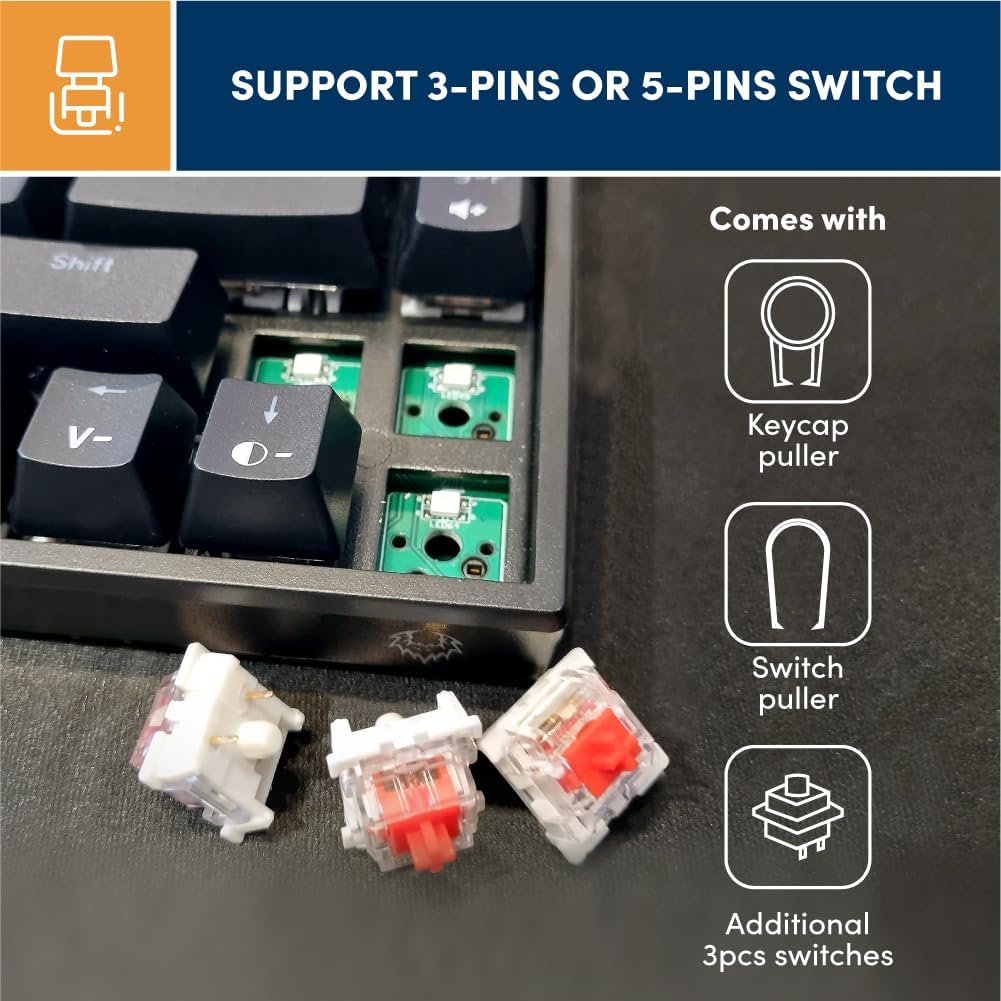
Imatge: Primer pla view of the keyboard's PCB with switches removed, alongside a keycap puller, switch puller, and additional Outemu switches (Blue, Brown, Red) for hot-swapping.
Manteniment
Proper maintenance ensures the longevity and performance of your Prolink GK-6002MS keyboard.
- Neteja: Regularly clean the keycaps and spaces between keys using a soft brush or compressed air to remove dust and debris. For stubborn dirt, gently wipe keycaps with a damp tela.
- Doubleshot Keycaps: The doubleshot keycaps are designed for enhanced durability, resisting fading and wear from frequent use.
- Cura del cable: Handle the detachable USB Type-C cable with care. Avoid sharp bends or excessive pulling to prevent damage.
- Emmagatzematge: Quan no l'utilitzeu, guardeu el teclat en un lloc net i sec, allunyat de temperatures extremes i de la llum solar directa.
Resolució de problemes
Si teniu problemes amb el teclat, consulteu els passos habituals següents per a la resolució de problemes:
- El teclat no respon:
- Assegureu-vos que el cable USB estigui connectat correctament tant al teclat com a l'ordinador.
- Prova de connectar el teclat a un port USB diferent de l'ordinador.
- Prova el teclat en un altre ordinador per descartar un problema específic de l'ordinador.
- If the LED light switch is present, ensure it is in the 'On' position.
- Claus que no es registren:
- Check if any debris is lodged under the keycap or switch.
- If using hot-swappable switches, ensure the switch is fully seated and its pins are not bent. Try re-seating the switch or replacing it with a spare.
- Il·luminació RGB no funciona/incorrecta:
- Ensure the LED light switch on the keyboard is turned on.
- Cycle through the RGB presets using the Fn key combinations to see if the lighting responds.
- Verifiqueu que el teclat rep prou energia del port USB.
- Windows Key Lock Function:
- The keyboard may have a function to lock the Windows key to prevent accidental presses during gaming. Refer to the keycap legends or product documentation for the specific Fn key combination to toggle this feature.
Especificacions
| Característica | Detall |
|---|---|
| Número de model | GK-6002MS |
| Marca | Prolink |
| Descripció del teclat | Mecànica |
| Tipus de canvi | Outemu Mechanical (Red, Blue, Brown hot-swappable) |
| Nombre de claus | 68 |
| Tecnologia de connectivitat | USB-C (Wired, Detachable) |
| Longitud del cable | 1.75 metres |
| Il·luminació de fons del teclat | RGB (12 presets, 3 customizable profiles) |
| Rollover de claus | Full N-Key Rollover (NKRO) |
| Tipus de tecla | Doubleshot ABS |
| Durada de la pulsació de tecles | 50 milions |
| Dispositius compatibles | Portàtil, PC |
| Sistema operatiu compatible | Windows, Mac OS |
| Dimensions del producte (L x A x A) | 31.2 x 10.2 x 3.8 cm |
| Material | Plàstic |
Garantia i Suport
The Prolink GK-6002MS Mechanical Gaming Keyboard comes with a Garantia del fabricant de 1 anys.
For technical support, warranty claims, or further inquiries, please visit the official Prolink weblloc web o poseu-vos en contacte amb el seu departament d'atenció al client. Conserveu el rebut de compra com a comprovant de compra a efectes de garantia.
Prolink Official Weblloc: www.prolink2u.com