
1. Introducció
The KKB G110S 4G LTE Cellular Security Camera is a solar-powered, wireless outdoor surveillance solution designed for locations without Wi-Fi access. This camera offers 2K resolution, color night vision, PIR motion detection, and a 355° pan and 90° tilt (PTZ) view, ensuring comprehensive monitoring and two-way communication capabilities. It comes with a built-in SIM card and a 64GB SD card for immediate use.

Image 1.1: The KKB G110S 4G LTE Cellular Security Camera with its solar panel, designed for outdoor use.
2. Què hi ha a la caixa
Si us plau, comproveu el contingut del paquet en rebre'l per assegurar-vos que hi hagi tots els elements:
- KKB 4G LTE Security Camera
- Panell solar
- 64GB SD Card (pre-installed)
- Manual d'usuari
- Installation Accessories (screws, wall plugs, mounting bracket)
3. Característiques clau
- 4G LTE Network & No Wi-Fi: This camera operates on a 4G LTE cellular network, making it suitable for remote areas without Wi-Fi. It does not support Wi-Fi connectivity.
- Built-in SIM Card & Data Plans: The camera includes a non-replaceable SIM card compatible with Verizon, T-Mobile, and AT&T 4G networks. It comes with 300MB of prepaid data. Additional data plans are available for purchase within the mobile application.
- Solar Powered & Wireless: Equipped with a 10400 mAh battery and a 5W high-conversion rate solar panel, the camera provides continuous power, reducing the need for manual recharging.
- PIR Detection & 2K Color Night Vision: A sensitive PIR sensor accurately detects human and animal movement, sending instant notifications to your mobile app. Enjoy clear 2K image quality and colorful night vision, with infrared night vision for low-light conditions.
- 2-Way Audio & 360° View (PTZ): Engage in real-time conversations with visitors using the two-way audio feature. The camera offers a 355° pan and 90° tilt view, allowing you to remotely adjust the viewing angle for comprehensive coverage via the app.
- Impermeable IP66: The camera is rated IP66 waterproof, ensuring reliable operation in various weather conditions, including rain, snow, and extreme temperatures.
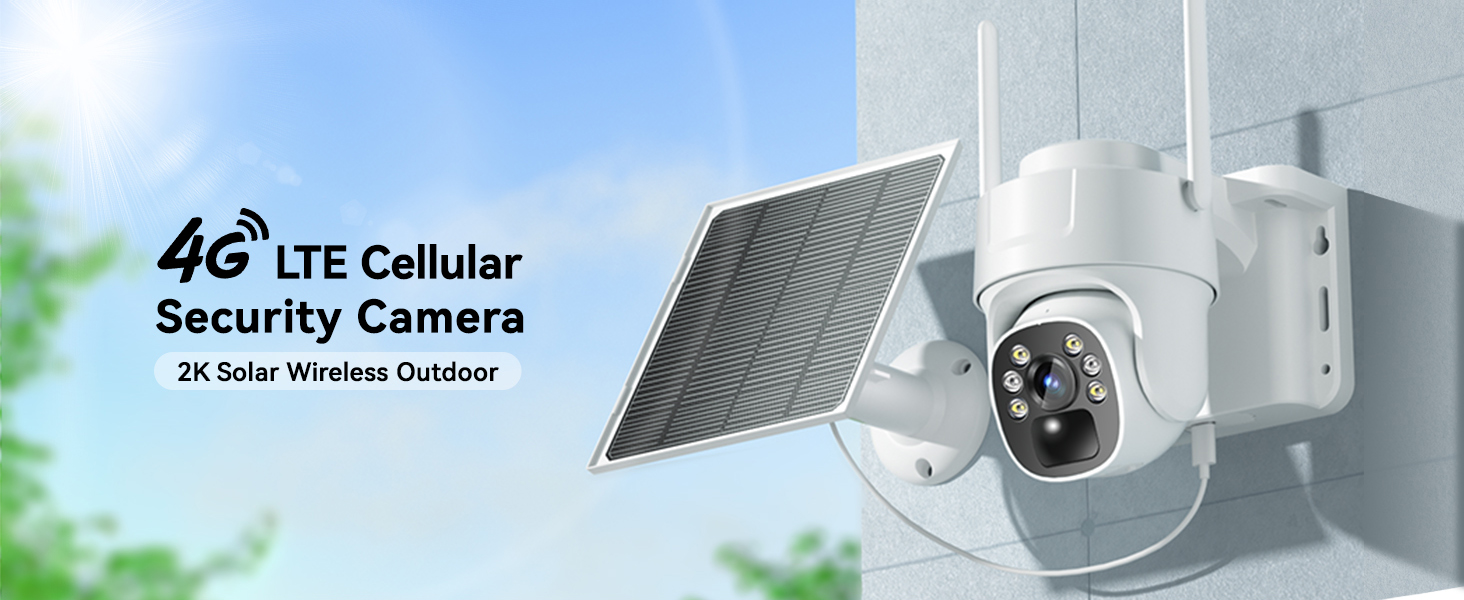
Image 3.1: The camera connects via 4G LTE, eliminating the need for Wi-Fi.

Image 3.2: The camera features a built-in SIM card for cellular connectivity and offers various data plan options.

Image 3.3: The solar panel continuously charges the camera's internal battery, ensuring uninterrupted operation.

Image 3.4: The camera provides both vivid color night vision and standard infrared night vision for optimal visibility in darkness.

Image 3.5: The two-way audio function allows for remote communication through the camera.

Image 3.6: The IP66 waterproof design ensures the camera functions reliably in all weather conditions.
4. Guia de configuració
4.1 Càrrega inicial
Before first use, fully charge the camera's internal battery using a standard USB charger (not included) for optimal performance, especially if solar charging conditions are initially poor.
4.2 Descàrrega de l'aplicació i creació de compte
- Scan the QR code provided in the Quick Start Guide or search for the "iCam365" app in your smartphone's app store (iOS or Android).
- Baixeu i instal·leu l'aplicació.
- Open the app and follow the on-screen instructions to create a new account and log in.
4.3 Camera Activation and Pairing
- Assegureu-vos que la càmera estigui engegada.
- In the iCam365 app, tap the "+" icon to add a new device.
- Select the option for a 4G cellular camera.
- Follow the app's instructions to scan the QR code located on the camera or its packaging.
- The app will guide you through the remaining pairing steps. Once connected, you will see the live feed from your camera.
4.4 SIM Card and SD Card
The camera comes with a built-in, non-replaceable SIM card and a pre-installed 64GB Micro SD card. The SD card is used for local storage of recordings. Ensure the SD card is properly seated if you encounter storage issues.

Image 4.1: The camera includes a pre-installed 64GB Micro SD card for local video storage.
4.5 Muntatge de la càmera i del panell solar
Use the provided installation accessories to securely mount the camera and solar panel. Choose a location where the solar panel receives direct sunlight for most of the day to maximize charging efficiency. The camera can be wall-mounted.

Image 4.2: The camera and solar panel are designed for easy wall mounting.
5. Instruccions de funcionament
5.1 Viu View i control PTZ
Open the iCam365 app to access the live video feed from your camera. Use the on-screen controls to pan (355°) and tilt (90°) the camera lens to adjust the viewing angle as needed. The app also supports digital zoom.

Image 5.1: Control the camera's pan, tilt, and zoom functions directly from the mobile app.
5.2 Àudio bidireccional
Per utilitzar la funció d'àudio bidireccional, toqueu la icona del micròfon a la pantalla en directe view interface of the app. You can then speak through your phone, and your voice will be transmitted through the camera's speaker. Release the icon to listen.
5.3 Detecció de moviment i alertes
The camera's PIR motion sensor detects movement and sends instant push notifications to your smartphone. You can customize motion detection sensitivity and alert settings within the iCam365 app.

Image 5.2: Receive immediate alerts on your phone when motion is detected by the camera.
5.4 Modes de visió nocturna
The camera automatically switches between day and night vision modes. It offers both full-color night vision (when sufficient ambient light or spotlight is available) and infrared night vision for clear black-and-white images in complete darkness.
5.5 Reproducció i emmagatzematge de vídeo
Recorded videos are stored on the pre-installed 64GB SD card. You can access and review these recordings through the iCam365 app. Cloud storage options may also be available via subscription within the app.
6. Manteniment
- Neteja de panells solars: Netegeu regularment la superfície del panell solar amb un drap suau i sec.amp cloth to ensure maximum sunlight absorption and charging efficiency.
- Neteja de lents: Netegeu suaument la lent de la càmera amb un drap de microfibra per eliminar la pols o les taques que puguin afectar la claredat de la imatge.
- Actualitzacions de firmware: Check the iCam365 app periodically for available firmware updates to ensure your camera has the latest features and security enhancements.
- Salut de la bateria: While solar-powered, extreme weather or prolonged periods of low sunlight may impact battery levels. Monitor battery status via the app and manually charge if necessary.
7. Solució De Problemes
7.1 Camera Not Connecting to 4G Network
- Ensure the camera is in an area with good 4G cellular coverage.
- Check the data plan status in the iCam365 app. You may need to renew or purchase a new data plan.
- Restart the camera by powering it off and on.
7.2 Mala qualitat d'imatge
- Clean the camera lens to remove any dirt or obstructions.
- Assegureu-vos que no hi hagi obstacles físics en el camp d'acció de la càmera. view.
- Check the network signal strength in the app; a weak 4G signal can affect streaming quality.
7.3 La bateria no es carrega
- Verify the solar panel is positioned to receive direct sunlight for several hours daily.
- Netegeu la superfície del panell solar.
- Ensure the connection cable between the solar panel and the camera is secure.
7.4 Motion Detection Alerts Not Received
- Check the motion detection settings in the iCam365 app to ensure they are enabled and configured correctly.
- Verify your phone's notification settings for the iCam365 app are enabled.
- Ensure the camera has sufficient battery power and 4G data.
8. Especificacions
| Característica | Detall |
|---|---|
| Nom del model | G110S |
| Tecnologia de connectivitat | Sense fil (4G LTE mòbil) |
| Resolució de captura de vídeo | 2K (3 MP Photo Sensor Resolution) |
| Viewangle ing | Panorama de 355°, inclinació de 90° |
| Visió nocturna | Color Night Vision, Infrared Night Vision (50 Feet Range) |
| Àudio | Àudio de 2 vies |
| Detecció de moviment | PIR Sensor (Motion Only Alert Type) |
| Font d'alimentació | Solar Powered (5W), 10400 mAh Battery |
| Emmagatzematge | 64GB Micro SD Card (included), supports up to 128GB |
| Nivell de resistència a l'aigua | Impermeable IP66 |
| Dispositius compatibles | Telèfon intel·ligent (Android, iOS) |
| Tipus d'instal·lació | Suport de paret, independent |
| Dimensions de l'article | 7.87 x 7.87 x 5.51 polzades |
| Material | Acrilonitril butadiè estirè (ABS) |
9. Garantia i Suport
KKB is committed to providing reliable home security solutions. For any technical assistance or inquiries, please utilize our support channels:
- Suport tècnic 24/7: Access professional technical support at any time.
- Multi-channel Service: Contact support via the iCam365 app's online contact feature or through email.
Please refer to the product packaging or the official KKB weblloc per obtenir detalls i termes específics de la garantia.
10. Vídeo del producte
Vídeo 10.1: Presentació oficial del producte en vídeoasing the KKB 4G LTE Cellular Solar Security Camera's features and applications, including its wireless operation, solar charging, and smart detection capabilities.