
Introducció
This manual provides detailed instructions for the Keychron B36 2.4 GHz Wireless Bluetooth 100% Full-Size Layout Keyboard. Please read this guide thoroughly to ensure proper setup, operation, and maintenance of your device. The Keychron B36 offers versatile connectivity, an ergonomic design, and a silent typing experience.
Què hi ha a la caixa
- Keychron B36 Wireless Keyboard x1
- Type-A 2.4 GHz Receiver x1
- Type-A to Type-C Cable x1
Configuració
1. Càrrega del teclat
Before initial use, fully charge the keyboard using the provided Type-A to Type-C cable. Connect the USB-C end to the keyboard and the USB-A end to a power source (e.g., computer USB port, USB wall adapter). The charging indicator will show the charging status.
2. Opcions de connectivitat
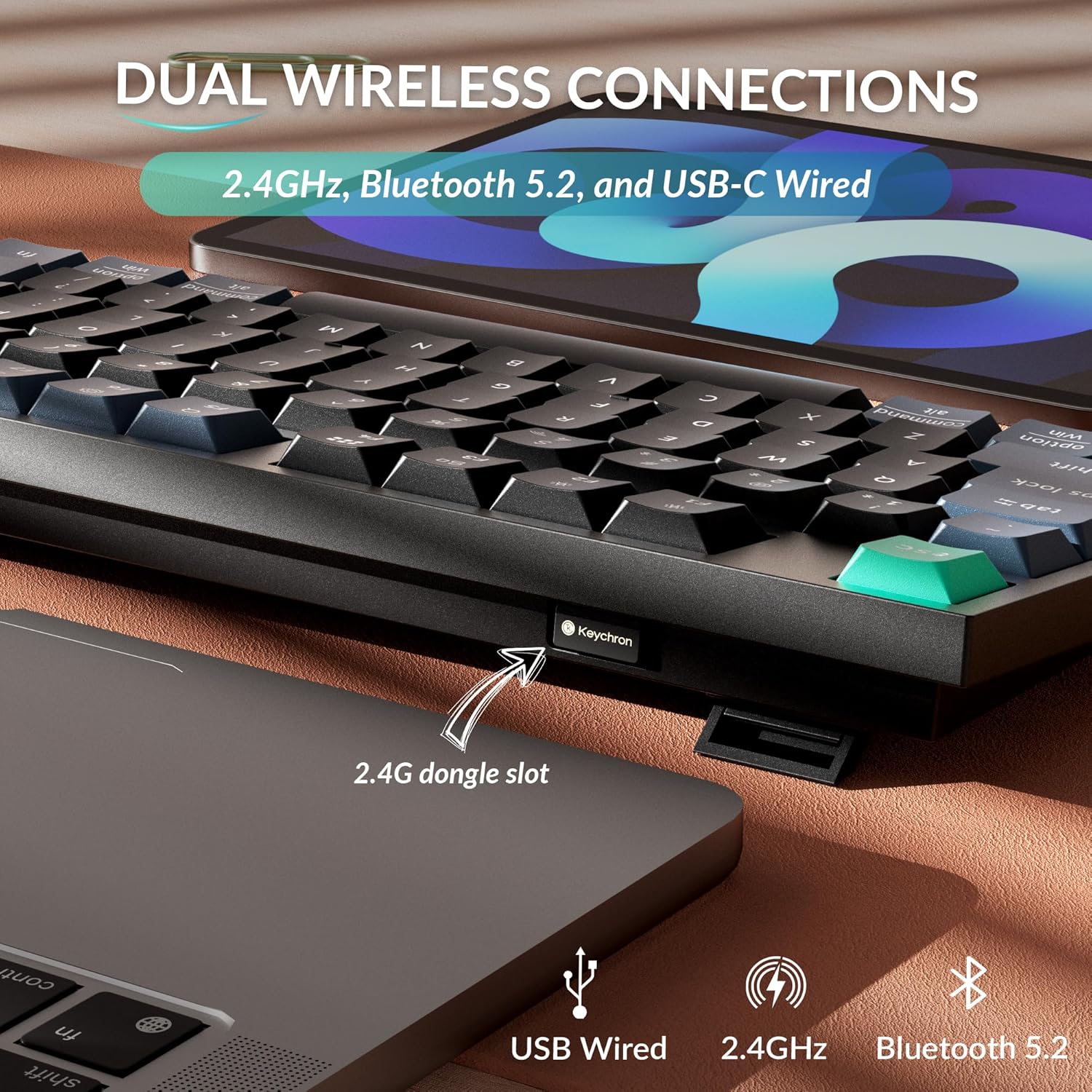
The Keychron B36 supports three connection modes: 2.4 GHz wireless, Bluetooth 5.2, and USB-C wired.

Image: The Keychron B36 keyboard highlighting its multiple connectivity options: 2.4 GHz wireless, Bluetooth 5.2, and USB-C wired. The 2.4G dongle slot is also visible.
2.1. Connexió sense fil de 2.4 GHz
- Locate the 2.4 GHz USB receiver (dongle) included in the box.
- Plug the 2.4 GHz receiver into an available USB-A port on your computer.
- Turn on the keyboard and switch the mode selector to 2.4G. The keyboard will automatically connect to the receiver.
2.2. Connexió Bluetooth 5.2
El teclat es pot connectar a un màxim de tres dispositius Bluetooth.
- Switch the mode selector on the keyboard to Bluetooth (BT).
- To pair with a new device, press and hold the Fn + 1 (per al dispositiu 1), Fn + 2 (per al dispositiu 2), o Fn + 3 (for device 3) key combination for 3 seconds until the indicator light flashes rapidly, indicating pairing mode.
- On your device (computer, tablet, smartphone), enable Bluetooth and search for "Keychron B36".
- Select "Keychron B36" to complete the pairing process. The indicator light will stop flashing once connected.
- Per canviar entre dispositius Bluetooth emparellats, premeu Fn + 1, Fn + 2, o Fn + 3 breument.
2.3. Connexió amb cable USB-C
- Connect the provided Type-A to Type-C cable from your computer's USB port to the keyboard's USB-C port.
- Switch the mode selector on the keyboard to "Cable" or "Wired" mode. The keyboard will function as a wired device.
3. Compatibilitat del sistema operatiu
The Keychron B36 is compatible with macOS, Windows, and Linux operating systems. Use the OS switch on the keyboard to select the appropriate layout for your system.
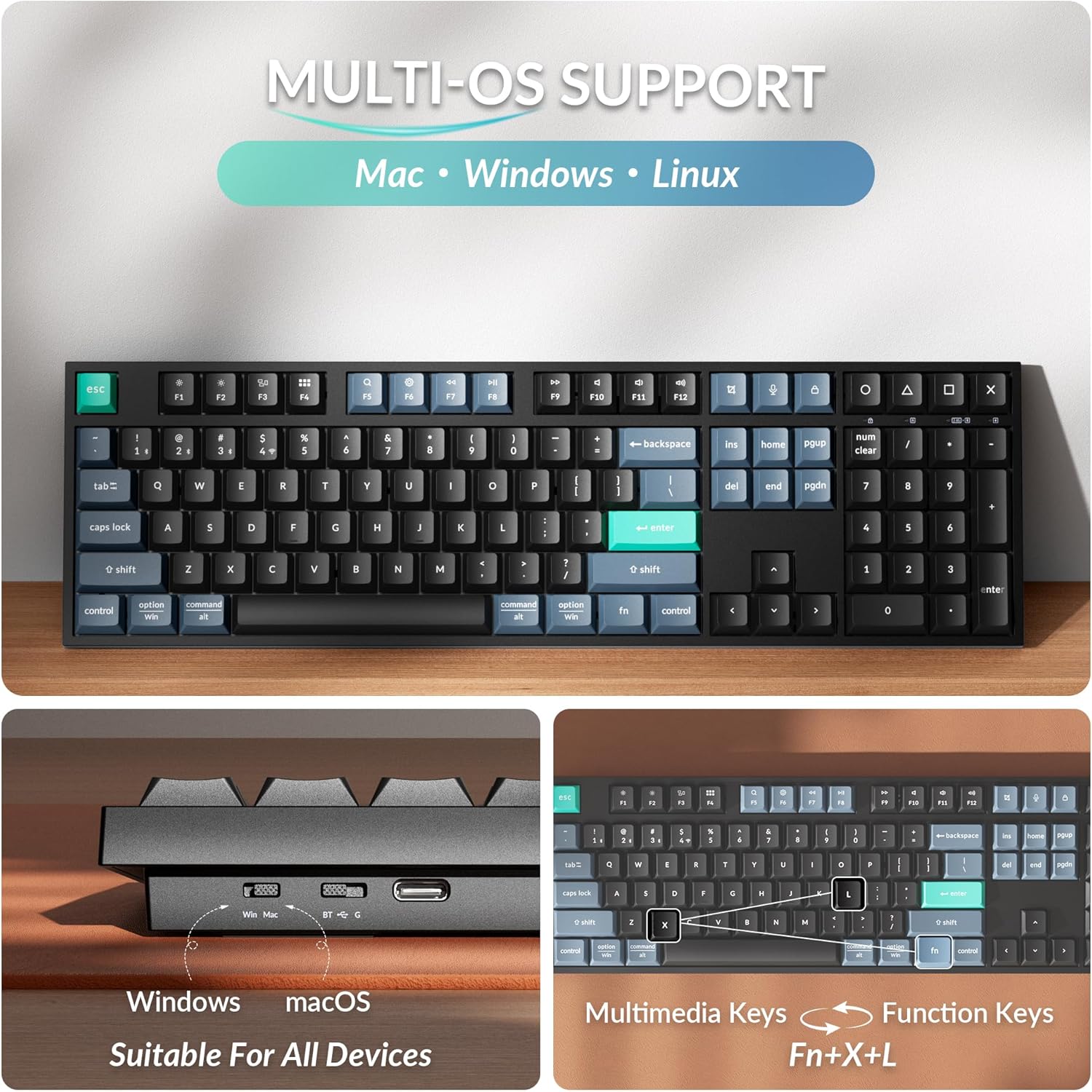
Image: The Keychron B36 keyboard demonstrating its compatibility with multiple operating systems, including Mac, Windows, and Linux. A physical switch allows users to toggle between Windows and macOS layouts.
Instruccions de funcionament
1. Key Functions and Layout
The B36 features a 100% full-size layout with a numeric keypad. Standard QWERTY layout is used. Function keys (F1-F12) can be accessed directly or via the Fn key in combination with other keys for multimedia controls.
- Tecles multimèdia: Premeu Fn + F1 a Fn + F12 for various multimedia functions (e.g., volume control, media playback).
- Tecles de funció: To use F1-F12 as standard function keys, press Fn + X + L (or refer to the specific key combination for your OS).
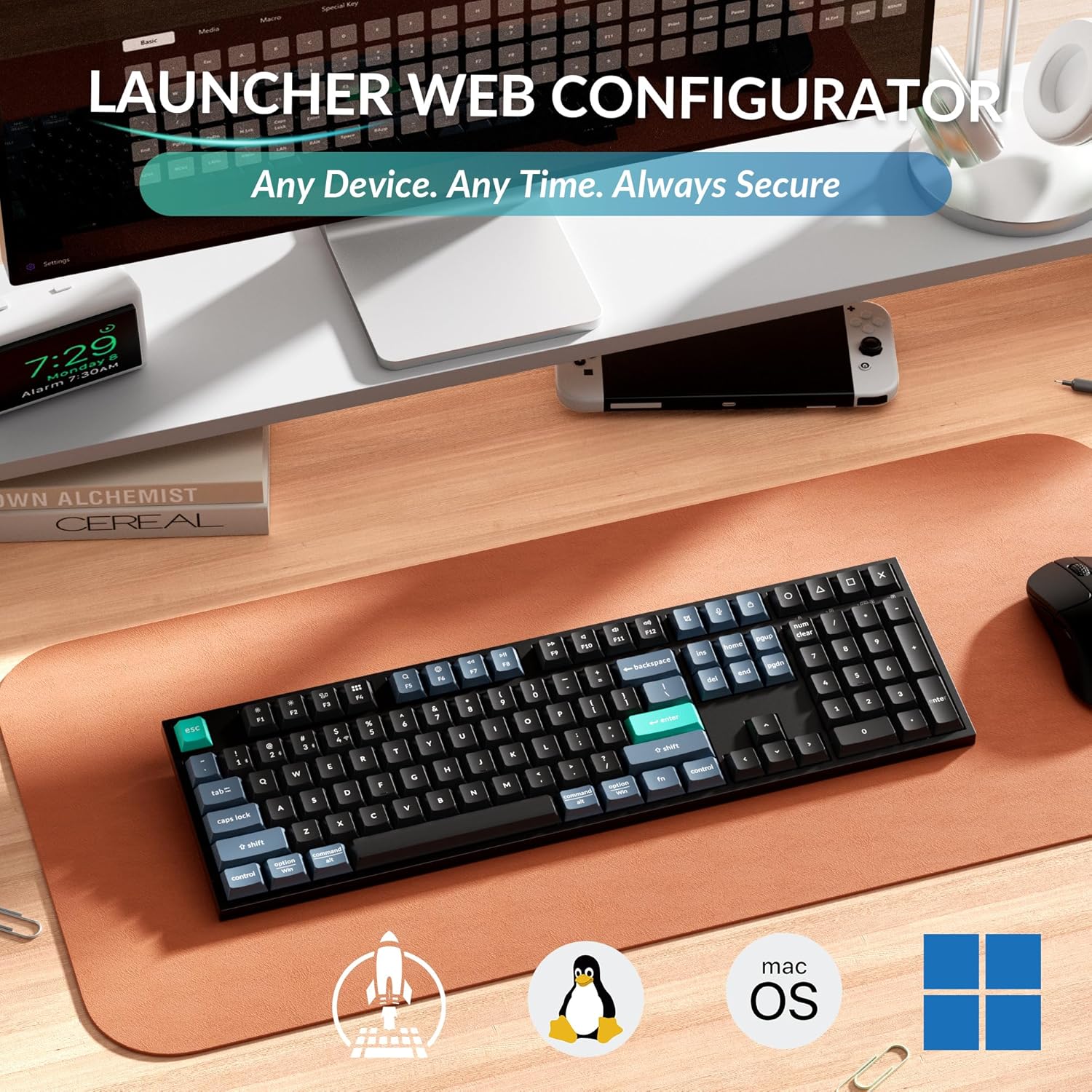
Imatge: Vista de dalt a baix view of the Keychron B36 full-size keyboard, showcasing its complete 100% layout including the numeric keypad.
2. Ergonomic Angle Adjustment
El teclat té dues "s"tage kickstand, allowing you to adjust the typing angle for improved comfort. Available angles are 5°, 6.5°, and 9°.
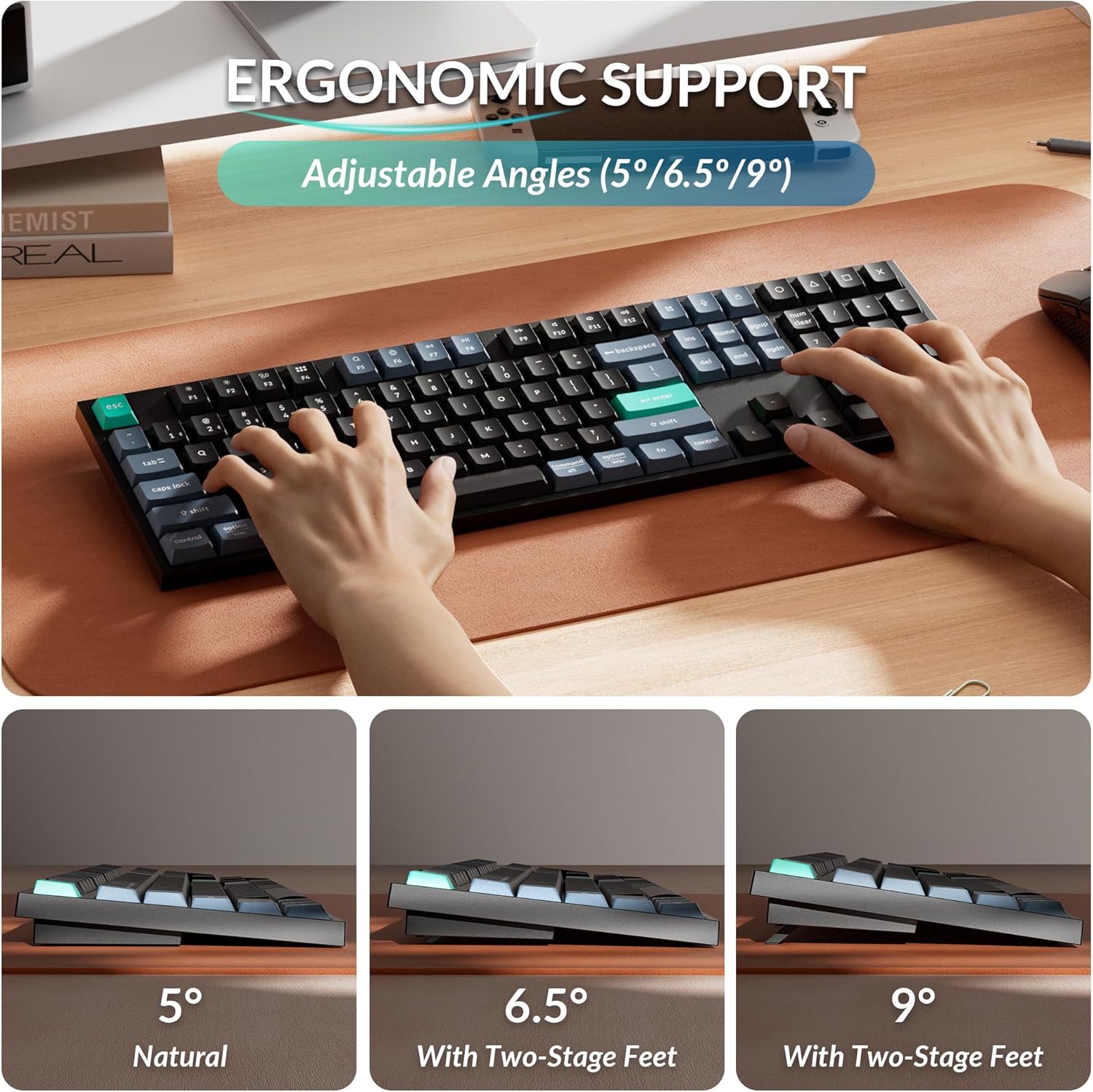
Image: The Keychron B36 keyboard demonstrating its adjustable ergonomic angles. The keyboard can be set to 5° (natural), 6.5°, or 9° using its two-stage feet for personalized comfort.
3. Llançador Web Configurador
The Keychron Launcher web application allows for key remapping, macro creation, shortcut customization, and firmware updates. This tool is accessible via web browsers like Chrome, Opera, or Edge and requires no software installation.
Visiteu el Keychron oficial website for access to the Launcher web aplicació.

Image: A visual representation of the Keychron Launcher web configurator, showing options for key remapping, macros, and firmware updates for the B36 keyboard.
4. Silent Typing Experience
The B36 keyboard utilizes pre-lubed scissor switches, designed to provide a smooth, consistent, and ultra-quiet typing experience. This makes it suitable for environments requiring minimal noise, such as offices or shared workspaces.
Imatge: Una imatge detallada view of the Keychron B36's scissor switch mechanism, illustrating the 2mm activation point and 3.5mm total travel distance for silent and precise typing.
5. Gestió de la bateria
The keyboard is equipped with an 800 mAh rechargeable battery, offering up to 320 hours of continuous use on a full charge. The intelligent power management system helps conserve battery life. Recharge the keyboard when the battery indicator shows low power.

Image: The Keychron B36 keyboard displayed with text highlighting its long-lasting battery, providing up to 320 hours of usage.
Manteniment
- Neteja: Use a soft, dry cloth to clean the keyboard surface. For deeper cleaning, use a slightly damp cloth with mild soap, ensuring no liquid enters the keyboard. Avoid abrasive cleaners or solvents.
- Emmagatzematge: Guardeu el teclat en un lloc fresc i sec, allunyat de la llum solar directa i de temperatures extremes.
- Cura de la bateria: To prolong battery life, avoid fully discharging the battery frequently. If storing for an extended period, charge the battery to about 50% before storage.
Resolució de problemes
| Problema | Solució |
|---|---|
| Keyboard not connecting via 2.4 GHz. | Ensure the 2.4 GHz receiver is securely plugged into a USB port. Verify the keyboard's mode switch is set to 2.4G. Try plugging the receiver into a different USB port. |
| Problemes de connexió Bluetooth. | Ensure the keyboard is in Bluetooth pairing mode (indicator flashing). Check that Bluetooth is enabled on your device. Forget the device in your device's Bluetooth settings and re-pair. Ensure the keyboard's OS switch matches your device. |
| Les tecles no responen o es produeixen errors d'escriptura. | Check battery level and charge if necessary. Ensure the keyboard is within range of the receiver/device. Try switching to wired mode to confirm functionality. Clean under the keycaps if debris is suspected. |
| Keyboard not charging. | Verify the USB-C cable is properly connected to both the keyboard and the power source. Try a different USB port or charging adapter. Ensure the cable is not damaged. |
Especificacions
| Característica | Detall |
|---|---|
| Model | Keychron B36 |
| Disseny | 100% Full-Size, 104 Keys (QWERTY) |
| Connectivitat | Sense fil de 2.4 GHz, Bluetooth 5.2, USB-C amb cable |
| Tipus de canvi | Scissor Mechanism (Pre-lubed, Linear) |
| Capacitat de la bateria | Recarregable de 800 mAh |
| Durada de la bateria | Fins a 320 hores (ús continu) |
| Compatibilitat de sistemes operatius | macOS, Windows, Linux |
| Dimensions (L x A x A) | 17.2" x 5.15" x 1.02" (436.95 x 130.95 x 25.9 mm) |
| Pes | 1.43 lliures (650 g) |
| Material del cos | ABS |

Image: A summary of the Keychron B36's technical specifications, including dimensions, weight, key count, connectivity, and operating system compatibility.
Garantia i Suport
Keychron products typically come with a limited warranty. For specific warranty details, registration, and technical support, please visit the official Keychron weblloc web o poseu-vos en contacte amb el servei d'atenció al client. Conserveu el rebut de compra per a reclamacions de garantia.
Keychron oficial Weblloc: www.keychron.com
Vídeo del producte
Video: A typing test demonstrating the sound and feel of the Keychron B36 wireless keyboard's scissor switches and ABS keycaps. This video is provided by the Keychron Store.