
Introducció
Thank you for choosing the KOORUI S3241XO 31.5-inch 4K OLED Gaming Monitor. This manual provides essential information for setting up, operating, and maintaining your monitor. Please read it thoroughly before use to ensure optimal performance and safety.
Informació de seguretat
- No exposeu el monitor a la pluja ni a la humitat per evitar incendis o descàrregues elèctriques.
- No obriu el monitor casing. No hi ha peces a l'interior que l'usuari pugui reparar. Demaneu totes les tasques de manteniment a personal de servei qualificat.
- Col·loqueu el monitor sobre una superfície estable i plana per evitar que caigui.
- Assegureu-vos que hi hagi una ventilació adequada al voltant del monitor. No bloquegeu les obertures de ventilació.
- Feu servir només l'adaptador de corrent i els cables proporcionats pel fabricant.
- Desendolleu el monitor de la presa de corrent durant tempestes o quan no el feu servir durant períodes prolongats.
- Avoid placing heavy objects on the power cord or monitor cables.
Contingut del paquet
Verifiqueu que tots els elements siguin presents al vostre paquet:
- KOORUI S3241XO 31.5-inch 4K OLED Gaming Monitor
- Cable HDMI 2.1
- DisplayPort 1.4 Cable (1.8m)
- Cable USB 3.0 AB
- Cable tipus C
- Cable d'alimentació de CA.
- Adaptador d'alimentació
- Manual d'usuari
Configuració
1. Muntatge del monitor
Follow these steps to assemble the monitor stand and attach it to the display panel.

Image: The KOORUI S3241XO monitor with its stand, showcasing the display and connectivity options.
2. Connexió a dispositius
The monitor offers various connectivity options. Ensure your device supports the required output.
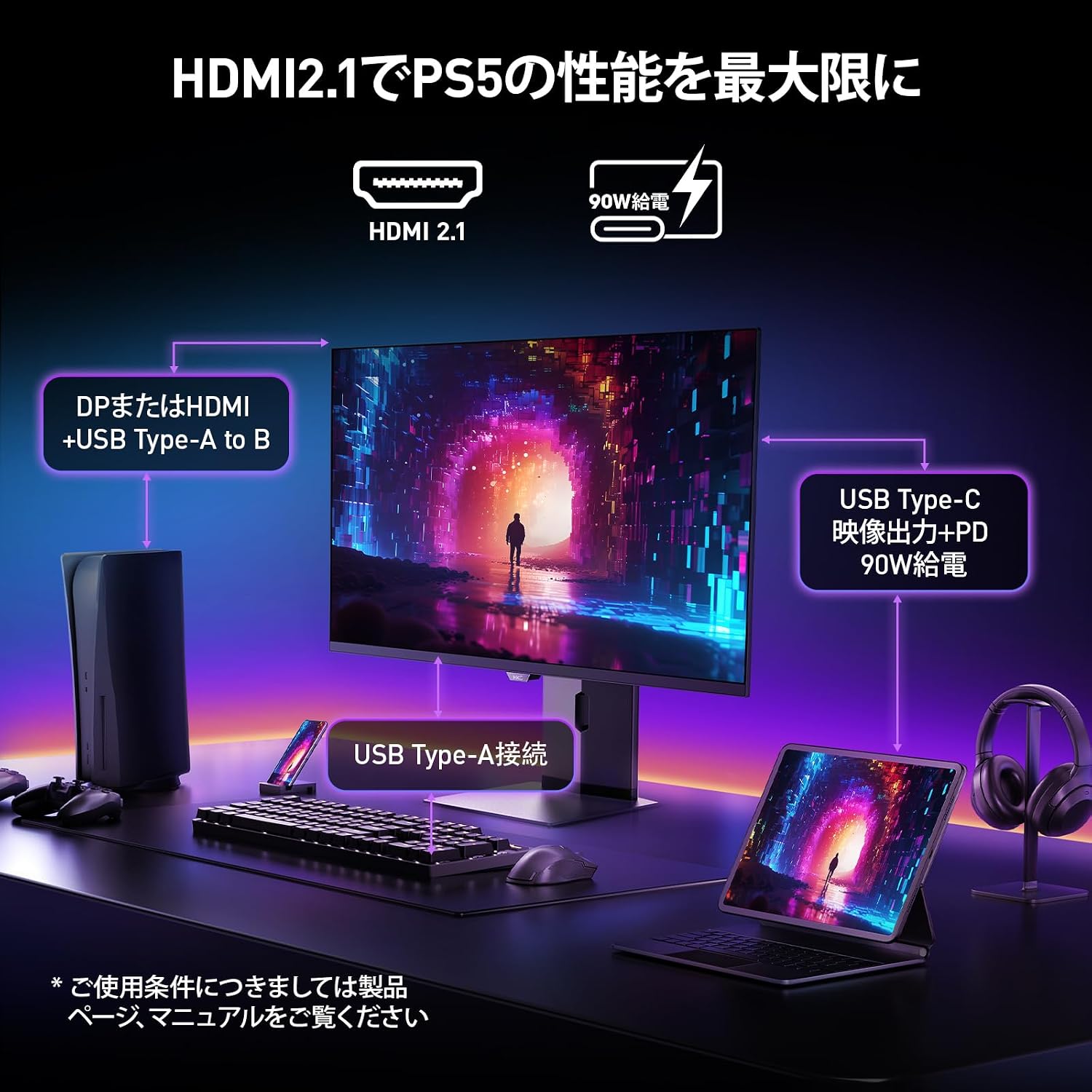
Image: A diagram illustrating how to connect various devices like a PS5, laptop, and peripherals to the monitor using HDMI 2.1, USB Type-C, and USB Type-A ports.
Port Overview:

Imatge: Detallada view of the monitor's rear input/output ports with numerical labels for identification.
- Cable de corrent: Connect the AC power cable to the monitor and a power outlet.
- USB Type-B (Upstream): Connecteu-lo a l'ordinador per habilitar els ports USB-A del monitor.
- USB 3.1 Tipus A (x2): Per connectar perifèrics USB.
- HDMI 2.1 (x2): Connect to devices supporting HDMI 2.1 for 4K 240Hz output.
- DisplayPort 1.4: Connect to devices supporting DisplayPort 1.4 for 4K 240Hz output.
- Type-C (with PD): Connect to compatible devices for video input and power delivery (up to 90W).
- Sortida d'auriculars: Per connectar auriculars o altaveus externs.
Instruccions de funcionament
1. Encendre/apagar
Press the power button, usually located on the back or bottom of the monitor, to turn it on or off.
2. Menú de visualització en pantalla (OSD).
Use the joystick or buttons on the monitor to navigate the OSD menu. The OSD allows you to adjust various settings.
Configuració principal de l'OSD:
- Configuració de la imatge: Ajusta la brillantor, el contrast, la nitidesa i la temperatura del color.
- Modes de color: Select from various preset color modes, including a professional color mode for accurate color reproduction (99% DCI-P3, 100% sRGB, Delta E<2, True 10-bit color).
- Font d'entrada: Manually select the input source (HDMI 1, HDMI 2, DisplayPort, Type-C).
- Característiques del joc: Access specific gaming modes (RPG, FPS, RCG) and settings like FreeSync and G-Sync compatibility.
- Temps de resposta: The monitor features a 0.03ms (OD) response time for rapid image transitions.
- HDR True Black 400: Optimizes black levels for enhanced detail in dark scenes.
- DIC (Digital Image Control) Mode: Enable or disable DIC to prevent ghosting and improve image quality.

Image: Visual representation of the monitor's color accuracy and wide color gamut.

Image: Illustrates the difference in motion clarity at various refresh rates, highlighting the 240Hz 0.03ms response.

Image: Demonstrates the enhanced black levels and detail in dark scenes provided by the KOORUI QD OLED technology compared to a typical LCD.

Image: Shows the effect of Digital Image Control (DIC) mode on reducing ghosting for smoother visuals.
3. Ajustaments ergonòmics
El suport del monitor permet diversos ajustaments per optimitzar el vostre viewExperiència:
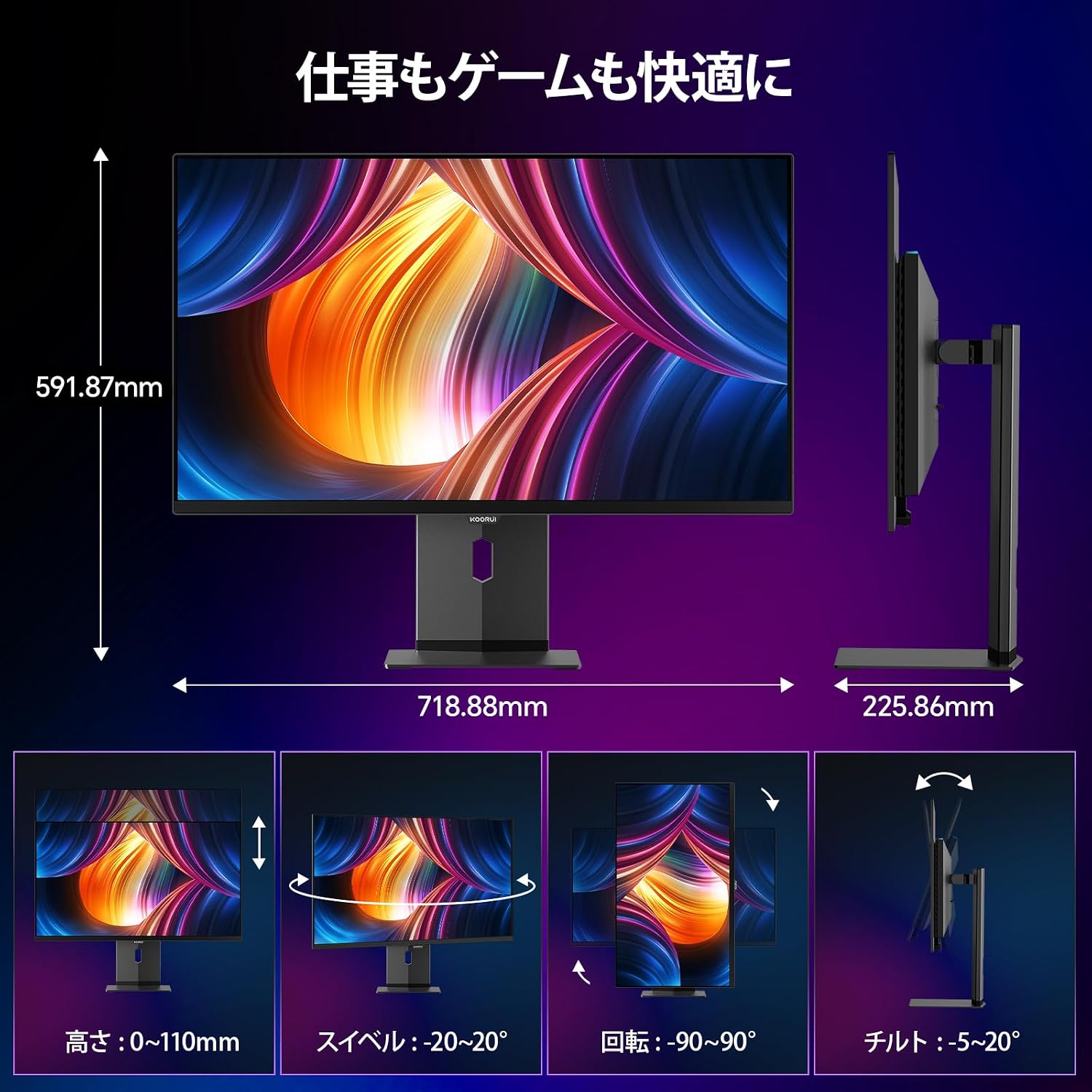
Image: Illustrations of the monitor's adjustable features: height, swivel, pivot (rotation), and tilt.
- Ajust d'alçada: Adjust the display height by up to 110mm.
- Inclinació: Inclina la pantalla de -5° a 20° per a una posició còmoda viewangles d'ajust.
- Girar: Swivel the monitor -20° to 20° horizontally.
- Pivot (Rotation): Rotate the screen -90° to 90° for portrait or landscape orientation.
Manteniment
1. Neteja del monitor
- Desconnecteu sempre el monitor abans de netejar-lo.
- Utilitzeu un drap suau i sense pelusa dampesbandida amb aigua o un netejador de pantalles suau i no abrasiu.
- No ruixeu el netejador directament sobre la pantalla.
- Avoid using benzene, thinner, or any volatile solvents, as they may damage the screen surface.
2. Característiques de la cura dels ulls
The monitor includes features to reduce eye strain during prolonged use:
- Hardware Blue Light Cut: Reduces harmful blue light emissions without affecting color accuracy.
- Flicker Guard: Elimina el parpelleig de la pantalla per a una major comoditat viewexperiència.

Image: Demonstrates the effectiveness of hardware blue light reduction in preserving natural colors.

Image: Illustrates the difference between Flicker Guard off and on, showing reduced screen flickering.
3. Panel Protection Features
To prevent OLED burn-in, the monitor incorporates proprietary panel protection technologies:
- Desplaçament de píxels: Periodically shifts pixels slightly to prevent static images from causing burn-in.
- Detecció de la barra de tasques: Detects static elements like the taskbar and adjusts their brightness to minimize burn-in risk.
- Graphene Sheet + Custom Heatsink: Advanced thermal management to maintain optimal operating temperature.

Image: Visual explanation of pixel shift, taskbar detection, and thermal management for panel protection.
Resolució de problemes
Si teniu problemes amb el monitor, consulteu els problemes i solucions més comuns següents:
| Problema | Causa possible | Solució |
|---|---|---|
| No hi ha imatge a la pantalla | Cable d'alimentació desconnectat, font d'entrada incorrecta, dispositiu no encès. | Comproveu les connexions d'alimentació, seleccioneu la font d'entrada correcta mitjançant l'OSD i assegureu-vos que el dispositiu connectat estigui encès. |
| Imatge parpellejant | Flicker Guard disabled, cable issue, graphics card driver issue. | Enable Flicker Guard in OSD, try a different cable, update graphics drivers. |
| Poca qualitat del color | Incorrect color mode, cable issue. | Adjust color settings in OSD, try a different cable. |
| No hi ha so dels auriculars | Headphones not properly connected, audio settings on device/monitor. | Ensure headphones are fully plugged in, check audio output settings on your computer and monitor. |
| Els ports USB no funcionen | USB Type-B upstream cable not connected. | Connect the USB Type-B cable from the monitor to your computer. |
Especificacions
| Característica | Especificació |
|---|---|
| Marca | KOORUI |
| Número de model | S3241XO |
| Mida de la pantalla | 31.5 polzades |
| Tipus de panell | OLED (QLED) |
| Resolució | 4K UHD (3840 x 2160 píxels) |
| Freqüència d'actualització | 240 Hz |
| Temps de resposta | 0.03 ms (OD) |
| Relació d'aspecte | 16:9 |
| Relació de contrast | 1,500,000:1 |
| Brillantor | 280 cd/m² |
| Gamma de colors | 99% DCI-P3, 100% sRGB |
| Profunditat de color | True 10-bit (1.07 billion colors) |
| Suport HDR | DisplayHDR400 Negre veritable |
| Sincronització adaptativa | FreeSync and G-Sync Compatible |
| Connectivitat | 2x HDMI 2.1, 1x DisplayPort 1.4, 1x Type-C (with 90W PD), 2x USB-A 3.1, 1x USB-B, 1x Headphone Jack |
| Ergonomia | Height Adjustment (110mm), Tilt (-5° to 20°), Swivel (-20° to 20°), Pivot (-90° to 90°) |
| Muntatge VESA | 100 x 100 mm |
| Dimensions (A x A x P) | Approx. 71.9 x 59.2 x 22.6 cm (with stand) |
| Pes | Aprox. 8.3 KG |
| Consum d'energia | 264 watts (màx.) |
Garantia i Suport
The KOORUI S3241XO monitor comes with a Garantia del fabricant de 3 anys. The LCD panel itself is covered by a 1-year warranty. For warranty claims or technical support, please contact KOORUI customer service.
KOORUI also offers a free recycling service for monitors. Please refer to the official KOORUI website or contact support for details on how to utilize this service.
Per obtenir més ajuda, visiteu el KOORUI Brand Store.