
1. Introducció
Thank you for choosing the DEDRA MC0932 Mini Laser Distance Meter. This compact and precise device is designed for quick and accurate distance measurements in various indoor applications. Please read this manual carefully before using the device to ensure safe and proper operation.
1.1 Informació de seguretat
ADVERTÈNCIA: Radiació làser
- This device emits Class II laser radiation. Do not stare directly into the laser beam or direct it towards other people's eyes.
- Do not disassemble or modify the device. Unauthorized modifications may result in hazardous laser radiation exposure.
- Mantingueu el dispositiu fora de l'abast dels nens.
- Feu servir només les piles especificades. No barregeu piles velles i noves ni piles de diferents tipus.
- Traieu les piles si no heu d'utilitzar el dispositiu durant un període prolongat per evitar fuites.
2. Contingut del paquet
Carefully unpack the box and ensure all items listed below are present and in good condition:
- DEDRA MC0932 Mini Laser Distance Meter
- Bossa protectora
- Corretja de canell
- Piles AAA (2x)

Image: The DEDRA MC0932 Mini Laser Distance Meter, its protective pouch, wrist strap, and two AAA batteries.
3. Producte acabatview
3.1 Disseny del dispositiu
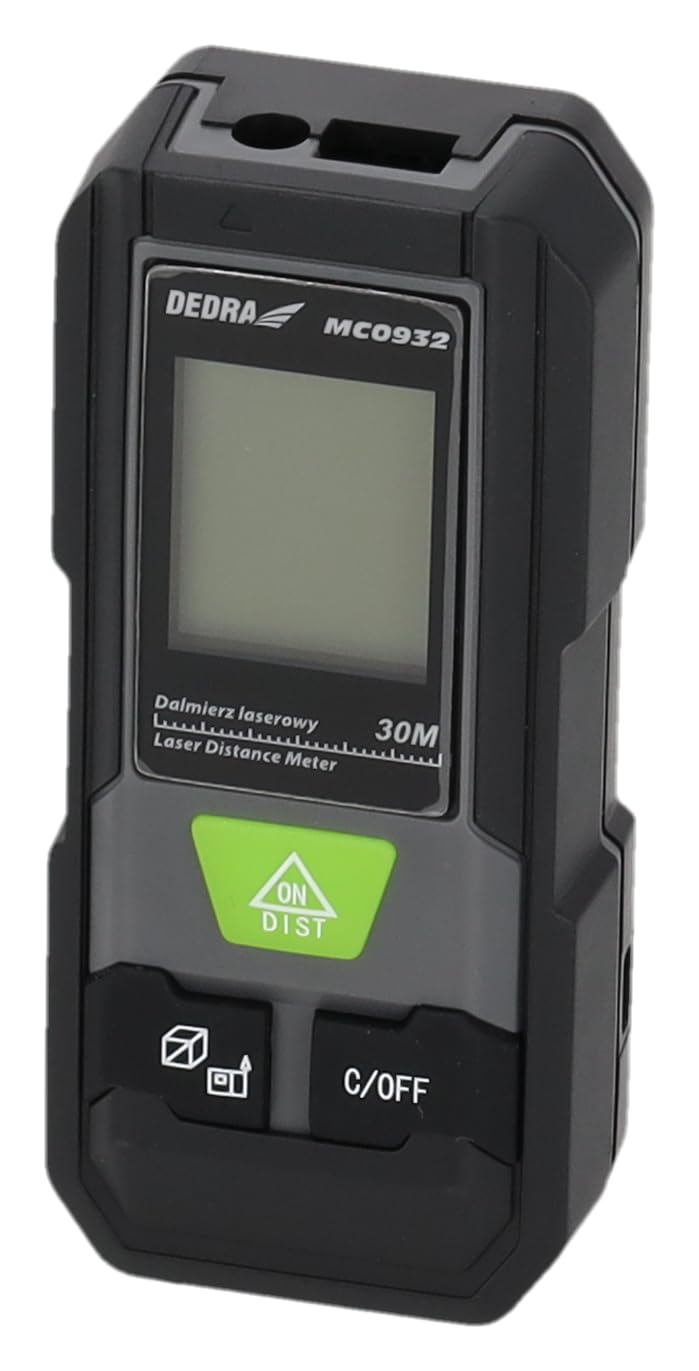
Imatge: Frontal view of the DEDRA MC0932 showing the display and control buttons.
- Lent d'emissió làser
- Lent de recepció làser
- Pantalla de visualització
- ON / DIST Button (Power On / Single Measurement / Continuous Measurement)
- C / OFF Button (Clear / Power Off)
- Function / Unit Button (Mode Selection / Unit Switching)
- Reference Point Button (Front/Rear Edge Measurement)

Imatge: Enrere view of the DEDRA MC0932, highlighting the battery compartment.
- Compartiment de la bateria
4. Configuració
4.1 Instal·lació de la bateria
- Localitzeu la tapa del compartiment de la bateria a la part posterior del dispositiu.
- Feu lliscar la tapa cap avall per obrir el compartiment.
- Introduïu dues (2) piles AAA, assegurant-vos de la polaritat correcta (+/-) tal com s'indica a l'interior del compartiment.
- Tanqueu la tapa del compartiment de la bateria fent-la lliscar de nou al seu lloc fins que faci clic de manera segura.
5. Instruccions de funcionament
5.1 Encès/Apagat
- Per encendre: Premeu el botó ON/DIST button once. The laser will activate, and the display will light up.
- Per apagar: Manteniu premut el botó C/OFF button for approximately 2 seconds. The device will also automatically power off after 180 seconds of inactivity.
5.2 Mesura de distància única
- Turn on the device by pressing ON/DIST. The laser will activate.
- Aim the laser beam at the target point.
- Premeu el botó ON/DIST button again. The measurement will be taken and displayed on the screen.
5.3 Mesura contínua (seguiment)
- Enceneu el dispositiu.
- Manteniu premut el botó ON/DIST button for approximately 2 seconds. The device will enter continuous measurement mode, displaying real-time distance as you move the device.
- To stop continuous measurement, press the C/OFF button once. The last measured value will remain on the display.
5.4 Mesura de l'àrea
- Enceneu el dispositiu.
- Premeu el botó Function / Unit button repeatedly until the area icon (a square with 'm²' or 'ft²') appears on the display.
- Measure the first side (e.g., length) by pressing ON/DIST.
- Measure the second side (e.g., width) by pressing ON/DIST de nou.
- El dispositiu calcularà i mostrarà l'àrea automàticament.
5.5 Mesura del volum
- Enceneu el dispositiu.
- Premeu el botó Function / Unit button repeatedly until the volume icon (a cube with 'm³' or 'ft³') appears on the display.
- Measure the first side (e.g., length) by pressing ON/DIST.
- Measure the second side (e.g., width) by pressing ON/DIST de nou.
- Measure the third side (e.g., height) by pressing ON/DIST una tercera vegada.
- El dispositiu calcularà i mostrarà el volum automàticament.
5.6 Canvi d'unitats
To change the measurement unit (meters, feet, inches), press and hold the Function / Unit button for approximately 2 seconds. The unit will cycle through m, ft, and in.
5.7 Reference Point Setting
The device can measure from its front edge or its rear edge. To switch the reference point, press the Punt de referència button. An icon on the display will indicate whether the measurement is taken from the front or rear of the device.
6. Manteniment
6.1 Neteja
- Utilitzeu un suau, damp drap per netejar el dispositiu casing. No utilitzeu productes de neteja abrasius ni dissolvents.
- Gently wipe the laser lenses with a clean, lint-free cloth. Avoid touching the lenses with your fingers.
6.2 Emmagatzematge
- Store the device in its protective pouch in a cool, dry place, away from direct sunlight and extreme temperatures.
- Remove the batteries if the device will not be used for an extended period (e.g., more than one month) to prevent battery leakage and damage.
6.3 Substitució de la bateria
When the low battery indicator appears on the display, replace both AAA batteries with new ones following the instructions in Section 4.1.
7. Solució De Problemes
| Problema | Causa possible | Solució |
|---|---|---|
| El dispositiu no s'encén | Les piles estan gastades o incorrectament inserides. | Canvieu les piles o comproveu la polaritat. |
| Missatge d'"error" a la pantalla | Laser path is obstructed, target surface is too reflective/absorbent, or measurement range exceeded. | Ensure clear laser path, use a target plate if necessary, ensure target is within 0.03m-30m range. |
| Mesures inexactes | Lenses are dirty, device is unstable, or environmental interference. | Clean lenses, ensure device is stable during measurement, avoid strong light sources. |
| La pantalla és tènue o parpelleja | Potència de bateria baixa. | Substituïu les piles. |
8. Especificacions
| Interval de mesura | 0.03 m - 30 m |
| Precisió de la mesura | ± 2 mm |
| Unitats de mesura | m / ft / in |
| Classe làser | Classe II |
| Tipus làser | 635 nm, <1 mW |
| Apagada automàtica del làser | 30 segons |
| Automatic Device Off | 180 segons |
| Tipus de bateria | 2 x AAA (es recomana alcalina) |
| Temperatura de funcionament | De 0 °C a 40 °C (32 °F a 104 °F) |
| Temperatura d'emmagatzematge | -20 °C a 60 °C (-4 °F a 140 °F) |
| Dimensions (aprox.) | 100 x 35 x 20 mm (3.9 x 1.4 x 0.8 polzades) |
| Pes (amb piles) | 200 g (7.05 oz) |
| Classificació IP | IP54 (protegit contra la pols i les esquitxades) |
9. Garantia i Suport
DEDRA products are manufactured to high-quality standards. For warranty information, please refer to the warranty card included with your purchase or contact your local DEDRA dealer or the seller directly. For technical support or service inquiries, please reach out to the point of purchase or the official DEDRA customer service channels.