
Introducció
The AIWA IC-320DAB is a 1 DIN car multimedia player designed for versatility, powerful sound, and modern connectivity. This device features a detachable front panel for enhanced security, offering multiple playback options through its high-quality AM/FM and DAB+ tuner. Its LCD screen with dimmer function ensures optimal visibility in various lighting conditions. It also incorporates Bluetooth 5.1 technology for wireless music streaming and hands-free calls, along with an auxiliary input for connecting external devices. With 30 preset stations, a USB output for charging, and compatibility with steering wheel controls (SWC) in some vehicles, this player is an ideal choice for upgrading any car audio system.
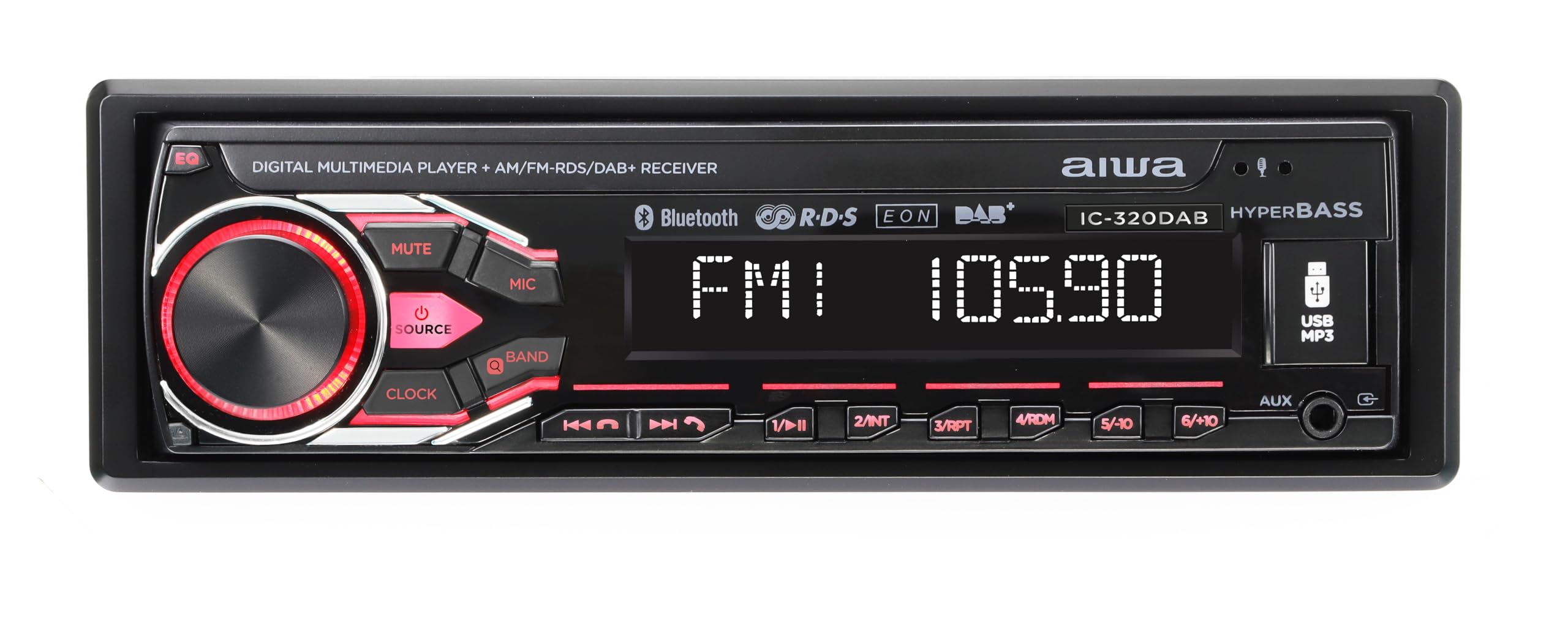
Image: AIWA IC-320DAB Car Multimedia Player. This image shows the front panel of the car multimedia player, highlighting its LCD screen and control buttons.
Què hi ha a la caixa
- Carcassa de plàstic
- Fixing and extraction tools
- Micròfon extern
Característiques del producte
- Potència de sortida: 4 channels of 40W each, ensuring powerful and clear audio.
- Detachable Panel: Enhanced security by allowing removal of the front panel to deter theft.
- Opcions d'afinació: AM/FM tuner with 30 preset stations. DAB+ for clearer and more stable digital reception.
- Pantalla LCD: Optimal readability, with a dimmer function to adjust to light conditions.
- Il·luminació personalitzable: 7 colors to match the driver's preference or vehicle interior.
- Connectivitat Bluetooth 5.1: Ideal for streaming music from smartphones and making hands-free calls.
- Multiple Inputs and Outputs: USB for charging and playback, Aux In for external devices, L/R audio output, and subwoofer output.
- SWC (Steering Wheel Control) Support: Allows control of the player from the steering wheel in compatible vehicles.
- Equalization Options: Bass and Treble adjustments to customize the sound experience.
- External Microphone Included: For optimal hands-free calls with high voice quality.
Configuració i instal·lació
Una instal·lació correcta és crucial per a un rendiment i una seguretat òptims. Es recomana que la instal·lació la realitzi un professional qualificat.
- Preparació: Disconnect the vehicle's negative battery terminal before starting any electrical work. Ensure you have all necessary tools and the included fixing/extraction tools.
- Muntatge: Insert the metal mounting sleeve into the vehicle's dashboard opening. Bend the tabs to secure it. Slide the AIWA IC-320DAB unit into the sleeve until it clicks into place.
- Cablejat:
- Connect the main power harness: Yellow wire to constant 12V, Red wire to accessory 12V (switched), Black wire to ground.
- Connect speaker wires: Ensure correct polarity for each speaker (front left, front right, rear left, rear right).
- Connect the antenna cable (AM/FM/DAB+).
- Connect the external microphone to the designated input for hands-free calling.
- If using, connect RCA outputs for external ampamplificadors o subwoofers.
- If your vehicle supports Steering Wheel Controls (SWC), connect the SWC wires according to your vehicle's wiring diagram and the player's instructions.
- Comprovacions finals: Reconnect the vehicle's negative battery terminal. Turn on the ignition and test the unit's basic functions (power, radio, volume).
- Connecteu el panell frontal: Carefully attach the detachable front panel to the main unit. Ensure it is securely latched.
Instruccions de funcionament
Funcionament bàsic
- Encès/apagat: Premeu el botó PODER button (usually the volume knob) to turn the unit on or off.
- Control de volum: Gira el VOLUM botó per ajustar el nivell del so.
- Selecció de la font: Premeu el botó SRC or MODE button to cycle through available sources (FM, AM, DAB+, Bluetooth, USB, AUX).
- Detaching Front Panel: Premeu el botó ALliberament button and carefully pull the front panel off. Store it safely to prevent theft.
Radio (AM/FM/DAB+)
- Selecció de la banda: En mode de ràdio, premeu el botó BANDA button to switch between FM1, FM2, FM3, AM1, AM2, and DAB+ (if available).
- Sintonització automàtica: Manteniu premut el botó BUSCAR or SINTONIA botons per cercar automàticament la següent emissora amb so fort.
- Sintonització manual: Premeu breument BUSCAR or SINTONIA botons per ajustar manualment la freqüència pas a pas.
- Estacions preseleccionades: To save a station, tune to the desired frequency, then press and hold one of the numeric preset buttons (1-6) until you hear a beep. To recall a preset, briefly press the corresponding numeric button.
Funcionament Bluetooth
- Maridatge:
- Seleccioneu Bluetooth com a font.
- Al dispositiu mòbil, activeu el Bluetooth i cerqueu els dispositius disponibles.
- Select "AIWA IC-320DAB" from the list. If prompted for a PIN, enter "0000".
- Once paired, the unit will display "Connected".
- Transmissió d'àudio: Play music on your paired device, and it will stream through the car's speakers. Use the player's REPRODUCCIÓ/PAUSA, SEGÜENT, i ANTERIOR botons per controlar la reproducció.
- Trucades mans lliures:
- Respon a la trucada: Premeu el botó TRUCA or RESPOSTA botó quan sona una trucada entrant.
- Finalitzar la trucada: Premeu el botó FINALITZAR LA TRUCADA botó.
- Marcació: Use your phone to dial, and the audio will route through the player.
USB and AUX Input
- Reproducció USB: Insert a USB drive into the USB port. The unit will automatically switch to USB mode and begin playing compatible audio files. Ús REPRODUCCIÓ/PAUSA, SEGÜENT, i ANTERIOR buttons for control. The USB port also provides charging for devices.
- Entrada AUX: Connect an external audio device (e.g., MP3 player) to the 3.5mm AUX input using an audio cable. Select AUX as the source. Control playback from the external device.
Configuració de so
- EQ (equalitzador): Premeu el botó EQ button to cycle through preset equalizer modes (e.g., Pop, Rock, Classic) or to access custom bass/treble adjustments.
- Gravs/Aguts: Use the menu or dedicated buttons to adjust bass and treble levels for personalized sound.
- Atenuador: Access the system settings to adjust the display brightness (dimmer function) for comfortable viewde dia o de nit.
- Illumination Color: Navigate to the illumination settings to choose from 7 available colors for the button backlighting.
Manteniment
- Neteja de la unitat: Feu servir un drap suau i sec per netejar la superfície de la unitat. Per a la brutícia persistent, dampen the cloth lightly with water. Avoid using abrasive cleaners, solvents, or alcohol, as these can damage the finish.
- Neteja del panell frontal: The detachable front panel should be handled with care. Clean it gently with a soft, dry cloth. Do not apply excessive pressure to the LCD screen.
- Port USB: Keep the USB port free from dust and debris. Avoid inserting foreign objects.
- Storage of Detachable Panel: When removed, store the front panel in its protective case (if provided) or a soft pouch to prevent scratches and damage.
- Temperatura: Eviteu exposar la unitat a temperatures extremes, a la llum solar directa durant períodes prolongats o a una humitat elevada.
Resolució de problemes
| Problema | Causa possible | Solució |
|---|---|---|
| Sense poder |
|
|
| Sense so |
|
|
| Bluetooth no connectat |
|
|
| Mala recepció de ràdio |
|
|
| No es reprodueix l'USB |
|
|
Especificacions
| Característica | Detall |
|---|---|
| Tipus de producte | 1 DIN Car Multimedia Player with LCD Screen, AM/FM and DAB+ |
| Marca | No |
| Número de model | B0F4DZWWBJ (Internal ASIN, product model is IC-320DAB) |
| Potència de sortida | 4 x 40 Watts (RMS) / 160 Watts (Peak) |
| Tecnologia de connectivitat | Bluetooth 5.1 |
| Tipus de sintonitzador | AM/FM, DAB+ |
| Mostra | LCD with Dimmer Function |
| Il·luminació | Multi-color (7 options) |
| Entrades | USB (for playback and charging), Aux In (3.5mm) |
| Sortides | L/R Audio Output, Subwoofer Output |
| Característiques especials | Detachable Front Panel, External Microphone, SWC Support, Bass/Treble EQ |
| Dimensions (paquet) | 24.3 x 22.9 x 8.1 cm |
| Pes (paquet) | 1.27 kg |
| País d'origen | Xina |
Garantia i Suport
This AIWA IC-320DAB Car Multimedia Player comes with a manufacturer's warranty.
- Període de garantia: Dos anys des de la data de compra.
- Cobertura: The warranty covers defects in materials and workmanship under normal use. It does not cover damage caused by misuse, accident, unauthorized modification, or improper installation.
- Reclamació de garantia: In case of a defect, please contact your retailer or the official Aiwa customer support with your proof of purchase.
- Atenció al client: For technical assistance, troubleshooting, or warranty inquiries, please refer to the contact information provided with your purchase or visit the official Aiwa weblloc.