
1. Introducció
Gràcies per la compraasing the JVC XS-N1154B Bluetooth Speaker. This manual provides essential information for the safe and efficient operation of your device. Please read it thoroughly before use and retain it for future reference.
2. Informació de seguretat
- No exposeu l'altaveu a temperatures extremes, llum solar directa ni humitat elevada.
- Eviteu deixar caure o sotmetre l'altaveu a forts impactes.
- No intenteu desmuntar ni modificar l'altaveu. Això anul·larà la garantia.
- Keep the speaker away from water and liquids, despite its waterproof rating, to prevent damage to internal components.
- Feu servir només el cable de càrrega i l'adaptador de corrent especificats.
- Netegeu l'altaveu amb un drap suau i sec. No utilitzeu productes de neteja abrasius ni dissolvents.
3. Contingut del paquet
Assegureu-vos que tots els elements siguin presents al paquet:
- JVC XS-N1154B Bluetooth Speaker
- Cable de càrrega
- Manual d'usuari
- Comandament a distància (si està inclòs)
4. Producte acabatview
Familiaritzeu-vos amb els components i els controls de l'altaveu.
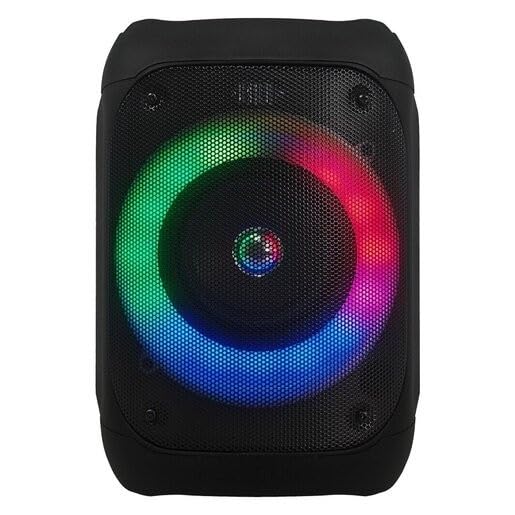
Figura 1: Davant view of the JVC XS-N1154B Bluetooth Speaker, showcasing the speaker grille and integrated music-activated LED lights.
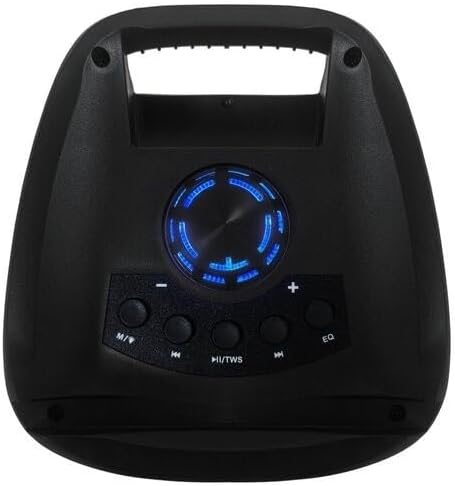
Figura 2: A dalt view of the JVC XS-N1154B Bluetooth Speaker, displaying the control panel with various buttons and the volume knob.
Funcions del tauler de control:
- Botó d'encesa: Activa o desactiva l'altaveu.
- Botó Mode (M): Switches between Bluetooth, USB, SD Card, and FM Radio modes.
- Play/Pause (►||) / TWS Button: Plays or pauses audio. Long press for TWS (True Wireless Stereo) pairing.
- Previous Track (◀◀) Button: Skips to the previous track or tunes down in FM mode.
- Next Track (►►) Button: Skips to the next track or tunes up in FM mode.
- Botó EQ: Passa ciclísticament pels preajustos de l'equalitzador.
- Pom de volum: Rotates to adjust the volume level.
5. Configuració
5.1 Càrrega de l'altaveu
- Connecteu el cable de càrrega al port de càrrega de l'altaveu.
- Plug the other end of the cable into a suitable USB power adapter (not included) or a powered USB port.
- El llum indicador de càrrega s'il·luminarà, normalment en vermell, durant la càrrega.
- Once fully charged, the indicator light may change color (e.g., turn off or turn blue/green). Disconnect the speaker from the power source.
5.2 Engegada/apagada
- Per encendre: Press and hold the Power button until the speaker powers on and you hear an audible prompt.
- Per apagar: Press and hold the Power button again until the speaker powers off.
6. Instruccions de funcionament
6.1 Vinculació Bluetooth
- Ensure the speaker is powered on and in Bluetooth mode. If not, press the Mode (M) button to switch to Bluetooth mode. The speaker will indicate it is ready for pairing (e.g., a blinking LED or audible prompt).
- Al dispositiu mòbil (telèfon intel·ligent, tauleta, ordinador portàtil), activeu el Bluetooth i cerqueu els dispositius disponibles.
- Select "JVC XS-N1154B" from the list of devices.
- Un cop emparellat, l'altaveu emetrà una confirmació audible i el llum indicador de Bluetooth s'il·luminarà fixament.
- Ara pots reproduir àudio des del teu dispositiu a través de l'altaveu.
6.2 Reproducció des de targeta USB/SD
- Insert a USB flash drive or an SD card (with supported audio files) into the corresponding port on the speaker.
- The speaker will automatically switch to USB or SD card mode and begin playing audio. If not, press the Mode (M) button to select the correct input.
- Use the Previous Track (◀◀), Next Track (►►), and Play/Pause (►||) buttons to control playback.
6.3 Funcionament de la ràdio FM
- Premeu el botó Mode (M) per canviar al mode de ràdio FM.
- To auto-scan and save available stations, press and hold the Play/Pause (►||) button. The speaker will scan and store stations automatically.
- Use the Previous Track (◀◀) and Next Track (►►) buttons to navigate between saved FM stations.
6.4 modes de llum LED
The speaker features music-activated LED lights. These lights typically synchronize with the audio playback. There may be an additional button or a combination of buttons to cycle through different light modes or to turn them off. Refer to the remote control section for specific controls if available.
6.5 Control de volum
Rotate the Volume Knob on the top panel clockwise to increase volume and counter-clockwise to decrease volume.
6.6 Ús del control remot
If your package includes a remote control, it provides convenient access to various functions:
- Potència: On/Off
- Mode: Switch input sources (Bluetooth, USB, SD, FM)
- Volum +/-: Ajustar el volum
- Reproduir/pausa: Controla la reproducció
- Anterior/Següent: Skip tracks/stations
- EQ: Change equalizer presets
- LED: Control LED light modes (if applicable)
7. Manteniment
7.1 Neteja
Wipe the speaker's exterior with a soft, dry, lint-free cloth. Do not use liquid cleaners, sprays, or solvents, as these may damage the finish or internal components. Ensure all ports are dry before use, especially given its waterproof nature.
7.2 Emmagatzematge
When not in use for extended periods, store the speaker in a cool, dry place, away from direct sunlight and extreme temperatures. It is recommended to charge the battery periodically to maintain its lifespan.
8. Solució De Problemes
| Problema | Causa possible | Solució |
|---|---|---|
| L'altaveu no s'encén. | La bateria està esgotada. | Carregueu l'altaveu completament. |
| Sense so. | Volume is too low or muted. Device not paired correctly. | Increase volume. Re-pair Bluetooth device. Check audio source. |
| L'aparellament de Bluetooth falla. | L'altaveu no està en mode d'emparellament. El dispositiu és massa lluny. Interferències. | Assegureu-vos que l'altaveu estigui en mode d'emparellament Bluetooth. Acosteu el dispositiu. Desactiveu els altres dispositius Bluetooth. |
| La targeta USB/SD no es reprodueix. | Incorrecte file format. La targeta/unitat no s'ha inserit correctament. | Assegureu-vos l'àudio files are in a supported format. Reinsert the USB drive/SD card. Press Mode button to select correct input. |
| La recepció de ràdio FM és deficient. | Senyal feble. | Recol·loca l'altaveu a una zona amb millor recepció. |
9. Especificacions
- Model: XS-N1154B
- Marca: JVC
- Connectivitat: Bluetooth, USB, targeta SD
- Ràdio: Ràdio FM digital
- Potència de sortida: 4 watts
- Mode de sortida d'àudio: estèreo
- Mètode de control: Remot
- Material: Plàstic
- Impermeable: Sí
- Font d'alimentació: Funciona amb bateria
- Dimensions: Approximately 18.6D x 18.9W x 25.5H cm
- Pes: Aproximadament 1.2 kg
- Dispositius compatibles: Portàtil, Smartphone
10. Garantia i Suport
10.1 Informació de la garantia
This JVC XS-N1154B Bluetooth Speaker comes with a 1 anys de garantia des de la data de compra. Aquesta garantia cobreix els defectes de fabricació i la mà d'obra en condicions d'ús normal. No cobreix els danys causats per un mal ús, accidents, modificacions no autoritzades o desgast normal.
10.2 Atenció al client
For technical assistance, warranty claims, or further inquiries, please contact JVC customer support through their official website or the retailer where the product was purchased. Please have your product model number (XS-N1154B) and proof of purchase ready when contacting support.