
PGST PGST A107F
Wireless Home Security System User Manual
Marca: PGST
Model: PGST A107F
1. Introducció
The PGST Wireless Home Security System is a comprehensive DIY alarm solution designed to provide peace of mind for your apartment, villa, or any property. This system integrates 4G/WiFi connectivity, a 2MP HD security camera, and various sensors for robust protection. With phone app control and compatibility with Alexa/Google, you can stay connected and monitor your home from anywhere, without subscription fees.
Key features include customizable and expandable protection, a one-click SOS function for emergencies, and easy installation. The system is designed to be user-friendly, allowing both the elderly and children to quickly understand its operation.
2. Contingut del paquet
Your PGST A107F Security System package includes the following components:
- 1 x PGST A107F Alarm Host Panel with 4.3-inch TFT colorful display screen
- 1 x 2MP HD Security Camera (T53W Camera)
- Multiple Door/Window Sensors (Magnetic Contact Sensors)
- Multiple PIR Motion Detectors
- Remote Controls (Key Fobs)
- RFID Tags
- Power Adapter for Alarm Host
- Mounting Hardware (Screws, Wall Plugs)
- Manual d'usuari (Aquest document)
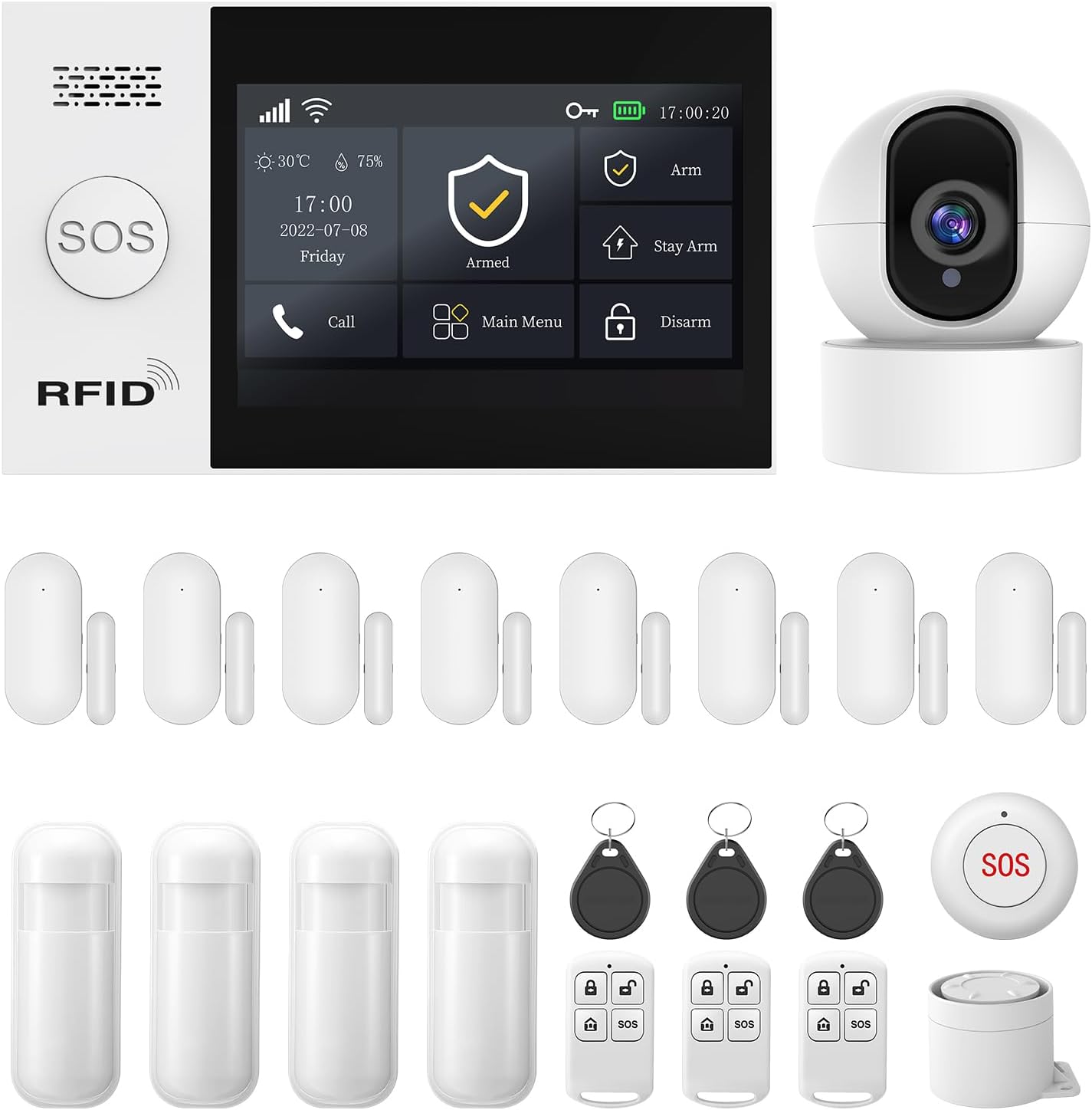
Figura 2.1: Mésview of the PGST Wireless Home Security System kit, including the main panel, camera, door/window sensors, motion sensors, key fobs, and SOS button.
3. Configuració i instal·lació
3.1. Main Alarm Host Panel Installation
The main alarm host panel features a 4.3-inch TFT colorful display screen for easy operation. It can be placed on a flat surface using its stand or mounted on a wall.

Figure 3.1: The 4.3-inch TFT colorful display screen of the alarm host panel, showing its user-friendly interface.

Figure 3.2: The system can link with various smart home products, enhancing overall home intelligence.
For wall mounting, use the provided screws and wall plugs. Ensure the panel is securely attached at a convenient height for access and visibility. The panel also includes an anti-demolition alarm function; if removed from its mounting, it will trigger an alarm and send notifications.

Figure 3.3: The anti-demolition feature ensures the system alerts you if the main panel is tampered with or removed from its installed location.
3.2. Instal·lació del sensor
Install door/window sensors on frames where the two parts can align when the door/window is closed. Motion sensors should be placed in corners or areas with a clear line of sight to detect movement within their 110° detection range.

Figura 3.4: Examples of door/window sensors and PIR motion detectors included in the kit.

Figure 3.5: The door magnetic sensor uses advanced magnetic field technology to accurately detect the opening and closing of doors and windows.

Figure 3.6: The PIR Motion Detector is engineered with state-of-the-art infrared technology, precisely detecting intruder movement within its wide-angle detection range.
3.3. Configuració de la càmera
The included T53W Camera provides 2MP HD video. Place it in an area that offers a good view of the space you wish to monitor.

Figure 3.7: The camera provides crystal clear 1080P HD images with a 120° viewing angle, supporting cloud storage.
3.4. App Control and Network Configuration
The system is controlled via the Smart Life or Tuya App. Download the app from your smartphone's app store. Follow the in-app instructions to add your devices.
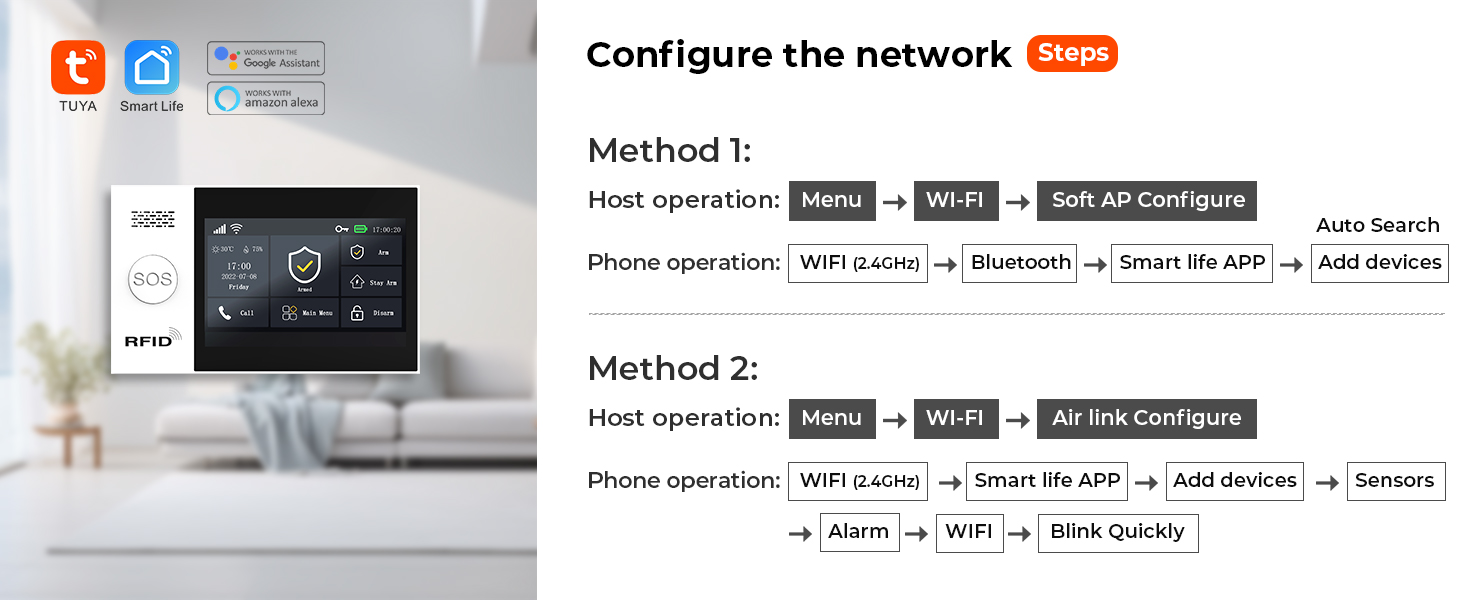
Figure 3.8: Network configuration steps for connecting the alarm host to your Wi-Fi network using either Soft AP Configure or Airlink Configure methods.
Method 1 (Soft AP Configure):
- On the Host: Go to Menu -> Wi-Fi -> Soft AP Configure.
- On your Phone: Enable Wi-Fi (2.4GHz) and Bluetooth. Open Smart Life APP, then Add devices.
- On the Host: Go to Menu -> Wi-Fi -> Airlink Configure.
- On your Phone: Enable Wi-Fi (2.4GHz). Open Smart Life APP, then Add devices -> Sensors -> Alarm -> Wi-Fi -> Blink Quickly.
Ensure your Wi-Fi network is 2.4GHz for successful pairing.
Video 3.1: This video demonstrates the setup process for the PGST107 Home Security Alarm System, including panel operation, sensor integration, and app connectivity.
4. Instruccions de funcionament
4.1. Armament i desarmament
The system can be armed or disarmed via the main panel, remote controls, or the Smart Life/Tuya App.
- Braç: Activates all sensors. Any triggered sensor will sound the alarm and send notifications.
- Braç d'estada: Activates perimeter sensors (e.g., door/window sensors) while allowing free movement inside.
- Desarma: Deactivates the alarm system.
You can also set up automatic arming and disarming schedules through the app to suit your daily routine.

Figure 4.1: Set the arm, disarm, stay arm, and SOS functions on the app. The system will automatically start these functions based on your schedule.
4.2. Funció SOS
The system includes a one-click SOS function. When activated, the alarm system immediately sends a distress signal to your pre-set contacts (family members, neighbors, or local authorities). This ensures rapid response in emergencies.

Figure 4.2: The system supports 5 preset alarm calls, ensuring no alarm information is missed. If one line is busy, it dials the next reserved number.

Figure 4.3: The SOS button is user-friendly, allowing elderly individuals and children to easily send a reminder if unexpected events occur.
4.3. App Alerts and Voice Intercom
Receive instant push notifications and phone calls directly to your smartphone whenever motion is detected or sensors are triggered. The integrated HD camera allows you to view live situations.

Figure 4.4: When someone attempts to enter your house and a door sensor or PIR detector is activated, you will receive phone messages and calls, in addition to app push alerts.
The system also supports two-way voice intercom through the app, allowing you to communicate through the camera. This feature can be used to deter intruders or communicate with family members.
4.4. Voice Control (Alexa/Google)
The PGST security system is compatible with Amazon Alexa and Google Assistant. You can arm or disarm your system using simple voice commands.

Figure 4.5: The system supports voice control via Alexa and Google Assistant, making it convenient to arm or disarm your home.
5. Manteniment
- Comprovació de la bateria: Regularly check the battery status of all wireless sensors via the app or directly on the devices. Replace batteries as needed to ensure continuous operation.
- Neteja: Use a soft, dry cloth to clean the main panel, camera, and sensors. Avoid using abrasive cleaners or solvents.
- Actualitzacions de firmware: Periodically check the Smart Life/Tuya App for any available firmware updates for your system components. Updates can improve performance and add new features.
- Col·locació del sensor: Ensure sensors remain securely attached and their detection paths are clear of obstructions.
6. Solució De Problemes
| Problema | Causa possible | Solució |
|---|---|---|
| El sistema no es connecta a la Wi-Fi | Incorrect Wi-Fi password; 5GHz network used; too far from router. | Ensure correct 2.4GHz Wi-Fi network and password. Move closer to router or use a Wi-Fi extender. Re-attempt network configuration as per Section 3.4. |
| Els sensors no activen l'alarma | Low battery; improper installation/alignment; sensor out of range. | Check sensor batteries. Re-align magnetic contacts for door/window sensors. Ensure motion sensor has a clear view. Re-pair sensor with the main panel if necessary. |
| Falses alarmes | Motion sensor triggered by pets or drafts; sensor malfunction. | Adjust motion sensor sensitivity or reposition to avoid false triggers. Check for loose wiring or damage to sensors. |
| Camera not showing live feed | Network connectivity issues; camera power issue; app glitch. | Check camera's power supply and Wi-Fi connection. Restart the camera and the app. Ensure sufficient network bandwidth. |
| SOS button not syncing/working | Pairing issue; low battery. | Ensure the SOS button is properly paired with the main panel. Check and replace its battery. Verify pre-set contacts in the app. |
7. Especificacions
- Marca: PGST
- Número de model: PGST A107F
- Estil: 21 PIECE KITS+T53W CAMERA
- Font d'alimentació: Elèctric amb cable
- Tecnologia de connectivitat: Wireless (4G/WiFi)
- Dispositius compatibles: Smartphone, Tablet (via Smart Life/Tuya App)
- Dimensions de l'article (L x A x A): 8 x 6 x 4 polzades
- Pes de l'article: 3.03 lliures
- Tipus d'instal·lació: Cargol
- Mètode de control: App
- Composició de la cèl·lula de la bateria: Alcalí (per a sensors/comandaments a distància)
- Tecnologia del sensor: Motion Sensor, Magnetic Contact Sensor
- Resolució de la càmera: 2MP HD (1080P)
- UPC: 735083581152
8. Garantia i Suport
The PGST A107F Security System comes with a 1 anys de garantia des de la data de compra. Aquesta garantia cobreix defectes de fabricació i avaries en condicions d'ús normal.
For any questions, technical assistance, or warranty claims, please feel free to contact PGST customer support. Refer to the contact information provided on the product packaging or the official PGST weblloc.
Ask a question about this manual
Ask about setup, troubleshooting, compatibility, parts, safety, or missing instructions. Manuals+ will review the question and use this page’s manual context to help answer it.