
1. Introducció
The Philips W2215A F1 Max is a smart watch designed for children, offering enhanced safety features and communication capabilities. This device includes dual cameras, GPS tracking, 4G connectivity for video and voice calls, and an SOS button for emergencies. It is built with a durable, water and dust resistant design and features a long-lasting battery.
2. Contingut del paquet
- Philips W2215A F1 Max Smart Watch
- Cable de càrrega
- SIM Card Ejection Tool
- Manual d'usuari
3. Dispositiu acabatview
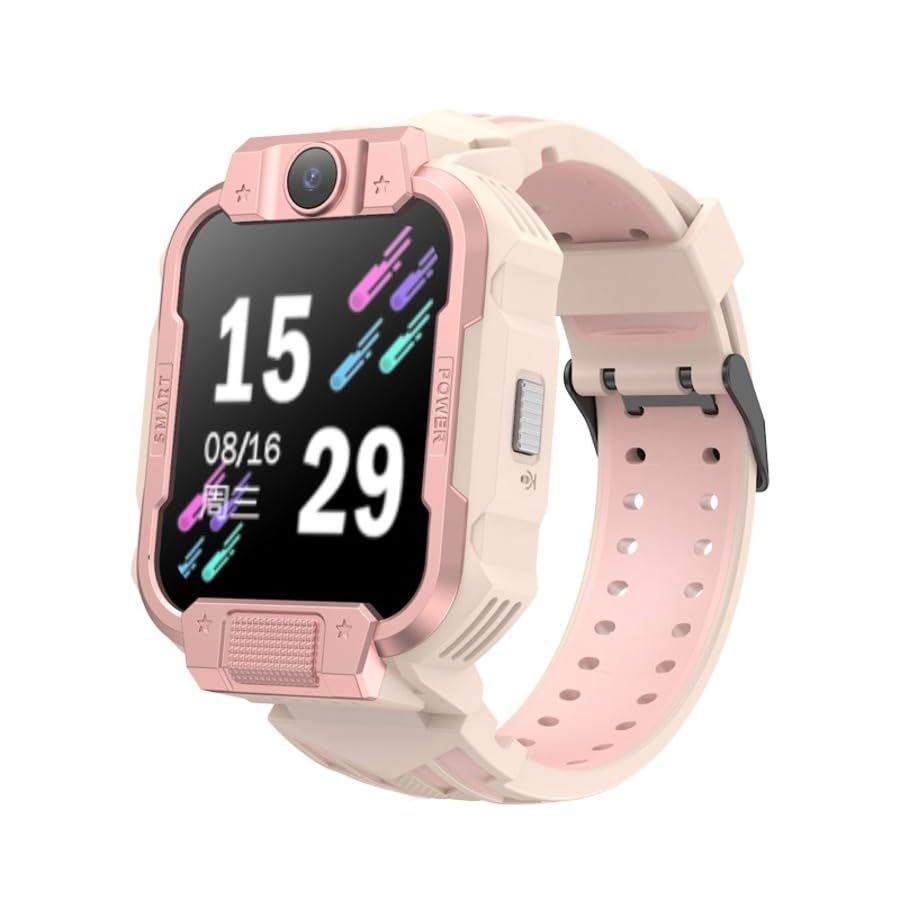

4. Configuració
4.1 Càrrega del dispositiu
Before first use, fully charge the smart watch. Connect the charging cable to the watch's charging port and a compatible USB power adapter. The watch display will indicate charging status. A full charge typically takes approximately 2 hours.
4.2 Instal·lació de la targeta SIM
- Assegureu-vos que el rellotge estigui apagat.
- Locate the SIM card slot on the side of the watch (refer to Figure 3.2).
- Use the provided SIM card ejection tool to open the SIM card tray.
- Insert a nano-SIM card into the tray with the gold contacts facing down, ensuring correct orientation.
- Empenyeu suaument la safata cap enrere a la ranura fins que encaixi al seu lloc.
Nota: The watch supports 4G cellular connectivity. Ensure your SIM card is activated and has a data plan.
4.3 Engegada inicial i emparellament d'aplicacions
- Press and hold the Power button until the Philips logo appears.
- Download the companion application to your smartphone. Cerca the official Philips Kids Watch app in your device's app store.
- Follow the on-screen instructions in the app to register the watch. This typically involves scanning a QR code displayed on the watch screen or entering a device ID.
- Configure contacts, safety zones, and other settings through the app.
5. Instruccions de funcionament
5.1 Navegació bàsica
The watch features a 1.83-inch AMOLED touchscreen. Swipe left/right to navigate between menus and apps. Swipe down from the top for quick settings and notifications. Tap to select an option.
5.2 Fer i rebre trucades
- Trucades de veu: Access the 'Contacts' app on the watch. Select a contact and tap the call icon.
- Videotrucades: The watch supports 4G video calls. Select a contact from the 'Video Call' app to initiate a video call.
- Recepció de trucades: When a call comes in, tap the green answer icon to accept or the red icon to decline.
5.3 Using the Dual Cameras
The watch is equipped with dual cameras. Access the 'Camera' app to take photos or record videos. You can switch between the front and side cameras within the app interface.
5.4 Funció SOS
In an emergency, press and hold the dedicated SOS button (if available, otherwise typically the power button) for a few seconds. The watch will automatically call pre-set emergency contacts and send location information.
5.5 Seguiment GPS
The watch's built-in GPS allows for real-time location tracking. Parents can monitor the child's location through the companion smartphone application. Safety zones can be configured, triggering alerts when the child enters or exits designated areas.
5.6 Missatgeria
The watch supports sending and receiving voice messages. Access the 'Messages' app to record and send short audio clips to approved contacts.
5.7 Pedòmetre
The integrated pedometer tracks daily steps, providing a basic overview of activity levels. This feature can be viewed in the 'Activity' or 'Pedometer' app on the watch.
6. Manteniment
6.1 Neteja
Wipe the watch screen and body with a soft, dry, lint-free cloth. For stubborn dirt, slightly dampRenta el drap amb aigua. Evita utilitzar productes químics agressius o materials abrasius.
6.2 Resistència a l'aigua i la pols
The Philips W2215A F1 Max is designed to be water and dust resistant for daily use. However, it is not suitable for swimming, showering, or prolonged submersion in water. Ensure the SIM card slot cover is securely closed to maintain resistance.
6.3 Cura de la bateria
- Eviteu exposar el rellotge a temperatures extremes.
- Carregueu el rellotge regularment, però eviteu deixar-lo completament descarregat durant períodes prolongats.
- Feu servir només el cable de càrrega proporcionat i un adaptador de corrent compatible.
7. Solució De Problemes
7.1 El rellotge no s'encén
- Assegura't que el rellotge estigui completament carregat. Connecta'l al carregador durant almenys 30 minuts.
- Premeu i manteniu premut el botó d'engegada durant 10-15 segons per intentar un reinici forçat.
7.2 Inaccurate Location Tracking
- Ensure the watch has a strong cellular signal. GPS accuracy can be affected by poor signal or indoor environments.
- Verify that the SIM card has an active data plan and sufficient credit.
- Check the companion app settings to ensure location services are enabled and updated frequently.
7.3 Durada curta de la bateria
- Redueix la brillantor de la pantalla.
- Limit frequent video calls or extensive use of features that consume more power.
- Ensure background apps are closed if possible.
- Check for app updates for both the watch and the companion smartphone app.
7.4 Cannot Make/Receive Calls
- Verify the SIM card is correctly installed and activated.
- Check for cellular network coverage in the watch's current location.
- Ensure contacts are correctly synced and approved in the companion app.
8. Especificacions
| Nom del model | F1 Màx |
| Número de model | W2215A |
| Tipus de visualització | AMOLED |
| Mida de la pantalla | 1.83 polzades |
| Memòria interna | 16 MB |
| Capacitat de la bateria | 800 mAh |
| Tipus de bateria | Ió de liti |
| Durada mitjana de la bateria | Fins a 4 dies |
| Connectivitat | Cel·lular 4G |
| Característiques clau | Dual Camera, Video Call, SOS Button, SIM Card Enabled, GPS, Pedometer |
| Durabilitat | Resistent a l'aigua i a la pols |
| Diàmetre de la caixa | 43 mm |
9. Informació de la garantia
This Philips W2215A F1 Max Smart Kids Watch comes with a 2-year official distributor warranty. Please retain your proof of purchase for warranty claims. The warranty covers manufacturing defects under normal use. It does not cover damage caused by misuse, accidents, unauthorized repairs, or normal wear and tear.
10. Suport
For further assistance, technical support, or warranty inquiries, please contact your local Philips customer service or the authorized distributor from whom you purchased the product. Refer to the contact information provided in your product packaging or on the official Philips weblloc.