
1. Introducció
Welcome to the user manual for your new ASUS ROG Strix SCAR 16 G635LX-RW158WS gaming laptop. This document provides essential information for setting up, operating, maintaining, and troubleshooting your device. The ROG Strix SCAR 16 is engineered for high-performance gaming, featuring an Intel Core Ultra 9 processor, NVIDIA GeForce RTX 5090 graphics, and a high-refresh-rate display.

Figure 1.1: The ASUS ROG Strix SCAR 16 Gaming Laptop.
2. Què hi ha a la caixa
Upon unboxing your ASUS ROG Strix SCAR 16, please verify that all the following items are included:
- ASUS ROG Strix SCAR 16 Gaming Laptop
- Adaptador d'alimentació
- Guia de l'usuari (aquest document)
- Documents de garantia
3. Producte acabatview
The ASUS ROG Strix SCAR 16 is designed for peak gaming performance and productivity. Key features include:
- Processador: Intel Core Ultra 9 275HX with Intel AI Boost NPU
- Gràfics: NVIDIA GeForce RTX 5090 Laptop GPU with 24GB GDDR7 RAM
- Visualització: 16-inch, 2.5K (2560 x 1600) WQXGA, 240Hz Refresh Rate, 1200nits Brightness ROG Nebula HDR Display
- Memòria: 32 GB de RAM DDR5
- Emmagatzematge: 2TB PCIe 4.0 NVMe M.2 Performance SSD
- Refrigeració: ROG Intelligent Cooling with Vapor Chamber, Sandwiched Heatsink, Tri-Fan Technology, and Conductonaut Extreme Liquid Metal
- Teclat: Backlit Chiclet Keyboard Per-Key RGB with Copilot key and Touchpad-based NumberPad
- Connectivitat: Wi-Fi 7, 2.5G LAN, Thunderbolt 5, HDMI 2.1, USB 3.2 Gen2 Type-A
- Àudio: Intel·ligent Amp Technology, 5.1.2 Channel Virtual Surround Sound, Two-Way AI Noise Cancelation
3.1 Components bàsics

Figura 3.1: Mésview of the laptop's core specifications.
3.2 Sistema de refrigeració
The ROG Intelligent Cooling system ensures optimal thermal performance, even during intense gaming sessions. It features an end-to-end Vapor Chamber, a sandwiched heatsink design, Tri-Fan Technology, and Conductonaut Extreme Liquid Metal for efficient heat dissipation.

Figure 3.2: ROG Intelligent Cooling system components.
3.3 Tecnologia de visualització
Experience stunning visuals with the ROG Nebula HDR display. This 16-inch Mini LED panel offers over 2000 dimming zones, 1200 nits peak brightness, a 240Hz refresh rate with 3ms response time, and 100% DCI-P3 color gamut coverage. It supports Dolby Vision, NVIDIA G-SYNC, and is VESA Certified DisplayHDR 1000.

Figure 3.3: ROG Nebula HDR Display specifications.
3.4 Connectivitat i ports
The laptop offers comprehensive connectivity options for all your peripherals and networking needs, including Wi-Fi 7, 2.5G Ethernet, Thunderbolt 5, HDMI 2.1, and multiple USB ports.

Figure 3.4: Port layout and connectivity options.
3.5 Sistema d'àudio
Enjoy immersive audio with Smart Amp Technology, 5.1.2 Channel Virtual Surround Sound, and Two-Way AI Noise Cancelation for clear communication.

Figure 3.5: Studio-quality sound features.
3.6 Teclat i touchpad
The full-size Chiclet keyboard features Per-Key RGB backlighting, dedicated gaming hotkeys, and a touchpad with an integrated NumberPad for enhanced functionality.

Figure 3.6: Keyboard and touchpad with NumberPad.
3.7 Actualització
The laptop features a tool-less access design, allowing for easy upgrades. It supports up to 64GB 5600MHz DDR5 memory and up to 4TB PCIe 4.0 storage in RAID 0 configuration.
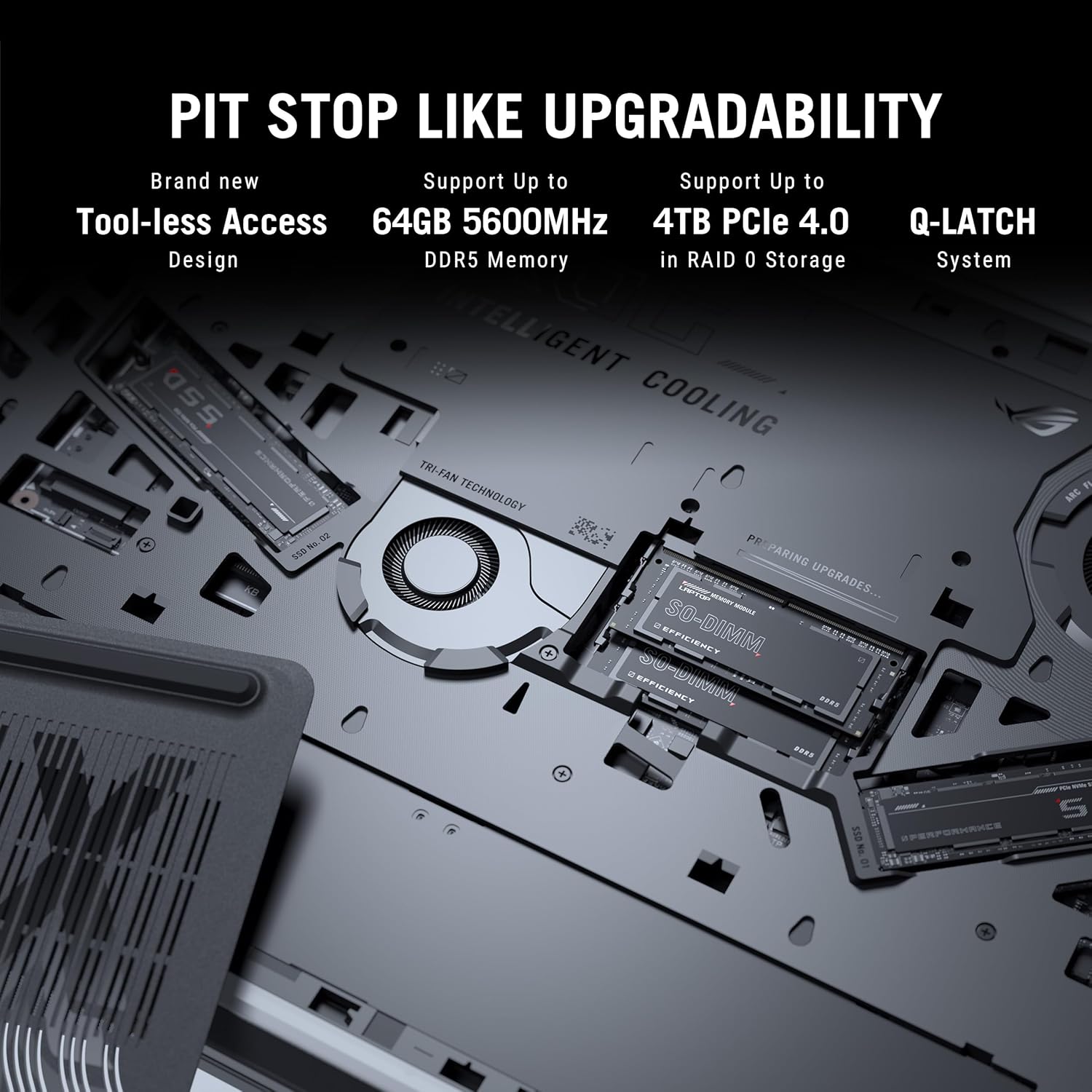
Figure 3.7: Internal components for upgradability.
4. Configuració
4.1 Encès inicial
- Connectar l'alimentació: Plug the power adaptor into the laptop's power port and then into a wall outlet. Ensure the power indicator light illuminates.
- Obre la pantalla: Carefully open the laptop display to a comfortable viewangle de ing.
- Encès: Premeu el botó d'engegada, que normalment es troba a la part superior dreta del teclat.
- Configuració inicial: Seguiu les instruccions que apareixen a la pantalla per completar la configuració del Windows 11 Home, inclosa la selecció d'idioma, la connexió de xarxa i la creació d'un compte d'usuari.
4.2 Connexió de perifèrics
Connect external devices such as a mouse, keyboard, external display, or storage devices to the available USB, HDMI, or Thunderbolt ports as needed.
5. Instruccions de funcionament
5.1 Gestió de l'energia
- Mode de repòs: Tanqueu la tapa o premeu breument el botó d'engegada per entrar en el mode de repòs.
- Apagar: Feu clic al botó Inici i, a continuació, a Energia > Apagar.
- Reinicia: Feu clic al botó Inici i, a continuació, a Energia > Reinicia.
5.2 Funcions del teclat
Utilitzeu les tecles de funció (F1-F12) en combinació amb Fn key for quick access to system controls such as volume, brightness, and wireless settings. The dedicated gaming hotkeys provide quick access to performance modes and other ROG-specific features.
5.3 Configuració de la pantalla
Adjust display settings through Windows Settings or the NVIDIA Control Panel for optimal gaming and visual experience. You can configure refresh rate, resolution, and color profiles.
6. Manteniment
6.1 Neteja
- Pantalla: Utilitzeu un drap suau i sense pelusa dampNetegeu amb aigua o un netejador de pantalles. Eviteu productes químics agressius.
- Teclat i xassís: Use a soft brush or compressed air to remove dust. Wipe surfaces with a slightly damp tela.
- Reixetes: Regularly clean the cooling vents with compressed air to prevent dust buildup and maintain airflow.
6.2 Cura de la bateria
- Eviteu descarregar completament la bateria amb freqüència.
- Guardeu el portàtil en un lloc fresc i sec si no el feu servir durant períodes prolongats.
- For optimal battery longevity, consider using battery health management features available in ASUS software.
6.3 Actualitzacions de programari
Regularly update your operating system, drivers (especially graphics drivers), and ASUS utilities to ensure optimal performance, security, and compatibility.
7. Solució De Problemes
Aquesta secció tracta problemes comuns que podeu trobar. Per a problemes més complexos, consulteu el servei d'assistència d'ASUS. weblloc o contacteu amb el servei d'atenció al client.
7.1 Problemes d'energia
- El portàtil no s'encén: Ensure the power adaptor is securely connected to both the laptop and a working power outlet. Check if the power adaptor's LED is lit. Try a different outlet.
- La bateria no es carrega: Verify the power adaptor connection. Check for any physical damage to the adaptor or charging port.
7.2 Problemes de visualització
- No es mostra a la pantalla: Connect an external monitor to check if the issue is with the laptop's internal display. Ensure the display cable (if external) is properly connected. Try pressing Fn + F8 (or the corresponding display toggle key) to switch display output.
- Pantalla parpellejant o distorsionada: Actualitza els controladors gràfics. Comprova les connexions del cable de la pantalla si fas servir un monitor extern.
7.3 Problemes de rendiment
- Rendiment lent: Close unnecessary applications. Check for background processes consuming high CPU/RAM. Ensure adequate ventilation and clean cooling vents. Update drivers.
- Sobreescalfament: Ensure the laptop is on a hard, flat surface to allow proper airflow. Clean the cooling vents. Consider using a laptop cooling pad.
8. Especificacions
Detailed technical specifications for the ASUS ROG Strix SCAR 16 G635LX-RW158WS.
| Característica | Especificació |
|---|---|
| Marca | ASUS |
| Nom del model | ROG Strix SCAR 16 |
| Número de model | G635LX-RW158WS |
| Processador | Intel Core Ultra 9 275HX (2.7 GHz, up to 5.4 GHz, 24 cores, 24 Threads) |
| Gràfics | NVIDIA GeForce RTX 5090 Laptop GPU, 24GB GDDR7 RAM |
| Mostra | 16-inch, 2.5K (2560 x 1600) WQXGA, 16:10, 240Hz, 1200nits, ROG Nebula HDR |
| Memòria | 32GB DDR5 RAM (Max 64GB) |
| Emmagatzematge | 2TB PCIe 4.0 NVMe M.2 Performance SSD |
| Sistema operatiu | Windows 11 Home |
| Teclat | Backlit Chiclet Keyboard Per-Key RGB, Copilot key |
| Weblleva | Càmera IR FHD 1080P per a Windows Hello |
| Connectivitat sense fil | Wi-Fi 7 (802.11.be), Bluetooth |
| Ports | Thunderbolt 5 (USB Type-C), HDMI 2.1, USB 3.2 Gen2 Type-A, 2.5G Ethernet, Audio Jack |
| Bateria | 90 Watt Hours Lithium Ion |
| Dimensions (L x W x Thickness) | 35.4L x 26.8W x 2.3Th Centimeters |
| Pes de l'article | 2.8 quilos |
9. Garantia i Suport
9.1 Informació de la garantia
This genuine ASUS laptop comes with a 1-year Global Warranty and Onsite Domestic Warranty from ASUS, covering manufacturing defects. Physical damage is not covered. To activate your warranty, please register on the ASUS brand weblloc.
9.2 Atenció al client
For product-related queries or immediate assistance, you can contact ASUS customer support:
- Número gratuït: 18002090365 (Monday - Saturday, 09:00 AM - 06:00 PM)
- Correu electrònic: rc_india@asus.com
- Assistència en línia: Visita el suport oficial d'ASUS website for service centers and further assistance: www.asus.com/in/support

Figure 9.1: ASUS 4A Guarantee and support contact details.
10. Notes importants
No hi havia vídeos oficials del producte disponibles a les dades proporcionades per integrar-les en aquest manual.