
1. Introducció
Thank you for choosing the INFINMIND Wireless Bluetooth Mouse. This manual provides detailed instructions for the Y670G (rechargeable green mouse) and D890 (battery-powered black mouse) models, designed for multi-device connectivity and enhanced productivity. Please read this manual carefully before use to ensure optimal performance and longevity of your device.
2. Contingut del paquet
- 1 x INFINMIND Wireless Bluetooth Green Mouse (Y670G)
- 1 x INFINMIND Wireless Bluetooth Black Mouse (D890)
- 2 x 2.4GHz USB Receivers (one for each mouse)
- 1 x USB Charging Cable (for Y670G mouse)
- 2 x AA Batteries (pre-installed in D890 mouse)
- 1 x Manual d'usuari
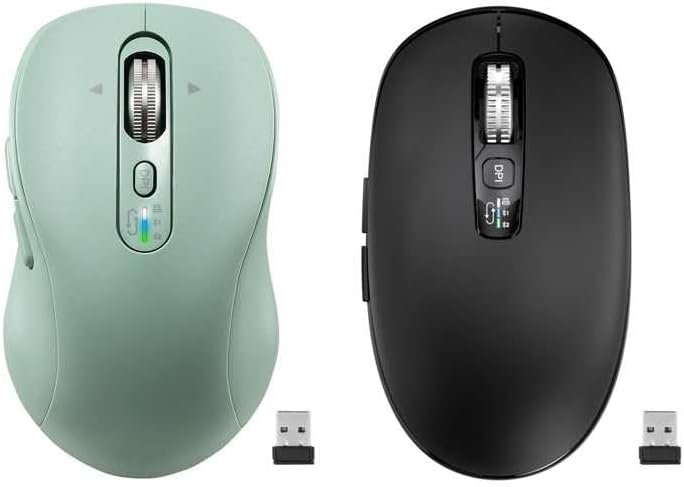
Image: The package includes both the green rechargeable mouse and the black battery-powered mouse, along with their respective USB receivers.
3. Producte acabatview
Familiarize yourself with the buttons and features of your INFINMIND wireless mice.
3.1 Green Rechargeable Mouse (Y670G)

Imatge: Detallada view of the green mouse with labels for each button and indicator.
- Botó esquerre: Funció estàndard del clic esquerre.
- Botó dret: Funció estàndard del clic dret.
- Smart Flying Scroll Wheel: For vertical and horizontal scrolling.
- Botó ON/OFF: Power switch for the mouse.
- Botó DPI: Adjusts cursor sensitivity (1000/1600/2400/3200 DPI).
- Indicadors de dispositius: LED lights (White, Blue, Green) to show active connection mode (2.4G USB, Bluetooth 1, Bluetooth 2).
- Devices Switch Button: Cycles between 2.4G USB, Bluetooth 1, and Bluetooth 2 connections.
- Botó Endavant: Navega cap endavant web navegadors o file exploradors.
- Botó enrere: Navega cap enrere web navegadors o file exploradors.
- Windows/Mac System Switch Button: Optimitza les funcions del ratolí per a Windows o macOS.
3.2 Black Battery-Powered Mouse (D890)

Image: The black mouse features a similar ergonomic design and button layout to the green model, with a DPI button and scroll wheel.
The black D890 mouse shares most functionalities with the Y670G, including Left/Right buttons, Scroll Wheel, DPI button, Forward/Back buttons, and multi-device switching. The primary difference is its power source (AA batteries) and the specific indicator lights for connection modes.
4. Configuració
Your INFINMIND mice support three connection modes: 2.4GHz wireless via USB receiver, and two independent Bluetooth channels (BT1 and BT2).

Image: The mouse can connect to a tablet via Bluetooth 2, a monitor via Bluetooth 1, and a laptop via 2.4GHz wireless, switching between them with a single click.
Connexió sense fil 4.1 de 2.4 GHz
- Locate the USB receiver. For the Y670G, it is typically stored in a slot on the bottom of the mouse. For the D890, it is also stored in a similar slot.
- Connecteu el receptor USB a un port USB disponible de l'ordinador.
- Engegueu el ratolí amb l'interruptor ON/OFF de la part inferior.
- Press the Devices Switch Button until the White LED indicator lights up, indicating 2.4G mode. The mouse should connect automatically.
4.2 Bluetooth Connection (BT1 & BT2)
- Engegueu el ratolí amb l'interruptor ON/OFF.
- Press the Devices Switch Button to select either Bluetooth Mode 1 (Blue LED) or Bluetooth Mode 2 (Green LED).
- Per entrar al mode de vinculació: Press and hold the Devices Switch Button for 3-5 seconds until the corresponding LED (Blue or Green) starts flashing rapidly.
- On your device (computer, tablet, phone), open Bluetooth settings.
- Cerca new devices and select "INFINMIND Mouse" (or similar name) from the list.
- Once paired, the LED indicator will stop flashing and remain solid for a few seconds before turning off, confirming the connection.
4.3 Canvi entre dispositius connectats
To switch between your connected devices (2.4G, BT1, BT2), simply press the Devices Switch Button. The LED indicator will briefly light up in White, Blue, or Green to show which mode is currently active.
5. Instruccions de funcionament
5.1 Ajust de DPI
Premeu el botó Botó DPI (located below the scroll wheel) to cycle through the available DPI settings: 1000, 1600, 2400, and 3200 DPI. A higher DPI setting increases cursor sensitivity, making the cursor move faster across the screen with less physical mouse movement.
5.2 4-Way Hyper-Fast Scrolling
The scroll wheel supports both vertical and horizontal scrolling.
- Vertical Scrolling: Roll the scroll wheel up or down.
- Horizontal Scrolling: Tilt the scroll wheel to the left or right. This allows for seamless navigation across wide documents or web pàgines.

Image: The scroll wheel can be moved Upward, Downward, Left, and Right for comprehensive navigation.
5.3 Forward/Back Buttons
Utilitza el Endavant i Enrere buttons (located on the side of the mouse) to quickly navigate through web pages, documents, or folders.
5.4 System Switch (Windows/Mac)
The Y670G mouse includes a dedicated Botó de canvi del sistema Windows/Mac on its underside. Toggle this switch to optimize mouse functionality and gestures for your operating system.
5.5 Silent Click Design
Both mice feature a silent click design, reducing click noise for a quieter working environment, ideal for offices and shared spaces.

Image: The mouse is designed for quiet operation, minimizing click sounds.
6. Gestió d'energia
6.1 Charging the Y670G (Rechargeable Green Mouse)
The Y670G mouse is equipped with a built-in rechargeable battery.
- Connect the provided USB charging cable to the charging port on the front of the mouse and to a USB power source (e.g., computer USB port, USB wall adapter).
- Una càrrega completa sol trigar aproximadament 2 hores.
- A single full charge can provide up to 60 days of use, depending on usage patterns.
- Nota: Fast charging is not supported. Please use standard USB charging.
6.2 Battery Installation for D890 (Battery-Powered Black Mouse)
The D890 mouse operates on 2 AA batteries, which are pre-installed.
- To replace batteries, open the battery compartment cover on the underside of the mouse.
- Insert two new AA batteries, ensuring correct polarity (+/-).
- Tanqueu bé la tapa del compartiment de la bateria.
- Battery life can extend up to 40 months, varying based on usage and environmental factors.
6.3 Auto Sleep Function
Both mice feature an intelligent auto-sleep function to conserve power. If inactive for 5 minutes, the mouse will enter sleep mode. To wake it up, simply click any button or move the mouse.
7. Manteniment
- Mantingueu el ratolí net netejant-lo amb un drap suau i sec. Eviteu utilitzar productes químics agressius o materials abrasius.
- Do not expose the mouse to extreme temperatures, direct sunlight, or moisture.
- Store the USB receiver in its designated slot on the mouse when not in use to prevent loss.
8. Solució De Problemes
| Problema | Causa possible | Solució |
|---|---|---|
| El ratolí no respon | Low battery (Y670G) / Dead batteries (D890) El ratolí està apagat Incorrect connection mode selected USB receiver not plugged in (2.4G) Bluetooth not paired or disconnected | Charge the Y670G mouse or replace AA batteries in D890. Enceneu el ratolí. Press the Devices Switch Button to select the correct mode (White for 2.4G, Blue for BT1, Green for BT2). Assegureu-vos que el receptor USB estigui ben connectat a un port USB que funcioni. Re-pair the mouse via Bluetooth settings on your device. |
| Cursor erràtic o saltant | Sensor brut Using mouse on unsuitable surface Interferència | Netegeu el sensor òptic de la part inferior del ratolí amb un drap suau. Feu servir el ratolí sobre una superfície neta, no reflectant i opaca o sobre una alfombrilla de ratolí. Move the mouse closer to the receiver/device or away from other wireless devices. |
| No es pot canviar entre dispositius | Devices not properly paired/connected | Ensure all desired devices are correctly paired (Bluetooth) or connected (2.4G). Follow setup instructions for each connection mode. |
9. Especificacions
- Connectivitat: 2.4GHz Wireless, Bluetooth 5.0 (BT1, BT2)
- Configuració de DPI: 1000/1600/2400/3200 DPI
- Botons: 10 (Left, Right, Scroll Wheel, DPI, Forward, Back, Devices Switch, System Switch, ON/OFF)
- Desplaçament: 4-Way Hyper-Fast Scrolling (Vertical & Horizontal)
- Font d'alimentació:
- Y670G: Rechargeable Lithium Battery (USB-C charging)
- D890: 2 x AA Batteries
- Durada de la bateria:
- Y670G: Up to 60 days on a 2-hour charge
- D890: Up to 40 months (varies with usage)
- Compatibilitat: Windows, macOS, Chrome OS, Linux, iPadOS, Android (with Bluetooth)
- Ergonomia: Designed for Small to Medium-sized hands (Y670G), Medium to Large hands (D890)
- Característiques especials: Silent Click, Auto Sleep Function
10. Garantia i Suport
INFINMIND products are designed for reliability and performance. For any questions, technical support, or warranty inquiries, please refer to the contact information provided with your purchase or visit the official INFINMIND weblloc web. Si us plau, conserveu el comprovant de compra per a reclamacions de garantia.