
1. Introducció
This manual provides essential instructions for the installation, operation, and maintenance of your Hikvision DS-2CD1041G0-I 4MP Fixed Wired Bullet Network Camera. Please read this manual thoroughly before using the product to ensure correct usage and to prevent damage.
2. Informació de seguretat
- Ensure the power supply meets the camera's requirements.
- No exposeu la càmera a temperatures extremes, humitat ni ambients corrosius.
- Avoid pointing the camera lens directly at strong light sources.
- La instal·lació ha de ser realitzada per personal qualificat.
- Disconnect power before any maintenance or installation procedures.
3. Contingut del paquet
Verifiqueu que tots els elements siguin presents al paquet:
- Hikvision DS-2CD1041G0-I 4MP Fixed Wired Bullet Network Camera
- Manual d'instruccions
- Cargols de muntatge
4. Producte acabatview
The Hikvision DS-2CD1041G0-I is a robust 4MP (2560 × 1440) fixed bullet network camera designed for reliable outdoor surveillance. It features advanced imaging and compression technologies to deliver clear video while optimizing storage and bandwidth.
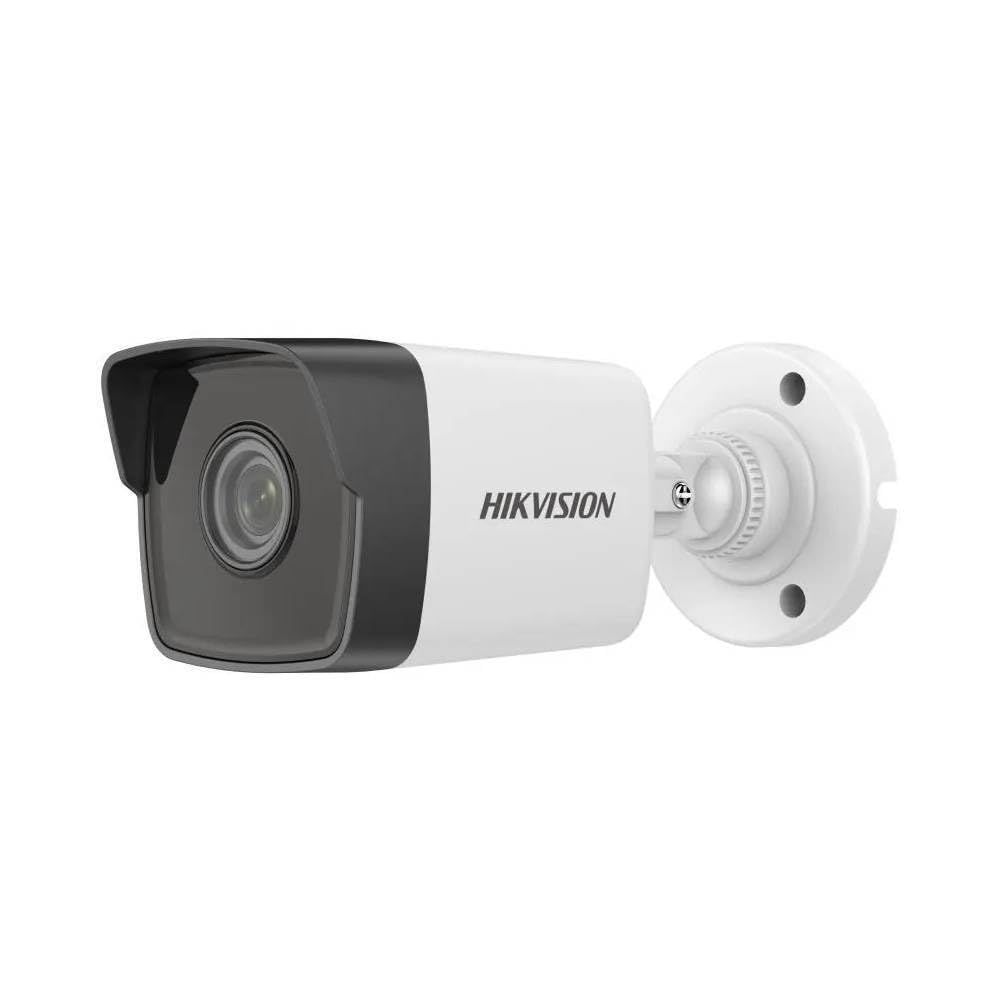
Figure 1: Hikvision DS-2CD1041G0-I 4MP Fixed Wired Bullet Network Camera. This image displays the compact bullet-style design of the camera, suitable for various outdoor mounting scenarios.
Característiques principals:
- Imatges d'alta qualitat: Delivers 4 MP resolution (2560 × 1440) for clear and detailed video.
- Compressió avançada: Utilizes H.265+ compression technology to reduce bandwidth and storage requirements.
- Ampli rang dinàmic (WDR): Ensures clear imaging in challenging lighting conditions.
- EXIR 2.0 Infrared Technology: Provides enhanced night vision capabilities with a long IR range up to 30 meters.
- Weather and Dust Resistance: Rated IP67, making it suitable for outdoor installations.
5. Configuració i instal·lació
5.1 Ubicació de muntatge
Choose a suitable outdoor location for mounting the camera. Ensure the area provides a clear field of view and is within reach of power and network cables. The camera is designed for wall mount installation.
5.2 Instal·lació física
- Prepara la superfície: Mark the drilling points on the wall using the camera's mounting template (if provided) or the camera base.
- Forats: Drill pilot holes at the marked positions. Insert wall anchors if necessary.
- Assegureu la càmera: Attach the camera base to the wall using the provided mounting screws. Ensure it is firmly secured.
- Ajust d'angle: Afloixeu els cargols d'ajust per posicionar la càmera a la posició desitjada viewAngle d'ajust. Estrenyeu els cargols un cop ajustats.
5.3 Connexions de cablejat
Connect the camera to your network and power supply.
- Connexió de xarxa: Connect an Ethernet cable from your network switch or router to the camera's RJ45 port. This camera uses a wired Ethernet connection.
- Connexió d'alimentació: Connect the power adapter (not always included, check package) to the camera's power input and then to a power outlet. The camera operates via corded electric power.
6. Funcionament de la càmera
6.1 Configuració i configuració inicials
After physical installation and connection, the camera needs to be configured via network software.
- Instal·lar programari: Download and install the Hikvision SADP Tool or Hik-Connect app on your computer or mobile device.
- Activa la càmera: Use the SADP Tool to find the camera on your network. Activate it by setting a strong password.
- Configuració de la xarxa: Configure network parameters such as IP address (DHCP or static).
- Accés en directe View: Accedir a la càmera web interface via its IP address in a web browser or through the Hik-Connect app for live viewing and further settings.
6.2 Enregistrament i emmagatzematge de vídeo
The camera supports various recording options, typically managed through a Network Video Recorder (NVR) or directly to an SD card (if supported by model, check specifications) or network storage.
- Configure recording schedules (continuous, motion-triggered, alarm-triggered).
- Set up storage locations and ensure sufficient capacity.
- Video capture format is AVI.
6.3 Accés remot
Per a comandament a distància viewing, configure port forwarding on your router or use the Hik-Connect cloud service.
7. Manteniment
7.1 Neteja
- Netegeu regularment la lent de la càmera amb un drap suau i sec per garantir una qualitat d'imatge nítida.
- No utilitzeu productes químics ni productes de neteja abrasius.
- Netegeu el cos de la càmera amb anuncisamp drap per eliminar la pols i la brutícia.
7.2 actualitzacions de microprogramari
Consulteu periòdicament el lloc web oficial de Hikvision. weblloc web per a actualitzacions de firmware. L'actualització del firmware pot millorar el rendiment, afegir funcions i augmentar la seguretat.
7.3 Consideracions ambientals
Although rated IP67 for outdoor use, ensure the camera is not subjected to prolonged direct water submersion or extreme physical impact.
8. Solució De Problemes
| Problema | Causa possible | Solució |
|---|---|---|
| Sense imatge/Sense alimentació | Power cable disconnected; Power adapter faulty. | Check power connections; Test with a known good power adapter. |
| No es pot connectar a la xarxa | Ethernet cable faulty; Incorrect IP address; Network configuration error. | Check Ethernet cable; Verify IP settings using SADP Tool; Ensure camera and NVR/router are on the same subnet. |
| Mala qualitat d'imatge | Lent bruta; Il·luminació insuficient; Configuració de resolució incorrecta. | Clean the lens; Ensure adequate lighting or enable IR; Adjust resolution settings in the camera's web interfície. |
| La visió nocturna no funciona | IR LEDs blocked; IR settings disabled. | Clear any obstructions; Check IR settings in the camera's configuration. |
9. Especificacions
| Característica | Detall |
|---|---|
| Nom del model | HIKVISION DS-2CD1041G0-I |
| Usos recomanats | Seguretat exterior |
| Tecnologia de connectivitat | Amb cable (Ethernet) |
| Ús interior/exterior | A l'aire lliure |
| Font d'alimentació | Elèctric amb cable |
| Tipus de muntatge | Muntatge de paret |
| Resolució de captura de vídeo | 1440p (4MP) |
| Format de captura de vídeo | AVI |
| Dimensions de l'article | 15 x 15 x 15 centímetres |
| Classificació IP | IP67 (Weather and Dust Resistance) |
| Tecnologia infraroja | EXIR 2.0, up to 30 meters IR range |
| Tecnologia de compressió | H.265 + |
| Interval dinàmic | Àmbit dinàmic ampli (WDR) |
10. Garantia i Suport
10.1 Informació de la garantia
This product typically comes with a standard manufacturer's warranty. Additionally, a 1-Year Extended Warranty by Onsitego may be available for purchase. Please refer to your purchase documentation for specific warranty terms and conditions.
10.2 Suport tècnic
For technical assistance, troubleshooting beyond this manual, or warranty claims, please contact your authorized Hikvision dealer or visit the official Hikvision support website. Ensure you have your product model number (DS-2CD1041G0-I) and purchase details ready.
Manufacturer: HIKVISION