
1. Introducció
Thank you for choosing the VENTION 15-in-1 Laptop Docking Station. This device is designed to expand the connectivity of your laptop, providing a comprehensive solution for multiple peripherals, external displays, network access, and power delivery through a single USB-C connection. Please read this manual carefully to ensure proper installation and operation.
2. Producte acabatview
The VENTION 15-in-1 Docking Station offers a wide array of ports to enhance your workstation. Its rotatable design allows for flexible placement on your desk.
2.1. Docking Station Features
- Connectivitat 15 en 1: Comprehensive port selection for various devices.
- Dual/Triple Display Output: Supports up to three external monitors via 2 HDMI and 1 DisplayPort.
- Power Delivery (PD 100W): Charges your laptop while connected.
- Transferència de dades d'alta velocitat: USB 3.2 Gen 2 ports offer up to 10Gbps.
- Gigabit Ethernet: Provides stable and fast wired network connection.
- Lector de targetes: Integrated SD/TF card slots for quick data access.
- Jack d'àudio: 3.5mm TRRS port for headphones or microphones.
- Disseny giratori: Allows for optimal positioning and cable management.
- Construcció duradora: Aluminum alloy shell for optimal heat dissipation.
2.2. Disseny del port
Familiarize yourself with the ports on the docking station:

Imatge: Anvers i revers view of the VENTION 15-in-1 Docking Station, showcasing its compact design and port arrangement.

Image: A detailed diagram illustrating all 15 ports on the docking station, including their types and functions.
- Ports frontals: SD/TF Card Slot, USB 3.0 (5Gbps), 2x USB 3.2 Gen 2 Type-A (10Gbps), USB 3.2 Gen 2 Type-C (10Gbps), USB 3.2 Gen 1 Type-C (5Gbps), 3.5mm TRRS Audio Jack.
- Ports posteriors: PD (Power Delivery 100W Max Input), PC HOST (USB-C connection to laptop), 2x USB 2.0 Type-A (480Mbps), 2x HDMI (4K@60Hz), 1x DisplayPort (4K@60Hz), RJ45 Gigabit Ethernet.
3. Guia de configuració
Segueix aquests passos per configurar la teva estació d'acoblament:
- Desempaquetar el dispositiu: Carefully remove the docking station and included accessories from the packaging.
- Col·loca el suport: The docking station features a detachable and rotatable U-shaped stand. Attach the stand to the base of the docking station for vertical placement, ensuring stability. The anti-slip pads on the stand provide protection and grip.
- Connecteu l'alimentació (opcional però recomanat): For optimal performance and laptop charging, connect a USB-C power adapter (not included) to the PD (Power Delivery) port on the rear of the docking station. The docking station supports up to 100W power input.
- Connectar-se al portàtil: Use the provided USB-C to USB-C cable to connect your laptop to the PC HOST port on the rear of the docking station. Ensure your laptop's USB-C port is a full-featured port or Thunderbolt 3/4 compatible for full functionality.

Image: Visual guide to identify compatible Thunderbolt or full-featured USB-C ports on your laptop, essential for the docking station's functionality.
Once connected, your laptop should automatically detect the docking station and its connected peripherals. Drivers are typically installed automatically by your operating system.
4. Instruccions de funcionament
4.1. Connexió de la pantalla
The docking station supports single, dual, or triple external displays. Connect your monitors to the HDMI and DisplayPort outputs on the rear of the docking station.

Image: A laptop connected to a single external 4K monitor through the docking station, demonstrating high-resolution display capabilities.
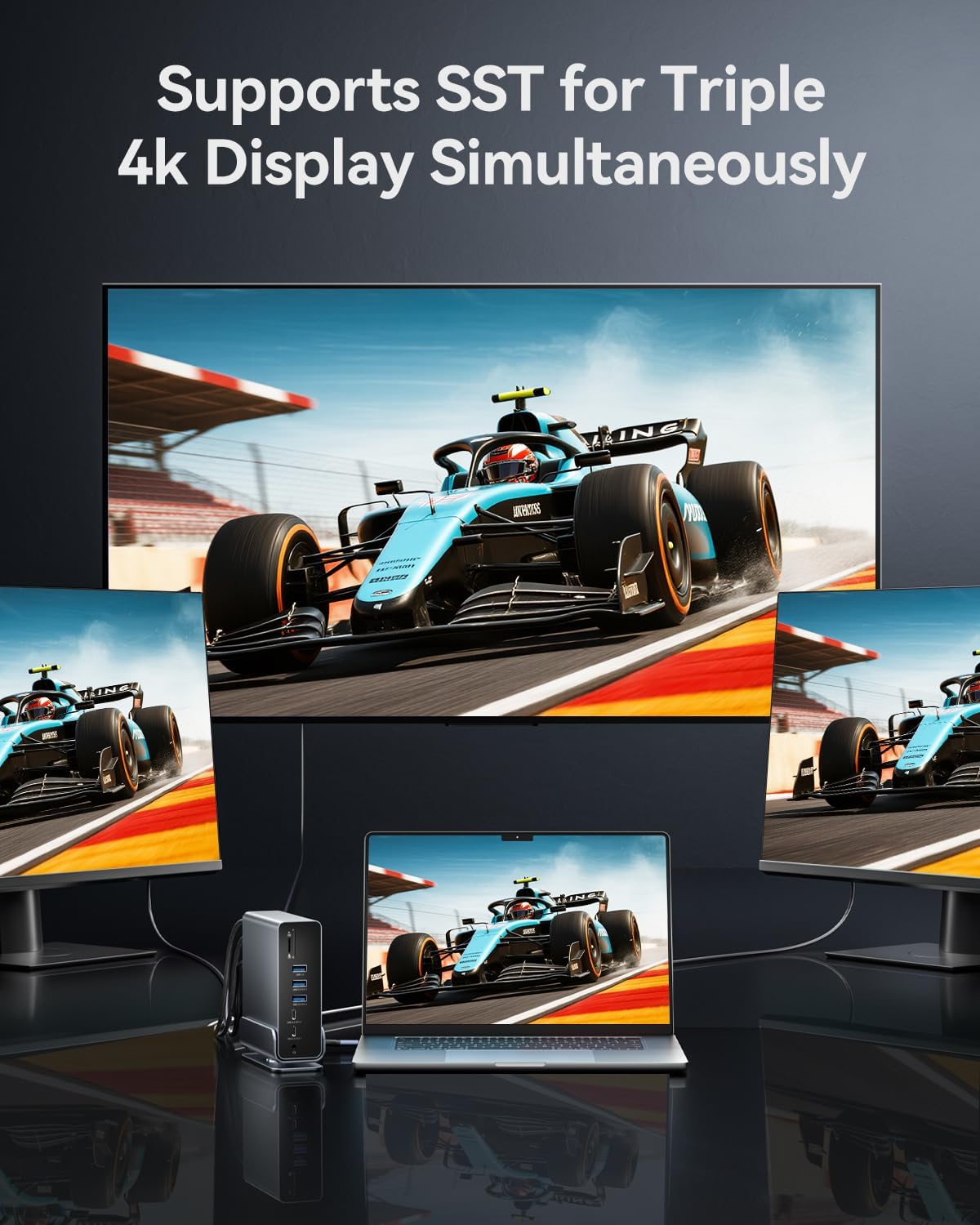
Image: A laptop connected to three external 4K monitors simultaneously, showcasing the triple display support of the docking station.
Modes de visualització:
- Mode mirall: Duplicates your laptop's screen on external monitors.
- Mode d'ampliació: Extends your desktop across multiple screens, allowing for increased workspace.
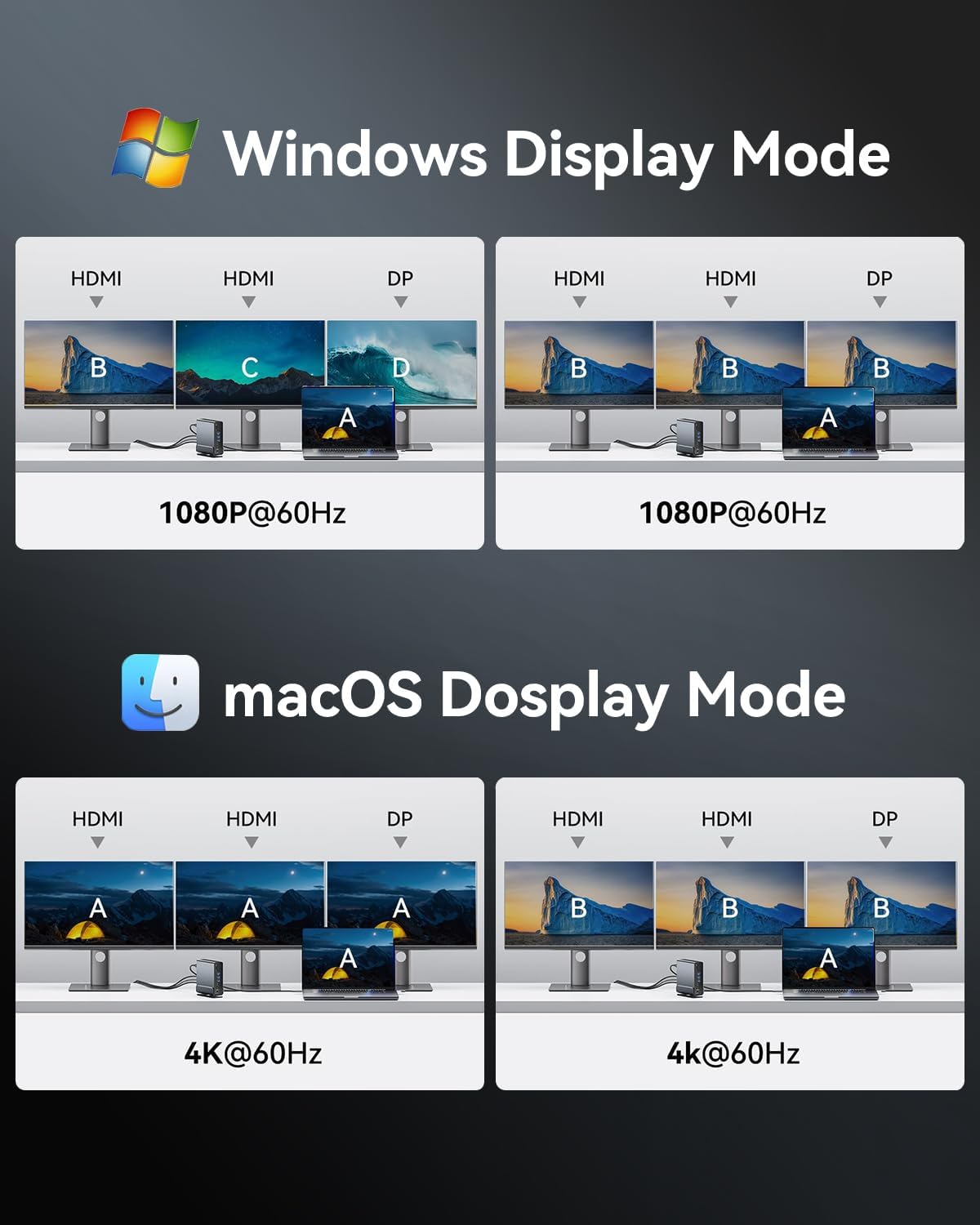
Image: Visual representations of various display configurations for Windows and macOS, including mirror and extend modes across multiple screens.

Image: A table detailing the highest supported resolutions and display modes for single, dual, and triple monitor setups on both Windows and macOS.
4.2. Lliurament d'energia
Connect your laptop's power adapter to the PD port on the docking station to charge your laptop while using the dock. The docking station supports up to 100W power input, delivering up to 85W to your laptop.

Image: A laptop receiving power through the docking station's 100W Power Delivery port, illustrating the charging function.
4.3. Transferència de dades
Connect your USB devices (external hard drives, flash drives, keyboards, mice, etc.) to the available USB ports. The docking station features a mix of USB 3.2 Gen 2 (10Gbps), USB 3.0 (5Gbps), and USB 2.0 (480Mbps) ports.

Image: An illustration detailing the data transfer speeds of different USB ports (Type-A and Type-C) and SD/TF card slots on the docking station.
Insert SD or TF cards into the dedicated slots on the front of the docking station for quick access to photos and files. Both slots can be used simultaneously.

Image: A laptop connected to the docking station, demonstrating easy access to SD and TF memory cards for data transfer and backup.
4.4. Connexió a la xarxa
For a stable and fast internet connection, connect an Ethernet cable from your router or modem to the RJ45 Gigabit Ethernet port on the rear of the docking station.

Image: A laptop connected to the docking station, which is then connected to a network via the Gigabit Ethernet port, ensuring a fast and stable internet connection.
4.5. Connexió d'àudio
Connect your headphones, speakers, or microphone to the 3.5mm TRRS audio jack on the front of the docking station.

Image: A laptop connected to the docking station, with headphones plugged into the 3.5mm audio and microphone jack, facilitating audio input and output.
5. Compatibilitat
The VENTION 15-in-1 Docking Station is compatible with a wide range of devices and operating systems, provided your laptop has a full-featured USB-C port or Thunderbolt 3/4 interface.
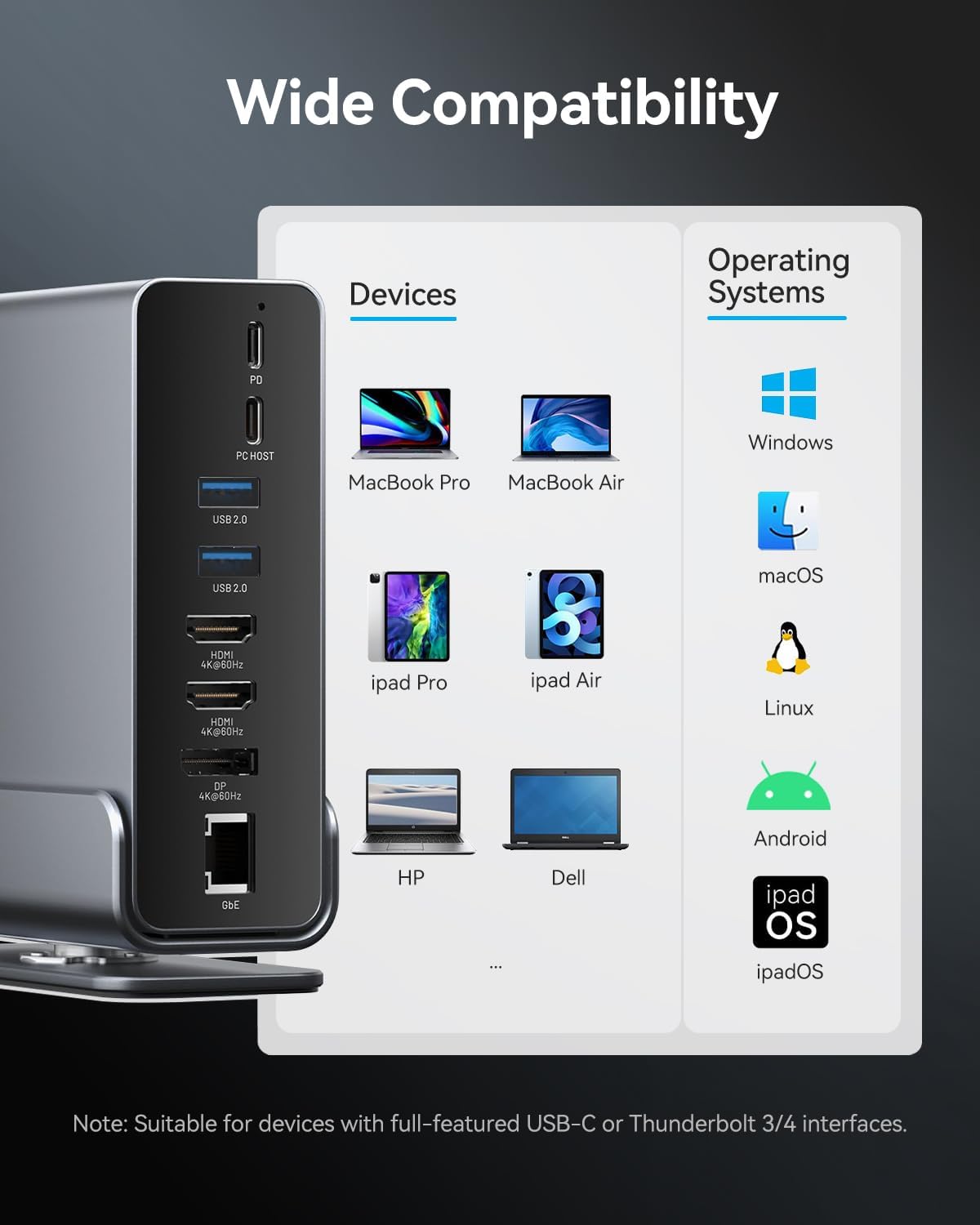
Image: A chart illustrating the wide compatibility of the docking station with various devices such as MacBook Pro/Air, iPad Pro/Air, HP, Dell, Surface, and operating systems including Windows, macOS, Linux, Android, and iPadOS.
Sistemes operatius compatibles:
- Windows
- macOS
- Linux
- Android
- iPadOS
Nota: Full functionality, especially for multiple displays and power delivery, requires a USB-C port that supports DisplayPort Alternate Mode (Alt Mode) and Power Delivery. Thunderbolt 3/4 ports are fully compatible.
6. Manteniment
Per garantir la longevitat i el rendiment òptim de la vostra estació d'acoblament, seguiu aquestes pautes de manteniment:
- Neteja: Use a soft, dry cloth to wipe the exterior of the docking station. Avoid using liquid cleaners or abrasive materials.
- Emmagatzematge: Guardeu l'estació d'acoblament en un lloc fresc i sec, allunyat de la llum solar directa i de temperatures extremes.
- Manipulació: Eviteu deixar caure o sotmetre el dispositiu a forts impactes.
- Ventilació: Ensure the docking station has adequate ventilation to prevent overheating. The aluminum alloy shell is designed for optimal heat dissipation.
7. Solució De Problemes
Si teniu problemes amb l'estació d'acoblament, consulteu les solucions habituals següents:
- Sense sortida de pantalla:
- Assegureu-vos que el port USB-C del vostre portàtil admeti el mode alternatiu de DisplayPort.
- Comproveu totes les connexions dels cables (USB-C al portàtil, HDMI/DP als monitors).
- Verify monitor input settings are correct.
- Try updating your laptop's graphics drivers.
- Reinicieu el portàtil i torneu a connectar l'estació d'acoblament.
- El portàtil no carrega:
- Ensure a compatible USB-C power adapter is connected to the PD port.
- Verify the power adapter provides sufficient wattage (up to 100W recommended).
- Check the connection between the power adapter and the docking station.
- Dispositius USB no reconeguts:
- Ensure the USB device is properly inserted into the port.
- Try connecting the device to a different USB port on the docking station or directly to your laptop.
- Reinicieu el vostre ordinador portàtil.
- Connexions intermitents:
- Assegureu-vos que tots els cables estiguin ben connectats.
- Avoid excessive bending or strain on the USB-C cable connecting to your laptop.
- Ensure the docking station is placed on a stable surface and not subject to movement.
- Ethernet no funciona:
- Comproveu la connexió del cable Ethernet tant a l'estació d'acoblament com al vostre encaminador/mòdem.
- Verifiqueu la configuració de xarxa al vostre ordinador portàtil.
- Reinicieu el vostre encaminador/mòdem.
If the issue persists, please contact VENTION customer support for further assistance.
8. Especificacions
| Característica | Especificació |
|---|---|
| Model | B0F5PTZTCP |
| Ports | 15 (2x HDMI, 1x DP, 1x RJ45, 1x PD, 1x PC Host, 2x USB 3.2 Gen 2 Type-A, 1x USB 3.0 Type-A, 2x USB 2.0 Type-A, 1x USB 3.2 Gen 2 Type-C, 1x USB 3.2 Gen 1 Type-C, 1x SD, 1x TF, 1x 3.5mm Audio) |
| Sortida de vídeo | 2x HDMI (4K a 60 Hz), 1x DisplayPort (4K a 60 Hz) |
| Lliurament d'energia | PD 100W Input (Max), 85W Output to Host (Max) |
| Transferència de dades USB | USB 3.2 Gen 2: 10Gbps, USB 3.0: 5Gbps, USB 2.0: 480Mbps |
| Ethernet | Gigabit Ethernet (10/100/1000 Mbps) |
| Lector de targetes | SD/TF (Read & Write 2 cards simultaneously) |
| Àudio | 3.5mm TRRS Audio/Microphone Jack |
| Material | Aliatge d'alumini |
| Dimensions | 7.9 x 6.7 x 2.34 polzades |
| Pes | 1.76 lliures (0.8 kg) |
9. Què hi ha a la caixa
El paquet inclou els articles següents:
- VENTION 15-in-1 Laptop Docking Station
- 1.5ft USB-C to USB-C Cable
- Manual d'usuari (aquest document)

Image: An illustration showing the contents included in the product package: the docking station, a USB-C cable, and the user manual.
10. Garantia i Suport
VENTION products are designed for reliability and performance. For warranty information or technical support, please refer to the contact details provided on the product packaging or visit the official VENTION weblloc web. Conserveu el rebut de compra com a comprovant de compra per a reclamacions de garantia.