
1. Introducció
The IOWODO Z30 Kids 4G Smartwatch is designed to provide communication, safety, and entertainment for children, while offering peace of mind for parents. This manual will guide you through the setup, operation, and maintenance of your new smartwatch.
2. Contingut del paquet
- IOWODO Z30 Smartwatch
- Corretja de silicona
- Funda protectora
- Cable de càrrega magnètica
- Manual d'usuari
- Eina expulsora de SIM
3. Guia de configuració
3.1. Instal·lació de la targeta SIM
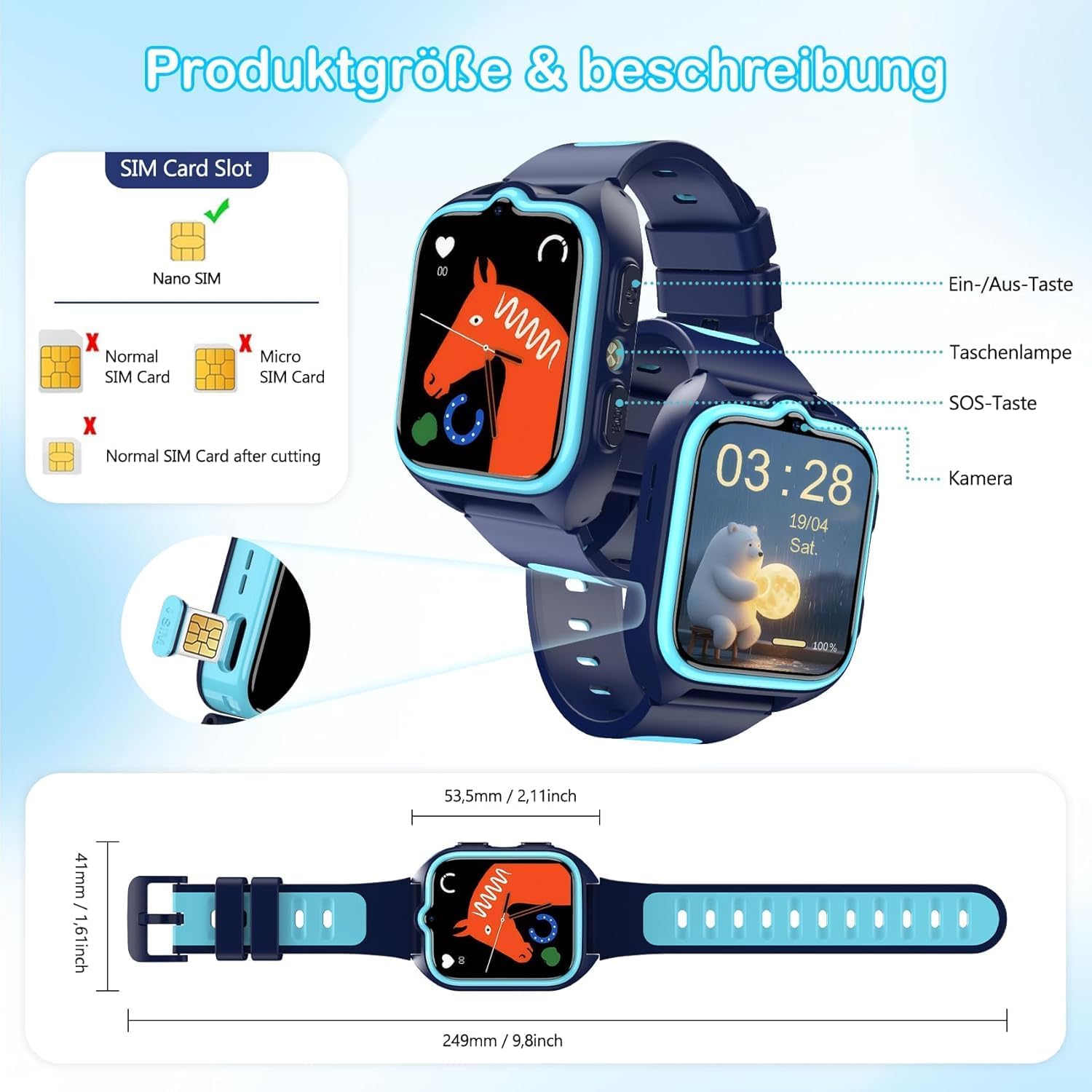
The IOWODO Z30 Smartwatch requires a Nano-SIM card (not included) for 4G connectivity, video calls, and other communication features. Ensure the SIM card is activated with a data plan before insertion.
- Carefully remove the protective case from the smartwatch.
- Localitza la ranura de la targeta SIM al lateral del rellotge.
- Using the provided SIM ejector tool, gently push into the small hole next to the SIM tray to eject it.
- Place the Nano-SIM card into the tray with the gold contacts facing up and the notched corner aligned correctly.
- Insert the SIM tray back into the smartwatch until it clicks into place.
- Reattach the protective case.
3.2. Càrrega del rellotge intel·ligent
Before first use, fully charge the smartwatch. The watch features an 800mAh battery and uses magnetic charging.
- Connecteu el cable de càrrega magnètic a un adaptador de corrent USB (no inclòs).
- Attach the magnetic end of the cable to the charging contacts on the back of the smartwatch. It will snap into place.
- La pantalla del rellotge mostrarà un indicador de càrrega. Una càrrega completa sol trigar entre 2 i 3 hores.

3.3. Instal·lació i emparellament de l'aplicació
To manage the smartwatch and access all its features, you need to install the 'SeTracker2' app on your smartphone (compatible with Android and iOS).
- On the smartwatch, navigate to the QR code display (usually found in the 'App' or 'Settings' menu).
- Using your smartphone's camera, scan the QR code displayed on the watch. This will direct you to download the 'SeTracker2' app from your app store.
- Install and open the 'SeTracker2' app.
- Register a new account if you don't have one, or log in.
- In the app, select 'Add Device' and scan the registration QR code from the watch again, or manually enter the device ID.
- Follow the on-screen prompts to complete the pairing process, including setting a nickname for the watch and assigning yourself as 'Papa' or 'Mama'.
- Grant necessary permissions to the app (e.g., location, notifications, camera, microphone) for full functionality.
4. Instruccions de funcionament
4.1. Navegació bàsica
- Encès/apagat: Premeu llargament el botó d'engegada.
- Navegació per pantalla: Swipe left/right or up/down on the touchscreen to access different menus and features.
- Tornada: Short press the Power button to return to the previous screen or the main interface.
4.2. 4G Video Calls and Voice Chat
With a Nano-SIM card inserted and activated, your child can make and receive calls and video calls.
- Fer trucades: Access the 'Contacts' menu on the watch, select a contact, and tap the call icon.
- Videotrucades: Access the 'Video Call' menu for high-definition video communication.
- Xat de veu: Use the 'Chat' function for sending and receiving voice messages with approved contacts.

4.3. GPS Tracking and Safety Zones
Monitor your child's location in real-time using the 'SeTracker2' app.
- Real-time Location: View your child's current location on a map within the app (GPS, LBS, Wi-Fi triple positioning).
- Safety Zones: Set up virtual boundaries (geofences) in the app. You will receive notifications if your child enters or leaves these designated safe areas.
- Historial de la ruta: Review your child's movement history for the past 30 days through the app.

4.4. SOS Emergency Function
In case of an emergency, the SOS function provides a quick way for your child to alert pre-set contacts.
- Activació: Press and hold the SOS button (usually located on the side of the watch) for 3 seconds.
- Trucada d'emergència: The watch will automatically dial up to three pre-configured emergency numbers in a loop until one is answered.

4.5. School Mode and Educational Games
- Modalitat escolar: Parents can set specific times in the app during which the watch will block calls and messages, allowing the child to focus on studies. Only the time will be displayed on the screen, but the SOS function remains active.
- Jocs educatius: The watch includes age-appropriate educational games (e.g., math, language) to stimulate learning.

4.6. Pedometer and Sleep Monitoring
The smartwatch can track your child's activity and sleep patterns.
- Podòmetre: Activate the pedometer in the 'SeTracker2' app to track steps, distance, and calories burned.
- Monitorització del son: Enable sleep observation in the app to monitor sleep quality and duration.
4.7. Altres característiques
- Càmera: The watch features a 1MP camera for taking photos.
- Llanterna: A built-in LED flashlight can be activated for convenience.
- Despertador: Set alarms via the app for reminders.
- Esferas personalitzables: Choose from various watch faces to personalize the display.
5. Manteniment
5.1. Resistència a l'aigua (IP68)
The IOWODO Z30 Smartwatch is IP68 waterproof, meaning it is resistant to dust and can withstand immersion in water up to 1.5 meters for 30 minutes. It is suitable for daily use, such as hand washing or playing in the rain, but not recommended for swimming or showering with hot water.
5.2. Neteja i cura
- Wipe the watch regularly with a soft, dry cloth.
- Eviteu utilitzar productes químics o materials abrasius.
- Mantingueu els contactes de càrrega nets i secs.
5.3. Cura de la bateria
- Carregueu el rellotge regularment, fins i tot si no l'esteu fent servir, per mantenir la bateria en bon estat.
- Eviteu les temperatures extremes, que poden afectar el rendiment de la bateria.
6. Solució De Problemes
- El rellotge no s'encén: Ensure the watch is fully charged. If it still doesn't turn on, try a different charging cable or adapter.
- Sense senyal de xarxa: Check if the Nano-SIM card is correctly inserted and activated. Verify that the area has 4G coverage.
- Inexactitud del GPS: GPS accuracy can be affected by environmental factors (e.g., dense buildings, indoors). Ensure the watch has a clear view del cel.
- L'aplicació no es connecta: Ensure the watch is powered on and has network connectivity. Check your phone's internet connection and that the 'SeTracker2' app has all necessary permissions. Try restarting both the watch and the app.
- Autonomia curta de la bateria: Adjust screen brightness, reduce the frequency of location updates in the app, and close unnecessary background applications on the watch.
7. Especificacions
| Característica | Especificació |
|---|---|
| Número de model | Z30 |
| Mida de la pantalla | Pantalla tàctil HD de 1.75 polzades |
| Connectivitat | 4G, Wi-Fi, Bluetooth |
| Posicionament | GPS + LBS + Wi-Fi |
| Tipus de targeta SIM | Nano-SIM (not included) |
| Capacitat de la bateria | 800 mAh |
| Resistència a l'aigua | IP68 |
| Càmera | 1 MP |
| Sistema operatiu | Compatible amb Android i iOS |
8. Garantia i Suport
The IOWODO Z30 Smartwatch comes with a 2-year manufacturer's warranty. For technical support, troubleshooting, or warranty claims, please contact IOWODO customer service through their official weblloc web o el venedor on es va comprar el producte.
Per a més informació, visiteu el IOWODO Brand Store.