
OMBAR N1
OMBAR N1 4K+2.5K Rear View Manual d'usuari de Mirror Dash Cam
Model: N1
1. Introducció
The OMBAR N1 is a high-performance rear view mirror dash camera system designed to enhance driving safety and provide comprehensive video recording. It features dual cameras for front 4K and rear 2.5K recording, advanced driver-assistance systems (ADAS), blind spot detection (BSD), lane change assist (LCA), GPS tracking, parking monitoring, and Wi-Fi connectivity for easy file gestió.

Image 1.1: OMBAR N1 Mirror Dash Cam and companion mobile application interface.
2. Contingut del paquet
Si us plau, verifiqueu que tots els articles que s'enumeren a continuació s'inclouen al vostre paquet. Si falta algun article o hi ha algun malmès, poseu-vos en contacte amb el servei d'atenció al client.

Image 2.1: All components included in the OMBAR N1 Mirror Dash Cam package.
- 1 x OMBAR N1 4K Mirror Dash Cam
- 1 x 2.5K Rear Camera with Screws and Adhesive Mount
- 1 x 12ft Type-C Power Cable with Car Charger
- 1 cable de càmera posterior de 20 peus
- 1 x Antena GPS externa
- 1 targeta MicroSD de 64 GB
- 1 x Pel·lícula protectora antireflexos
- 1 x OMBAR User Manual
- 5 x clips de cable
- 4 x corretges
- 1 x eina de palanca
- 1 x Cleaning Wipes
3. Configuració i instal·lació
3.1. Muntatge de la Dash Cam
- Attach to Rear View Mirall: Secure the N1 Mirror Dash Cam over your existing rear view mirror using the provided straps. Ensure it is firmly attached and centered for optimal viewing.
- Adjust Front Camera Lens: The front camera lens can be adjusted to capture the desired field of view.
3.2. Instal·lació de la càmera posterior
- Trieu la ubicació de muntatge: Install the rear camera on the rear windshield or near the license plate. Ensure the view està sense obstacles.
- Connect Rear Camera Cable: Route the 20ft rear camera cable from the main dash cam unit to the rear camera. Connect the cable securely.
- Ajusta la càmera posterior View: The rear camera display can be adjusted for mirror flip and vertical flip settings to match your installation orientation.

Image 3.1: Adjustable rear camera display options for mirror and vertical flipping.
3.3. Connecting Power and GPS
- Inseriu la targeta MicroSD: Insert the provided 64GB MicroSD card into the designated slot on the dash cam.
- Connecteu l'antena GPS: Plug the external GPS antenna into the dash cam and mount it on the dashboard or windshield where it has a clear view del cel.
- Connexió d'alimentació: Connect the Type-C power cable to the dash cam and plug the car charger into your vehicle's 12V power outlet.
3.4. Applying Anti-Glare Protective Film
The anti-glare protective film helps minimize reflections and enhances contrast for improved visibility. Carefully apply the film to the dash cam screen, ensuring no air bubbles.

Image 3.2: The anti-glare protective film reduces reflections and improves screen clarity.
4. Instruccions de funcionament
4.1. Funcionament bàsic
- Encès/apagat: The dash cam will automatically power on and begin recording when the vehicle starts, and power off when the ignition is turned off.
- Visualització de la pantalla: The 12-inch IPS display provides a wide field of view. Brightness, lens angle, and field of view can be adjusted via the touchscreen interface.

Image 4.1: Adjustable screen settings for optimal viewexperiència.
4.2. Modes d'enregistrament
- Enregistrament en bucle: The dash cam records video in segments (1, 3, or 5 minutes). When the MicroSD card is full, the oldest unlocked recordings are automatically overwritten.
- Gravació d'emergència: In case of a collision, the built-in G-sensor automatically locks the current video segment to prevent it from being overwritten. This can also be triggered manually or via voice command.

Image 4.2: Emergency recording methods ensure critical footage està salvat.
4.3. Monitor d'aparcament
The 24-hour parking monitor provides surveillance when your vehicle is parked. This feature requires a hardwire kit (sold separately, ASIN: B0DQK1QW7ZM) for continuous power.

Image 4.3: The 24-hour parking monitor provides security for your vehicle.
4.4. Control per veu
The dash cam supports various voice commands for hands-free operation. Examples include "Take photo," "Start recording," "Turn on WiFi," "Turn off display," and "Show rear camera."

Image 4.4: Voice control allows for hands-free operation of the dash cam.
4.5. Wi-Fi i control d'aplicacions
Connect the dash cam to your smartphone via 5.8GHz Wi-Fi using the OMBAR app. This allows for live viewing, downloading, and sharing of recorded footage. The Wi-Fi range is approximately 25ft (about 1.5 parking spaces) and does not support remote live view.

Image 4.5: The OMBAR app facilitates video management via 5.8GHz Wi-Fi.
5. Funcions avançades
5.1. ADAS (Advanced Driver Assistance System)
The ADAS feature provides real-time alerts to help prevent accidents. This includes:
- Avís de col·lisió frontal: Alerts when approaching a vehicle too quickly.
- Avís de sortida de carril: Notifies if the vehicle drifts out of its lane.
- Avís de col·lisió amb vianants: Detects pedestrians in the vehicle's path.
- Forward Vehicle Start Warning: Alerts when traffic ahead begins to move.
- Close Range Warning: Warns of objects in close proximity.
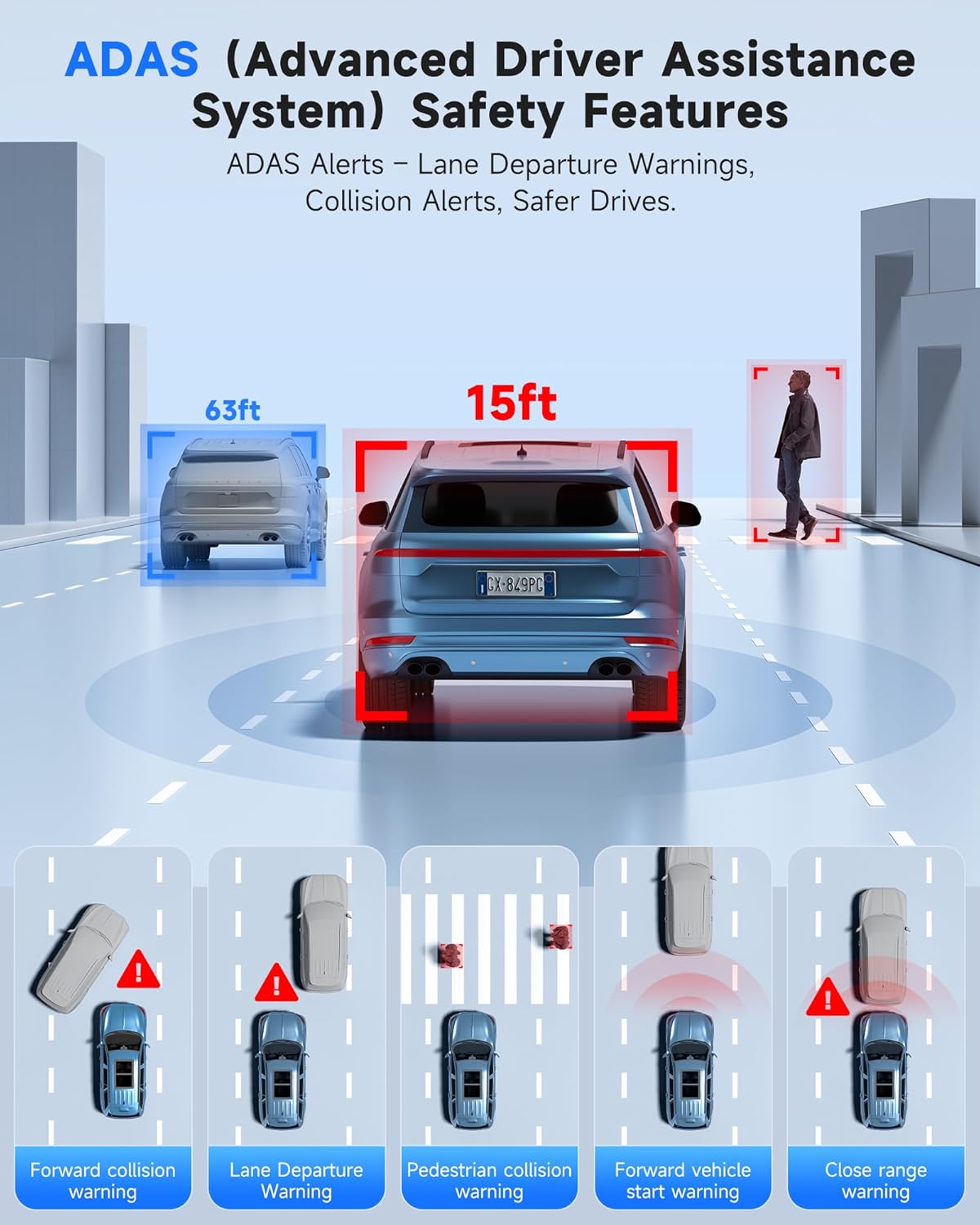
Image 5.1: ADAS provides multiple safety alerts for a safer driving experience.
5.2. BSD (Blind Spot Detection) & LCA (Lane Change Assist)
These features provide 360° protection by monitoring your vehicle's sides and rear for approaching vehicles.
- Blind Spot Detection: Alerts to vehicles in your blind spots.
- Assistència al canvi de carril: Warns if a lane change is unsafe due to approaching vehicles.

Image 5.2: BSD and LCA provide warnings for vehicles in blind spots and during lane changes.
5.3. Built-in GPS & Route Tracking
The integrated GPS module records your driving route, speed, and location data, which can be reviewed via the OMBAR app or dedicated PC software.

Image 5.3: GPS tracking records route and speed data for review.
5.4. Visió nocturna
Advanced HDR technology and sensor capabilities ensure clear video recording even in low-light conditions, capturing details like license plates at night.

Image 5.4: Night vision capabilities provide clear footage en ambients amb poca llum.
6. Manteniment
- Neteja: Use a soft, dry cloth to clean the dash cam screen and lenses. Avoid abrasive cleaners.
- Cura de la targeta MicroSD: Format the MicroSD card regularly (e.g., once a month) to ensure optimal performance and prevent data corruption. Use only high-quality MicroSD cards.
- Actualitzacions de firmware: Check the OMBAR website or app periodically for firmware updates to ensure your dash cam has the latest features and improvements.
7. Solució De Problemes
| Problema | Causa possible | Solució |
|---|---|---|
| La càmera del salpicader no s'encén. | No hi ha font d'alimentació; cable defectuós. | Check power cable connection to car charger and dash cam. Ensure car's 12V outlet is functional. |
| L'enregistrament s'atura o es congela. | MicroSD card full or corrupted; low-quality MicroSD card. | Format the MicroSD card. Replace with a high-speed, high-endurance MicroSD card if issues persist. |
| No s'ha trobat el senyal GPS. | Antena GPS obstruïda o desconnectada. | Ensure GPS antenna is mounted with a clear view of the sky and securely connected. |
| Problemes de connexió Wi-Fi. | Incorrect password; out of range. | Verify Wi-Fi password. Ensure device is within 25ft of the dash cam. |
| Screen is too dark/bright. | Brightness settings. | Adjust screen brightness via the touchscreen settings. |
8. Especificacions
| Característica | Detall |
|---|---|
| Nom del model | N1 |
| Resolució de la càmera frontal | 4K (3840x2160) a 30 fps |
| Resolució de la càmera posterior | 2.5K (2560x1440) a 30 fps |
| Mostra | Pantalla tàctil IPS de 12 polzades |
| Connectivitat | 5.8GHz Wi-Fi, USB, Memory SD Card |
| Característiques especials | Built-In WiFi, Built-In GPS, G-Sensor, ADAS, Blind Spot Detection, Lane Change Assist, Parking Monitor, Reverse Assist, Touch Screen, App Control, Voice Control, Loop Recording, Built-In Microphone, Built-In Speaker, Built-In Supercapacitor, HDR, Night Vision |
| Emmagatzematge | Supports MicroSD card (64GB included) |
| Temperatura de funcionament | -20 °F a 176 °F (-28 °C a 80 °C) |
| Dimensions del producte | 0.1 x 0.5 x 0.5 polzades |
| Pes de l'article | 2.38 lliures |
| Tipus de muntatge | posteriorview Muntatge del mirall |
| Tipus de servei del vehicle | Autobús, Cotxe, Monovolum, Camió |

Image 8.1: The dash cam is designed for reliable operation in extreme temperatures.
9. Garantia i Suport
- Garantia: The OMBAR N1 Mirror Dash Cam comes with a 1-year manufacturer's warranty.
- Política de devolució: A 30-day return policy is applicable from the date of purchase.
- Atenció al client: For technical assistance or warranty claims, please contact OMBAR customer support at support@ombars.com. Support is typically available within 24 hours.
Ask a question about this manual
Ask about setup, troubleshooting, compatibility, parts, safety, or missing instructions. Manuals+ will review the question and use this page’s manual context to help answer it.