
1. Introducció
This manual provides essential information for setting up, operating, and maintaining your DOOGEE Tab A9 Pro Android 15 Tablet. Please read it thoroughly to ensure proper usage and to maximize your device's capabilities.
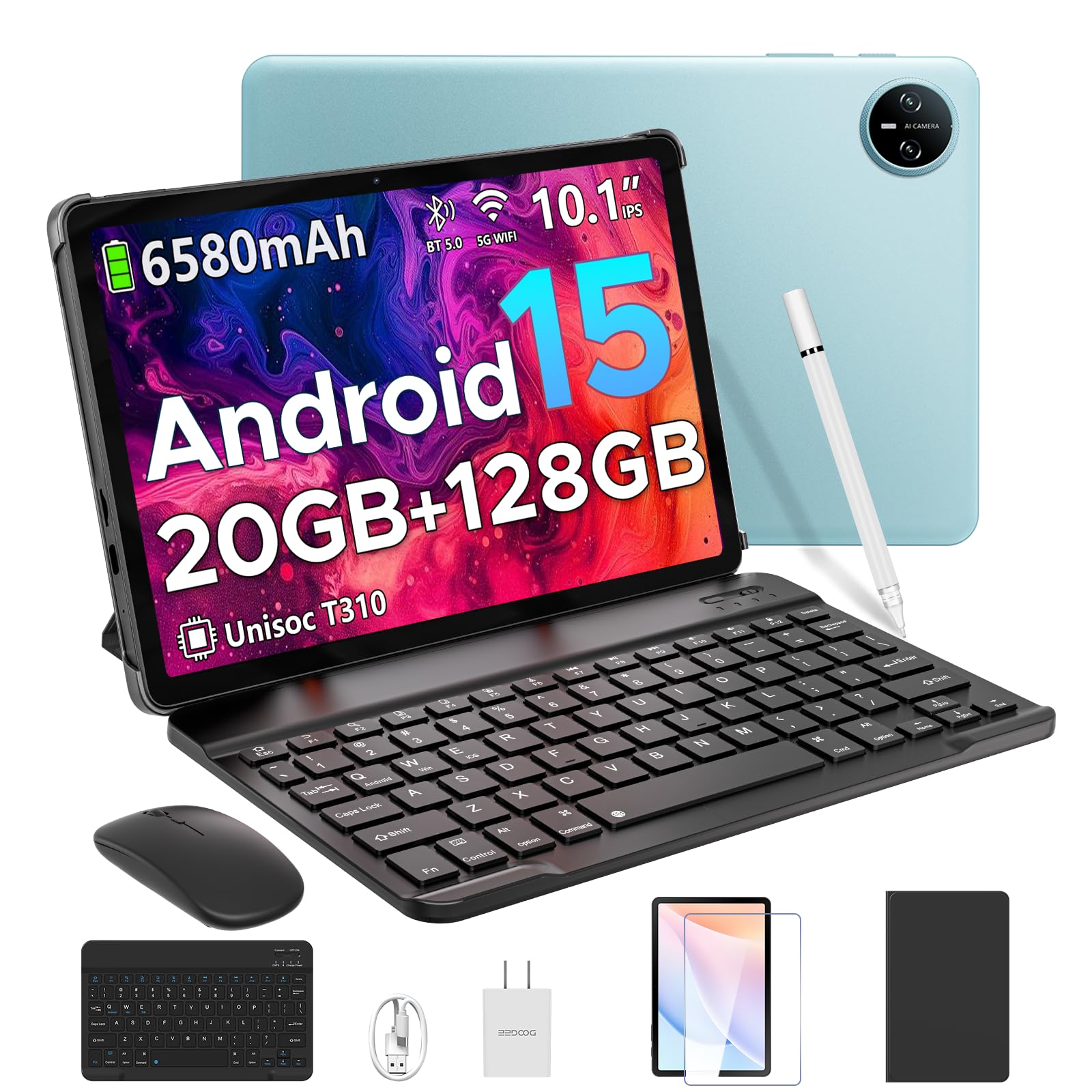
Image 1.1: The DOOGEE Tab A9 Pro Tablet.
2. Què hi ha a la caixa
Your DOOGEE Tab A9 Pro package includes the following items:
- DOOGEE Tab A9 Pro Tablet (x1)
- Cable USB tipus C (x1)
- Carregador (x1)
- Manual (x1)
- Targeta de garantia (x1)
- Bluetooth Keyboard (VIP Edition)
- Bluetooth Mouse (VIP Edition)
- Stylus (VIP Edition)
- Leather Protective Cover (VIP Edition)
- Tempered Film (VIP Edition)

Image 2.1: All items included in the DOOGEE Tab A9 Pro package.
3. Producte acabatview
The DOOGEE Tab A9 Pro features a sleek design with essential components for user interaction and connectivity.
3.1 Característiques físiques
- Visualització: 10.1-inch IPS HD Ultra-Clear Display.
- Càmeres: 8MP Main Camera (rear) and 5MP Front Camera.
- Àudio: High-Quality Dual Speakers and a 3.5mm Audio Jack.
- Ports: Type-C USB port for charging and data transfer.
- Botons: Power button and volume controls located on the side.

Imatge 3.1: posterior view of the DOOGEE Tab A9 Pro, highlighting the camera module.

Imatge 3.2: Lateral view of the tablet, illustrating the power button, volume controls, and ports.
Vídeo 3.1: Una breu projecció de vídeoasing the ultra-thin body and design of the DOOGEE Tab A9 Pro.
4. Configuració
4.1 Càrrega inicial
Before first use, fully charge your tablet using the provided Type-C USB cable and charger. The battery indicator on the screen will show charging progress.
4.2 Encès/Apagat
- Per encendre: Press and hold the power button until the DOOGEE logo appears.
- Per apagar: Mantingueu premut el botó d'engegada i, a continuació, seleccioneu "Apagar" de les opcions que apareixen a la pantalla.
4.3 Assistent de configuració inicial
Upon first power-on, follow the on-screen instructions to complete the initial setup, including language selection, Wi-Fi connection, and Google account login.
5. Operating System (Android 15)
The DOOGEE Tab A9 Pro runs on the Android 15 operating system, offering a smart, fluid, and secure user experience with enhanced privacy features.

Image 5.1: Visual representation of the Android 15 system interface.
Vídeo 5.1: Un overview of the DOOGEE Tab A9 Pro running Android 15.
6. Performance & Storage
The tablet is designed for smooth operation and ampla capacitat d'emmagatzematge.
Processador 6.1
Powered by the energy-efficient Unisoc T310 octa-core processor, the tablet ensures seamless performance for various tasks.

Image 6.1: Diagram illustrating the Unisoc T310 Quad-Core Processor.
6.2 RAM and Storage
The tablet features 20GB of RAM (4GB physical + 16GB virtual) and 128GB of internal storage. Storage can be expanded up to 2TB using a microSD card (sold separately).

Image 6.2: Visual representation of the tablet's RAM and ROM configuration.
7. Display & Audio
Experience vibrant visuals and clear sound with your tablet.
7.1 Pantalla
The 10.1-inch IPS HD display offers wide viewing angles and a resolution of 1280x800 for an immersive visual experience.

Image 7.1: The 10.1-inch IPS HD display with key specifications.
7.2 Àudio
Built-in dual speakers deliver clear and dynamic sound for movies, music, and video calls.

Image 7.2: Illustration of the tablet's dual speaker system.
8. Càmeres
Capture moments and conduct video calls with the integrated cameras.
8.1 Main Camera
The 8MP main camera allows you to take sharp photos.

Image 8.1: Close-up of the 8MP main camera on the tablet's rear.
8.2 Càmera frontal
La càmera frontal de 5MP és adequada per a selfies i videotrucades.

Image 8.2: The 5MP front camera in use for a video call.
9. Connectivitat
Stay connected with various wireless options.
9.1 connexions Wi-Fi
Supports 2.4G/5G dual-band Wi-Fi for smooth, high-speed internet access.

Image 9.1: Features of WiFi 5 connectivity on the tablet.
Bluetooth 9.2
Equipped with Bluetooth 5.0 for connecting wireless accessories.
9.3 GPS
Built-in GPS provides accurate navigation for travel and outdoor activities.
10. Accessoris
The DOOGEE Tab A9 Pro comes with a suite of accessories to enhance its functionality.
10.1 Teclat Bluetooth
Connect the Bluetooth keyboard for a desktop-like typing experience, ideal for productivity tasks.

Image 10.1: The tablet connected to its Bluetooth keyboard for efficient typing.
10.2 Mouse and Stylus
The included mouse and stylus further enhance navigation and interaction, especially for note-taking and creative tasks.

Image 10.2: The tablet shown with its accompanying keyboard and mouse.

Image 10.3: The tablet being used with the stylus for precise input.
10.3 funda protectora
The protective case shields your tablet from drops and scratches and can also function as a stand.

Image 10.4: The tablet securely placed within its protective case.
11. Gestió de la bateria
The tablet is equipped with a high-capacity battery for extended use.
Capacitat de la bateria 11.1
Features a long-lasting 6580mAh battery, providing hours of power for various activities without frequent recharging.

Image 11.1: Diagram showing the 6580mAh battery inside the tablet.
Video 11.1: A video highlighting the large battery capacity of the DOOGEE Tab A9 Pro.
12. Característiques de seguretat
Protect your device and data with built-in security options.
12.1 Desbloqueig facial
Effortlessly unlock your tablet using facial recognition technology.

Image 12.1: Illustration of the facial recognition unlock feature.
12.2 Fortified Privacy Shield
Android 15 provides enhanced privacy controls, robust data encryption, timely security patches, and proactive app screening for unbreakable security.

Imatge 12.2: acabatview of Android 15's privacy features.
13. Multitasking & Productivity
Optimize your workflow and entertainment with these features.
13.1 Split-Screen Multitasking
Run two applications simultaneously side-by-side for enhanced productivity.

Image 13.1: The tablet displaying two apps in split-screen mode.
13.2 Built-in WPS Office
The tablet comes with WPS Office pre-installed, providing PC-level productivity for documents, spreadsheets, and presentations (Note: WPS Office feature may be unavailable in certain regions).

Image 13.2: The tablet showcasing WPS Office applications.
Video 13.1: A video demonstrating the DOOGEE Tab A9 Pro's capabilities for learning and work.
14. Manteniment
14.1 Neteja
Feu servir un drap suau i sense borrissol per netejar la pantalla i el cos de la tauleta. Eviteu utilitzar productes químics agressius o materials abrasius.
14.2 Actualitzacions de programari
Regularly check for and install system updates to ensure optimal performance, security, and access to new features. Navigate to Configuració > Sistema > Actualització del sistema per comprovar si hi ha actualitzacions.
15. Solució De Problemes
Aquesta secció tracta problemes habituals que podeu trobar amb la vostra tauleta.
La tauleta 15.1 no s'encén
- Assegureu-vos que la tauleta estigui prou carregada. Connecteu-la al carregador durant almenys 30 minuts.
- Premeu i manteniu premut el botó d'engegada durant 10-15 segons per realitzar un reinici forçat.
15.2 Rendiment lent
- Tanca les aplicacions de fons innecessàries.
- Esborra les dades de la memòria cau de les aplicacions que s'utilitzen amb freqüència.
- Ensure sufficient storage space is available. Delete old files or transfer them to external storage.
- Reinicieu la tauleta.
15.3 Problemes de connectivitat Wi-Fi
- Reinicieu el router Wi-Fi i la tauleta.
- Oblida't de la xarxa Wi-Fi i torna a connectar-te.
- Assegureu-vos que esteu dins de l'abast del senyal Wi-Fi.
15.4 Accessories Not Connecting
- Ensure Bluetooth is enabled on the tablet and the accessory.
- Check if the accessory is charged and in pairing mode.
- Refer to the accessory's individual manual for specific pairing instructions.
16. Especificacions
| Característica | Especificació |
|---|---|
| Marca | DOOGEE |
| Nom del model | TABA9PRO |
| Número de model de l'article | Pestanya A9 Pro |
| Sistema operatiu | Android 15 |
| Mida de la pantalla de peu | 10.1 polzades |
| Resolució de pantalla | 1280*800 HD |
| Resolució de pantalla màxima | 1280*800 píxels |
| Marca del processador | Unisoc |
| Coprocessador gràfic | Mali-G52 1-Core-2EE |
| Capacitat d'emmagatzematge de memòria | 128 GB (ampliable fins a 2 TB amb microSD) |
| RAM | 20 GB (4 GB físic + 16 GB virtual) |
| Tipus sense fil | 802.11ac, 802.11n (2.4G/5G Dual-band WiFi) |
| Bluetooth | 5.0 |
| Capacitat de la bateria | Polímer de liti de 6580 mAh (inclòs) |
| Durada mitjana de la bateria | Up to 2 years (estimated lifespan) |
| Pes de l'article | 1.05 lliures |
| Dimensions del producte | 9.55 x 6.33 x 0.31 polzades |
| Color | Blue (other colors available) |
| Data de primera disponibilitat | 23 d'abril de 2025 |
17. Garantia i assistència
17.1 Informació de la garantia
Your DOOGEE Tab A9 Pro comes with a 2-Year Limited Warranty. Please refer to the included Warranty Card for detailed terms and conditions.
17.2 Atenció al client
For any questions or technical assistance, please contact our support team. We aim to respond within 24 hours.
- Assistència en línia: Available 24/7.
- Devolucions: 30-day money-back guarantee and free returns.