
1. Introducció
The ANBERNIC RG34XXSP is a portable retro handheld game console designed for an immersive gaming experience. Featuring a flip design, a 3.4-inch IPS screen, and a powerful H700 quad-core processor, it supports a wide range of classic game formats. This manual provides essential information for setting up, operating, and maintaining your device.
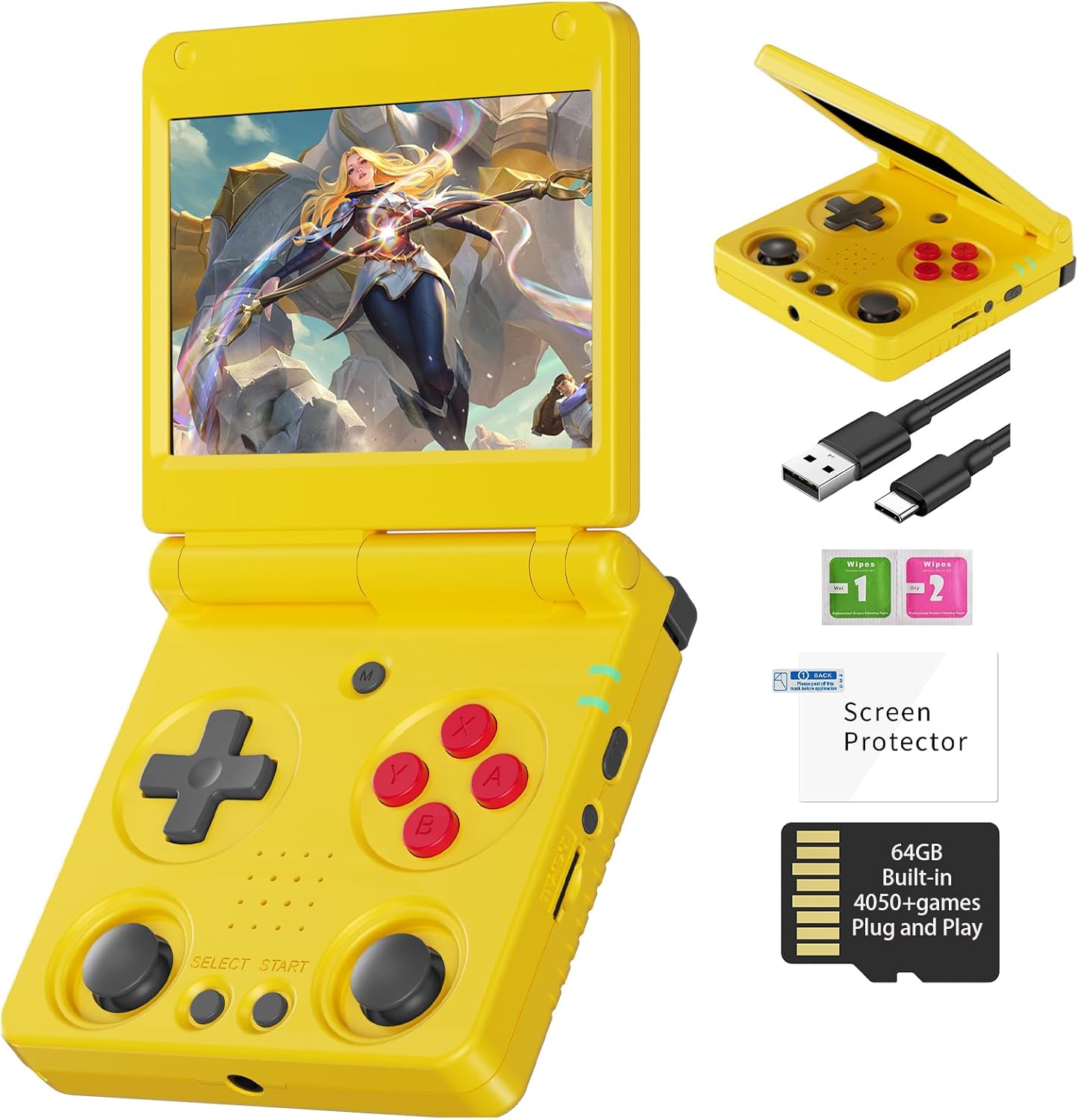
Image 1.1: The ANBERNIC RG34XXSP Retro Handheld Game Console in yellow.
2. Informació de seguretat
- Mantingueu el dispositiu allunyat de l'aigua i la humitat.
- Eviteu les temperatures extremes i la llum solar directa.
- No intenteu desmuntar o reparar el dispositiu vosaltres mateixos. Contacteu amb l'assistència al client per obtenir assistència.
- Use only the provided charging cable or a certified USB Type-C charger.
- Mantenir fora de l'abast dels nens petits a causa de les peces petites.
- Prolonged use at high volume may cause hearing damage.
3. Contingut del paquet
Verifiqueu que tots els elements siguin presents al paquet:
- RG34XXSP Game Console
- Cable de càrrega USB
- Protector de pantalla
- Manual d'usuari
- Caixa de regal

Image 3.1: Included accessories with the RG34XXSP console.
4. Disseny del dispositiu
Familiarize yourself with the buttons, ports, and features of your RG34XXSP console.
Image 4.1: Detailed diagram of the RG34XXSP console layout.
- D-Pad: Directional input for navigation and gameplay.
- Game Keys (A, B, X, Y): Botons d'acció principals.
- Joysticks esquerre/dret: Analog input for movement and camera control in supported games.
- Botons SELECCIONAR/INICIAR: Game-specific functions, menu navigation.
- Botó MENÚ: Accesses the console's main menu or in-game options.
- Tecla d'engegada: Turns the console on/off.
- Llum indicadora: Shows power and charging status.
- TF1/INT. Slot: Main TF card slot for system and games.
- TF2/EXT. Slot: Secondary TF card slot for additional storage.
- VOL+/- Buttons: Ajusta el volum.
- OTG/USB Port: Per connectar dispositius externs o carregar.
- Port HDMI: Connects to a TV or external display.
- L1/L2/R1/R2 Shoulder Buttons: Additional action buttons, typically used for triggers or modifiers.
5. Configuració
- Unpack the Console: Carefully remove the RG34XXSP console and all accessories from its packaging.
- Charge the Console: Connect the provided USB Type-C cable to the console's charging port and a compatible USB power adapter (not included). Charge the console until the battery indicator shows full. The 3300mAh Li-Polymer battery provides approximately 7-8 hours of gameplay on a full charge.
- Inseriu la targeta TF: The console comes with a 64GB TF card pre-installed in the TF1/INT. slot. This card contains the operating system and pre-loaded games. If you wish to expand storage, insert an additional TF card (up to 512GB) into the TF2/EXT. slot.
- Encès: Open the console by flipping the upper cover. The magnetic suction function will hold it open. Press and hold the Power Key until the screen illuminates.
- Initial Navigation: Upon startup, use the D-Pad or joysticks to navigate the main menu. Press the 'A' button to select options and 'B' to go back.
6. Instruccions de funcionament
6.1 Funcionament bàsic
- Activació/desactivació: Press and hold the Power Key to turn the console on or off.
- Mode de repòs: Closing the console's lid will activate sleep mode, thanks to the built-in Hall switch chip. Opening the lid will resume operation.
- Ajust de volum: Use the VOL+/- buttons on the side of the console.
- Navegació del menú: Use the D-Pad or joysticks to move through menu options. Press 'A' to confirm, 'B' to cancel or go back.
6.2 Jugar a jocs
- From the main menu, navigate to the desired emulator or game list.
- Select a game using the 'A' button.
- Once the game loads, use the D-Pad, joysticks, and game keys (A, B, X, Y, L1, L2, R1, R2) to play. Refer to the game's specific controls if available.
- To exit a game or access in-game options, press the MENU button.
6.3 In-Game Menu Shortcuts
The RG34XXSP supports various in-game shortcuts for enhanced control:
- Menú: Accesses the in-game menu.
- Menu + R2: Avança ràpida.
- Menu + L2: Slow Motion.
- Menu + R1: Save State.
- Menu + L1: Load State.
- Menu + Y: Display Frame Rate.
- Menu + B: Captura de pantalla.
- Menu + X: Pausa.
- Menu + START: Quit Game.
- Menu + VOL+: Adjust Brightness.
- Menu + Left/Right Direction: Select Save State Slot.
7. Game Management
The RG34XXSP supports over 30 game formats. You can add more games by transferring compatible ROM files to the TF card. The console supports dual card slots and TF card expansion up to 512GB.
7.1 Adding Games
- Apagueu la consola.
- Carefully remove the TF card (TF1/INT. or TF2/EXT.) from its slot.
- Insert the TF card into a computer's card reader.
- Locate the appropriate emulator folder (e.g., 'GBA', 'PS1', 'PSP') on the TF card.
- Copy your game ROM files into the respective folders. Ensure the ROMs are in compatible formats.
- Safely eject the TF card from your computer and reinsert it into the console.
- Power on the console. The new games should now appear in the corresponding emulator's game list.
The console is compatible with third-party software like RixeIHK, which allows for one-click game downloads and management.

Image 7.1: Supported game formats and console models.
8. Connectivitat
The RG34XXSP offers multiple connectivity options for enhanced gaming and entertainment.
8.1 Wi-Fi i Bluetooth
- Wi-Fi (2.4G/5G 802.11a/b/g/n/ac): Connect to a wireless network for online multiplayer games, streaming, and system updates.
- Bluetooth (Bluetooth 4.2): Connect wireless controllers or other Bluetooth-enabled accessories.
8.2 TV Output (HDMI)
Connect your RG34XXSP to a TV or monitor using an HDMI cable (not included) for a larger screen gaming experience. This mode is ideal for family gatherings or parties.

Image 8.1: RG34XXSP connected to a TV for screen casting.
8.3 External Controllers
The console supports 2.4G wireless controllers and wired controllers, as well as Bluetooth controllers, for versatile gameplay options.
9. Manteniment
- Neteja: Feu servir un drap suau i sec per netejar l'exterior de la consola. No utilitzeu netejadors líquids ni materials abrasius.
- Cura de la pantalla: Apply the included screen protector to prevent scratches. Clean the screen with a microfiber cloth.
- Emmagatzematge: When not in use, close the console's lid to protect the screen. Store in a cool, dry place away from direct sunlight.
- Bateria: To prolong battery life, avoid fully discharging the battery frequently. Charge regularly, even if not in active use.
10. Solució De Problemes
- Console not turning on: Ensure the battery is charged. Connect the charger and try again. If the issue persists, perform a hard reset by pressing the reset button (if available) or holding the power button for an extended period.
- Games not loading: Verify that the TF card is properly inserted. Check if the game ROM file is in a supported format and placed in the correct emulator folder.
- Screen issues (flickering, no display): Ensure the console is fully open and the screen connection is stable. If connected to a TV, check the HDMI cable and TV input.
- Problemes de so: Check the volume level using the VOL+/- buttons. Ensure headphones are properly connected if in use.
- Els controls no responen: Restart the console. If using external controllers, ensure they are properly paired via Bluetooth or connected via USB.
11. Especificacions
| Característica | Detall |
|---|---|
| Número de model | RG34XXSP |
| Dimensions | 3.45 cm de llargada x 2.49 cm d'amplada x 0.71 cm d'alçada |
| Pes | 0.28 quilograms (9.9 unces) |
| Mida de la pantalla | 3.4 Inches IPS Full Viewing Angle, OCA Full Lamination |
| Resolució de pantalla | 720*480 |
| CPU | H700 Quad-core ARM Cortex-A53, 1.5GHz |
| GPU | Dual-core G31 MP2 |
| RAM | LPDDR4 2 GB |
| Emmagatzematge | 64GB TF/MicroSD (expandable up to 512GB) |
| Sistema operatiu | Linux de 64 bits |
| Wi-Fi | 2.4G/5G 802.11a/b/g/n/ac |
| Bluetooth | Bluetooth 4.2 |
| Bateria | 3300mAh Li-Polymer, up to 8 hours battery life |
| Carregant | USB Type-C (5V/1.5A, supports C2C charger) |
| Connectivitat | HDMI Output, USB OTG |
| Tipus de controlador | Joystick, D-Pad, Buttons |
| Material | Plàstic |
| Edat recomanada | 15 anys i més |
12. Vídeo oficial del producte
Vídeo 12.1: Presentació oficial del producte en vídeoasing the ANBERNIC RG34XXSP handheld gaming console and its features.
13. Garantia i Suport
For warranty information, technical support, or service inquiries, please refer to the warranty card included in your package or contact the retailer where you purchased the product. You may also visit the official ANBERNIC weblloc web per obtenir més ajuda i recursos de suport actualitzats.
Si us plau, conserveu el comprovant de compra per a qualsevol reclamació de garantia.