
1. Producte acabatview
The Philips 40" Class 6000 Series Full HD 1080p Smart LED TV (Model 40PFL6533/F7) offers a high-definition viewing experience with integrated smart features. This television operates on the Roku OS, providing access to a wide array of streaming content. It is compatible with voice assistants such as Alexa, Google Assistant, and Apple HomeKit, allowing for convenient control.
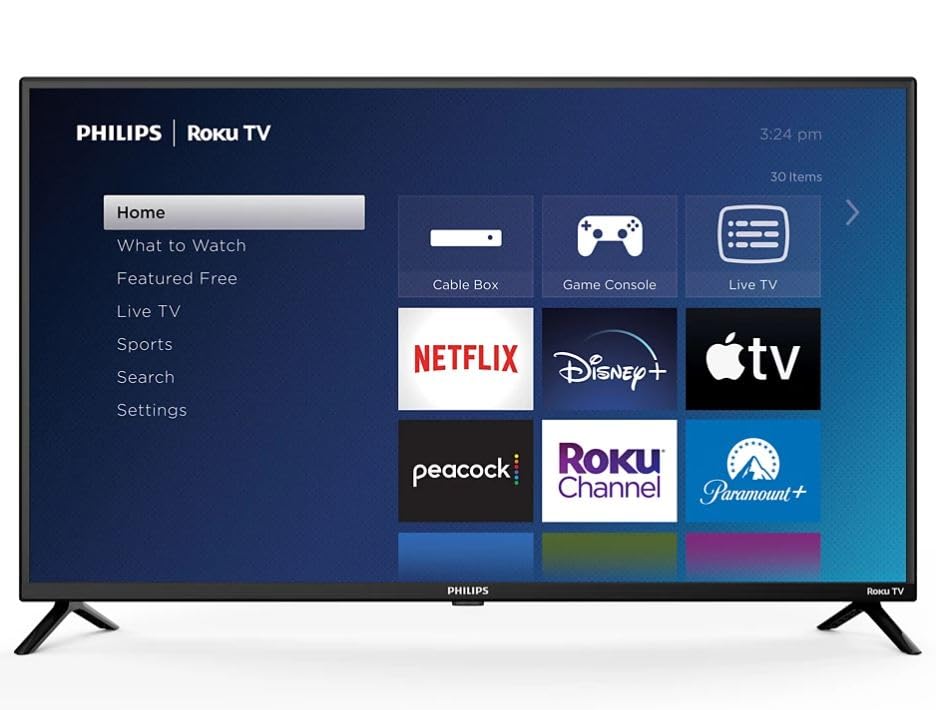
Image: Philips 40-inch Smart LED TV showcasing its Roku operating system interface with popular streaming applications.
2. Guia de configuració
2.1 Desembalatge i inspecció inicial
Carefully remove the TV and its components from the packaging. Ensure all items listed in the 'What's in the Box' section are present and undamaged.
2.2 Col·locació del suport
Place the TV screen-down on a soft, clean surface to prevent scratches. Align the included stand feet with the designated slots on the bottom of the TV. Secure the feet using the provided screws. Refer to the diagram below for proper attachment.

Image: Detail of the Philips and Roku TV branding on the lower frame of the television, indicating the front-facing design.
2.3 Connexió de l'alimentació i de dispositius externs
Connect the power cord to the TV and then to a wall outlet. The TV features multiple connectivity options:
- Ports HDMI: 3 ports for connecting devices like gaming consoles, Blu-ray players, or cable boxes.
- Entrada USB: 1 port for media playback from USB drives.
- Sortida d'àudio òptic: Per connectar a sistemes d'àudio externs.
- Wi-Fi: Built-in for internet connectivity.
- Ethernet: Per a una connexió a Internet per cable.
Connect your desired devices to the appropriate ports. For optimal performance, use high-quality HDMI cables.

Imatge: Side profile of the television highlighting the accessible input/output ports for external device connections.
2.4 Initial Setup and Remote Pairing
Upon first power-on, the TV will guide you through the initial setup process. This includes selecting your language, connecting to your Wi-Fi network, and activating the Roku OS. Follow the on-screen instructions. The remote control typically pairs automatically during this process. If not, refer to the remote control's specific pairing instructions, usually involving holding down certain buttons for a few seconds.
3. Instruccions de funcionament
3.1 Funcions bàsiques
- Potència: Premeu el botó d'engegada del comandament a distància per encendre o apagar el televisor.
- Volum: Use the 'Vol +' and 'Vol -' buttons to adjust the volume.
- Entrades: Use the 'Input' button to switch between connected devices (HDMI 1, HDMI 2, USB, etc.).
- Navegació: Use the directional pad (up, down, left, right) and 'OK' button to navigate menus and select options.
3.2 Smart TV Features (Roku OS)
The Roku OS provides a user-friendly interface for accessing streaming content. The home screen displays various streaming channels (apps) and input options. You can customize the order of channels and add new ones from the Roku Channel Store.

Image: The Roku TV home screen, illustrating the intuitive layout for app selection and navigation.
- Aplicacions de streaming: Access pre-installed apps like Netflix, Prime Video, Max, Disney Plus, YouTube TV, Paramount+, Apple TV+, Crunchyroll, and more.
- Control de veu: The TV is compatible with Alexa, Google Assistant, and Apple HomeKit. Use your voice assistant device to control TV functions such as power, volume, and channel selection.
- Cerca: Use the search function to find movies, TV shows, actors, or channels across multiple streaming services.
3.3 Configuració d'imatge i àudio
Access the 'Settings' menu to adjust picture and audio preferences. You can select various picture modes (e.g., Standard, Movie, Sport) and fine-tune brightness, contrast, and color. The TV supports Dolby Audio for an enhanced sound experience.
4. Manteniment
4.1 Neteja del televisor
- Pantalla: Netegeu suaument la pantalla amb un drap suau i sense borrissol. Per a marques difícils, netegeu suaument.ampNetegeu el drap amb aigua o un netejador de pantalles especialitzat. No ruixeu líquid directament sobre la pantalla.
- Marc i suport: Feu servir un drap suau i sec per netejar la pols i la brutícia del marc i el suport del televisor.
4.2 Atenció general
- Eviteu col·locar el televisor sota la llum solar directa o a prop de fonts de calor.
- Assegureu-vos que hi hagi una ventilació adequada al voltant del televisor per evitar el sobreescalfament.
- No bloquejar les obertures de ventilació.
5. Solució De Problemes
5.1 Sense poder
- Comproveu si el cable d'alimentació està ben connectat tant al televisor com a la presa de corrent.
- Verifiqueu que la presa de corrent funciona connectant-hi un altre dispositiu.
- Proveu una presa de corrent diferent.
5.2 No Picture/Sound from External Device
- Assegureu-vos que la font d'entrada correcta estigui seleccionada al televisor.
- Check the cable connections between the device and the TV. Try re-seating the cables.
- Test with a different HDMI cable if possible.
- Verifiqueu que el dispositiu extern estigui encès i funcioni correctament.
5.3 El comandament a distància no respon
- Substituïu les piles del comandament a distància.
- Assegureu-vos que no hi hagi obstacles entre el comandament a distància i el sensor d'infrarojos del televisor.
- Re-pair the remote control if necessary (refer to section 2.4).
5.4 Problemes de connectivitat de xarxa
- Reinicieu el vostre encaminador i mòdem Wi-Fi.
- Check the TV's network settings to ensure it's connected to the correct Wi-Fi network.
- Si feu servir un cable Ethernet, assegureu-vos que estigui connectat correctament.
6. Especificacions
| Característica | Especificació |
|---|---|
| Mida de la pantalla | 40 polzades |
| Tecnologia de visualització | LED de 1080p |
| Resolució | 1920 x 1080 (Full HD) |
| Freqüència d'actualització | 60 Hz |
| Sistema operatiu | Roku OS |
| Tecnologia de connectivitat | Wi-Fi, HDMI, USB |
| Total Number of HDMI Ports | 3 |
| Ports USB totals | 1 |
| Entrada d'àudio | HDMI |
| Descripció del ponent | Dolby Audio |
| Compatibilitat de l'Assistent de veu | Alexa, Google Assistant, Apple HomeKit |
| Tipus de muntatge | Table Mount (VESA 200 x 200 mm compatible) |
| Dimensions del producte (P x A x A) | 3 "P x 35" W x 20" H |
| Pes de l'article | 12 lliures |
| Any model | 2024 |
7. Garantia i Suport
7.1 Informació de la garantia
This Philips TV comes with a Limited 3 Months Warranty. Please retain your proof of purchase for warranty claims.
7.2 Atenció al client
For further assistance, technical support, or warranty inquiries, please refer to the official Philips support website or contact their customer service. Contact information can typically be found in the quick start guide included with your product or on the manufacturer's weblloc.