
1. Introducció
Thank you for choosing the Orbitell Indoor Wi-Fi Surveillance Home Security Camera. This manual provides essential information for setting up, operating, and maintaining your camera. Please read it thoroughly before use to ensure proper functionality and safety.
Contingut del paquet
- Orbitell Indoor Security Camera
- Adaptador d'alimentació
- Mounting Screws (if applicable for wall mount)
- Manual d'usuari (aquest document)

Image 1.1: The Orbitell Indoor Wi-Fi Security Camera shown with a smartphone demonstrating its mobile application interface.
2. Característiques del producte
- FHD Video: Records in Full High Definition (1080p) for clear and detailed surveillance footage.
- Visió nocturna: Equipped with infrared LEDs, providing visibility in complete darkness up to 30 feet (9 meters).
- Detecció de moviment: Sends instant alerts to your smartphone when movement is detected within the camera's field of view.
- Àudio bidireccional: Features a built-in microphone and speaker, enabling real-time communication with individuals near the camera.
- Només Wi-Fi de 2.4 GHz: Compatible exclusively with standard 2.4GHz Wi-Fi networks. Not compatible with 5GHz networks.
- Control d'aplicacions mòbils: View live feed, manage settings, and receive notifications via a dedicated smartphone application (iOS/Android).
- Muntatge flexible: Designed for versatile placement, including on a flat surface or mounted to walls/ceilings using the provided hardware.
- Cloud Storage (Sold Separately): Supports secure cloud storage for recorded footage, protected by AES 128-bit encryption protocols.

Image 2.1: Key features of the Orbitell camera, including AI Human Detection, Easy Installation, Two-way Talk, 2.4G/5G Wi-Fi (note: product is 2.4G only), and Cloud Storage.

Image 2.2: Demonstration of the two-way audio feature, showing a user communicating with someone near the camera.
3. Guia de configuració
Follow these steps to set up your Orbitell Security Camera and connect it to your Wi-Fi network.
- Download and Launch the App: Cerca the designated Orbitell app in your smartphone's app store (iOS or Android) and install it.
- Plug in Your Camera: Connect the camera to a power source using the provided power adapter. The camera will power on and indicate its status (e.g., flashing LED).
- Afegeix un dispositiu a l'aplicació: Open the Orbitell app, log in or create an account, and tap the "+" icon to add a new device.
- Seleccioneu el tipus de dispositiu: Choose "Indoor Security Camera" or the appropriate camera model from the list of available devices in the app.
- Initiate Pairing Mode: Press and hold the SYNC button on the camera until the red light begins flashing. Confirm this action in the app to proceed.
- Connexió Bluetooth: The app will attempt to connect to the camera via Bluetooth. Ensure Bluetooth is enabled on your smartphone.
- Configuració Wi-Fi: Select your 2.4GHz Wi-Fi network from the list and enter the correct Wi-Fi password. The camera is only compatible with 2.4GHz networks.
- Confirmació de connexió: The app will display a confirmation once the camera successfully connects to the Wi-Fi network.
- Finalitza la configuració: Follow any remaining on-screen prompts in the app to name your camera and complete the setup process.
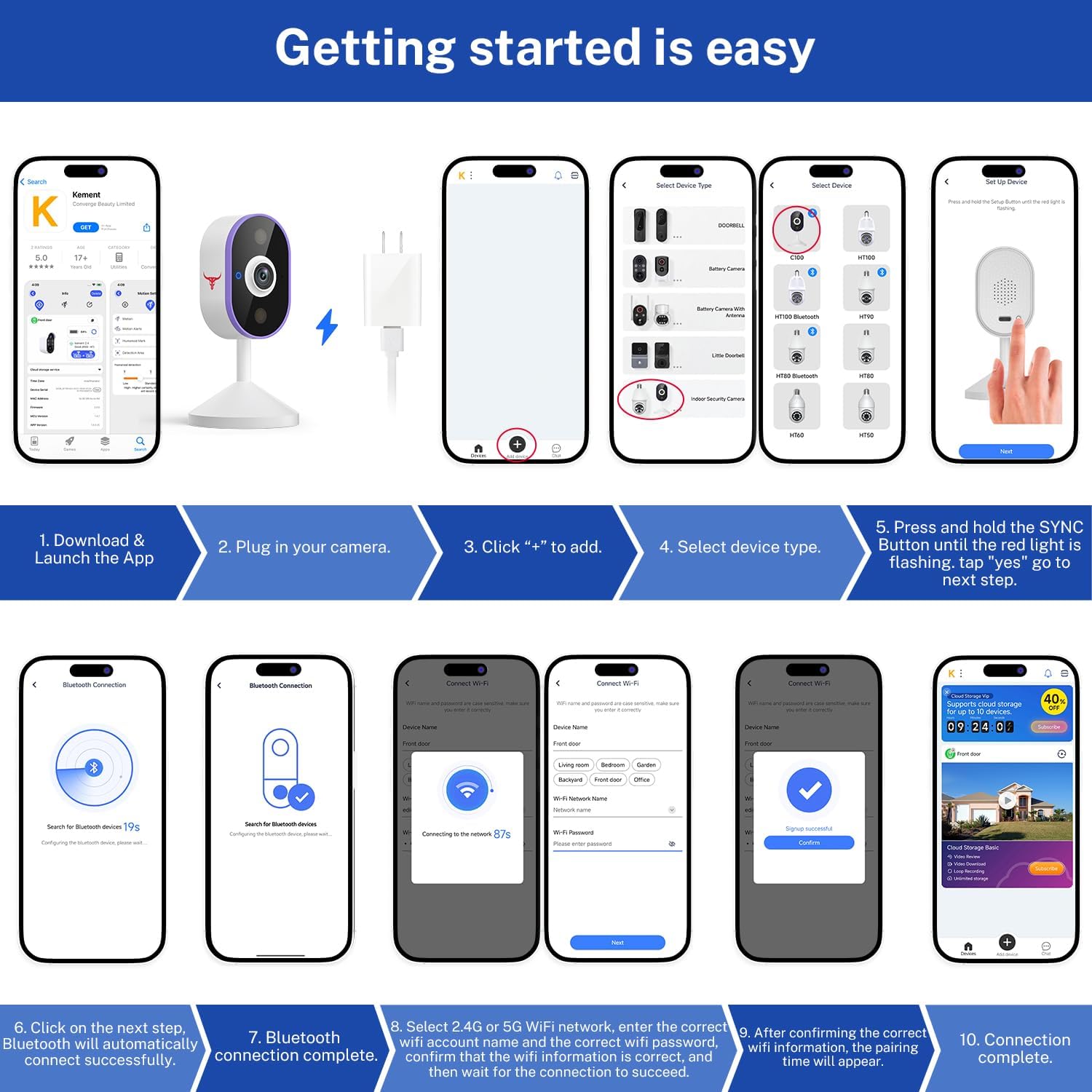
Image 3.1: Visual step-by-step guide for connecting the Orbitell camera using the mobile application, from downloading the app to successful Wi-Fi connection.
Opcions de muntatge
The Orbitell camera offers flexible mounting. It can be placed on a flat surface like a shelf or desk, or securely mounted to a wall or ceiling using the included mounting hardware. Ensure the camera has a clear line of sight to the area you wish to monitor and is within range of your 2.4GHz Wi-Fi network.

Imatge 3.2: Ex.amples of flexible mounting options for the Orbitell camera, including wall mounting and placement on a desk.
4. Instruccions de funcionament
Utilitzant l'aplicació mòbil
Once your camera is set up, you can access its features through the Orbitell mobile application:
- Viu View: Tap on your camera in the app to view el canal de vídeo en directe des de qualsevol lloc.
- Àudio bidireccional: Utilitza la icona del micròfon en directe view to speak through the camera's speaker and the speaker icon to listen.
- Alertes de moviment: Enable motion detection in the app settings to receive push notifications on your phone when activity is detected.
- Gravació: Manually record video or capture screenshots from the live view.
- Reproducció: Accés gravat footage stored on cloud (subscription required) or a local SD card (if supported and installed).
- Configuració: Adjust camera settings such as night vision mode, motion sensitivity, and notification preferences.

Image 4.1: A smartphone receiving a real-time notification indicating human detection from the Orbitell camera.
Emmagatzematge al núvol
The Orbitell camera supports cloud storage for your video recordings. This service is sold separately and typically requires a subscription. Cloud storage provides secure, encrypted storage for your footage, allowing you to access it anytime, anywhere, and protecting it from physical damage or theft of the camera.

Image 4.2: Illustration of the cloud storage feature, showing video footage being securely stored and accessible.
5. Manteniment
To ensure optimal performance and longevity of your Orbitell camera, follow these maintenance guidelines:
- Neteja: Netegeu suaument la lent i el cos de la càmera amb un drap suau, sec i sense borrissol. Eviteu utilitzar productes químics agressius o netejadors abrasius.
- Font d'alimentació: Always use the original power adapter provided with the camera. Do not use damaged cables or adapters.
- Col·locació: Assegureu-vos que la càmera estigui col·locada en un lloc estable, allunyat de la llum solar directa, de temperatures extremes i d'alta humitat.
- Actualitzacions de programari: Regularly check the Orbitell app for firmware updates for your camera. Updates often include performance improvements and security enhancements.
- Estabilitat de la xarxa: Mantingueu una connexió Wi-Fi estable de 2.4 GHz per a un funcionament ininterromput.
6. Solució De Problemes
If you encounter issues with your Orbitell camera, refer to the following common problems and solutions:
| Problema | Causa possible | Solució |
|---|---|---|
| Camera won't power on | L'adaptador de corrent no està connectat o està defectuós. | Ensure the power adapter is securely plugged into the camera and a working power outlet. Try a different outlet. |
| No es pot connectar a la Wi-Fi | Contrasenya Wi-Fi incorrecta; s'utilitza una xarxa de 5 GHz; la càmera està massa lluny del router. | Verify Wi-Fi password. Ensure you are connecting to a 2.4GHz network. Move camera closer to the router. Restart router and camera. |
| Sense alertes de detecció de moviment | Motion detection disabled; sensitivity too low; app notifications off. | Enable motion detection in the app. Adjust sensitivity settings. Check phone notification settings for the Orbitell app. |
| L'àudio bidireccional no funciona | Microphone/speaker muted in app; network issues. | Ensure microphone and speaker icons are not muted in the live view. Check network connection stability. |
| Poca qualitat de vídeo | Insufficient bandwidth; dirty lens. | Ensure stable Wi-Fi connection. Clean the camera lens with a soft cloth. |
7. Especificacions
| Característica | Detall |
|---|---|
| Nom del model | C100 |
| Ús interior/exterior | Interior |
| Resolució de captura de vídeo | 1080p (Full HD) |
| Tecnologia de connectivitat | Sense fil (Wi-Fi) |
| Protocol de connectivitat | Wi-Fi (només 2.4 GHz) |
| Font d'alimentació | Elèctric amb cable |
| Tipus de muntatge | Wall Mount, Shelf/Desk Placement |
| Característica especial | 2-Way Audio, Night Vision, Motion Detection |
| Dispositius compatibles | Telèfon intel·ligent (iOS/Android) |
| Dimensions de l'article (L x A x A) | 2.36 x 2.36 x 4.47 polzades (6.0 x 6.0 x 11.35 cm) |
| Pes de l'article | 2.56 unces (0.16 lliures) |
| Piles necessàries | No |
| Format de captura de vídeo | MP4 |
| Usos recomanats | Monitorització de nadons, Seguretat interior, Monitorització d'animals de companyia |

Image 7.1: Dimensional specifications of the Orbitell Indoor Security Camera.
8. Garantia i Suport
Orbitell products are designed for reliability and performance. For warranty information, technical support, or service inquiries, please refer to the contact details provided on the product packaging or visit the official Orbitell weblloc web. Conserveu el rebut de compra com a comprovant de compra per a reclamacions de garantia.