
1. Introducció
This manual provides essential information for the safe and effective use of your TOPELOTEK Kids Tablet ZIDS7001. Please read it thoroughly before operating the device and retain it for future reference.
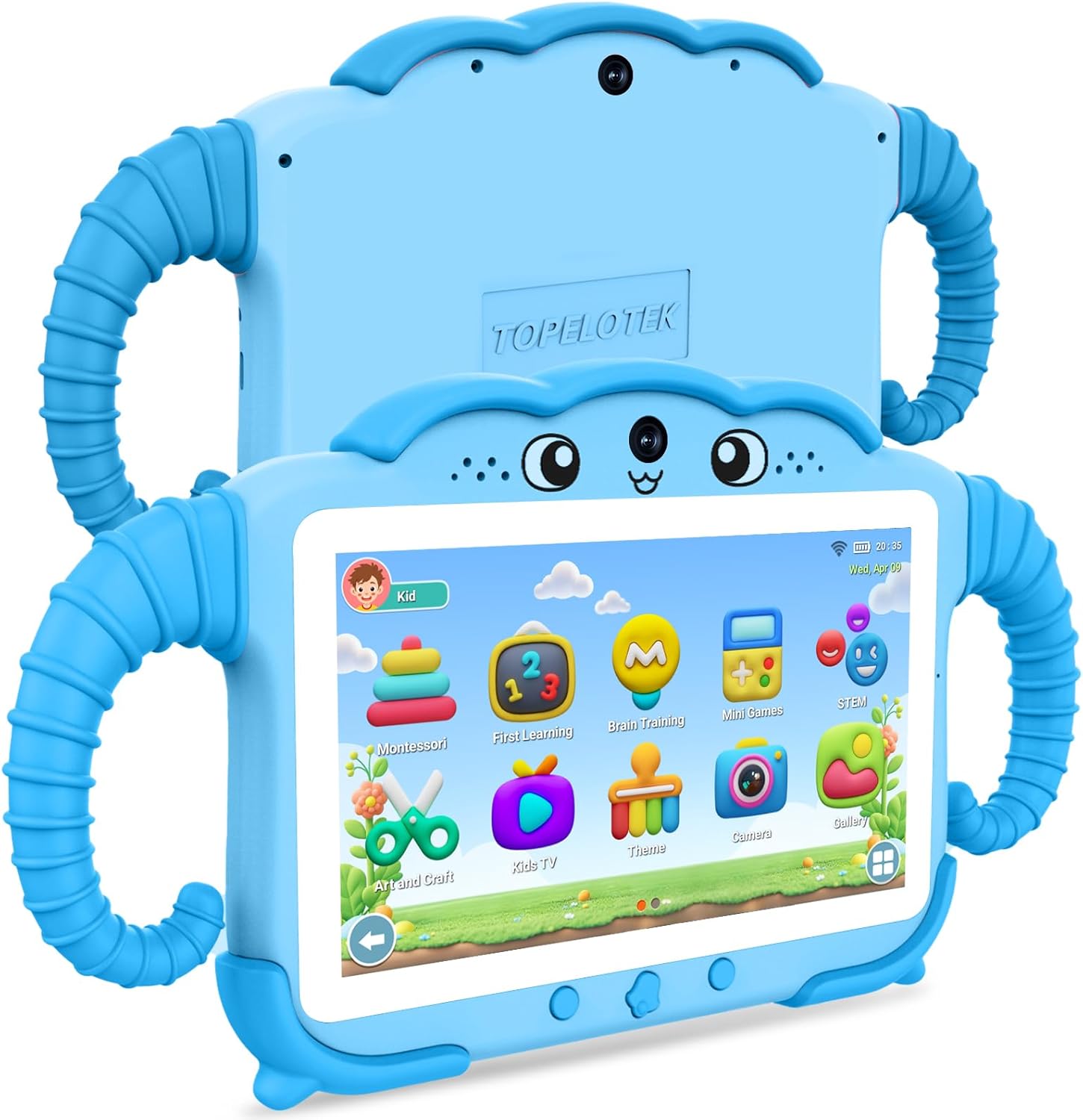
Imatge 1: Davant i darrere view of the TOPELOTEK Kids Tablet ZIDS7001, showcasing its blue protective case and overall design.
2. Què hi ha a la caixa
Verifiqueu que hi hagi tots els elements en desembalar-los:
- Kids Tablet (ZIDS7001) x 1
- Cable tipus C x 1
- Manual d'instruccions x 1
- Capçal del carregador x 1
3. Producte acabatview
Familiarize yourself with the tablet's components and controls:

Image 2: Detailed diagram of the TOPELOTEK Kids Tablet ZIDS7001, highlighting its various ports and buttons for easy identification.
- Càmera frontal
- Volum -
- Botó d'engegada
- Volum +
- Càmera posterior
- Port d'auriculars
- Port tipus C
- TF Card Slot (for expandable storage)
- Clau de restabliment
4. Configuració
4.1 Càrrega inicial
Before first use, fully charge the tablet using the provided Type-C cable and charger head. The battery indicator will show charging status.
4.2 Encès/Apagat
Press and hold the Power Button (3) for a few seconds to turn the tablet on or off. A short press will put the tablet to sleep or wake it up.
4.3 Connexió Wi-Fi
Navigate to Settings > Network & Internet > Wi-Fi. Select your desired network and enter the password to connect.
4.4 Parental Controls Setup
The tablet features a dedicated parental control mode to manage content and usage. This allows for setting up individual profiles for each child, customizing access to applications, websites, and media content, and establishing time limits.

Image 3: The Parental Control interface, showing options for managing content, applications, websites, and media.
To access parental controls, locate the Parental Control icon on the home screen or within the settings. You can configure:
- Kids Store: Manage access to the curated app store.
- Aplicacions: Select which installed applications your child can use.
- Webllocs: Filter or whitelist specific webllocs.
- Media Content: Control access to videos, music, and other media.
- Límit de temps: Set daily or weekly usage limits, including start/end times, session length, and rest periods.
For a visual guide on setup and features, refer to the video below:
Vídeo 1: Un overview of the TOPELOTEK Kids Tablet ZIDS7001, demonstrating unboxing, initial setup, user interface navigation, and parental control features.
5. Funcionament de la tauleta
Navegació amb pantalla tàctil 5.1
The tablet features a responsive touch screen. Use gestures such as tapping, swiping, and pinching to navigate menus, open applications, and interact with content.
5.2 Kids Learning Content
The tablet comes pre-loaded with various educational applications and games designed for children aged 3-12. These include Montessori, first learning, brain training, mini-games, and STEM activities, promoting learning through interactive play.

Image 4: The Kids Learning Content interface, displaying icons for various educational apps like Montessori, First Learning, Brain Training, and Mini Games.
5.3 Reproducció multimèdia
Access pre-approved videos and music through the Kids TV and Music sections. Parents can manage available content via parental controls.
5.4 Hand-Free Viewing
The tablet's protective case includes adjustable handles that can be used as a stand, allowing for hands-free viewing i interacció.

Image 5: A child using the tablet with its integrated stand on an airplane tray table, demonstrating its portability and hands-free functionality for travel.
6. Manteniment
6.1 Neteja
Use a soft, lint-free cloth to clean the screen and exterior of the tablet. Avoid abrasive cleaners or solvents. Ensure the tablet is powered off before cleaning.
6.2 Cura de la bateria
To prolong battery life, avoid exposing the tablet to extreme temperatures. Charge the tablet regularly, but do not leave it fully charged or fully discharged for extended periods.
6.3 Emmagatzematge
The tablet supports expandable storage up to 128GB via the TF Card Slot (8). This allows for ample space for pictures, e-books, and videos. The shock-proof case provides protection against bumps, dust, and drops.
7. Solució De Problemes
Si teniu problemes amb la tauleta, consulteu les solucions habituals següents:
- La tauleta no s'encén: Ensure the tablet is fully charged. Connect it to the charger and wait a few minutes before attempting to power it on again.
- La pantalla no respon: Try restarting the tablet by holding the Power Button (3). If unresponsive, use a small pin to press the Resetting Key (9) for a soft reset.
- Rendiment lent: Close unused applications and clear cache regularly. Consider reducing the number of installed apps or moving large files to an external TF card.
- Problemes de càrrega: Verify that the Type-C cable and charger head are securely connected and undamaged. Try using a different compatible charger if available.
8. Especificacions
| Característica | Especificació |
|---|---|
| Mida de la pantalla de peu | 7 polzades |
| Resolució de pantalla | 1024 x 600 píxels |
| Resolució de pantalla màxima | 1024*600 |
| Descripció de la targeta | Integrat |
| Tipus sense fil | 802.11 g |
| Durada mitjana de la bateria | 8 hores |
| Marca | TOPELOTEK |
| Sèrie | ZIDS7001 |
| Número de model de l'article | ZIDS7001 |
| Sistema operatiu | Android |
| Pes de l'article | 9.6 unces |
| Dimensions del producte | 11 x 5.9 x 0.6 polzades |
| Color | Blau |
| Marca del processador | Allwinner |
| Mida de la memòria flash | 32 GB |
| Bateries | Necessites 1 piles de polímer de liti. (inclòs) |
| Capacitat d'emmagatzematge de memòria | 32 GB |
9. Garantia i Suport
For any questions or concerns regarding your TOPELOTEK Kids Tablet, please contact our customer service team. We aim to respond to all inquiries within 24 hours.
Please refer to the product packaging or official TOPELOTEK website for specific warranty details and terms of service.
Video 2: A demonstration of the Topelotek kids tablet, highlighting its included case and various features.