
1. Introducció
This manual provides essential instructions for the safe operation and maintenance of your elecci A22 Drone. Please read this manual thoroughly before operating the drone to ensure proper function and to prevent damage or injury. Keep this manual for future reference.
2. Precaucions de seguretat
- Entorn de vol: Operate the drone in open areas, away from people, animals, buildings, and power lines. Avoid flying in strong winds or adverse weather conditions.
- Seguretat de la bateria: Use only the provided batteries and charger. Do not overcharge or puncture batteries. Discontinue use if batteries show signs of damage or swelling.
- Seguretat de l'hèlix: Keep hands, face, and loose clothing away from rotating propellers. Ensure propellers are securely attached before flight.
- Responsabilitat de l'operador: The operator is responsible for safe operation and compliance with local regulations. Do not operate under the influence of drugs or alcohol.
- Exposició a l'aigua: Avoid exposing the drone or controller to water or moisture.
3. Contingut del paquet
Verifiqueu que tots els elements siguin presents al vostre paquet:
- elecci A22 Drone
- Controlador de pantalla
- Piles recarregables (2 incloses)
- Cable de càrrega USB
- Hélices de recanvi
- Targeta SD
- Handbag (Carrying Case)
- Manual d'usuari (Aquest document)

Image 3.1: Contents of the elecci A22 Drone package, including the drone, screen controller, batteries, and other accessories.
4. Identificació de components
4.1 Components del dron
- Hèlixs: Four rotating blades for lift and propulsion.
- Motors sense escombretes: Provide efficient and durable power for flight.
- Càmera HD 1080P: Located at the front for photo and video capture.
- Sensor de flux òptic: Located on the underside for stable hovering.
- Obstacle Avoidance Sensors: Integrated for active obstacle detection.
- Compartiment de la bateria: Located on the rear/underside for battery insertion.
- Llums LED: Indicate drone status and orientation.

Image 4.1: Detail of the elecci A22 Drone's 1080P HD camera and integrated sensors.
4.2 Screen Controller Components
- Sticks de control: Left stick for throttle/yaw, right stick for pitch/roll.
- Pantalla integrada: Displays real-time video feed and flight data.
- Botons de funció: One-key take-off/landing, return home, speed modes, photo/video capture.
- Botó d'encesa: To turn the controller on/off.
- Ranura per a targeta SD: For storing captured media directly from the screen.

Image 4.2: The elecci A22 Drone screen controller, highlighting the integrated display for live video feed.
5. Configuració
5.1 Càrrega de bateries
- Connect the drone battery to the USB charging cable.
- Plug the USB cable into a 5V/2A USB power adapter (not included).
- The indicator light on the battery will show charging status (e.g., red for charging, green for fully charged).
- Charge the controller battery using its dedicated charging port if applicable.
Nota: A full charge typically takes 60-90 minutes. Do not leave charging batteries unattended.
5.2 Installing Drone Battery
- Assegureu-vos que el drone estigui apagat.
- Open the battery compartment on the drone.
- Insert a fully charged battery, ensuring it clicks into place securely.
- Tanqueu el compartiment de la bateria.
5.3 Preparing the Controller
- Ensure the controller battery is charged.
- Press and hold the power button to turn on the controller.
- If using the detachable display screen independently, ensure it is charged and powered on.
- Insert the provided SD card into the designated slot on the screen controller for media storage.

Image 5.1: The elecci A22 Drone controller demonstrating the detachable display screen functionality.
5.4 Emparellar el dron i el controlador
- Col·loqueu el drone sobre una superfície plana i plana.
- Power on the drone by pressing and holding its power button. The drone's LED lights will flash.
- Enceneu el controlador.
- Push the left control stick (throttle) all the way up, then all the way down. The drone's LED lights will become solid, indicating successful pairing.
6. Instruccions de funcionament
6.1 Controls bàsics de vol
- Enlairament/aterratge amb una sola tecla: Press the dedicated button on the controller to automatically take off or land.
- Accelerador (joystick esquerre amunt/avall): Controla l'altitud.
- Guinyada (joystick esquerre esquerra/dreta): Rotates the drone horizontally.
- Pitch (Right Stick Up/Down): Moves the drone forward/backward.
- Roll (Right Stick Left/Right): Moves the drone left/right (sideways).
- Manteniment d'altitud: The drone will maintain its current altitude automatically once the throttle stick is released to the center position.
6.2 Funcions avançades
- Optical Flow Localization: Provides stable hovering, especially indoors or in areas with clear ground patterns.
- Active Obstacle Avoidance: The drone is equipped with sensors to detect and avoid obstacles, enhancing flight safety.
- Volteig de 360°: Press the 360° flip button and move the right stick in the desired direction to perform an aerial flip.
- Retorn amb un botó: Press the return home button, and the drone will attempt to fly back to its take-off point. Ensure a clear path.
- Modes de velocitat: Use the speed button to switch between different flight speeds (e.g., low, medium, high) for varying skill levels and conditions.
6.3 Funcionament de la càmera
- Captura de fotos: Press the photo button on the controller to take a still image.
- Gravació de vídeo: Press the video button to start recording. Press again to stop.
- En temps real View: The integrated screen on the controller displays the live video feed from the drone's camera.
- Emmagatzematge multimèdia: Photos and videos are saved to the SD card inserted in the screen controller.
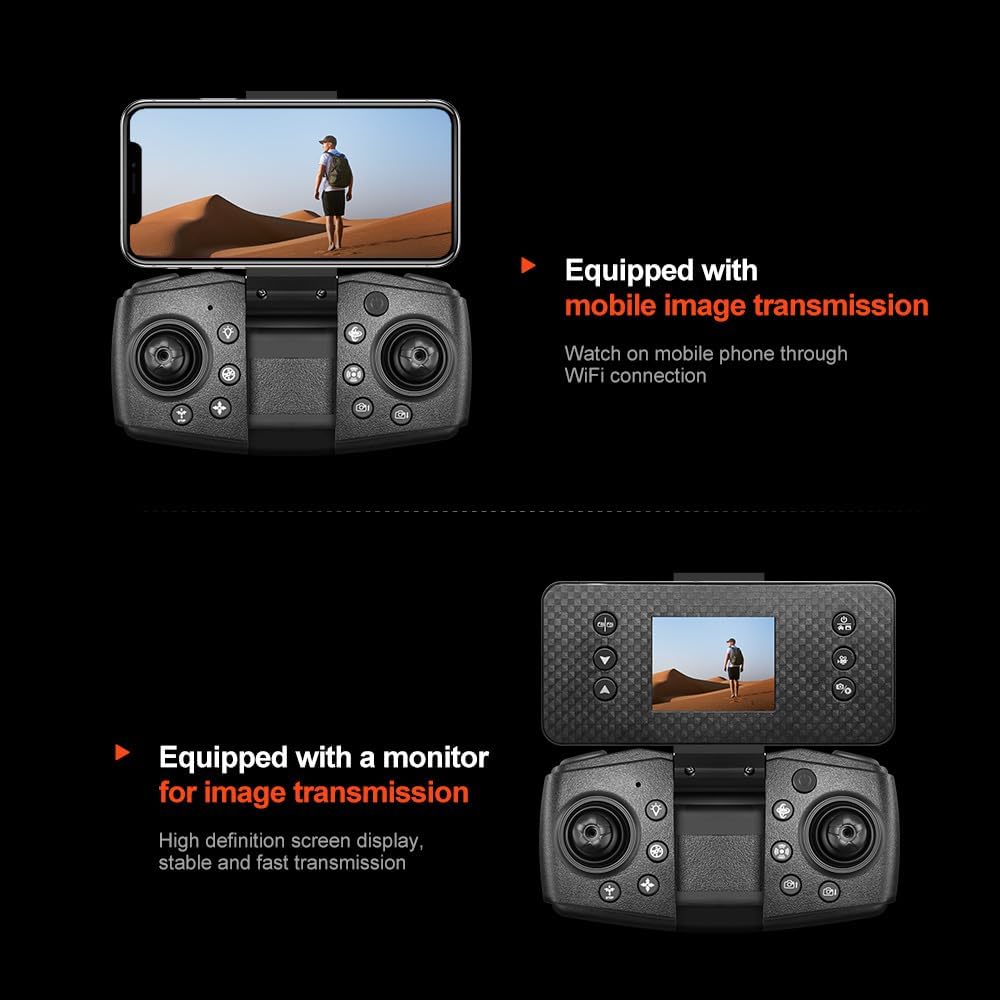
Image 6.1: The elecci A22 Drone controller, illustrating the option for mobile phone integration for image transmission via Wi-Fi.
7. Manteniment
- Neteja: Use a soft, dry cloth to clean the drone and controller. Do not use solvents.
- Inspecció de l'hèlix: Regularly check propellers for damage (cracks, bends). Replace damaged propellers immediately using the provided spares.
- Cura de la bateria: Store batteries in a cool, dry place. Do not store fully charged or completely depleted batteries for extended periods.
- Emmagatzematge: When not in use, store the drone and its components in the provided carrying case to protect them from dust and physical damage.
8. Solució De Problemes
| Problema | Causa possible | Solució |
|---|---|---|
| El dron no s'encén. | La bateria no està carregada o no està inserida correctament. | Charge the battery fully and ensure it is securely inserted. |
| Controller does not connect to drone. | Not paired correctly or low controller battery. | Repeat pairing steps (Section 5.4). Charge controller battery. |
| El dron es desplaça durant el vol. | Not calibrated or strong wind interference. | Perform gyroscope calibration (refer to quick start guide for specific steps). Fly in calm conditions. |
| Poor camera image quality or no video feed. | Weak signal, dirty lens, or SD card issue. | Ensure drone is within range. Clean camera lens. Check SD card for proper insertion and format. |
| L'evitació d'obstacles no funciona. | Els sensors estan bruts o obstruïts. | Clean the obstacle avoidance sensors carefully. |
9. Especificacions
| Característica | Detall |
|---|---|
| Nom del model | A22 |
| Marca | elecci |
| Resolució de captura de vídeo | 1080p |
| Resolució de fixes efectius | 2 MP |
| Tecnologia de connectivitat | Bluetooth, WiFi |
| Característiques especials | 360 Degree Flip, Auto Follow, One Button Return, One Key Rotation, Optical Flow, Obstacle Avoidance |
| Tipus de motor | Sense raspalls |
| Bateries | 2 bateries d'ions de liti (incloses) |
| Pes de l'article | 0.4 lliures (aproximadament 6.4 unces) |
| Dimensions del producte | 9.05 cm de llargada x 2.55 cm d'amplada x 7.08 cm d'alçada |
| Components inclosos | Battery, Camera, Handbag, SD Card, Screen Controller |
10. Garantia i Suport
For warranty information and technical support, please refer to the contact details provided with your purchase documentation or visit the official elecci weblloc web. Conserveu el comprovant de compra per a reclamacions de garantia.
Fabricant: Shantou QICHENG Intelligent Technology Co., Ltd