
1. Introducció
Thank you for choosing the Proster PST252-US Digital Rechargeable Pinless Moisture Meter. This device is designed for non-destructive measurement of moisture content in various materials such as wood, walls, plaster, and masonry. It features a clear LCD display, a 3-color LED bar graph, and an audible alarm for easy interpretation of moisture levels. Please read this manual thoroughly before use to ensure proper operation and to maximize the lifespan of your device.

Image: The Proster PST252-US Digital Rechargeable Pinless Moisture Meter, showing its orange and black design with an LCD screen.
2. Informació de seguretat
- Mantingueu el dispositiu allunyat de l'aigua i d'entorns amb molta humitat per evitar danys.
- No intenteu desmuntar ni modificar el dispositiu. Les reparacions només les ha de realitzar personal qualificat.
- Eviteu exposar el dispositiu a temperatures extremes o a la llum solar directa durant períodes prolongats.
- Ensure the device is fully charged before critical measurements to avoid inaccurate readings due to low battery.
- Be aware that the presence of metals or pipes within the material being measured can affect the reading accuracy.
3. Producte acabatview
3.1 Components
- Mesurador d'humitat digital
- Cable de càrrega USB tipus C
- Bossa d'emmagatzematge
- Manual d'usuari

Image: The Proster PST252-US moisture meter, storage pouch, USB-C charging cable, and user manual.
3.2 Disseny i pantalla del dispositiu
The device features an intuitive layout with a large LCD screen and clearly labeled buttons for various functions and measurement modes.

Imatge: Detallada view of the Proster PST252-US display showing moisture percentage, battery indicator, 3-color LED bar graph (Dry, Risk, Wet), HOLD function, and mode selection icons for Wall, Masonry, Soft Wood, and Hard Wood.
- Pantalla LCD: Shows moisture percentage, battery status, and selected material mode.
- 3-Color LED Bar Graph: Visually indicates moisture levels (Green for Dry, Yellow for Risk, Red for Wet).
- Botó d'encesa: Encén/apaga el dispositiu.
- Botó HOLD: Short press to freeze the current reading; long press for calibration.
- Botons de mode: Separate buttons for selecting Wall, Masonry, Soft Wood, and Hard Wood measurement modes.
4. Configuració
4.1 Càrrega del dispositiu
The Proster PST252-US features a rechargeable lithium-ion battery. When the battery icon on the display shows low power or the device does not turn on, it needs to be charged.
- Connecteu el cable USB tipus C proporcionat al port de càrrega del dispositiu.
- Connecteu l'altre extrem del cable USB a un adaptador de corrent USB estàndard (no inclòs) o a un port USB de l'ordinador.
- The battery indicator on the display will show charging status. Charge until the battery icon indicates full charge.

Image: The Proster PST252-US moisture meter connected to a wall charger via its USB-C cable for recharging.
4.2 Encès inicial
Press the power button to turn on the device. The LCD display will illuminate, and the device will be ready for use.
5. Instruccions de funcionament
5.1 Selecting a Measurement Mode
The device offers four specific measurement modes for different materials. Select the appropriate mode before taking a reading for optimal accuracy.
- Premeu el botó PARET button for plaster and drywall.
- Premeu el botó FABRICACIÓ button for brick and concrete.
- Premeu el botó FUSTA TOVA button for softwoods.
- Premeu el botó FUSTA DURA button for hardwoods.

Image: The Proster PST252-US displaying measurement ranges for different materials like walls, masonry, soft wood, and hard wood.
5.2 Prendre una mesura
The Proster PST252-US uses a non-destructive sensor to detect moisture up to 19mm (0.75 inches) below the surface.
- Assegureu-vos que el dispositiu estigui carregat i encès.
- Select the appropriate material mode using the dedicated buttons.
- Place the sensor panel (located on the back of the device) flat against the surface of the material you wish to measure. Ensure full contact.
- Llegiu el percentatge d'humitattage displayed on the LCD screen. The 3-color LED bar graph will also provide a visual indication of the moisture level (Green: Dry, Yellow: Risk, Red: Wet).
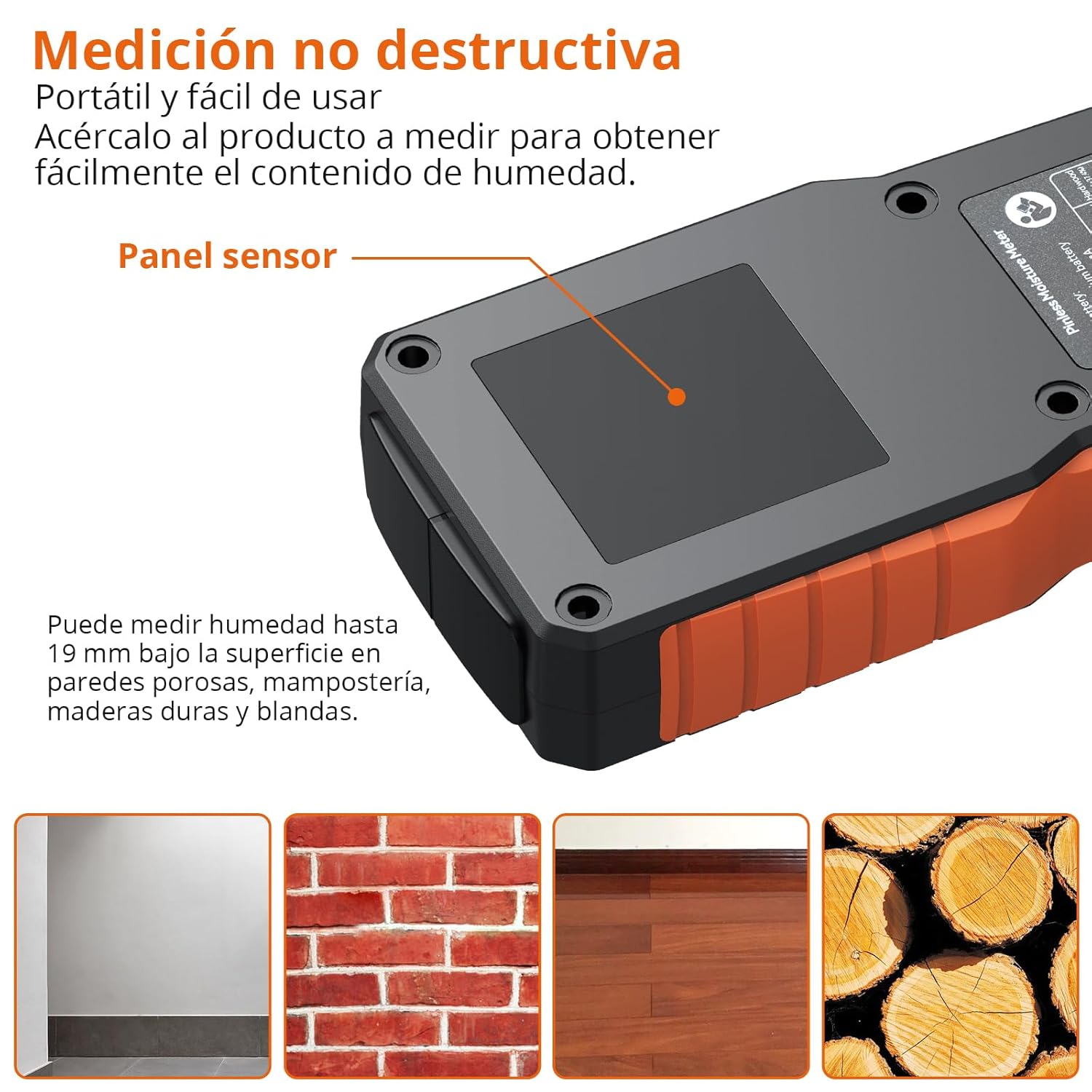
Image: The Proster PST252-US moisture meter being used to measure a wall, highlighting the sensor panel and showing examples of materials it can measure: porous walls, brick masonry, hardwood flooring, and wood logs.
Consideracions importants:
- The material being measured should have a thickness greater than 19mm for accurate readings.
- The presence of metals, screws, nails, or pipes within the material can interfere with the sensor and affect measurement accuracy. Avoid these areas if possible.
- For precise measurements, place your finger on the rubber grip area of the device.

Image: Illustration showing correct measurement on a brick wall (left) and incorrect measurement on a damaged wall with exposed metal rebar (right), indicating that metals can affect accuracy.
5.3 Funció de retenció de dades
To freeze the current reading on the display, short press the MANTENIM button. Press it again to release the hold and resume live measurement.
5.4 Alarma sonora
The device features an audible alarm that activates when moisture levels exceed predefined thresholds for the selected material. The alarm will sound faster as the moisture content increases.
| Material | Llindar d'alarma |
|---|---|
| Fusta | >10% |
| Plaster/Drywall | >20% |
| maçoneria | >8% |

Image: The Proster PST252-US displaying a high moisture reading (27.3% on Wall mode) with a visual representation of the audible alarm.
5.5 Apagada automàtica
The device will automatically shut off after 5 minutes of inactivity to conserve battery life.
6. Manteniment
6.1 Neteja
Wipe the device with a soft, dry cloth. Do not use abrasive cleaners or solvents, as these may damage the casing o pantalla.
6.2 Emmagatzematge
When not in use, store the moisture meter in its protective pouch in a cool, dry place, away from direct sunlight and extreme temperatures.
6.3 Calibració
The device can be calibrated by long-pressing the MANTENIM button. Refer to the on-screen instructions or contact support if you suspect calibration issues.
7. Solució De Problemes
- El dispositiu no s'encén: Ensure the battery is charged. Connect the USB-C cable and charge for at least 30 minutes.
- Lectures inexactes:
- Verify that the correct material mode is selected.
- Ensure the sensor panel is in full contact with the surface.
- Check for any metal objects (nails, pipes, rebar) within the measurement area that might interfere with the sensor.
- Ensure the material thickness is greater than 19mm.
- Perform a calibration if necessary (long press HOLD button).
- La pantalla és tènue o parpelleja: Pot ser que la bateria estigui baixa. Torneu a carregar el dispositiu.
- Audible alarm not working: Check if the device is in a high moisture area. If not, contact customer support.
8. Especificacions
| Característica | Especificació |
|---|---|
| Número de model | PST252-EUA |
| Tipus de mesura | Pinless (Non-destructive) |
| Profunditat de detecció | Fins a 19 mm |
| Modes de mesura | Wall, Masonry, Soft Wood, Hard Wood |
| Precisió de la mesura | ±4% |
| Mostra | LCD with 3-color LED bar graph |
| Tipus de bateria | 1 Lithium-metal (rechargeable, included) |
| Port de càrrega | USB tipus C |
| Apagat automàtic | Sí (després de 5 minuts d'inactivitat) |
| Dimensions del producte | 19 x 8 x 4.3 cm |
| Pes del producte | 140 grams |
| Vol. Operatiutage | 3.7 Volts |
| Temperatura màxima de funcionament | 40 graus centígrads |
9. Garantia i Suport
Els productes Proster estan dissenyats per a la fiabilitat i el rendiment. Per obtenir informació sobre la garantia o assistència tècnica, consulteu les dades de contacte que es proporcionen amb la documentació de compra o visiteu el lloc web oficial de Proster. weblloc web. Conserveu el rebut de compra com a comprovant de compra per a qualsevol reclamació de garantia.
