
NEWFAST USB WiFi 6 Adapter 01
NEWFAST USB WiFi 6 Adapter 01 User Manual
Model: USB WiFi 6 Adapter 01
1. Producte acabatview
The NEWFAST USB WiFi 6 Adapter 01 is a high-performance wireless network adapter designed to provide fast and reliable internet connectivity for your desktop PC or laptop. Utilizing the latest WiFi 6 (802.11ax) standard, it offers enhanced speed, efficiency, and security for a superior online experience. This adapter supports dual-band operation (2.4GHz and 5GHz) and features advanced technologies like MU-MIMO and OFDMA to ensure stable and efficient data transfer.

Image 1.1: The NEWFAST USB WiFi 6 Adapter 01, showcasing its compact design and dual external antennas for improved signal reception.
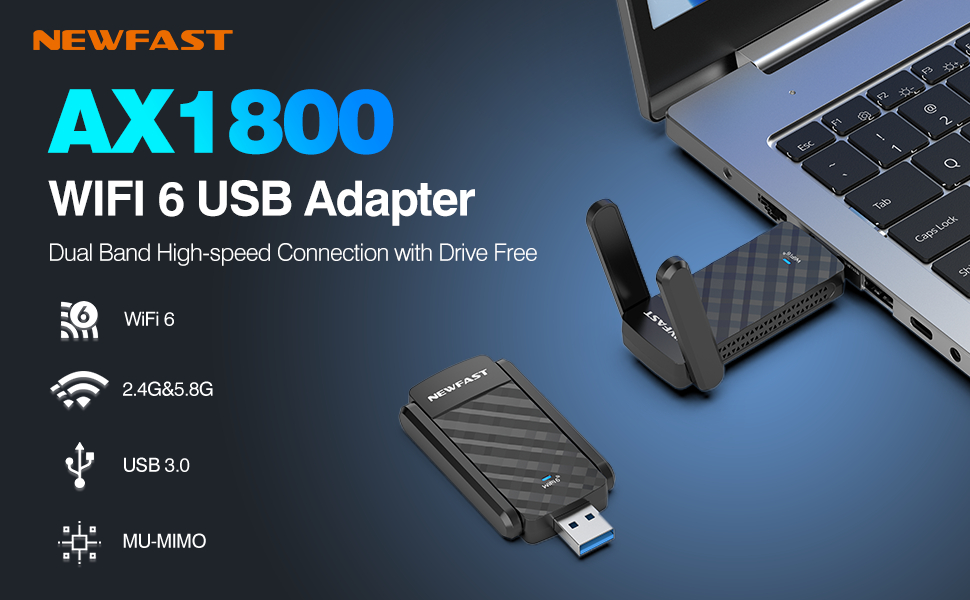
Imatge 1.2: acabatview of the NEWFAST AX1800 WiFi 6 USB Adapter highlighting its core features and application with a laptop.
2. Característiques clau
- Lightning-Fast Connectivity: Experience significantly improved speeds for all your online activities.
- Suport de doble banda: Operates on both 2.4GHz and 5GHz frequencies for flexible and optimized network performance.
- Interfície USB 3.0: Ensures high-speed data transfer, up to 10 times faster than USB 2.0.
- Tecnologia MU-MIMO: Allows the adapter to communicate with multiple devices simultaneously, enhancing network efficiency.
- Tecnologia OFDMA: Improves network capacity and efficiency, especially in environments with many connected devices.
- Xifratge WPA3: Provides advanced security protocols to protect your wireless network from unauthorized access.
- 1800Mbps Speed: Delivers high throughput for demanding applications like gaming, 4K streaming, and large file transferències.
- Wide Range & Stable Connection: Equipped with dual external antennas for extended coverage and a more stable signal.
- Disseny portàtil: Compact and easy to carry, ideal for both desktop and laptop use.
- Compatibilitat multisistema: Supports Windows 10 and Windows 11 operating systems.

Image 2.1: A summary of the adapter's key technical features, including its dual antennas, USB 3.0, WPA3, and speed capabilities.

Image 2.2: Visual representation of speed improvements with WiFi 6 on both 2.4GHz and 5GHz bands.

Image 2.3: Explanation of OFDMA technology, showing its efficiency in handling multiple data streams simultaneously.

Image 2.4: Diagram illustrating the benefits of MU-MIMO for multi-device communication.

Image 2.5: Visual representation of the adapter's wide range and stable high-speed network capabilities within a typical environment.
3. Guia de configuració
Follow these steps to set up your NEWFAST USB WiFi 6 Adapter 01:
- Inseriu l'adaptador: Plug the USB WiFi 6 Adapter firmly into an available USB 3.0 port on your desktop PC or laptop. For optimal performance, ensure you use a USB 3.0 port (often identified by a blue insert).
- Instal·lació del controlador: The adapter is designed to be 'drive-free', meaning it often contains its own driver software. Upon first insertion, your operating system (Windows 10/11) should automatically detect the device and initiate driver installation. If prompted, allow the installation to proceed. In some cases, you may need to navigate to 'This PC' or 'My Computer', locate the adapter as a removable drive, and run the setup executable.
- Connexió a una xarxa: Once the driver is successfully installed, the adapter will appear as a wireless network device. Click on the Wi-Fi icon in your system tray (usually in the bottom right corner of your screen), select your desired Wi-Fi network from the list, enter the network password if required, and click 'Connect'.
4. Instruccions de funcionament
The NEWFAST USB WiFi 6 Adapter 01 can function in two primary modes:
- Receive WiFi (WiFi Card Function): This is the standard mode where the adapter acts as a wireless network card, allowing your computer to connect to existing Wi-Fi networks. After setup, simply select and connect to any available Wi-Fi network as you would with any other wireless adapter.
- Send WiFi (WiFi Router Function): The adapter can also be configured to create a Wi-Fi hotspot, allowing other devices (like smartphones or tablets) to connect to your computer's internet connection. This feature is typically managed through your operating system's Mobile Hotspot settings (e.g., in Windows Settings > Network & Internet > Mobile hotspot).

Image 4.1: Illustration of the adapter's dual functionality: receiving WiFi for a desktop and sending WiFi as a hotspot from a laptop.
The adapter is ideal for various uses, including:

Image 4.2: Common applications for the adapter, demonstrating its versatility for high-demand network activities.
5. Manteniment
To ensure the longevity and optimal performance of your NEWFAST USB WiFi 6 Adapter 01, consider the following maintenance tips:
- Mantingueu-lo net: Regularly wipe the adapter with a soft, dry cloth to remove dust and debris. Avoid using liquid cleaners directly on the device.
- Emmagatzematge adequat: Quan no l'utilitzeu, emmagatzemeu l'adaptador en un lloc fresc i sec, lluny de la llum solar directa i de temperatures extremes.
- Manejar amb cura: Avoid dropping the adapter or subjecting it to strong impacts, which can damage internal components.
- Connexió ferma: Ensure the adapter is always firmly seated in the USB port to prevent intermittent connections or damage to the port.
6. Solució De Problemes
Si teniu problemes amb l'adaptador, consulteu els problemes i solucions més comuns següents:
| Problema | Causa possible | Solució |
|---|---|---|
| No Wi-Fi connection / Adapter not detected | Loose connection, driver not installed, USB port issue. | Ensure adapter is firmly plugged into a USB 3.0 port. Reinstall drivers if necessary. Try a different USB port. Check Device Manager for adapter status. |
| Velocitat Wi-Fi lenta | Connected to 2.4GHz band, router distance, interference, USB 2.0 port. | Connect to the 5GHz band if available. Move closer to the router. Minimize interference from other devices. Ensure adapter is in a USB 3.0 port. |
| Desconnexions freqüents | Weak signal, driver issue, power management settings. | Ensure strong signal strength. Update or reinstall drivers. Disable power saving for the USB port in Device Manager. |
| Cannot connect to 6GHz network | Adapter does not support 6GHz band. | This adapter supports 2.4GHz and 5GHz bands. It does not support the 6GHz band. Ensure your router is broadcasting on 2.4GHz or 5GHz. |
7. Especificacions tècniques
| Especificació | Detall |
|---|---|
| Marca | NEWFAST |
| Model | USB WiFi 6 Adapter 01 |
| Interfície del maquinari | USB 3.0 |
| Estàndard sense fils | 802.11ax (WiFi 6) |
| Bandes de freqüència | 2.4 GHz, 5 GHz |
| Velocitat de dades màxima | Fins a 1800 Mbps |
| Protocol de seguretat | WPA3 |
| Dispositius compatibles | Ordinadors de sobretaula, portàtils |
| Sistemes operatius | Windows 10, Windows 11 |
| Dimensions del producte | 1.44 x 0.41 x 3.08 polzades (37 mm x 11 mm x 79 mm aprox.) |
| Pes de l'article | 1.76 unces |
| Color | Negre |
| Fabricant | NEWFAST |
| País d'origen | Xina |
8. Garantia i Suport
NEWFAST products are designed for reliability and performance. This product comes with a standard manufacturer's warranty against defects in materials and workmanship. For specific warranty terms and conditions, please refer to the documentation included with your purchase or visit the official NEWFAST weblloc.
For technical support, troubleshooting assistance, or warranty claims, please contact NEWFAST customer service through the contact information provided on the product packaging or the official NEWFAST support channels. Please have your product model and purchase details ready when contacting support.
Ask a question about this manual
Ask about setup, troubleshooting, compatibility, parts, safety, or missing instructions. Manuals+ will review the question and use this page’s manual context to help answer it.