
Introducció
This manual provides essential instructions for the safe and effective use, installation, and maintenance of your iScooter F7 Electric Scooter replacement battery. Please read this manual thoroughly before using the product to ensure optimal performance and safety.
Informació important de seguretat:
- Always use the correct charger for this battery. Note that a charger is no inclòs with this battery.
- Do not expose the battery to extreme temperatures, direct sunlight, or moisture.
- No desmunteu, perforeu ni modifiqueu la bateria.
- Mantenir fora de l'abast dels nens i mascotes.
- Desfeu-vos de les piles de manera responsable d'acord amb la normativa local.
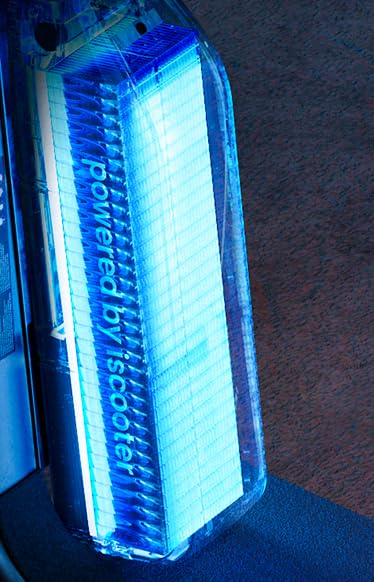
Image showing the iScooter F7 Electric Scooter replacement battery.
Configuració i instal·lació
Follow these steps to safely install the iScooter F7 replacement battery into your electric scooter.
- Apagar el patinet: Ensure your iScooter F7 electric scooter is completely powered off and disconnected from any charging source.
- Localitzeu el compartiment de la bateria: Refer to your iScooter F7 scooter's original manual to locate and open the battery compartment. This is typically found on the deck or stem of the scooter.
- Treure la bateria antiga (si escau): Carefully disconnect the old battery's connectors and remove it from the compartment. Note the orientation for correct installation of the new battery.
- Inseriu una bateria nova: Place the new iScooter F7 battery into the compartment, ensuring it fits securely and correctly.
- Connecta la bateria: Connect the battery cables to the scooter's power port. Ensure the connection is firm and secure.
- Compartiment tancat: Tanqueu de manera segura la tapa del compartiment de la bateria.
- Càrrec inicial: It is recommended to fully charge the new battery before its first use. (Refer to the "Operating" section for charging instructions).
Instruccions de funcionament
This section outlines how to properly charge and use your iScooter F7 battery.
Carregant la bateria
Note: A charger is NOT included with this battery. You must use a compatible charger designed for the iScooter F7 Electric Scooter battery.
- Connecta el carregador: Plug the compatible charger into a standard wall outlet.
- Connect to Scooter: Connect the charger's output plug to the charging port on your iScooter F7 electric scooter.
- Càrrega del monitor: The charger will typically have an indicator light (e.g., red for charging, green for fully charged). Monitor this light.
- Desconnectar: Once fully charged, disconnect the charger from the scooter first, then from the wall outlet. Avoid overcharging.
Using the Scooter with the New Battery
- Ensure the battery compartment is securely closed after installation.
- Power on your iScooter F7 electric scooter as per its original operating instructions.
- Monitor the battery level indicator on your scooter's display during use.
- Eviteu esgotar completament la bateria per allargar-ne la vida útil.
Manteniment
Proper maintenance will extend the life and performance of your iScooter F7 battery.
- Càrrega regular: Charge the battery regularly, even if the scooter is not in frequent use. Avoid leaving it fully discharged for extended periods.
- Emmagatzematge: If storing the scooter or battery for a long time, ensure the battery is charged to approximately 50-70% and stored in a cool, dry place away from direct sunlight.
- Neteja: Keep the battery and its compartment clean and free from dust and debris. Use a dry, soft cloth for cleaning. Do not use water or harsh chemicals.
- Temperatura: Operate and store the battery within recommended temperature ranges (typically 0°C to 40°C or 32°F to 104°F). Extreme temperatures can degrade battery performance and lifespan.
Resolució de problemes
This section addresses common issues you might encounter with your iScooter F7 battery.
| Problema | Causa possible | Solució |
|---|---|---|
| La bateria no es carrega | Charger not connected properly; Faulty charger; Battery issue | Ensure charger is securely connected to both wall and scooter. Test charger with another device if possible. If issue persists, contact support. |
| El patinet no s'encén | Battery not installed correctly; Battery fully discharged; Battery fault | Check battery connections and ensure it's fully charged. If the battery is charged and connected, but the scooter still doesn't power on, there might be an issue with the scooter itself or the battery. |
| Abast/rendiment reduït | Battery not fully charged; Old battery; Extreme temperatures | Ensure battery is fully charged before use. Battery capacity naturally degrades over time. Avoid using in very cold or hot conditions. |
If you encounter problems not listed here or if the suggested solutions do not resolve the issue, please contact iScooter customer support.
Especificacions
| Característica | Detall |
|---|---|
| Marca | iScooter |
| Model | F7 Electric Scooter Battery |
| ASIN | B0F7R58Y8N |
| Usos recomanats | Scooter |
| Recompte d'unitats | 1.0 recompte |
| Reutilitzabilitat | Single Use (refers to the battery unit, not disposable after one charge cycle) |
| Carregador inclòs | No (Please Note: Not Charger Included) |
Informació de la garantia
Specific warranty details for the iScooter F7 Electric Scooter Battery are not provided within this manual. For information regarding warranty coverage, terms, and conditions, please refer to the product packaging, the official iScooter weblloc web o poseu-vos en contacte amb el distribuïdor on es va comprar el producte.
Atenció al client
If you have any questions, require technical assistance, or need further support regarding your iScooter F7 Electric Scooter Battery, please contact iScooter customer service. You can typically find contact information on the official iScooter weblloc web o a través de la documentació de compra.
Recursos en línia:
- Visit the official iScooter website for FAQs and product information.
- Refer to your iScooter F7 Electric Scooter's original manual for scooter-specific instructions.


