
FLEXISPOT Q4
FLEXISPOT Q4 One-Piece Standing Desk User Manual
Model: Q4
1. Introducció
Thank you for choosing the FLEXISPOT Q4 One-Piece Standing Desk. This manual provides essential information for the safe assembly, operation, and maintenance of your new adjustable height desk. Please read these instructions carefully before use and retain them for future reference.
Informació de seguretat
- Assegureu-vos que tots els components siguin presents i no estiguin danyats abans del muntatge.
- Mantingueu els nens i les mascotes allunyats de l'escriptori durant el funcionament.
- Do not overload the desk. Refer to specifications for maximum weight capacity.
- Eviteu col·locar líquids directament sobre el tauler de control o a prop de components elèctrics.
- Desconnecteu l'alimentació abans de netejar o realitzar tasques de manteniment.
- Aquest escriptori està dissenyat només per a ús interior.
2. Contingut i components del paquet
The FLEXISPOT Q4 Standing Desk is shipped in two separate packages. Please verify all parts are included before beginning assembly.
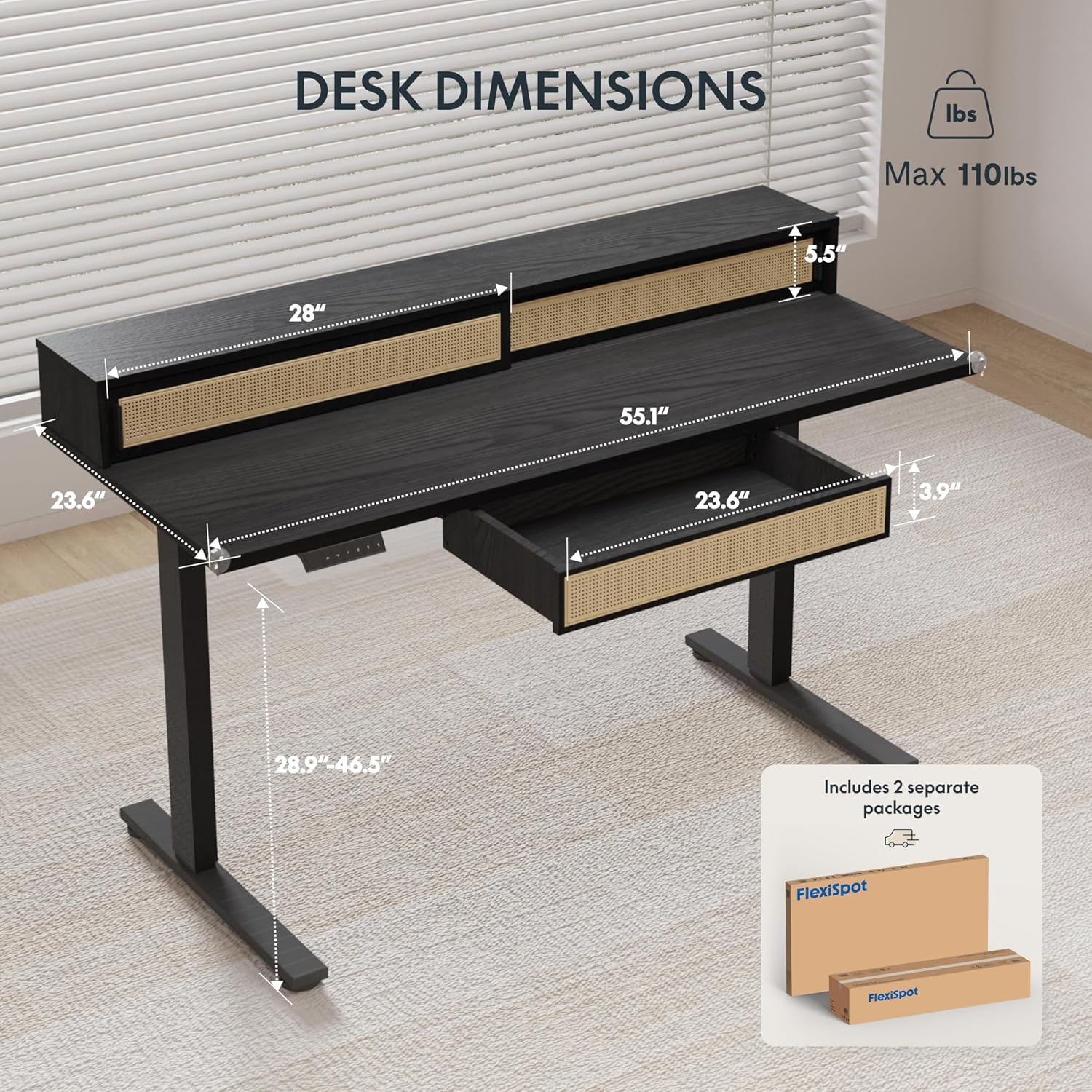
Figure 2.1: Desk dimensions and indication of two separate packages for shipping.
Components principals:
- Desktop with integrated monitor shelf and sliding compartments
- Under-desk drawer
- Potes d'escriptori (2)
- Coixinets per als peus (2)
- Panell de control
- Adaptador d'alimentació i cables
- Maquinari de muntatge (cargols, perns, eines)
3. Instruccions de muntatge
Assembly typically requires two people due to the size and weight of the desk components. Follow the steps below carefully.
Muntatge pas a pas:
- Desempaquetar components: Traieu amb cura totes les peces de l'embalatge. Col·loqueu-les sobre una superfície suau i neta per evitar ratllades.
- Attach Desk Legs: Secure the desk legs to the desktop frame using the provided hardware. Ensure all connections are tight and stable.
- Install Foot Pads: Attach the foot pads to the bottom of the desk legs.
- Panell de control de muntatge: Secure the control panel to the underside of the desktop in the designated area.
- Connectar els cables: Connect the motor cables from the legs to the control box, and then connect the control panel cable to the control box. Finally, connect the power adapter to the control box and plug it into a power outlet.
- Install Under-Desk Drawer: Slide the under-desk drawer into its designated slot beneath the desktop.
- Gestió de cables: Utilize the integrated cable management features to organize power and data cables for a tidy workspace.

Figure 3.1: Fully assembled FLEXISPOT Q4 Standing Desk, showcasing el seu disseny i funcionalitat.

Figura 3.2: Primer pla view of the stable desk frame, highlighting the reinforced structure and junction zone.
4. Instruccions de funcionament
The FLEXISPOT Q4 desk features an electric height adjustment system with a smart control panel.
Funcions del tauler de control:

Figure 4.1: The smart control panel, illustrating buttons for up/down movement and height memory presets.
- Fletxes amunt/avall (▲ / ▼): Premeu i manteniu premut per ajustar l'alçada de l'escriptori cap amunt o cap avall. Deixeu anar el botó per aturar-vos a l'alçada desitjada.
- Memory Presets (1, 2, T, Person Icon): The desk allows you to save preferred heights for quick adjustments.
- To save a height: Adjust the desk to your desired height, then press and hold one of the preset buttons (1, 2, T, or Person Icon) until you hear a beep or see a confirmation on the display (if available).
- To use a saved height: Simply press the corresponding preset button once, and the desk will automatically move to the saved height.
Interval d'ajust d'alçada:
The desk smoothly transitions between a minimum height of 28.9 inches and a maximum height of 46.5 inches.

Figure 4.2: Visual representation of the desk's adjustable height range, from minimum to maximum settings.
5. Característiques clau
Spacious Storage System
The desk integrates a comprehensive storage system, including sliding-door desktop compartments (55.1"×8.7"×5.5") and a dedicated under-desk drawer (23.6"×11.8"×3.9"). These dual storage solutions are designed to keep your essentials accessible and maximize workspace organization.
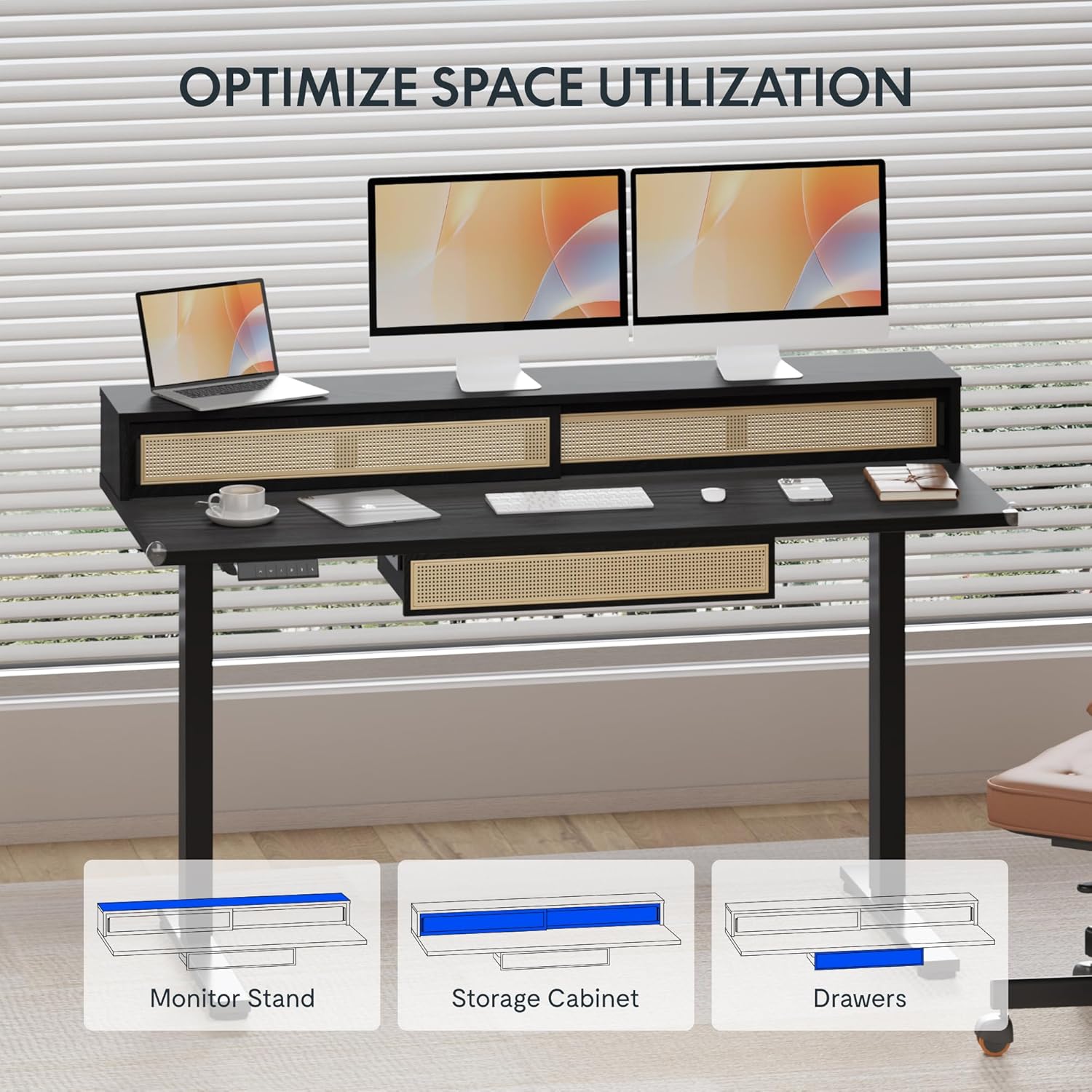
Figure 5.1: Illustration of the desk's integrated storage options, including the monitor stand, storage cabinet, and drawers.
Elegant Rattan Design
The desk features a premium woven rattan texture that enhances interior aesthetics. The seamless desktop design eliminates weak joints, and the scratch-resistant surface is designed to resist daily wear, warping, and stains, maintaining its appearance over time.

Figura 5.2: Detallada view of the desk's rattan design, metal handles, and corner protectors.
Integrated Monitor Shelf
An ergonomically designed monitor shelf elevates screens to eye level, which can help reduce neck strain and back discomfort. This feature promotes proper posture alignment during extended work sessions, whether sitting or standing.
Quiet Electric Height Adjustment
The desk is equipped with a silent motor system (operating at less than 50dB) for smooth transitions between sitting and standing positions. Programmable presets allow for quick adjustments, accommodating multiple users or varying work scenarios.
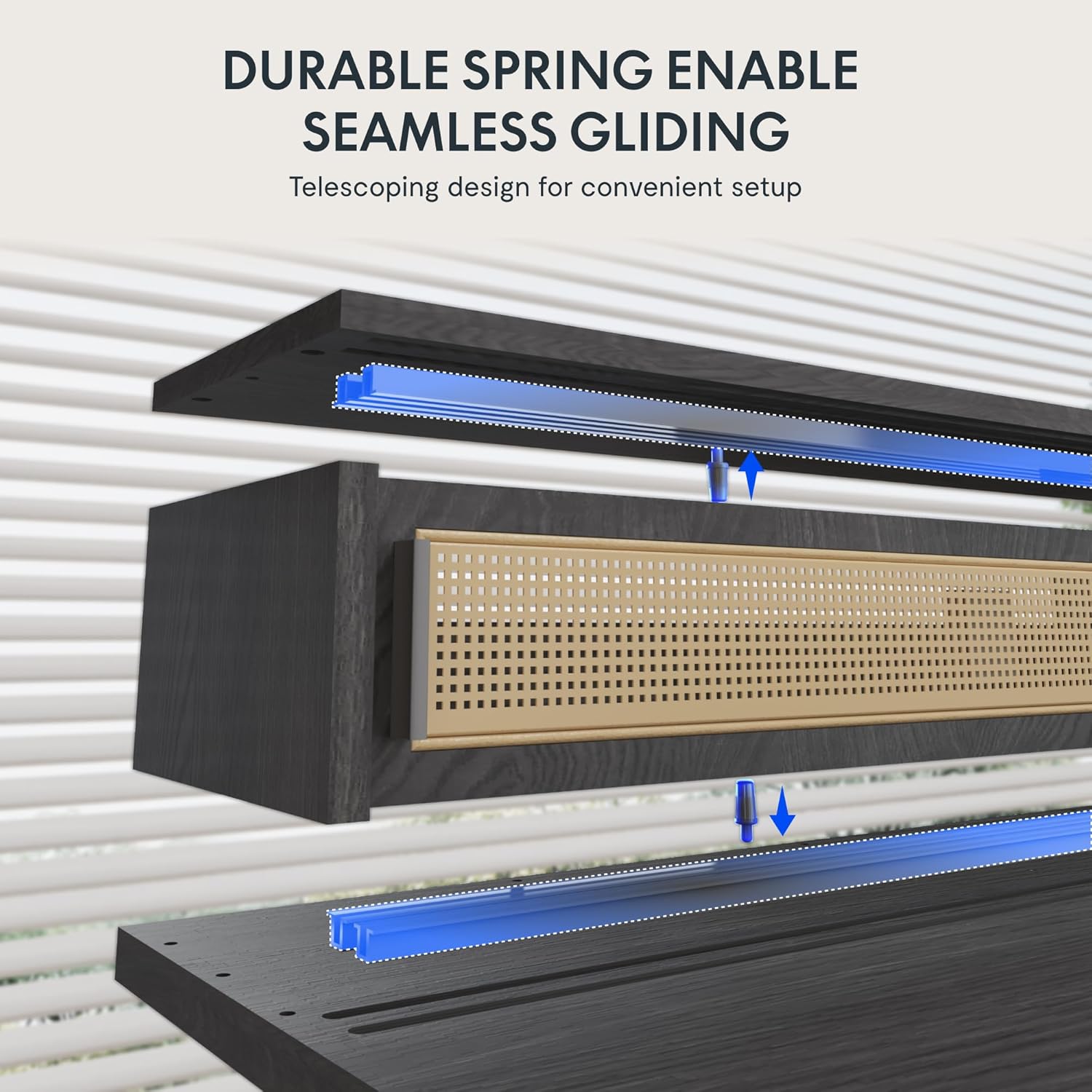
Figure 5.3: Illustration of the durable spring mechanism enabling seamless gliding of desk components.
6. Manteniment
Regular maintenance ensures the longevity and optimal performance of your FLEXISPOT Q4 Standing Desk.
- Neteja: Netegeu l'escriptori i el marc amb un drap suauamp tela. Eviteu netejadors abrasius o productes químics durs que puguin danyar l'acabat.
- Gestió de cables: Reviseu i reorganitzeu els cables periòdicament per evitar embolics i garantir un funcionament suau.
- Comprovació de fixació: Occasionally inspect all screws and bolts to ensure they remain tight. Retighten if necessary.
- Cura del motor: The electric motor system is designed for maintenance-free operation. Do not attempt to open or lubricate motor components.
7. Solució De Problemes
If you encounter issues with your FLEXISPOT Q4 Standing Desk, refer to the following common solutions:
| Problema | Causa possible | Solució |
|---|---|---|
| L'escriptori no es mou | Cable d'alimentació desconnectat, cable del motor fluix, sobrecàrrega. | Check all cable connections. Ensure the desk is plugged into a working outlet. Reduce weight on the desk. |
| Ajust d'alçada desigual | Obstruction, uneven weight distribution. | Clear any obstructions. Redistribute weight evenly on the desktop. Perform a reset if necessary (refer to control panel instructions). |
| El tauler de control no respon | Connexió fluixa, problema d'alimentació. | Check the control panel cable connection to the control box. Ensure main power is connected. |
| L'escriptori s'atura a mig moviment | Safety feature activated (anti-collision), motor overheating. | Remove any obstruction. Allow the motor to cool down for 20 minutes before attempting to operate again. |
If the problem persists after attempting these solutions, please contact FLEXISPOT customer support.
8. Especificacions
| Característica | Detall |
|---|---|
| Model | Q4 |
| Dimensions del producte (P x A x A) | 23.6" x 55.1" x 29" (alçada mínima) |
| Altura mínima | 28.9 polzades |
| Altura màxima | 46.5 polzades |
| Tipus de material superior | Fusta |
| Material base | Acer d'aliatge |
| Color | Negre |
| Opcions d'emmagatzematge | 1 sliding-door compartment, 1 under-desk drawer |
| Nombre de calaixos | 1 |
| Nombre de prestatgeries | 1 (Monitor Shelf) |
| Muntatge obligatori | Sí |
| UPC | 840460464574 |
9. Garantia i Suport
Protecció de garantia:
The FLEXISPOT Q4 Standing Desk is backed by a comprehensive warranty to ensure your investment security:
- Cobertura de 5 anys: Applies to the desk frame and motor components.
- Cobertura de 2 anys: Applies to all electronic components.
This warranty covers manufacturing defects and ensures lasting performance under normal use conditions.
Atenció al client:
For any questions, assistance with assembly, troubleshooting, or warranty claims, please contact FLEXISPOT customer support through the official website or your purchase platform. Please have your model number (Q4) and proof of purchase ready when contacting support.
Ask a question about this manual
Ask about setup, troubleshooting, compatibility, parts, safety, or missing instructions. Manuals+ will review the question and use this page’s manual context to help answer it.