
1. Introducció
This manual provides essential information for setting up, operating, maintaining, and troubleshooting your new Auusda T160R 16-inch laptop. This device is designed for productivity and entertainment, featuring a Ryzen 5 3500U processor, 32GB RAM, and a 1TB SSD, running on Windows 11 Pro.
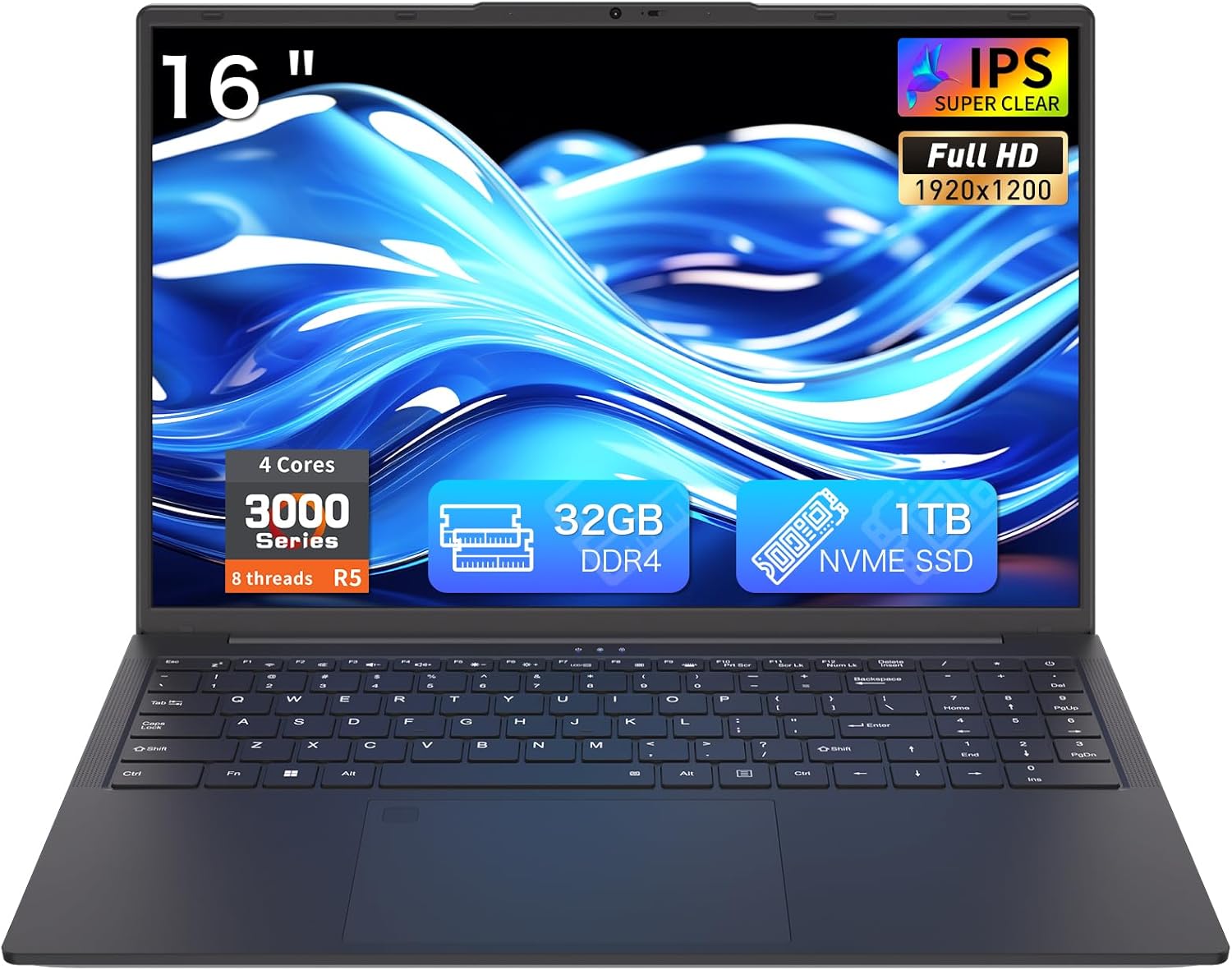
Figure 1: Auusda T160R 16-inch Laptop. This image displays the laptop from the front, highlighting its 16-inch screen, 32GB RAM, 1TB SSD, and Ryzen 5 processor.
2. Configuració
2.1 Desembalatge i inspecció inicial
Traieu amb cura tots els components de l'embalatge. La caixa ha de contenir:
- Auusda T160R Laptop
- Power Adapter (19V/3.42A, 3.5 mm plug)
- Manual d'usuari (aquest document)
- Funda de teclat
Inspect the laptop and accessories for any signs of damage. If any components are missing or damaged, contact customer support immediately.
Video 1: Unboxing a similar Auusda laptop model. This video demonstrates the unboxing process and initial setup steps, which are generally applicable to the T160R model.
2.2 Encès inicial
- Connect the power adapter to the DC3.5mm power port on the left side of the laptop and plug it into a power outlet.
- Obriu la tapa de l'ordinador portàtil.
- Press the power button, usually located on the top right of the keyboard or side.
- Segueix les instruccions que apareixen a la pantalla per completar la configuració del Windows 11 Pro.
3. Components mésview
Familiarize yourself with the key components of your Auusda T160R laptop:

Figure 2: Key features of the Auusda T160R laptop, including the Ryzen 5 3500U CPU, 32GB DDR4 RAM, 1TB SSD, 16-inch FHD IPS display, fingerprint unlock, Wi-Fi 6, Bluetooth 5.3, and 5000mAh battery.
3.1 Processador i memòria
The laptop is equipped with a Ryzen 5 3500U 4C8T (2.1-3.7GHz) processor i 32 GB de RAM DDR4, providing smooth performance for multitasking and various applications.

Figure 3: Diagram illustrating the Ryzen 5 3500U processor with 4 cores, 8 threads, 12W TDP, and a maximum frequency of 3.7GHz.
3.2 Pantalla
Enjoy visuals on a 16-inch FHD+ (1920x1200) IPS display with narrow bezels and a 180° hinge for flexible viewing. It includes a 720p HD webcàmera per a videotrucades.

Figure 4: The laptop's 16-inch FHD+ IPS display showcasing vibrant colors and wide viewangles d'ajust.
3.3 Teclat i touchpad
The laptop features a full-size backlit keyboard for comfortable typing in various lighting conditions, a teclat numèric, i un integrated touchpad with a fingerprint reader for secure login.

Figure 5: Close-up of the full-size backlit keyboard and the integrated fingerprint reader on the touchpad.
3.4 Ports i connectivitat
The Auusda T160R offers comprehensive connectivity options:
- Port USB-C: Supports 65W fast charging, data transfer, and display output.
- Ports USB-A: Three USB-A ports for connecting peripherals.
- HDMI: Standard HDMI port for external displays.
- Ranura per a targeta SD: Supports up to 2TB microSD cards for expanded storage.
- Sense fil: Wi-Fi 6 and Bluetooth 5.0 for fast and reliable wireless connections.
- Jack d'àudio: 3.5mm audio jack with microphone support.

Figure 6: Detailed diagram showing the various ports on the laptop, including USB, HDMI, SD card slot, and DC-in jack.
4. Instruccions de funcionament
4.1 Encès/Apagat
- Per encendre: Open the lid or press the power button.
- Per apagar: Feu clic al botó Inici, després a Engegada i seleccioneu "Apagar".
- Per reiniciar: Feu clic al botó Inici, després a Engegada i seleccioneu "Reinicia".
- Per dormir: Tanqueu la tapa o feu clic al botó Inici, després al botó Engegada i seleccioneu "Repos".
4.2 Ús del teclat i del touchpad
- Teclat retroil·luminat: Premeu el botó Fn + F9 keys to toggle the keyboard backlight on or off.
- Lector d'empremtes digitals: Use the integrated fingerprint reader on the touchpad for quick and secure login. Follow Windows Hello setup instructions to configure your fingerprint.
- Gestos del touchpad: The touchpad supports standard Windows gestures for navigation and control.
4.3 Visualització i Weblleva
- 180° Hinge: The display can be opened flat to 180 degrees, facilitating screen sharing and collaboration.
- WebObturador de privacitat de la càmera: Slide the physical shutter located above the webcam to cover or uncover the camera, ensuring your privacy during video calls or when the camera is not in use.
4.4 Connectivitat de dispositius externs
Connecteu dispositius externs mitjançant els ports disponibles:
- Dispositius USB: Plug USB drives, mice, or other peripherals into the USB-A ports.
- Pantalla externa: Use the HDMI port or the USB-C port (with a compatible adapter/cable) to connect an external monitor.
- Targeta SD: Insert an SD card into the dedicated slot for additional storage or data transfer.
- Àudio: Connecteu uns auriculars o uns altaveus externs al connector d'àudio de 3.5 mm.
Vídeo 2: Acabatview of the Auusda 16-inch laptop's features, including its display, keyboard, and connectivity options.
5. Manteniment
5.1 Cura de la bateria
- Per maximitzar la durada de la bateria, eviteu descarregar-la completament amb freqüència.
- Guardeu el portàtil en un lloc fresc i sec quan no el feu servir durant períodes prolongats.
- Feu servir només l'adaptador de corrent proporcionat per carregar.
5.2 Gestió d'emmagatzematge
- Elimina regularment els innecessaris files to free up space on the 1TB PCIe SSD.
- Utilize the SD card slot for additional storage (supports up to 2TB microSD).
- Consider external storage solutions for large media files o còpies de seguretat.
5.3 Cleaning and Cooling
- Feu servir un drap suau i sense borrissol per netejar la pantalla i l'exterior. Eviteu productes químics agressius.
- Ensure the laptop's vents are clear of obstructions to allow for proper airflow and efficient cooling.
6. Solució De Problemes
If you encounter any issues with your laptop, try the following basic troubleshooting steps:
- Sense energia: Assegureu-vos que l'adaptador de corrent estigui ben connectat i que la presa de corrent funcioni. Proveu una altra presa de corrent.
- Problemes de pantalla: If the screen is blank, try adjusting the brightness or connecting an external monitor to check if the display is faulty.
- Rendiment lent: Close unnecessary applications, check for background updates, or restart the laptop.
- Problemes de connectivitat: For Wi-Fi or Bluetooth issues, try toggling them off and on, or restarting your router/modem.
For more complex issues, refer to the online support resources or contact customer service.
7. Especificacions
| Característica | Especificació |
|---|---|
| Marca | Auusda |
| Nom del model | T160R |
| Mida de la pantalla | 16 polzades |
| Resolució de pantalla | 1920 x 1200 píxels (FHD+) |
| Processador | Ryzen 5 3500U (2.1 GHz, up to 3.7 GHz) |
| RAM | 32 GB DDR4 |
| Disc dur | 1 TB PCIe SSD |
| Coprocessador gràfic | AMD Radeon RX Vega 8 |
| Sistema operatiu | Windows 11 Pro |
| Tipus sense fil | 5 GHz Radio Frequency, 802.11ax (Wi-Fi 6), Bluetooth 5.0 |
| Ports USB | 3x USB 3.0, 1x USB-C (full-featured) |
| Bateria | 11.4V 5000mAh / 57Wh Li-Po |
| Pes de l'article | 3.970 kg (1.8 lliures) |
| Dimensions del producte | 14.07″ × 9.65″ × 0.72″ |
| Característiques especials | Backlit Keyboard, Fingerprint Reader, Webobturador de privadesa de la càmera |
8. Garantia i Suport
Your Auusda T160R laptop comes with a two-year coverage for materials and workmanshipA més, un 100-day trial està inclòs.
For customer support, you can reach out via email:
Email: Auusda.ltd@gmail.com
7/24 customer support is available to assist you with any questions or issues.