
1. Producte acabatview
The Mobvoi Treadmill Plus is a versatile and compact fitness device designed for walking, workstation use, and running. It features a foldable design for easy storage, an LED display, remote control, and smart app connectivity.
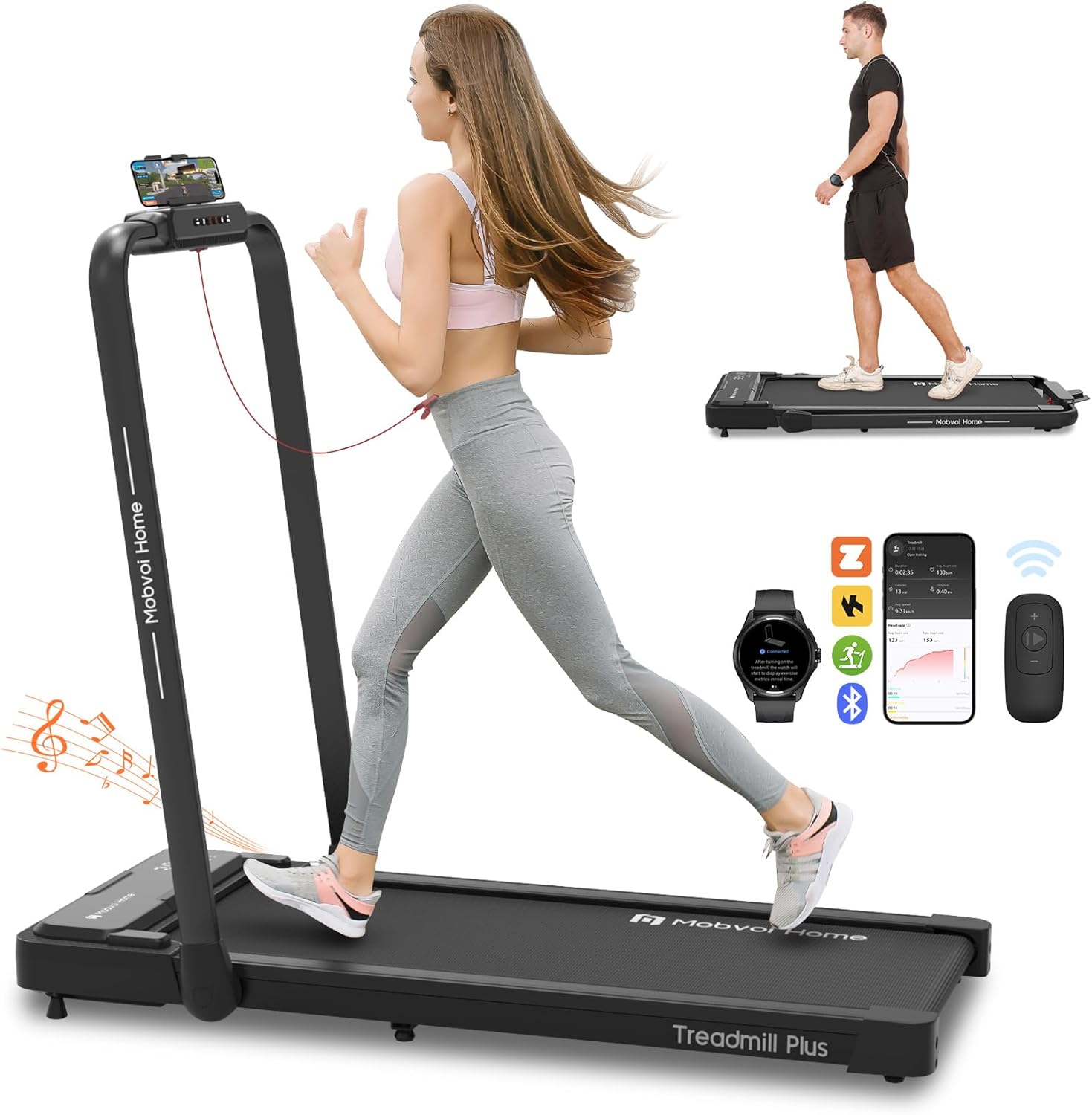
Figure 1: Mobvoi Treadmill Plus in running and walking configurations.
2. Contingut del paquet
Before assembly, please verify that all components are present in the package:
- Manual d'instruccions x1
- Phone Mount x1
- Safety Key x1
- Control remot x1
- Clau anglesa oberta x1
- 5mm & 6mm L-shaped Wrench Set x1
- Clau de tub x1
- Peu ajustable x2
- 4.2 x 16mm Screw x2
- Lubricant Oil x1
- 1.8 m Power Cord x1

Figure 2: All components included in the Mobvoi Treadmill Plus package.
3. Muntatge i muntatge
The Mobvoi Treadmill Plus is designed for minimal assembly. Follow these steps to prepare your treadmill for use:
- Desempaqueta la cinta de córrer: Traieu amb cura tots els components de l'embalatge.
- Fixeu els peus ajustables: Screw the two adjustable feet into the designated slots at the bottom of the treadmill.
- Install Phone Mount: Secure the phone mount onto the handle using the provided screws and wrenches.
- Raise the Handlebar: Lift the handlebar into the upright position until it locks securely. Ensure the fixed lock design is engaged.
- Connectar l'alimentació: Plug the 1.8m power cord into the treadmill and then into a suitable power outlet.
- Col·locació: Position the treadmill on a flat, stable surface. Avoid placing the treadmill on a carpet, as this may reduce ventilation and cooling efficiency, potentially leading to motor burnout.

Figure 3: Folding and unfolding the treadmill for setup and storage.
4. Instruccions de funcionament
4.1 Clau de seguretat
The safety key is a critical safety feature. Always attach the magnetic safety key to the designated area on the treadmill console and clip the other end to your clothing before starting any exercise. If the safety key is detached, the treadmill will stop immediately.
4.2 Encès/Apagat
To power on the treadmill, ensure the power cord is connected and press the power button located on the front of the unit. To power off, press the power button again or detach the safety key for an emergency stop.
4.3 Exercise Modes
The Mobvoi Treadmill Plus offers three distinct exercise modes:
- Mode de caminada: Speed range from 1 to 6 km/h. Ideal for light activity or walking while working.
- Workstation Mode: Speed range from 1 to 6 km/h. Designed for use with a standing desk.
- Mode de funcionament: Speed range from 1 to 12 km/h. For jogging and running exercises.

Figure 4: The three operational modes of the Mobvoi Treadmill Plus.
4.4 Ajust de velocitat
Speed can be adjusted using two methods:
- Console Buttons: Use the '+' and '-' buttons on the treadmill's console to increase or decrease speed. Shortcut buttons '3' and '6' allow instant adjustment to 3 km/h and 6 km/h respectively.
- Comandament a distància: The included remote control provides convenient adjustment of speed and start/stop functions.

Figure 5: LED display and control options (console buttons and remote control).
4.5 pantalles LED
The integrated LED display cycles through key exercise data every 5 seconds, including speed, duration, distance, and calories burned. This allows for real-time tracking of your workout progress.
4.6 Altaveu Bluetooth
The treadmill features a built-in Bluetooth speaker. To use it, connect your smartphone or other audio device via Bluetooth. This allows you to play music or other audio during your workout.
4.7 Connectivitat d'aplicacions intel·ligents
Enhance your workout experience by connecting the treadmill to various fitness applications:
- TicSports App: This AI-powered app provides personalized daily plans, real-time metrics, and instant AI coaching feedback. It syncs live with your treadmill to help you train effectively.
- Virtual Training (Zwift & Kinomap): Seamlessly connect to platforms like Zwift and Kinomap via your device for immersive virtual racing and scenic trail experiences.
- Smartwatch Connection: Connect your smartwatch (compatible with the Mobvoi Treadmill app from Google Play Store) to the treadmill for a unified fitness hub, tracking your data comprehensively.
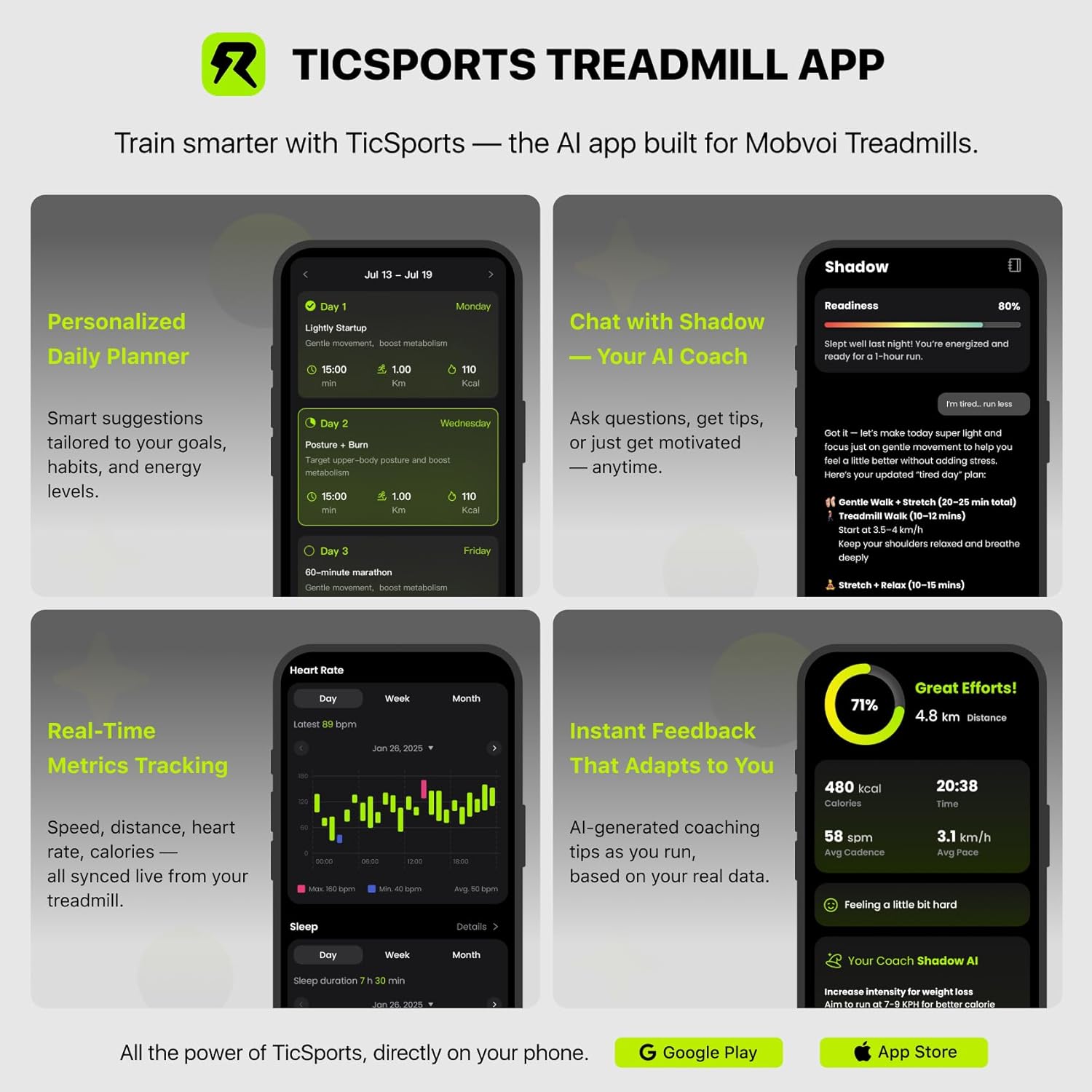
Figure 6: Features of the TicSports AI-powered treadmill app.

Figure 7: Smartwatch connectivity and virtual training experience.
5. Manteniment
5.1 Lubricació
Regular lubrication of the running belt is essential for optimal performance and longevity. Use the provided lubricant oil as instructed in the detailed user manual (separate document) to apply to the running belt. The frequency of lubrication depends on usage.
5.2 Neteja
Netegeu la cinta de córrer amb anuncisamp cloth after each use to remove sweat and dust. Avoid using abrasive cleaners or solvents that could damage the surfaces.
5.3 Ajust del cinturó de carrera
Periodically check the running belt for proper alignment and tension. If the belt is off-center or slipping, refer to the detailed user manual for instructions on how to adjust it using the provided tools.
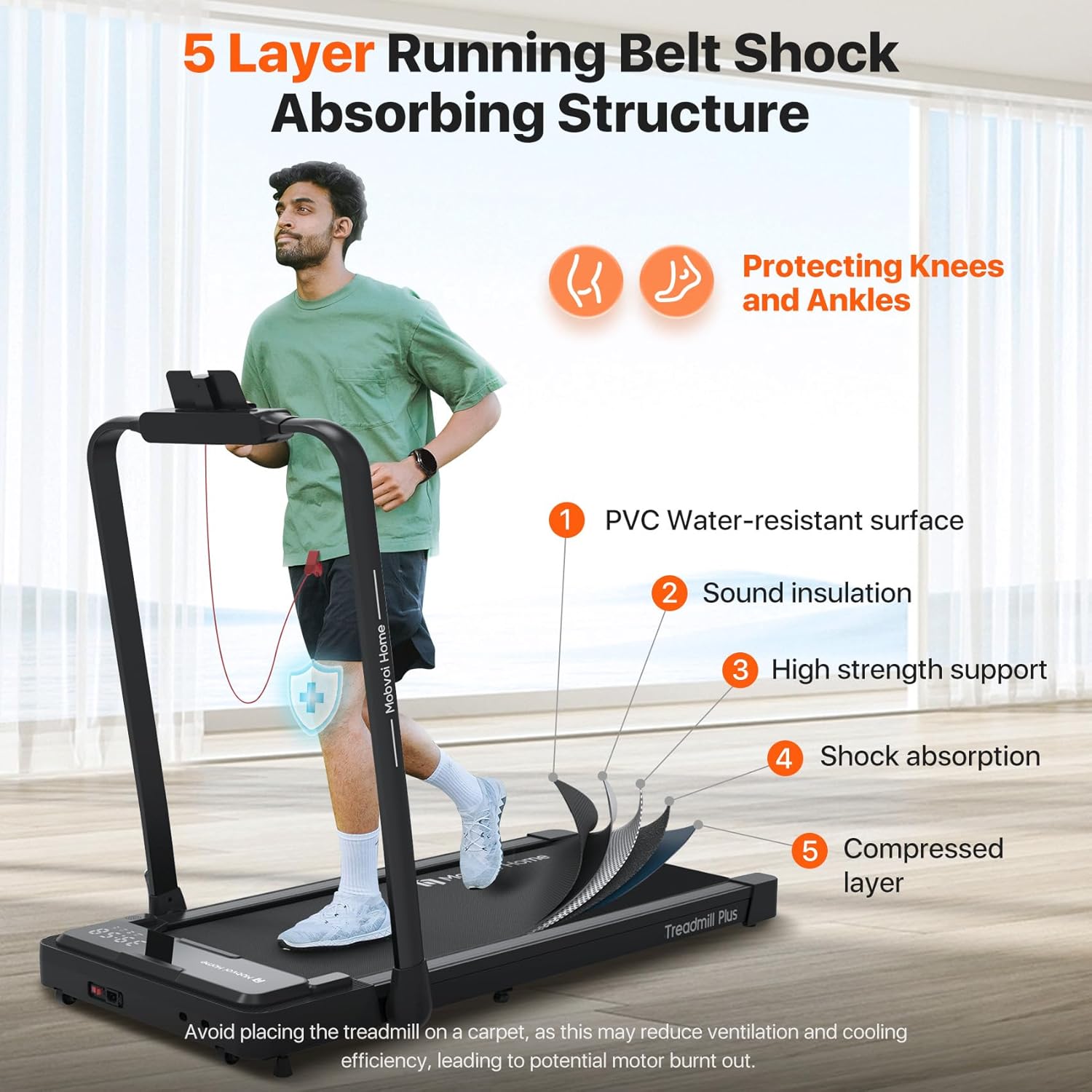
Figure 8: The 5-layer shock-absorbing running belt structure.
6. Solució De Problemes
6.1 La cinta de córrer no arrenca
- Check Safety Key: Ensure the magnetic safety key is correctly attached to the console. The treadmill will not operate without it.
- Connexió d'alimentació: Verify that the power cord is securely plugged into both the treadmill and the wall outlet.
- Interruptor d'alimentació: Confirm the main power switch on the treadmill is in the 'ON' position.
6.2 Sorolls inusuals
- Lubricació: A dry running belt can cause friction and noise. Refer to the maintenance section for lubrication instructions.
- Alineació del cinturó: An improperly aligned belt can rub against the side rails. Adjust the belt as per the maintenance guidelines.
- Parts soltes: Comproveu si hi ha cargols o components solts i apreneu-los si cal.
6.3 Lectures inexactes
- Recalibració: If speed or distance readings appear inaccurate, consult the detailed user manual for potential recalibration procedures.
- Sincronització d'aplicacions: Ensure your TicSports app or other connected apps are properly synced and updated.
7. Especificacions
| Característica | Especificació |
|---|---|
| Número de model | Cinta de córrer Plus |
| Marca | Mobvoi |
| Potència del motor | 2.5 CV |
| Velocitat màxima | 12 km/h |
| Capacitat màxima de pes | 120 quilos |
| Àrea de córrer (L x A) | 102 cm x 42 cm |
| Dimensions del producte (desplegat) | 113 x 64.2 x 124 cm |
| Dimensions del producte (plegat) | 138 x 64.2 x 12 cm |
| Pes de l'article | 25 quilos |
| Nivell de soroll | <60 dB |
| Tipus de visualització | LED (Speed, Distance, Calories Burned) |
| Material del marc | Acer al carboni |
| Font d'alimentació | Elèctric amb cable |
| Característiques especials | Built-In Speaker, Compact Design, Foldable, Portable, Wheeled |
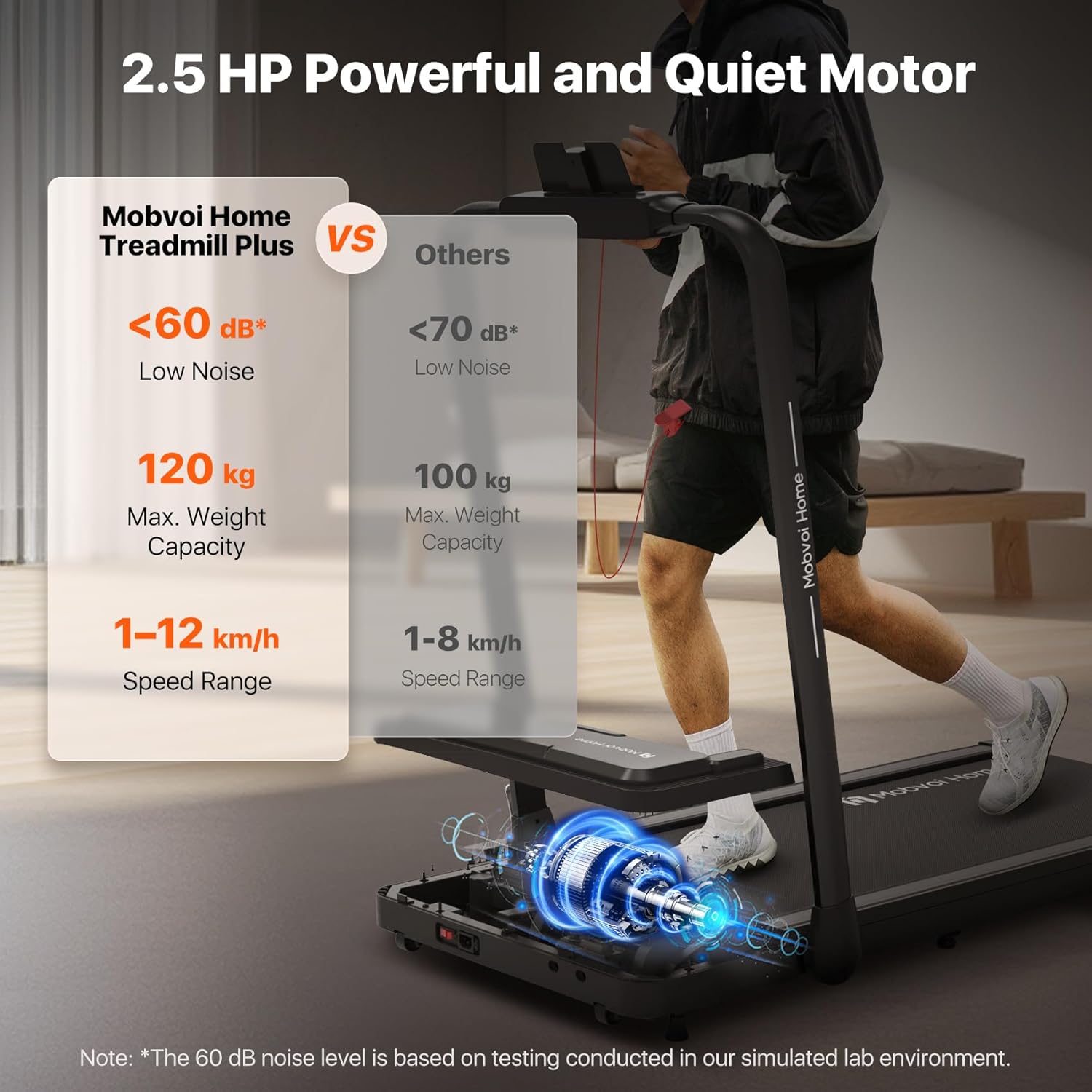
Figure 9: Key performance specifications of the Mobvoi Treadmill Plus.

Figure 10: Expanded running area dimensions.
8. Garantia i Suport
8.1 Atenció al client
For any inquiries, technical assistance, or support regarding your Mobvoi Treadmill Plus, please contact Mobvoi's specialized customer support. Refer to the contact information provided in your product registration or on the official Mobvoi weblloc.
8.2 Devolucions
This item is returnable. Please refer to the retailer's return policy for specific terms and conditions regarding returns and exchanges.