
Introducció
The Surfans F28 is a high-fidelity portable music player designed to deliver an immersive audio experience. Featuring dual ESS9018 DACs, a 4.4mm balanced output, and comprehensive Bluetooth 5.2 support including LDAC and aptX HD, the F28 supports a wide range of lossless audio formats. This manual provides detailed instructions for setting up, operating, maintaining, and troubleshooting your device to ensure optimal performance and longevity.

Figura 1: Davant i darrere view of the Surfans F28 HiFi Music Player.
Contingut del paquet
Si us plau, verifiqueu que tots els elements que s'enumeren a continuació siguin presents al vostre paquet:
- 1x Surfans F28 HiFi Music Player
- 1x cable de càrrega USB-C
- 1x 128GB Micro SD Card (pre-installed or included separately)
- 1x Manual d'usuari (aquest document)

Figure 2: Illustration of typical package contents.
Producte acabatview
Familiarize yourself with the various components and controls of your F28 music player.
Característiques principals:
- Dual ESS9018 DACs: For high-resolution audio decoding and minimal distortion.
- Sortida equilibrada de 4.4 mm: Provides enhanced audio quality and power for demanding headphones.
- Sortida d'un sol extrem de 3.5 mm: Standard audio output for common headphones.
- Bluetooth 5.2 bidireccional: Supports LDAC and aptX HD for high-quality wireless audio transmission and reception.
- Pantalla tàctil IPS de 3.5 polzades: Per a una navegació i un control intuïtius.
- ALPS Analog Volume Knob: For precise volume adjustments.
- Emmagatzematge ampliable: Admet targetes Micro SD de fins a 512 GB.
- Port USB-C: Per a càrrega i transferència de dades.

Figure 3: The F28 player showcasing its display and audio capabilities.

Figure 4: The dual ESS9018K2M DAC chips, central to the F28's high-fidelity audio.

Figure 5: Top panel with 4.4mm balanced and 3.5mm single-ended audio outputs, and the ALPS analog volume knob.
Configuració
1. Càrrega del dispositiu
Before first use, fully charge the F28. Connect the included USB-C cable to the player's USB-C port and the other end to a USB power adapter (5V/1A recommended) or a computer's USB port. The charging indicator will show the charging status. A full charge typically takes several hours.
2. Inserció de la targeta Micro SD
The F28 supports Micro SD cards up to 512GB. Locate the Micro SD card slot on the bottom of the device. Gently insert the Micro SD card with the gold contacts facing down until it clicks into place. To remove, push the card in slightly until it springs out.

Figure 6: Inserting the Micro SD card and connecting via USB-C for data transfer.
3. Transferència de música Files
Connect the F28 to your computer using the USB-C cable. The player will appear as a removable storage device. You can then drag and drop your music files directly into the Micro SD card's folders. The F28 supports various lossless formats including DSD (DSF/DFF), FLAC/WAV (up to 384kHz), AIFF/APE, as well as MP3/AAC.

Figure 7: Supported audio file formats for the F28 player.
Instruccions de funcionament
1. Encendre/apagar
- Encès: Press and hold the power button (located on the side) until the screen illuminates.
- Apagar: Press and hold the power button until a power-off prompt appears, then confirm.
2. Navegació bàsica
The F28 features a 3.5-inch IPS touchscreen for primary navigation. Swipe gestures and taps are used to select options and move between menus. Physical buttons on the side provide additional control for playback (play/pause, next/previous track) and menu navigation.
3. Reproducció de música
From the main menu, select "My Music" or "Folder" to browse your audio files. Tap on a song to begin playback. The playback screen displays track information, progress, and playback controls.
4. Control de volum
Adjust the volume using the gold-colored ALPS analog knob located on the top right of the device. Rotate clockwise to increase volume and counter-clockwise to decrease. The volume level will be displayed on the screen.
5. Connectivitat Bluetooth
The F28 supports Bidirectional Bluetooth 5.2 with LDAC and aptX HD codecs for high-quality wireless audio. To pair with Bluetooth headphones or speakers:
- Go to "System Settings" and select "Bluetooth".
- Activa el Bluetooth.
- El reproductor buscarà els dispositius disponibles. Seleccioneu el vostre dispositiu de la llista per emparellar-lo.
The F28 can also act as a Bluetooth receiver, allowing you to stream audio from your phone or PC to the player.

Figure 8: The F28 features a Bluetooth 5.2 chip for stable and high-quality wireless connections.
6. Configuració de l'equalitzador
The F28 includes an equalizer to customize your sound. Navigate to the "Equalizer" option in the settings. You can choose from various presets or create a custom sound profile by adjusting the frequency bands.
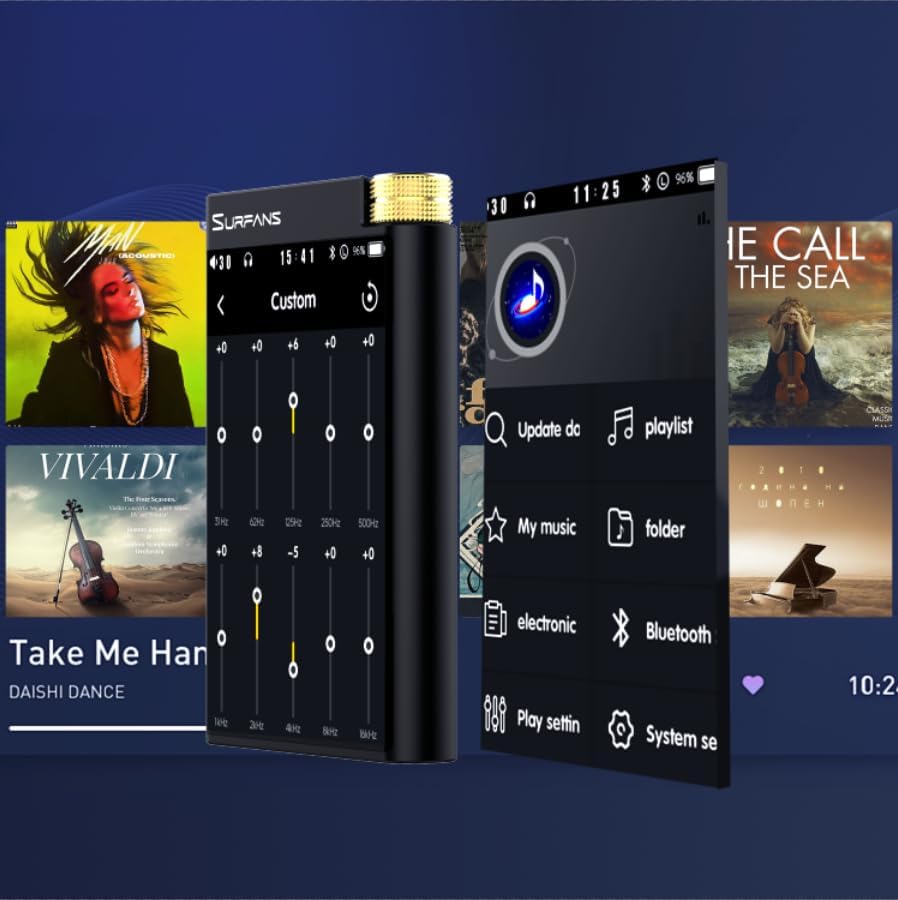
Figure 9: Customizing audio with the built-in equalizer.
7. Connexió a dispositius externs
Use the 4.4mm balanced or 3.5mm single-ended output to connect to headphones, amplifiers, or speakers. The USB-C port also supports USB DAC functionality, allowing the F28 to act as an external sound card for your computer.

Figure 10: The F28 can be connected to various audio systems, including acting as a USB DAC for computers.
Manteniment
- Neteja: Feu servir un drap suau i sec per netejar el dispositiu. Eviteu utilitzar productes de neteja o dissolvents abrasius.
- Emmagatzematge: Guardeu el reproductor en un lloc fresc i sec, allunyat de la llum solar directa i de temperatures extremes.
- Cura de la bateria: Per allargar la durada de la bateria, eviteu descarregar-la completament amb freqüència. Si la guardeu durant períodes prolongats, carregueu-la fins a un 50% aproximadament cada pocs mesos.
Resolució de problemes
| Problema | Causa possible | Solució |
|---|---|---|
| El dispositiu no s'encén. | Bateria baixa; dispositiu bloquejat. | Charge the device for at least 30 minutes. If still unresponsive, try holding the power button for 10-15 seconds for a hard reset. |
| Touchscreen is unresponsive or slow. | Error temporal de programari; interferències del protector de pantalla. | Restart the device. Ensure the screen is clean and free of debris. If using a screen protector, ensure it is properly applied and not too thick. |
| Problemes d'emparellament per Bluetooth. | Device not in pairing mode; distance; interference. | Ensure both devices are in pairing mode and within range. Turn off and on Bluetooth on both devices. Clear previous pairings if necessary. |
| Low volume via Bluetooth. | Volume settings on both devices; codec compatibility. | Increase volume on both the F28 and the connected Bluetooth device. Ensure optimal codec (LDAC/aptX HD) is selected if supported by the receiving device. |
| Música files not recognized or played in incorrect order. | Corrupta files; file system indexing issue. | Assegureu-vos files are in supported formats. Re-scan the music library from the player's settings. If issues persist, try reformatting the Micro SD card (backup data first) and re-transferring files. Note: Some players may sort by filename alphabetically rather than track number metadata. |
Especificacions
| Característica | Detall |
|---|---|
| Nom del model | F28 128G |
| Dimensions del producte | 0.7 x 2.6 x 4.7 polzades |
| Pes de l'article | 9.6 unces |
| Xip DAC | Dual ESS9018K2M |
| Formats d'àudio compatibles | DSD (DSF/DFF), FLAC/WAV (up to 384kHz/32-bit), AIFF/APE, MP3/AAC, WMA Lossless |
| Versió Bluetooth | 5.2 (Bidirectional, supports LDAC/aptX HD) |
| Mida de la pantalla | 3.5 Inches IPS Touchscreen |
| Emmagatzematge intern | 128GB (included Micro SD card) |
| Emmagatzematge ampliable | Fins a 512 GB mitjançant targeta Micro SD |
| Bateria | 1x 12V battery (included), approx. 12-hour playback |
| Ports de sortida | 4.4mm Balanced, 3.5mm Single-Ended |
| Tecnologia de connectivitat | Aux, Bluetooth 5.2, USB-C |
| Característica especial | Equalitzador |
Garantia i Suport
For warranty information and technical support, please refer to the official Surfans weblloc web o contacteu directament amb el servei d'atenció al client. Conserveu el rebut de compra com a comprovant de compra per a reclamacions de garantia.
You can visit the official Surfans Store on Amazon for more information and support: Surfans Audio Store