
1. Introducció
The STC My Home Q30 WiFi Range Extender is designed to expand and strengthen your existing Wi-Fi network, eliminating dead zones and providing stable, high-speed internet coverage throughout your home or office. This dual-band booster supports both 2.4GHz and 5GHz frequencies, offering speeds up to 1200 Mbps for seamless streaming, gaming, and browsing.
1.1 Contingut del paquet
- STC My Home Q30 WiFi Range Extender
- Power Adapter (Integrated)
- Guia d'inici ràpid
2. Producte acabatview
Familiarize yourself with the STC My Home Q30 extender's components and indicators.

Imatge 2.1: Frontal view of the STC My Home Q30 WiFi Range Extender. The device is white with a black central panel featuring the 'stc' logo.

Imatge 2.2: Primer pla frontal view of the STC Q30 extender, highlighting the indicator lights and WPS button area.

Imatge 2.3: Darrere view of the STC Q30 extender, showing the ventilation and power plug area.
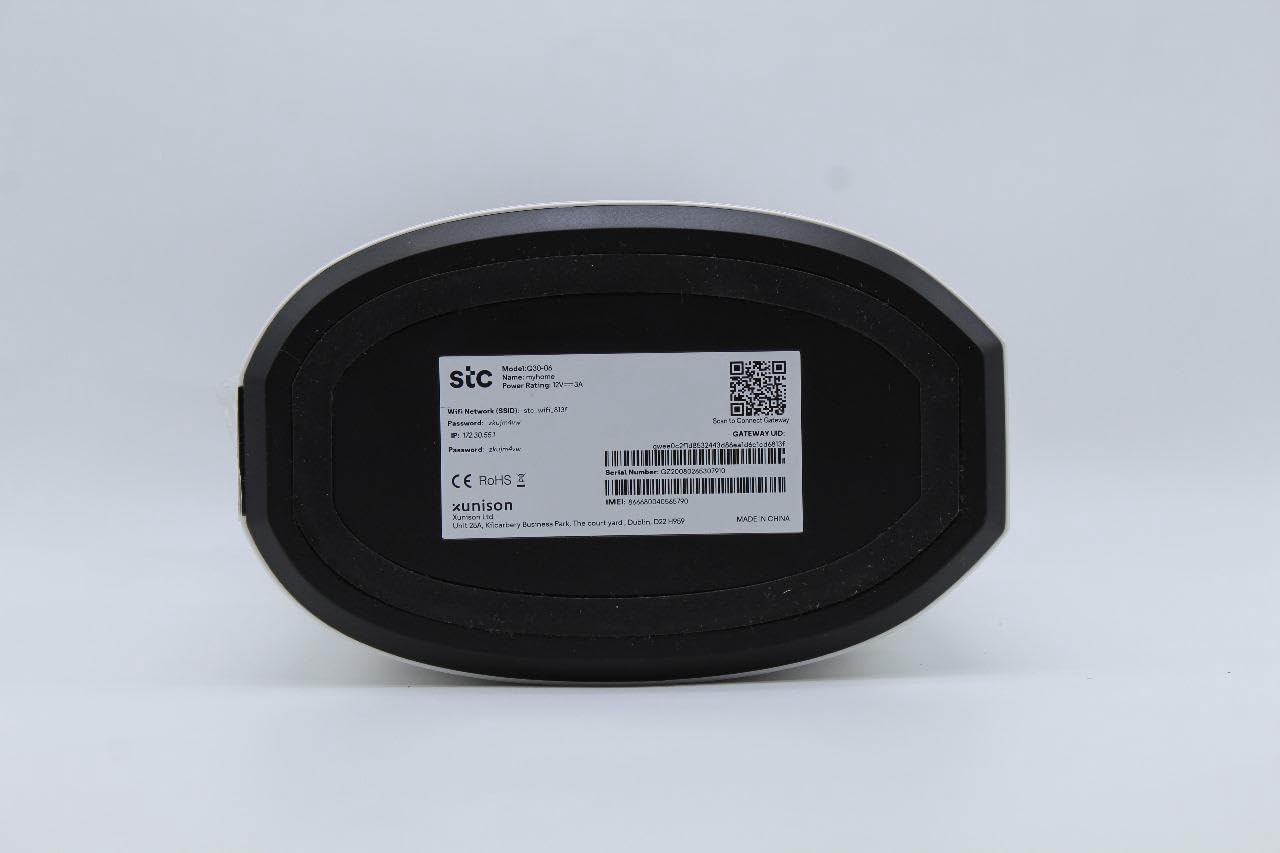
Image 2.4: Bottom label of the STC Q30 extender, displaying model information, serial number, default login details, and a QR code for quick access or setup.
2.1 Llums indicadors
- LED d'alimentació: Indica l'estat d'alimentació.
- LED Wi-Fi: Indicates Wi-Fi signal status and activity.
- LED de força del senyal: Shows the strength of the signal received from the main router.
2.2 Botons i ports
- Botó WPS: For quick and easy setup with WPS-enabled routers.
- Botó de restabliment: Used to restore the extender to factory default settings (typically a small pinhole button).
- Port Ethernet: For connecting wired devices or for initial setup.
3. Instruccions de configuració
The STC My Home Q30 offers two primary methods for setup: WPS (Wi-Fi Protected Setup) and Web Interfície.
3.1 WPS Setup (Recommended for Quick Setup)
- Plug the Q30 extender into an electrical outlet near your main Wi-Fi router. Wait for the Power LED to turn solid.
- Premeu el botó WPS del vostre encaminador Wi-Fi principal.
- Within two minutes, press the WPS button on the STC My Home Q30 extender.
- Wait for the Wi-Fi LED on the extender to turn solid, indicating a successful connection.
- Relocate the extender to a suitable location between your router and the Wi-Fi dead zone. Ensure the Signal Strength LED indicates a good connection (e.g., green or blue).
3.2 Web Configuració de la interfície
- Plug the Q30 extender into an electrical outlet near your main Wi-Fi router. Wait for the Power LED to turn solid.
- Connect your computer or mobile device to the extender's default Wi-Fi network (e.g., "STC_Extender" or similar, usually found on the product label). No password is required initially.
- Obre a web navegador i introduïu l'adreça IP o el nom de domini predeterminat (per exemple,
192.168.1.1orstcextender.net) provided on the product label or quick start guide. - Log in using the default username and password (e.g.,
admin/adminor as specified on the label). - Follow the on-screen instructions of the setup wizard to select your main Wi-Fi network and enter its password.
- Configure the extender's Wi-Fi network name (SSID) and password. You can choose to keep the same as your main network or create a new one.
- Complete the setup. The extender will restart.
- Relocate the extender to an optimal position and connect your devices to the extended network.
4. Instruccions de funcionament
Once set up, the STC My Home Q30 operates automatically. Here are some operational guidelines:
- Col·locació òptima: Place the extender roughly halfway between your main router and the area with weak Wi-Fi signal. The Signal Strength LED should indicate a strong connection to the router.
- Dispositius de connexió: Devices will automatically connect to the strongest available Wi-Fi signal. If you created a new SSID for the extender, connect to that network.
- Ethernet Port Usage: The Ethernet port can be used to connect a wired device (e.g., smart TV, gaming console, PC) to the extended network, providing a stable wired connection.
5. Manteniment
Regular maintenance ensures optimal performance and longevity of your STC My Home Q30 extender.
- Actualitzacions de firmware: Periodically check the STC support website for firmware updates. Updating firmware can improve performance, add features, and fix bugs. Access the web interface to perform updates.
- Neteja: Gently wipe the device with a dry, soft cloth. Do not use liquid cleaners or abrasive materials. Ensure ventilation holes are clear of dust.
- Reiniciant: Si teniu problemes de connectivitat, proveu de desconnectar l'extensor de la presa de corrent durant 10 segons i després torneu-lo a connectar.
- Restabliment de fàbrica: If the extender is not functioning correctly or you forget the login credentials, perform a factory reset by pressing and holding the Reset button for 5-10 seconds with a paperclip until the LEDs flash. Note that this will erase all custom settings.
6. Solució De Problemes
Refer to the following common issues and their solutions.
- Sense energia:
- Ensure the extender is securely plugged into a working electrical outlet.
- Check if the Power LED is illuminated.
- Sense accés a Internet després de la configuració:
- Verifiqueu que el vostre encaminador principal tingui una connexió a Internet activa.
- Check the Signal Strength LED on the extender. If it's red or off, the extender is too far from the router or the connection is poor. Relocate the extender closer to the router.
- Ensure you entered the correct Wi-Fi password for your main router during setup.
- Try restarting both the router and the extender.
- Velocitat lenta a la xarxa estesa:
- Relocate the extender to an optimal position where the Signal Strength LED indicates a strong connection (e.g., green or blue). Avoid placing it near large metal objects or other interference sources.
- Assegureu-vos que el vostre encaminador principal ofereixi una velocitat adequada.
- Check for firmware updates for the extender.
- No es pot accedir Web Pàgina de gestió:
- Assegureu-vos que el dispositiu estigui connectat a la xarxa Wi-Fi de l'extensor.
- Verify the IP address or domain name entered in the browser.
- Esborra la memòria cau del navegador o prova un altre navegador.
- Feu un restabliment de fàbrica si heu oblidat les credencials d'inici de sessió.
7. Especificacions
| Número de model | P30 |
| Marca | STC (Generic) |
| Velocitat de transferència de dades | Fins a 1200 Mbps |
| Band Frequency Supported | 2.4 GHz, 5 GHz (Dual-Band) |
| Dispositius compatibles | WiFi-enabled devices |
| Color | Blanc |
| Pes de l'article | 1.33 quilos |
| Dimensions del paquet | 34.8 x 18 x 14.8 cm |
8. Garantia i Suport
For warranty information and technical support, please refer to the documentation included with your purchase or contact your retailer. STC provides reliable network expertise, and support channels are typically available through the point of purchase or the official STC weblloc.
Keep your purchase receipt for warranty claims.