
ChongXiao WXGN301
ChongXiao WXGN301 Brushless Controller and LCD Display User Manual
Model: WXGN301 | Brand: ChongXiao
Producte acabatview
This manual provides detailed instructions for the installation, operation, and maintenance of your ChongXiao WXGN301 Brushless Controller and accompanying LCD Display. This system is designed for electric bikes and e-scooters, supporting universal voltage ranges from 36V to 72V and power outputs from 500W to 1000W.

Figura 1: The ChongXiao WXGN301 Brushless Controller and LCD Display kit, including the controller unit, LCD display, and various wiring harnesses.
Instal·lació i cablejat
Careful wiring is essential for proper function and safety. Follow these steps for connecting the controller and LCD display.
Controller Wiring Connections

Figura 2: Detallada view of the controller's wiring harness with numbered labels indicating each connection point.
- Phase Line Connection: Connect the motor's phase lines to the controller's phase lines, matching colors (e.g., green to green, blue to blue, yellow to yellow).
- Hall Line Connection: Connect the motor's Hall sensor lines to the controller's Hall lines, matching colors. Ensure your motor has 5 Hall wires.
- Connexió de la bateria: Connect the battery lines. The red wire is for battery positive (+), and the black wire is for battery negative (-). Ensure correct polarity.
- LCD Line and Ignition Switch: Connect the controller's LCD line. If your throttle does not have an ignition switch, the two ignition wires on the controller must be shorted together to power on the system.
- Intelligent Recognition (Self-Learning):
- Apagueu l'alimentació.
- Connect the two intelligent recognition lines together.
- Turn on the power. The wheel will rotate forward or reverse.
- If the wheel rotates forward, separate the intelligent recognition lines.
- If the wheel rotates in reverse, separate the intelligent recognition lines, then connect them together again. If the wheel now rotates forward, separate the intelligent recognition lines.
- This function allows the controller to automatically identify the battery voltage and motor rotation direction.
- Nota: When using the throttle, the intelligent recognition lines must be separated.
- Altres connexions: Connect other functions as needed, such as high-level brake, brake light power, throttle handle, reverse gear, low brake, linear brake (thumb brake), PAS, headlight/taillight power, and regenerative brake. Refer to Figure 2 for connection points.

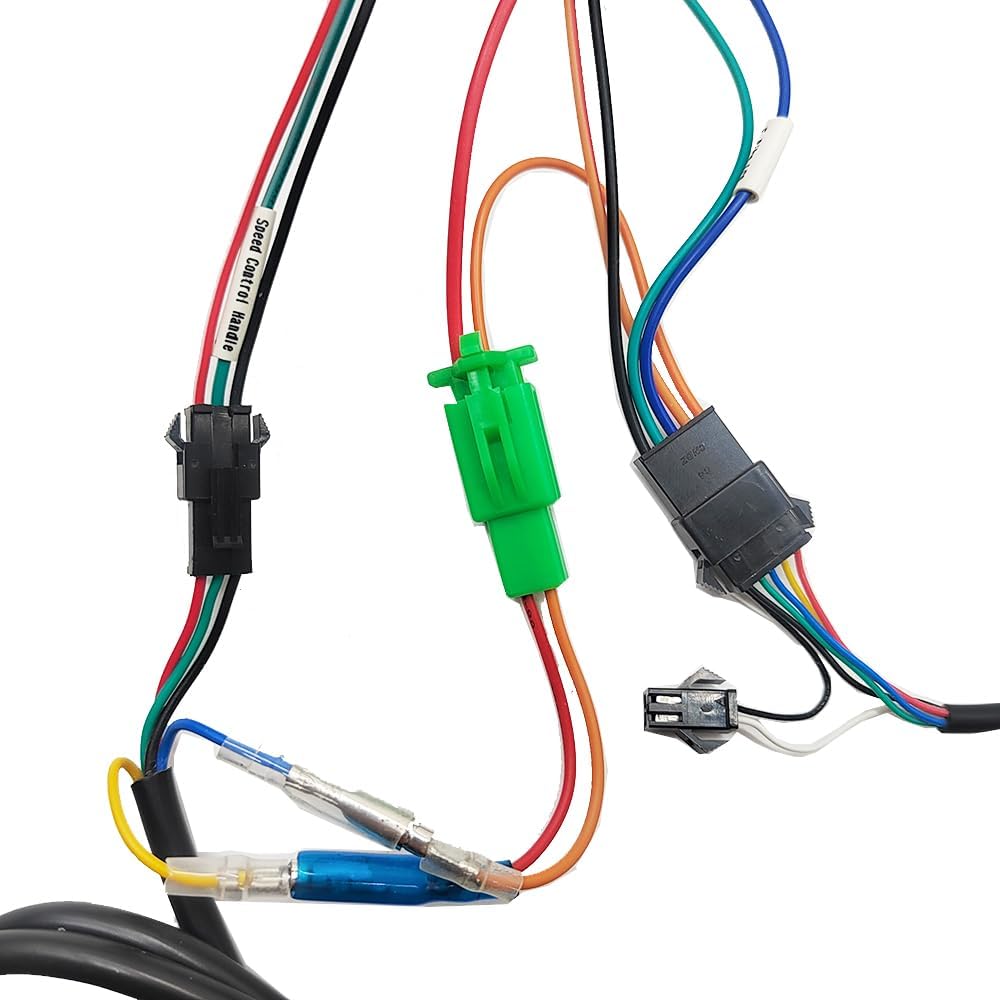
Figura 3: Examples of specific connectors for the LCD display, light power, and speed control handle.
Instruccions de funcionament
Pantalla LCD acabadaview (WXGN301)
The LCD display communicates with the controller using the UART protocol. It provides real-time riding data and allows for parameter adjustments.

Figura 4: The WXGN301 LCD Display and its integrated control buttons.
LCD 5-Wire Interface
- Vermell: Cable d'alimentació del comptador
- Blau: Cable de control de potència del controlador
- Negre: Instrument ground wire
- Verd: Línia de recepció de dades del comptador
- groc: Data transmission line of the meter
Botó Introducció
The display features an 'M' (Mode/Power) button, an 'Up' button, and a 'Down' button. Operations are categorized into short press, long press, and combination long press.
- Premsa curta: Used for quick actions (e.g., changing assist/speed gear, switching display data).
- Single Button Long Press: Used for mode or state switching (e.g., turning display on/off).
- Combination Key Long Press: Used for parameter settings to prevent accidental changes.
Operacions específiques
- Encès/apagat: Long press the 'M' (power) button to turn the display on or off.
- Canvia els modes de visualització: After the display is on, short press the 'M' button to cycle through different display data (e.g., ODO, Trip, Voltagi).
- Modify Assist Ratio/Electric Gear:
- Short press the 'Up' button to increase the assist level.
- Short press the 'Down' button to decrease the assist level.
- Switch Speed Display Mode: Long press the 'M' and 'Up' buttons simultaneously to switch between different speed display modes (e.g., average speed, max speed).
- Turn On/Off Headlights: Long press the 'Up' button to toggle the headlights on or off.
Parameter Settings (P01-P18)
To enter the parameter setting interface, press and hold the 'Up' and 'Down' buttons simultaneously. Use the 'Up' or 'Down' buttons to adjust values. Short press the 'M' button to move to the next parameter. To exit and save, long press 'Up' and 'Down' simultaneously, or the system will auto-save and exit after 10 seconds of inactivity.
| Codi de paràmetre | Descripció | Range/Notes |
|---|---|---|
| P01 | Brillantor de la llum de fons | 0001 (darkest) to 0003 (brightest) |
| P02 | Unitat de quilometratge | 0000: KM; 0001: MILLA |
| P03 | Voltage Nivell | 24V, 36V, 48V, 52V, 60V, 72V (Default: 36V) |
| P04 | Temps de son | 0: No sleep; 1-60: Sleep time in minutes |
| P05 | Power-Assist Gear | Adjustable: 3rd, 5th, or 9th gears |
| P06 | Diàmetre de la roda | Unit: inches; Precision: 0.1 |
| P07 | Number of Speed Measuring Magnets | Interval: 1-255 |
| P08 | Límit de velocitat | Range: 0-100 km/h (100 means max speed limit). Note: Displayed mile speed limit may not convert automatically from km/h setting. |
| P09 | Mode d'inici | 0: Zero start; 1: Non-zero start |
| P10 | Configuració del mode de conducció | 0000: Power-assisted drive (throttle invalid). 0001: Electric drive (throttle active, assist invalid). 0002: Power-assisted and electric drive coexist (zero start invalid). |
| P11 | Boost Sensitivity | Interval: 1-24 |
| P12 | Power-Assisted Start Strength | Interval: 1-5 |
| P13 | Power-Assisted Magnetic Steel Discs | 5, 8, or 12 magnets |
| P14 | (0 gear) | Value: 1 (excluding 0 gear) |
| P15 | Funció de creuer | Value: 0 (does not cruise) |
| P16 | Total Mileage Reset | ODO reset |
| P17 | Restabliment de fàbrica | Resets all parameters to default settings. |
| P18 | Valor per defecte | No es pot canviar. |
Nota: Due to potential production batch differences, some parameters may vary slightly from this description but will not affect general usage.
Resolució de problemes
The LCD display can show error codes to indicate system issues. Refer to the table below for common error codes and their potential solutions.
| Codi | Significat | Acció suggerida |
|---|---|---|
| 6 | Bateria Undervoltage | Charge the battery or check battery connections. |
| 7 | Falla del motor | Check if the motor Hall sensor has 5 wires and if they are connected color-to-color. Inspect motor wiring for damage. |
| 8 | Throttle Handle Failure | Inspect throttle wiring and ensure it is properly connected. Test throttle functionality. |
| 9 | Falla del controlador | Check all controller connections. If the issue persists, the controller may require replacement. |
| 10 | Fallada de recepció de la comunicació | Check the green data receiving line of the meter and its connection to the controller. |
| 11 | Error d'enviament de comunicació | Check the yellow data transmission line of the meter and its connection to the controller. |
| 12 | Falla de comunicació del BMS | Verify the battery management system (BMS) connection and functionality. |
| 13 | Fallada del far | Check headlight wiring and bulb/LED. Ensure the headlight power connection is secure. |
Especificacions del producte
Especificacions del controlador
- Voltage: 36V / 48V / 52V / 60V / 72V (Universal)
- Actual: 26A - 33A
- Number of Transistors: 12
- Potència nominal: 500W - 1000W (Compatible)
- Material: Aliatge d'alumini casing per a la dissipació de calor
- Característiques de seguretat: Overvol incorporattage/undervoltage protection, overheating protection, short circuit protection, anti-runaway function.


Figura 5: Controller label detailing voltage and current, and physical dimensions.
LCD Display Specifications (WXGN301)
- Voltage: 36V, 48V, 52V, 60V, 72V (Default: 36V, user adjustable)
- Protocol de comunicació: UART
- Dimensions: Aproximadament 110 mm (llargada) x 60 mm (amplada)
- Característiques: High-definition display, real-time speed, battery level, mileage, fault codes, night backlight function.

Figura 6: The WXGN301 LCD Display showing its approximate dimensions.
Informació general del producte
- Components inclosos: 1x Brushless Controller, 1x LCD Display
- Color: Red (Controller casing)
- Pes de l'article: Aproximadament 862 g
- Fabricant: Jiangsu Wuxi Bull Technology Co. Ltd
Manteniment
To ensure the longevity and optimal performance of your controller and display, follow these general maintenance guidelines:
- Neteja: Regularly wipe the controller and display with a soft, dry cloth. Avoid using harsh chemicals or excessive moisture.
- Inspecció: Periodically check all wiring connections for looseness or damage. Ensure the controller is securely mounted.
- Protecció del medi ambient: Protect the components from extreme temperatures, direct sunlight, and heavy rain. While the controller has an aluminum alloy casing for heat dissipation, prolonged exposure to harsh conditions can affect performance.
Garantia i Suport
For warranty information or technical support, please refer to the documentation provided at the point of purchase or contact your retailer. Keep your purchase receipt as proof of purchase.
Ask a question about this manual
Ask about setup, troubleshooting, compatibility, parts, safety, or missing instructions. Manuals+ will review the question and use this page’s manual context to help answer it.