
Introducció
Thank you for choosing the XREXS 3-Channel Digital Kitchen Timer. This versatile timer is designed to assist you with various timing needs in the kitchen and beyond, featuring a large display, magnetic back, stand, and adjustable volume. Please read this manual carefully to ensure proper use and maintenance of your device.

Image: The XREXS 3-Channel Digital Kitchen Timer, showing its large display with three separate timer readouts, along with two AAA batteries.
Característiques del producte
- 3-Channel Design: Simultaneously track three different events or tasks.
- Pantalla LCD gran: Clear and easy-to-read digits for all three timers.
- Volum ajustable: Customize the alarm sound level (High/Low).
- Múltiples opcions d'ubicació: Features a magnetic back for metal surfaces, a foldable stand for tabletop use, and a hanging hole for hooks.
- Funció de memòria: Recalls the last set time for quick reuse.
- Countdown and Count-up: Functions as both a countdown timer and a stopwatch.
Contingut del paquet
- 1 x XREXS 3-Channel Digital Kitchen Timer
- 2 piles AAA (incloses)
- 1 x Lanyard/Cord
Producte acabatview
Familiarize yourself with the timer's components and controls.

Imatge: Frontal view of the XREXS timer, highlighting the Hour (HR), Minute (MIN), Second (SEC) buttons, Timer selection buttons (TIMER 1, TIMER 2, TIMER 3), ON/OFF, CLEAR, and START/STOP buttons.
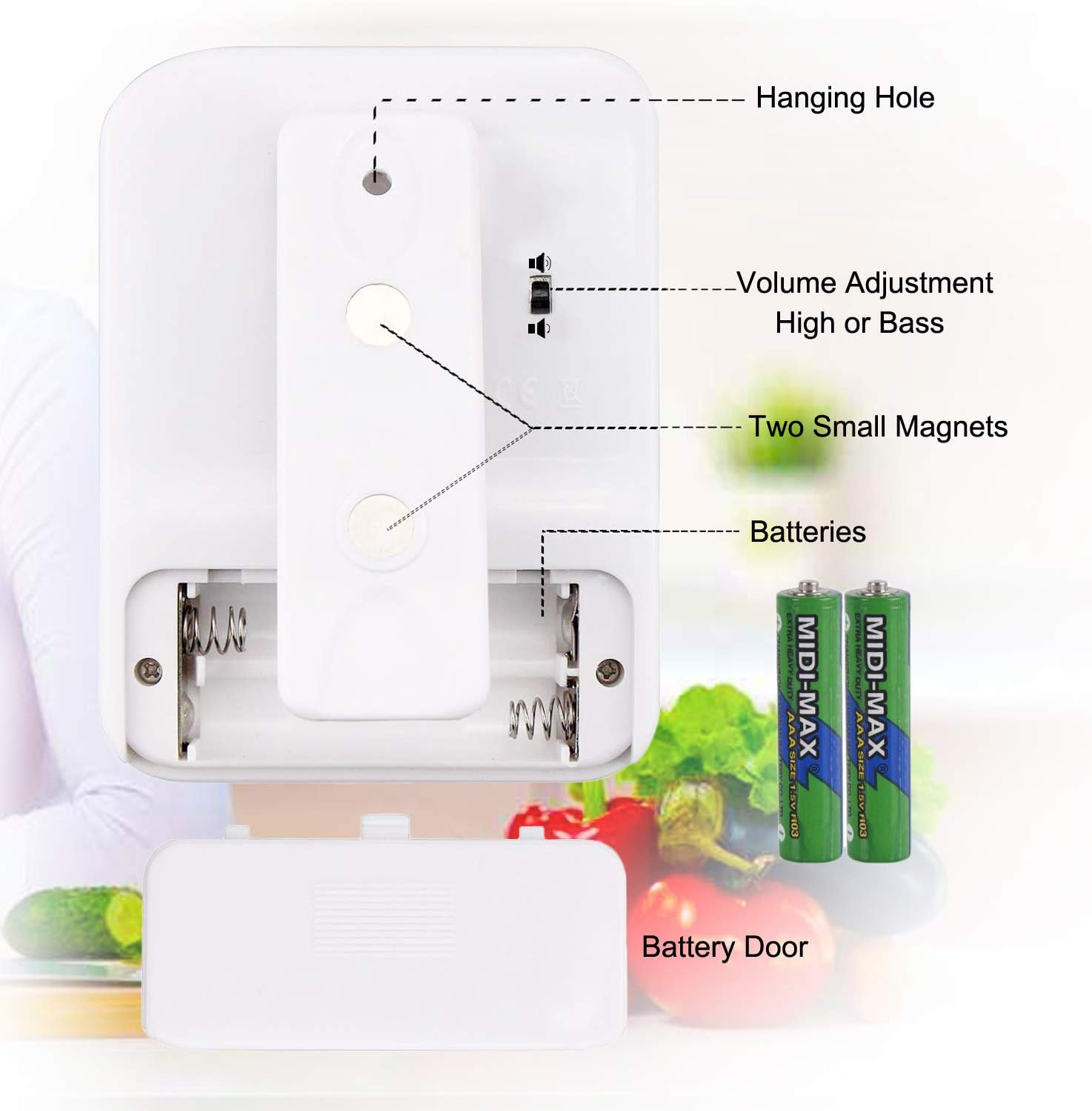
Imatge: Part posterior view of the XREXS timer, illustrating the battery door, two small magnets, the hanging hole, and the volume adjustment switch (High or Bass).
Funcions del botó:
- TIMER 1/2/3: Selects the desired timer channel (Timer 1, Timer 2, or Timer 3) for setting or operation.
- RRHH: Press to set hours. Long press to fast forward.
- MIN: Press to set minutes. Long press to fast forward.
- SEC: Press to set seconds. Long press to fast forward.
- ON/OFF: Long press for 3 seconds to turn the timer on or off (standby mode).
- ESBORAR: Clears the current timer setting to zero.
- INICI / PARADA: Starts or stops the countdown/count-up operation for the selected timer.
Configuració
1. Instal·lació de la bateria
- Localitza el compartiment de les piles a la part posterior del temporitzador.
- Fes lliscar per obrir la porta de la bateria.
- Introduïu dues (2) piles AAA, assegurant-vos de la polaritat correcta (+/-).
- Tanqueu la porta de la bateria de manera segura.
2. Engegada inicial
After installing batteries, long press the ON/OFF button for 3 seconds to activate the timer. The display will light up.
3. Ajust de volum
On the back of the timer, locate the small switch for volume adjustment. Slide it to select between High or Low alarm volume.
4. Opcions de col·locació
- Esquena magnètica: Attach the timer to any metal surface, such as a refrigerator door.
- Suport plegable: Pull out the integrated stand on the back to place the timer on a countertop or desk.
- Forat per penjar: Use the hole at the top of the timer to hang it on a hook or with the included lanyard.

Image: Demonstrates the versatility of the XREXS timer, showing it magnetically attached to a refrigerator, standing on a countertop, hanging from a hook, and clipped to a belt for portability.
Instruccions de funcionament
Setting a Countdown Timer:
- Premeu TEMPORITZADOR 1, TEMPORITZADOR 2, o TEMPORITZADOR 3 to select the desired timer channel. The selected timer's display will flash.
- Premeu el botó HR button to set the hours, MIN to set the minutes, and SEC to set the seconds. Long press these buttons for faster setting. The maximum setting is 99 hours, 59 minutes, 59 seconds.
- Un cop configurat el temps desitjat, premeu el botó INICI/PARA button to begin the countdown. The timer will start counting down, and the colon (:) will flash.
- Per aturar el compte enrere, premeu INICI/PARA de nou. Premeu-lo una vegada més per reprendre.
- When the countdown reaches zero, the timer will beep and automatically start counting up (as a stopwatch) to indicate elapsed time since the alarm.
- Per aturar l'alarma, premeu qualsevol botó.
- To clear the timer setting to zero, press the CLAR botó.
Using as a Stopwatch (Count-up Timer):
- Select a timer channel (TIMER 1/2/3).
- Ensure the selected timer is cleared to "00:00:00" by pressing CLAR si cal.
- Premeu INICI/PARA to begin counting up.
- Premeu INICI/PARA again to pause the count-up. Press again to resume.
- Premeu CLAR per posar el cronòmetre a zero.
Manteniment
- Neteja: Netegeu el temporitzador amb un suau, damp tela. No utilitzeu netejadors abrasius ni submergiu el dispositiu en aigua.
- Emmagatzematge: Guardeu el temporitzador en un lloc fresc i sec quan no l'utilitzeu.
- Cura de la bateria: If the timer will not be used for an extended period, remove the batteries to prevent leakage and damage.
Resolució de problemes
| Problema | Causa possible | Solució |
|---|---|---|
| El temporitzador no s'encén. | Les bateries estan esgotades o instal·lades incorrectament. | Check battery polarity. Replace with new AAA batteries. Long press ON/OFF button for 3 seconds. |
| La pantalla està tènue o parpelleja. | Potència de bateria baixa. | Substituïu les piles. |
| Alarm is too quiet/loud. | La configuració del volum és incorrecta. | Adjust the volume switch on the back of the timer. |
| El temporitzador no s'inicia/s'atura. | Incorrect button press or timer not selected. | Ensure a timer channel (1, 2, or 3) is selected. Press START/STOP firmly. |
| Cannot set time. | Timer not in setting mode or wrong channel selected. | Select the desired timer channel (TIMER 1/2/3) first. Ensure the timer is not currently running. |
Especificacions
| Marca | XREXS |
| Número de model | PS-382 |
| Color | Blanc |
| Dimensions (L x A x A) | 7 x 2 x 10 cm (aprox. 2.76 x 0.79 x 3.94 polzades) |
| Pes de l'article | 100 grams (aprox. 0.22 lliures) |
| Font d'alimentació | 2 piles AAA (incloses) |
| Configuració de temps màxim | 99 Hours, 59 Minutes, 59 Seconds |
| Canals | 3 canals independents |

Image: The XREXS timer with its approximate dimensions indicated: 6.7 cm width, 9 cm height, and 4.3 cm display height.
Informació de seguretat
- Do not expose the timer to extreme temperatures, direct sunlight, or high humidity.
- Eviteu deixar caure el temporitzador ni sotmetre'l a impactes forts.
- Mantenir fora de l'abast dels nens petits.
- Do not attempt to disassemble or repair the timer yourself. Contact customer support if issues arise.
- Eliminar les bateries usades de manera responsable d'acord amb la normativa local.