
Posture FI2211LB
Posture Smart Body Composition Scale (Model FI2211LB)
Manual d'usuari
1. Introducció
This manual provides essential instructions for the safe and effective use of your Posture Smart Body Composition Scale, Model FI2211LB. This digital scale is designed to measure body weight and analyze various body composition metrics using advanced 8-electrode technology. Please read this manual thoroughly before first use and retain it for future reference.
2. Informació de seguretat
- No utilitzeu aquest dispositiu si teniu un marcapassos o un altre dispositiu mèdic implantat.
- No utilitzeu aquest dispositiu si esteu embarassada.
- The scale is intended for household use only. It is not intended for medical diagnosis or treatment.
- Col·loqueu sempre la bàscula sobre una superfície dura i plana. L'ús en superfícies toves com ara una catifa pot afectar la precisió.
- La superfície de la bàscula pot ser relliscosa quan està mullada. Assegureu-vos que la superfície estigui seca abans de trepitjar-la.
- No saltis a la bàscula ni la facis servir per a altres finalitats que no siguin pesar-la.
- Keep the scale away from extreme temperatures, direct sunlight, and damp ambients.
- Mantenir fora de l'abast dels nens.
3. Contingut del paquet
- Posture Smart Body Composition Scale (Model FI2211LB)
- Retractable Handle with 8 Electrodes
- 4 x piles AA
- Manual d'usuari (aquest document)
4. Característiques del producte
- 8-Electrode Technology: Provides comprehensive body composition analysis by sending a safe, low-level electrical current through the body via both feet and hands.
- 28 Body Composition Measurements: Tracks metrics such as body weight, body fat percentage, BMI, muscle mass, bone mass, water weight, and more.
- Sensors d'alta precisió: Utilizes advanced sensor technology for accurate and reliable measurements.
- Pantalla LED clara: Features a bright, easy-to-read LED screen for instant weight and key data display.
- Funció d'indicació de veu: Announces measurement results automatically after each use for convenience.
- Connectivitat Bluetooth: Seamlessly connects to the Fitdays mobile application for data synchronization and tracking.
- Integració d'aplicacions: Compatible with popular health apps including Apple Health, Google Fit, Samsung Health, and Fitbit.
- Large Platform Design: Provides a stable and comfortable weighing experience.
5. Configuració
5.1 Instal·lació de la bateria
- Obriu el compartiment de la bateria a la part inferior de la bàscula.
- Introduïu les 4 piles AA, assegurant-vos de la polaritat correcta (+/-).
- Tanqueu el compartiment de la bateria de manera segura.
5.2 Descàrrega i emparellament de l'aplicació
The Posture Smart Scale uses the Fitdays app to track and analyze your body composition data. Ensure your smartphone's Bluetooth is enabled.
- Download the "Fitdays" app from the Apple App Store or Google Play Store.
- Create an account and set up your personal profile (gender, age, height, etc.). This information is crucial for accurate body composition calculations.
- Step onto the scale briefly to activate it. The LED display will light up.
- Open the Fitdays app. The app will automatically detect and pair with the scale via Bluetooth. Follow any on-screen prompts to confirm the connection.
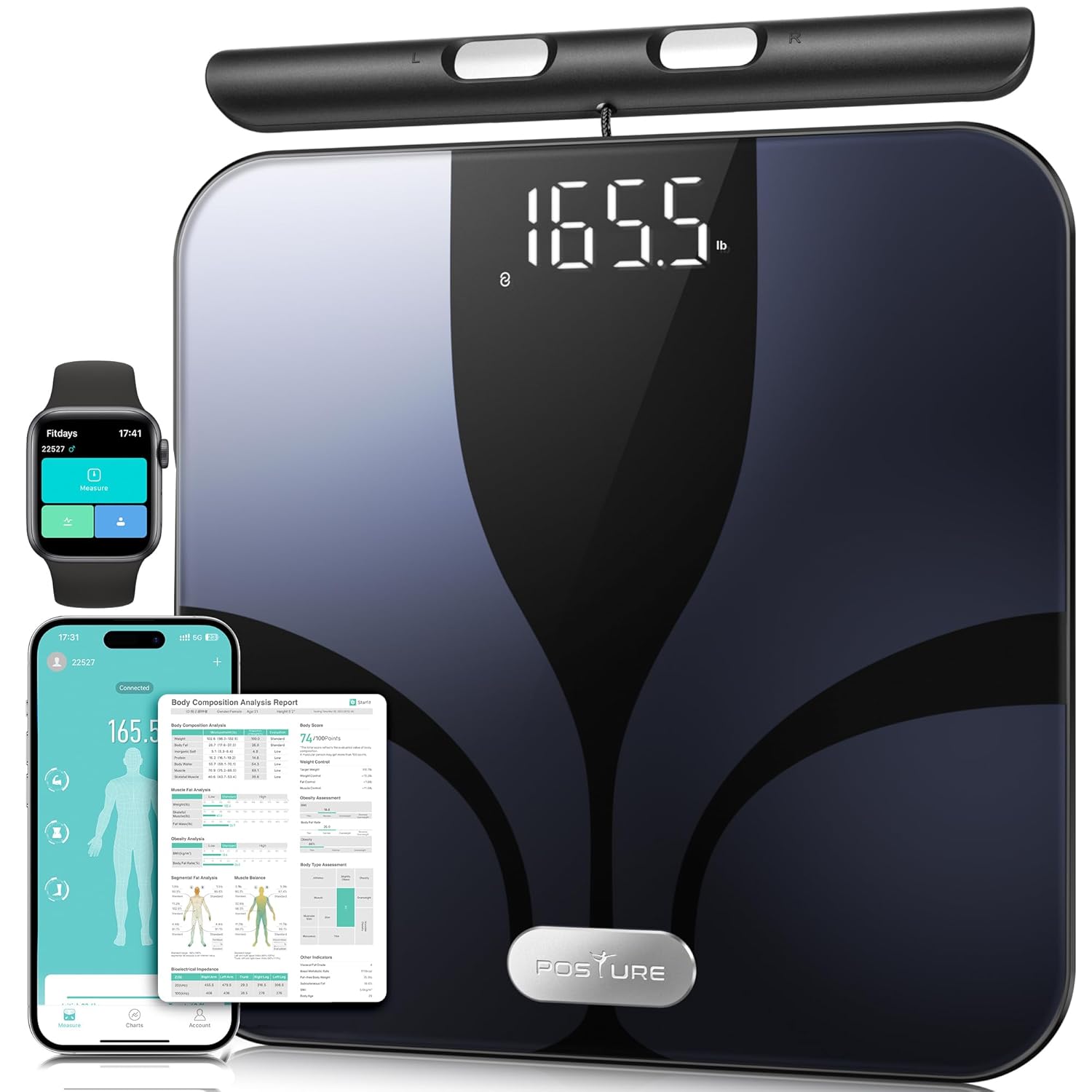
Figure 1: Posture Smart Body Composition Scale with connected mobile and smartwatch applications.
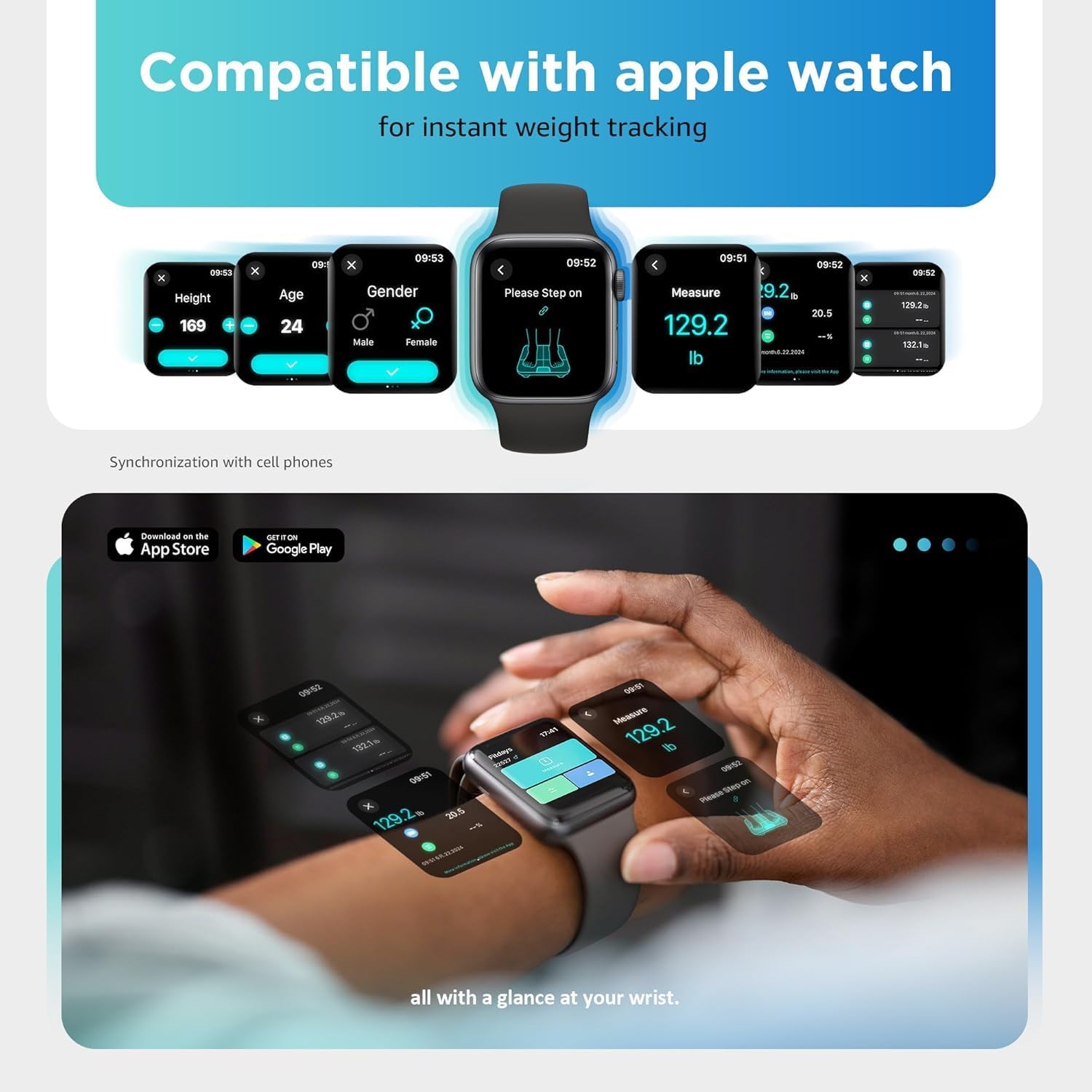
Figure 2: Smartwatch interface showing instant weight tracking, compatible with the Posture scale.
6. Instruccions de funcionament
6.1 Prendre una mesura
- Place the scale on a hard, flat, and stable surface.
- Ensure your feet are bare and clean.
- Step onto the scale with both feet, positioning them on the electrode pads.
- Grasp the retractable handle with both hands, ensuring your palms are in full contact with the handle electrodes. Hold the handle at approximately a 45-degree angle, keeping your arms slightly away from your body to avoid interference.
- Stand still until the measurement is complete. The LED display will show your weight, body fat, and BMI. The voice prompt function will announce the results.
- Your data will automatically synchronize with the Fitdays app on your paired smartphone.

Figure 3: Proper posture and hand placement for accurate 8-electrode body composition measurement.
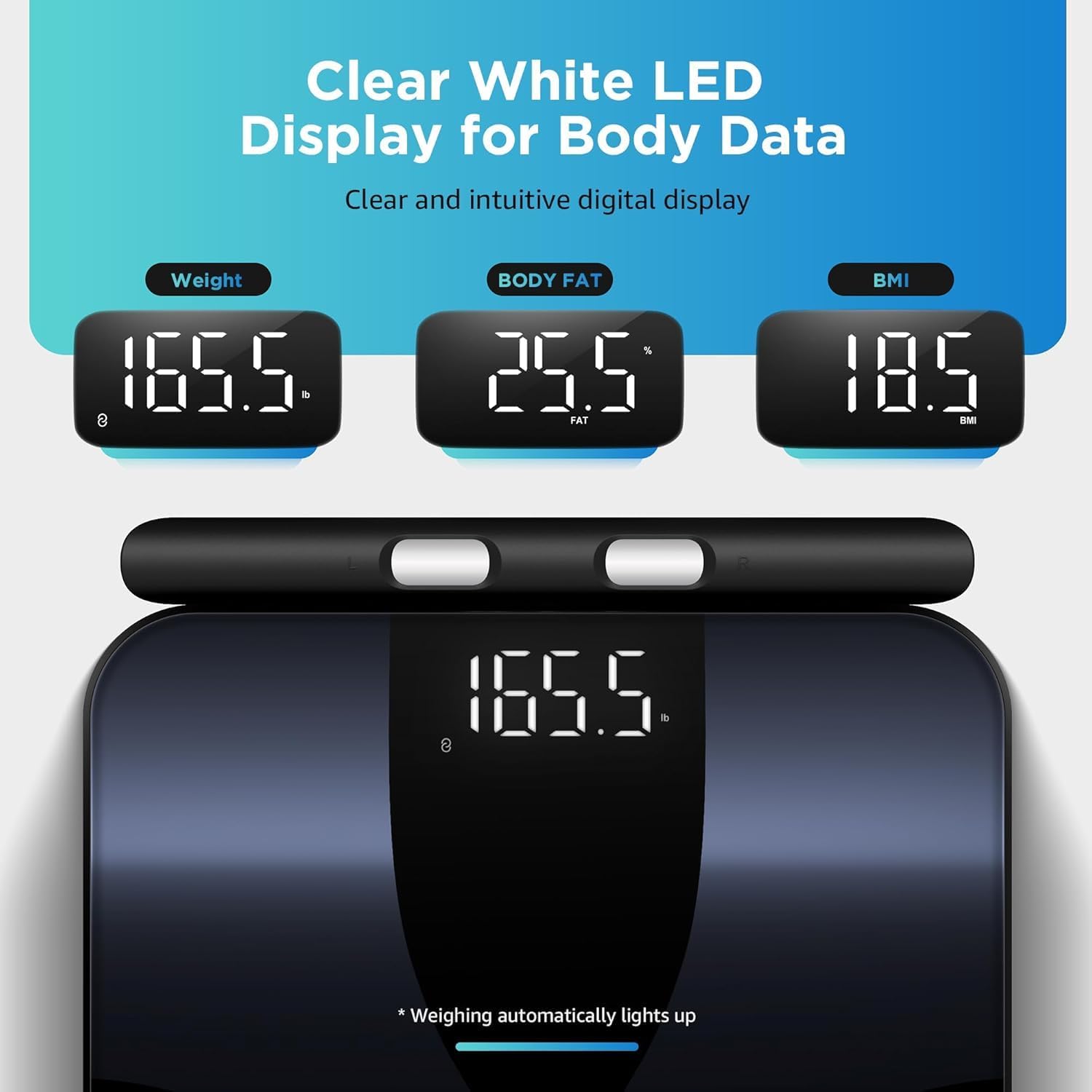
Figure 4: Clear white LED display showing weight, body fat percentage, and BMI readings.
6.2 Consistent Measurements
For the most consistent and comparable results, it is recommended to take measurements:
- At the same time each day (e.g., in the morning before eating or drinking).
- Under similar conditions (e.g., after using the restroom).
- Without clothing, or with minimal, consistent clothing.
7. Comprensió de les mesures
The Posture Smart Scale provides 28 different body composition metrics. These metrics are calculated based on your bio-electrical impedance analysis (BIA) data and your profile information (age, gender, height). The Fitdays app offers detailed explanations and historical tracking for each metric.

Figure 5: Visual representation of the 28 body composition metrics measured by the scale, including BMI, body fat, muscle rate, and more.
Key Metrics Include:
- Pes: Your total body mass.
- IMC (índex de massa corporal): Una mesura del greix corporal basada en l'alçada i el pes.
- Percentatge de greix corporaltage: La proporció de greix respecte al pes corporal total.
- Massa muscular: El pes total de la massa muscular del teu cos.
- Pes de l'aigua: El percentatgetage d'aigua al teu cos.
- Massa òssia: The total weight of bone mineral in your body.
- Greix visceral: Fat stored around the organs in your abdomen.
- Greix subcutani: Greix emmagatzemat directament sota la pell.
- BMR (taxa metabòlica basal): The number of calories your body needs to function at rest.
- Proteïna: El percentatgetage de proteïnes al teu cos.
- Edat corporal: An estimation of your body's biological age.
- Skeletal Muscle Rate: El percentatgetage of skeletal muscle in your body.
- Left/Right Arm/Leg Mass & Fat: Detailed segmental analysis of body composition.
8. App Integration and Data Tracking
The Fitdays app is your central hub for all body composition data. It provides comprehensive charts, trends, and insights to help you monitor your health journey.
- Dades històriques: View your measurements over time with daily, weekly, monthly, and yearly trends.
- Gestió d'usuaris: Add multiple users to the app, allowing each family member to track their individual progress.
- Establiment d'objectius: Set personal health goals and track your progress towards them.
- Third-Party App Sync: The Fitdays app can synchronize data with other popular health platforms:
- Salut d'Apple
- Google Fit
- Samsung Health
- Fitbit

Figure 6: Fitdays app displaying historical data and trends for various body metrics.

Figure 7: The Fitdays app integrates with major health platforms for comprehensive data management.
9. Manteniment i cura
- Neteja: Netegeu la superfície de l'escala amb l'anunciamp drap i detergent suau. No utilitzeu productes de neteja abrasius ni submergiu la bàscula en aigua.
- Emmagatzematge: Guardeu la bàscula en un lloc fresc i sec. Eviteu col·locar objectes pesats a sobre quan no l'utilitzeu.
- Substitució de la bateria: If the display shows a low battery indicator or becomes dim, replace all four AA batteries simultaneously.
- Calibració: If the scale is moved or stored vertically, it may require recalibration. Step on the scale briefly to turn it on, then step off and wait for it to display "0.0" before taking a measurement.
10. Solució De Problemes
| Problema | Causa possible | Solució |
|---|---|---|
| L'escala no s'encén. | Les bateries estan esgotades o instal·lades incorrectament. | Comproveu la polaritat de la bateria o substituïu les bateries. |
| Lectures de pes inexactes. | Scale on soft surface; not calibrated; inconsistent measurement conditions. | Place on hard, flat surface. Step on, then off, wait for "0.0" before weighing. Ensure consistent measurement times and conditions. |
| Body composition data not displayed or inconsistent. | Feet/hands not bare or fully contacting electrodes; profile incomplete in app; inconsistent measurement conditions. | Ensure bare feet and hands make full contact with all 8 electrodes. Complete your profile in the Fitdays app. Maintain consistent measurement conditions. |
| Problemes de connexió Bluetooth. | Bluetooth off on phone; app not open; scale not activated; interference. | Ensure phone Bluetooth is on. Open Fitdays app. Step on scale to activate. Move closer to the scale. Restart phone/app. |
| Voice prompt not working. | Feature disabled in app; low battery. | Check app settings to ensure voice prompt is enabled. Replace batteries. |
11. Especificacions
- Model: FI2211LB
- Marca: Postura
- Dimensions: 13.1 x 12 x 1.3 polzades (33.3 x 30.5 x 3.35 cm)
- Capacitat de pes: Fins a 400 lliures (180 kg)
- Font d'alimentació: 4 piles AA (incloses)
- Visualització: LED
- Connectivitat: Bluetooth
- Body Composition Metrics: 28
- Elèctrodes: 8 (4 on platform, 4 on retractable handle)
12. Garantia i Suport
Posture products are manufactured with high-quality standards. For warranty information and customer support, please refer to the contact details provided with your purchase or visit the official Posture website. Please have your model number (FI2211LB) and purchase date available when contacting support.
For additional assistance, you may also refer to the Fitdays app's help section.
Ask a question about this manual
Ask about setup, troubleshooting, compatibility, parts, safety, or missing instructions. Manuals+ will review the question and use this page’s manual context to help answer it.