
1. Introducció
This manual provides essential information for the proper setup, operation, and maintenance of your FUNYET FUNPAD 10-inch Android Tablet. Please read this guide thoroughly before using your device to ensure optimal performance and longevity.
2. Què hi ha a la caixa
Verifiqueu que tots els elements siguin presents al paquet:
- FUNYET FUNPAD 10-inch Android Tablet
- Adaptador d'alimentació
3. Producte acabatview
The FUNYET FUNPAD is a 10-inch Android tablet featuring an Octa-Core processor, 8GB RAM, 128GB storage, and a metal shell design. It is equipped with dual cameras, Wi-Fi 5, and Bluetooth 5.0 for versatile use.
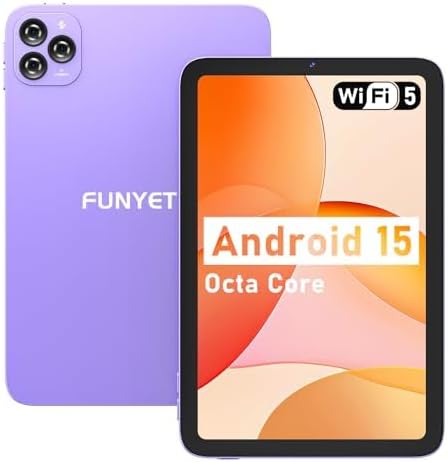
Imatge: Anvers i revers view of the FUNYET FUNPAD 10-inch Android Tablet, showcasing its purple metal shell and camera module.
3.1 Device Layout and Components

Image: Diagram illustrating the various ports and buttons on the FUNYET FUNPAD tablet. This includes the Micro SD Slot, Power On/Off button, Volume buttons, Type-C (Full Function) port, Auto Focus 8MP Rear Camera, Fixed Focus 2MP Front Camera, Flashlight, and Dual Speakers.
- Botó d'encesa: Located on the side, used to power the device on/off or put it to sleep.
- Botons de volum: Ajusta el nivell de sortida d'àudio.
- Port de tipus C: Per a càrrega i transferència de dades.
- Ranura Micro SD: Insert a Micro SD card for expandable storage.
- Càmera frontal: Càmera de 2MP per a videotrucades i selfies.
- Càmera posterior: 8MP autofocus camera with flashlight for capturing photos and videos.
- Altaveus duals: Proporcioneu sortida d'àudio.
4. Configuració
4.1 Càrrega inicial
Before first use, fully charge the tablet using the provided power adapter and Type-C cable. The battery indicator on the screen will show charging status.
4.2 Engegada/apagada
- Per encendre: Press and hold the Power button until the FUNYET logo appears.
- Per apagar: Mantingueu premut el botó d'engegada i, a continuació, seleccioneu "Apagar" de les opcions que apareixen a la pantalla.
- Per reiniciar: Mantingueu premut el botó d'engegada i, a continuació, seleccioneu "Reiniciar" de les opcions.
4.3 Assistent de configuració inicial
En engegar-la per primera vegada, la tauleta us guiarà a través d'un procés de configuració inicial. Seguiu les instruccions que apareixen a la pantalla per a:
- Seleccioneu el vostre idioma.
- Connecteu-vos a una xarxa Wi-Fi.
- Configura el teu compte de Google (opcional, però recomanat per a les baixades d'aplicacions).
- Configura la data i l'hora.
5. Instruccions de funcionament
5.1 Navegació bàsica
The FUNYET FUNPAD features an In-cell multi-touch display. Use standard Android gestures:
- Toca: Selecciona un element o obre una aplicació.
- Llisca: Desplaçar-se per pantalles o llistes.
- Pessigar: Apropar o allunyar les imatges i web pàgines.
- Premsa llarga: Accedir a menús contextuals o moure icones.
Connectivitat Wi-Fi 5.2
Per connectar-se a una xarxa Wi-Fi:
- Vés a Configuració > Xarxa i Internet > Wi-Fi.
- Activa/desactiva el Wi-Fi On.
- Seleccioneu la xarxa desitjada de la llista.
- Introduïu la contrasenya si us demana i, a continuació, toqueu Connecta't.
5.3 Vinculació Bluetooth
Per emparellar-lo amb un dispositiu Bluetooth (per exemple, auriculars, altaveus):
- Vés a Configuració > Dispositius connectats > Bluetooth.
- Commuta el Bluetooth On.
- Assegureu-vos que el dispositiu Bluetooth estigui en mode d'emparellament.
- Select your device from the list of available devices and follow any on-screen prompts to complete pairing.
5.4 Ús de la càmera
The tablet features an 8MP autofocus rear camera and a 2MP fixed-focus front camera.

Image: Visual representation of the FUNYET FUNPAD tablet's camera capabilities, highlighting the 8MP rear camera with autofocus and flashlight, and the 2MP front camera. Example photos are displayed.
- Obriu el Càmera aplicació.
- Toqueu la icona de la càmera per canviar entre la càmera frontal i la posterior.
- Toqueu el botó de l'obturador per fer una foto o iniciar/aturar la gravació de vídeo.
5.5 Gestió d'emmagatzematge
The tablet comes with 128GB of internal storage. You can expand this by inserting a Micro SD card (up to 1TB capacity).

Image: The FUNYET FUNPAD tablet screen showing icons for 128GB ROM, 8GB RAM, and 1TB Micro SD expansion, indicating ample storage and expandability.
To manage storage:
- Vés a Configuració > Emmagatzematge.
- View internal storage usage and manage files.
- Insert a Micro SD card into the designated slot to expand storage.
5.6 Gestió de la bateria
The tablet is equipped with a 6000mAh battery for extended usage.

Image: The FUNYET FUNPAD tablet being used for various activities like watching videos and video calls, illustrating its long-lasting 6000mAh battery.
- Per comprovar l'estat de la bateria, aneu a Configuració > Bateria.
- For optimal battery life, avoid extreme temperatures and use the provided charger.
5.7 Navegació GPS
The tablet supports GPS, GLONASS, and BDS for accurate location services. Ensure location services are enabled in Configuració > Ubicació for navigation apps to function correctly.
6. Manteniment
6.1 Neteja del dispositiu
- Feu servir un drap suau i sense borrissol per netejar la pantalla i la carcassa.
- Eviteu utilitzar productes químics o materials abrasius.
- Do not spray cleaners directly onto the screen.
6.2 Actualitzacions de programari
Regularly check for and install software updates to ensure your tablet has the latest features and security enhancements. Go to Configuració > Sistema > Actualització del sistema.
6.3 Cura de la bateria
- Eviteu descarregar completament la bateria amb freqüència.
- Do not expose the tablet to extreme heat or cold.
- Si no feu servir la tauleta durant un període prolongat, carregueu-la al 50% aproximadament abans de guardar-la.
7. Solució De Problemes
If you encounter issues with your FUNYET FUNPAD, refer to the following common solutions:
| Problema | Possible solució |
|---|---|
| La tauleta no s'encén | Ensure the battery is charged. Connect the tablet to the charger for at least 30 minutes, then try powering on again. |
| Problemes de connexió Wi-Fi | Restart the tablet and your Wi-Fi router. Forget the network in Wi-Fi settings and reconnect. Ensure you are within range. |
| Rendiment lent o congelació | Close unnecessary background apps. Clear cache for problematic apps. Restart the tablet. Check for available storage space. |
| La pantalla no respon | Perform a forced restart by holding the Power button for approximately 10-15 seconds. If the issue persists, consider a factory reset (data will be lost). |
| Device reboots unexpectedly | Ensure the device is updated to the latest software. Check for conflicting apps. If the issue persists, a factory reset may be necessary. |
7.1 Restabliment de fàbrica
Un restabliment de fàbrica esborrarà totes les dades de la tauleta i la restaurarà a la configuració original de fàbrica. Això s'ha de considerar com a últim recurs per a problemes de programari persistents.
- Back up any important data.
- Vés a Configuració > Sistema > Restablir opcions > Esborra totes les dades (restabliment de fàbrica).
- Confirmeu la vostra elecció i seguiu les instruccions que apareixen a la pantalla.
8. Especificacions
Key technical specifications for the FUNYET FUNPAD 10-inch Android Tablet:
| Característica | Especificació |
|---|---|
| Mida de la pantalla | 10 polzades |
| Resolució de pantalla | 800 x 1280 píxels |
| Processador | 1.6 GHz Octa-Core (Spreadtrum T606) |
| Coprocessador gràfic | Mali-G57 |
| RAM | 8 GB |
| Emmagatzematge intern | 128 GB |
| Emmagatzematge ampliable | Micro SD (fins a 1 TB) |
| Sistema operatiu | Android |
| Tipus sense fil | 802.11ac (Wi-Fi 5) |
| Bluetooth | Bluetooth 5.0 |
| Càmera posterior | Enfocament automàtic de 8 MP |
| Càmera frontal | Enfocament fix de 2 MP |
| Bateria | 6000 mAh |
| Pes de l'article | 1.74 lliures |
| Dimensions del producte | 9.48 x 6.28 x 0.3 polzades |
9. Garantia i Suport
FUNYET is dedicated to providing quality electronic products. We offer a 30-day free exchange policy and a 1-year free repair service for all our products.
If you have any questions or require assistance with your FUNYET FUNPAD tablet, please contact FUNYET support. We aim to reply to all inquiries within 24 hours.
For further information or to explore other products, visit the official FUNYET store: FUNYET Store on Amazon