
InMotion ANC True Wireless Earbuds
Manual d'usuari dels auriculars sense fil InMotion ANC True Wireless
Model: ANC True Wireless Earbuds
Brand: InMotion
1. Introducció
Thank you for choosing the InMotion ANC True Wireless Earbuds. This manual provides essential information for setting up, operating, and maintaining your earbuds to ensure optimal performance and longevity. Please read this manual thoroughly before use.
These earbuds feature Active Noise Cancelling (ANC) for an immersive audio experience, true wireless connectivity for freedom of movement, and intuitive touch controls. They are designed for comfort with suction tips and offer up to 6 hours of use on a single charge.
Informació de seguretat
- No exposeu els auriculars ni l'estoig de càrrega a temperatures extremes, humitat o líquids.
- Eviteu deixar caure o sotmetre el dispositiu a forts impactes.
- Do not attempt to disassemble or modify the earbuds or charging case.
- Mantenir fora de l'abast dels nens.
- Feu servir només el cable de càrrega proporcionat o un equivalent certificat.
2. Què hi ha a la caixa
Verifiqueu que tots els elements siguin presents al vostre paquet:
- InMotion ANC True Wireless Earbuds (Left and Right)
- Charging Carry Case
- Cable de càrrega USB-C
- Manual d'usuari (aquest document)

Image: The InMotion ANC True Wireless Earbuds resting inside their open charging case, showcasinel disseny elegant i els indicadors de càrrega.
3. Configuració
3.1 Càrrega dels auriculars i l'estoig
Abans del primer ús, carregueu completament els auriculars i l'estoig de càrrega.
- Col·loca els auriculars a l'estoig de càrrega, assegurant-te que estiguin correctament col·locats.
- Connecteu el cable de càrrega USB-C al port de càrrega de la carcassa i l'altre extrem a una font d'alimentació USB (per exemple, un adaptador de paret, un port USB de l'ordinador).
- The indicator lights on the case will show charging status. Once fully charged, the lights will indicate completion or turn off.
A full charge provides up to 6 hours of earbud use. The charging case provides multiple additional charges.
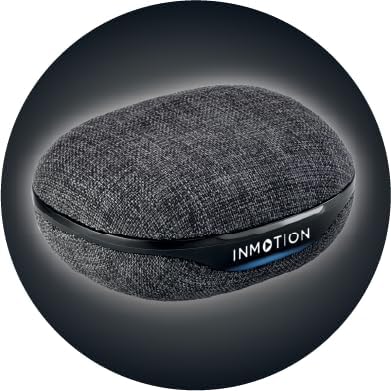
Imatge: Frontal view of the InMotion ANC True Wireless Earbuds charging case, highlighting the charging port and indicator lights.
3.2 Emparellament amb el dispositiu (emparellament en un sol pas)
The InMotion ANC True Wireless Earbuds feature one-step pairing for quick and easy connection.
- Assegureu-vos que els auriculars estiguin carregats i dins de l'estoig de càrrega.
- Obre la tapa de l'estoig de càrrega. Els auriculars entraran automàticament en mode d'emparellament.
- Al dispositiu (telèfon intel·ligent, tauleta, ordinador portàtil), aneu a la configuració de Bluetooth i activeu el Bluetooth.
- Cerca "InMotion ANC Earbuds" (or similar name) in the list of available devices.
- Select the earbuds to connect. Once connected, you will hear an audible confirmation, and the indicator lights on the earbuds may change.
Els auriculars es tornaran a connectar automàticament a l'últim dispositiu emparellat quan es treguin de l'estoig, si el Bluetooth està activat al dispositiu.
4. Instruccions de funcionament
4.1 Controls tàctils
The earbuds are equipped with intuitive touch controls on each earbud. Specific functions may vary slightly by device, but common controls include:
- Reproduir/pausa: Un sol toc a qualsevol dels auriculars.
- Pista següent: Toqueu dues vegades l'auricular dret.
- Pista anterior: Toqueu dues vegades l'auricular esquerre.
- Respondre/Finalitzar la trucada: Toqueu un sol cop a qualsevol dels auriculars durant una trucada entrant.
- Rebutja la trucada: Prem i mantén premut qualsevol dels auriculars durant una trucada entrant.
- Activa l'Assistent de veu: Toqueu tres vegades qualsevol dels auriculars.
- Activa/desactiva el mode ANC/Transparència: Press and hold on either earbud (duration may vary, refer to specific product details if available).

Imatge: Lateral view of a single InMotion ANC True Wireless Earbud, illustrating its ergonomic design and the touch-sensitive area.
4.2 Cancel·lació activa de soroll (ANC)
The Active Noise Cancelling feature reduces ambient noise, allowing for a more immersive listening experience. To activate or deactivate ANC, use the designated touch control gesture (typically a press and hold). Some models may also feature a Transparency Mode, which allows you to hear your surroundings while still enjoying your audio.
5. Manteniment
Proper maintenance ensures the longevity and performance of your InMotion ANC True Wireless Earbuds.
5.1 Neteja
- Netegeu suaument els auriculars i l'estoig de càrrega amb un drap suau, sec i sense borrissol.
- No utilitzeu netejadors abrasius, alcohol ni dissolvents químics.
- Carefully remove any earwax or debris from the ear tips and speaker mesh using a small, soft brush or cotton swab.
5.2 Emmagatzematge
Quan no els utilitzeu, guardeu els auriculars a la funda de càrrega per protegir-los de la pols, la brutícia i altres danys. Guardeu la funda en un lloc fresc i sec, allunyat de la llum solar directa i de temperatures extremes.

Imatge: Enrere view of the InMotion ANC True Wireless Earbuds charging case, showing its compact and portable design.
6. Solució De Problemes
Si teniu problemes amb els auriculars, proveu les solucions següents:
| Problema | Solució |
|---|---|
| Els auriculars no s'emparellan/connecten. |
|
| No se sent so d'un o dels dos auriculars. |
|
| L'estoig de càrrega no es carrega. |
|
| L'ANC no funciona eficaçment. |
|
7. Especificacions
| Característica | Detall |
|---|---|
| Nom del model | Auriculars True Wireless ANC |
| Control de soroll | Cancel·lació adaptativa del soroll |
| Tecnologia de connectivitat | Sense fil (Bluetooth) |
| Components inclosos | Funda de càrrega |
| Dispositius compatibles | Laptops, Smartphone, Tablets |
| Mètode de control | Toca |
| Tipus de controlador d'àudio | Conductor dinàmic |
| Característica especial | Resposta de trucades |
| Fabricant | En moviment |
| Pes de l'article | 3.2 unces |
| Color | Negre |
| Col·locació de l'orella | A l'orella |
| Factor de forma | A l'orella |
| Impedància | 16 ohms |
| Durada de la bateria (auriculars) | Fins a 6 hores |
| Temps de càrrega | Approx. 1.5 hours (for earbuds and case) |
8. Garantia i Suport
InMotion products are manufactured with high-quality standards. For warranty information and customer support, please refer to the warranty card included with your product or visit the official InMotion website. You can also contact InMotion customer service through their Amazon store page:
Visit the InMotion Store on Amazon
InMotion is committed to providing excellent customer service and support for their products.
Ask a question about this manual
Ask about setup, troubleshooting, compatibility, parts, safety, or missing instructions. Manuals+ will review the question and use this page’s manual context to help answer it.