
1. Instruccions de seguretat
Please read all instructions carefully before assembly and use to ensure safe operation and prevent injury or damage. Keep this manual for future reference.
- Assegureu-vos que tots els components siguin presents i no estiguin danyats abans del muntatge. No utilitzeu el producte si hi falta alguna peça o si està defectuosa.
- Mantingueu els nens i les mascotes allunyats de l'escriptori durant el funcionament per evitar accidents.
- Ensure there are no obstructions (walls, furniture, cables, etc.) in the desk's path during height adjustment.
- Do not place heavy or unstable objects on the desk that exceed its maximum load capacity of 100 kg.
- Avoid placing the desk near heat sources, open flames, or in excessively humid environments.
- Unplug the desk from the power outlet before cleaning, maintenance, or if it will be unused for an extended period.
- Només feu servir l'adaptador de corrent i els cables proporcionats.
- Do not attempt to modify or disassemble the desk's electrical components. Contact qualified service personnel for repairs.
2. Producte acabatview
The FLEXISPOT EC5 Lite is an electric height-adjustable desk frame designed for ergonomic workspaces. It features a robust dual-motor system and a stable 3-column leg design.
Característiques principals:
- Dual-Motor Lifting System: Provides smooth, quiet (<50 dB) and stable height adjustments.
- Wide Height Range: Adjustable from 60 cm to 125 cm to accommodate various user preferences and activities.
- Alta capacitat de càrrega: Supports up to 100 kg, suitable for multiple monitors and office equipment.
- Smart Memory Panel: Allows saving and recalling up to 4 preferred height settings.
- Tecnologia anti-colisió: Automatically stops and retracts the desk if an obstacle is detected during movement, ensuring safety.
- Construcció robusta: Made with reinforced steel for durability and stability.

Figure 2.1: Ultra-High Load Capacity (100 kg)

Figure 2.2: Large Height Adjustment Range (60-125 cm)

Figure 2.3: Powerful Dual Motors
3. Muntatge i muntatge
The FLEXISPOT EC5 Lite desk frame is designed for straightforward assembly, typically completed in under 25 minutes. A detailed instruction manual is included with the product for step-by-step guidance.
Consells de muntatge:
- Deixeu una zona espaiosa per al muntatge.
- Lay out all parts and hardware according to the included manual.
- Assegureu-vos que tots els cargols estiguin ben ajustats, però no els estrenyeu massa.
- The frame's width is adjustable to fit various tabletop sizes.

Figure 3.1: Wide Adjustable Frame Width
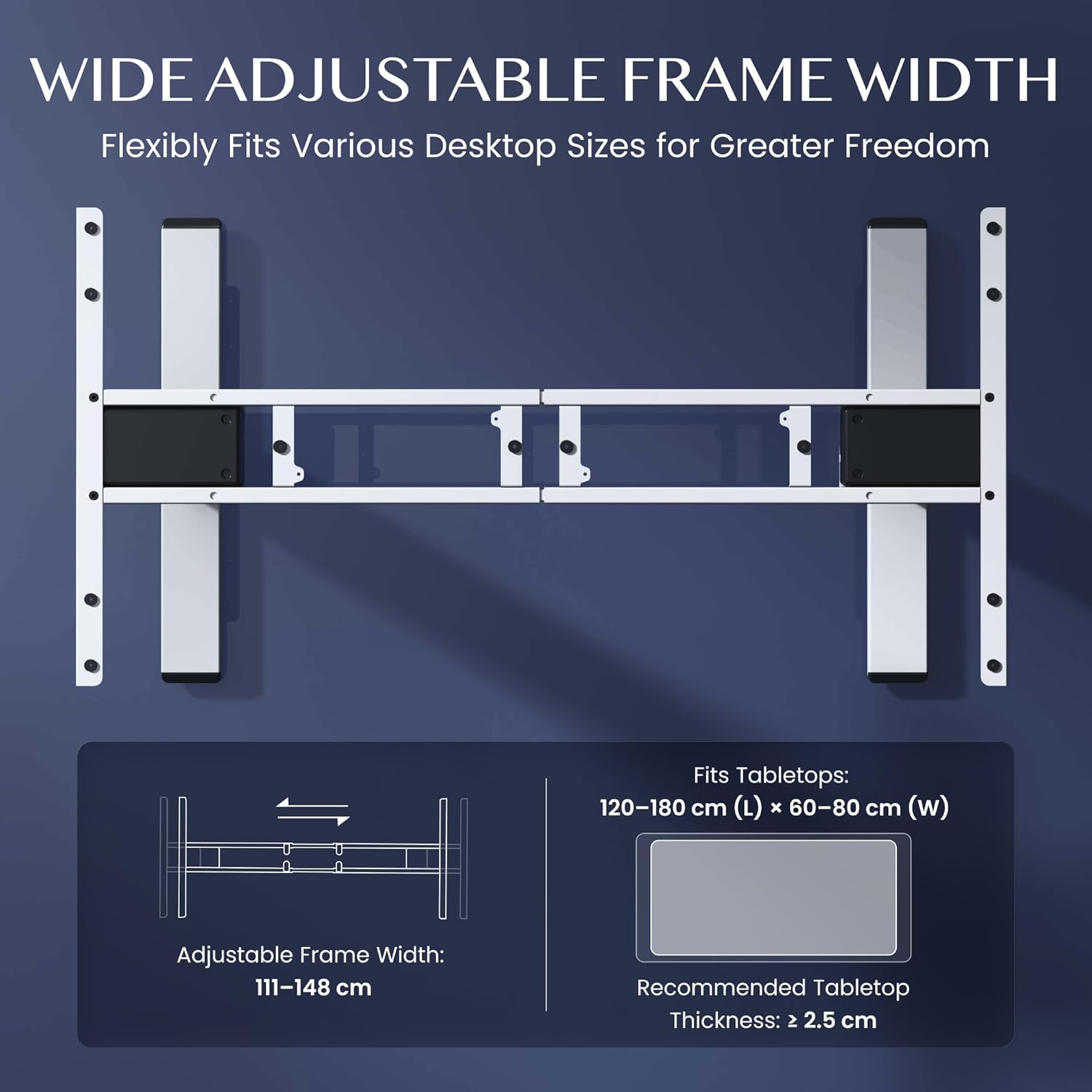
Figure 3.2: Easy Installation Components
4. Instruccions de funcionament
The FLEXISPOT EC5 Lite desk is operated via a digital control panel, offering intuitive height adjustment and memory functions.
Panell de control digital:

Figura 4.1: Panell de control digital
Ajust d'alçada:
- Utilitza el Amunt (^) i Avall (v) arrow buttons on the control panel to manually adjust the desk height.
- The current height will be displayed on the LED screen.
Preajustos de memòria:
The desk allows you to save up to 4 preferred height settings for quick adjustments.
- Ajusteu l'escriptori a l'alçada desitjada amb els botons Amunt/Avall.
- Premeu el botó 'M' botó. La pantalla mostrarà 'S-'.
- Premeu immediatament un dels botons numèrics (1, 2, 3 o 4) per desar l'alçada actual a aquesta configuració predefinida. La pantalla mostrarà 'S-1', 'S-2', etc., per confirmar.
- To recall a saved height, simply press the corresponding number button (1, 2, 3 o 4). L'escriptori es mourà automàticament a la posició desada.
Sistema anticol·lisió:
The desk is equipped with an anti-collision sensor. If the desk encounters an obstacle during upward or downward movement, it will automatically stop and retract slightly to prevent damage or injury.
5. Manteniment
Regular maintenance ensures the longevity and optimal performance of your FLEXISPOT EC5 Lite desk.
- Neteja: Netegeu el marc de l'escriptori i el panell de control amb un drap suau.amp drap. Eviteu utilitzar productes químics agressius, netejadors abrasius o humitat excessiva.
- Inspeccions: Reviseu periòdicament tots els cargols i perns per assegurar-vos que estiguin ben ajustats. Torneu a apretar-los si cal.
- Gestió de cables: Ensure all cables are neatly organized and not pinched or tangled, especially during height adjustments.
- Cable d'alimentació: Inspect the power cord for any signs of damage. If damaged, discontinue use and contact customer support.
6. Solució De Problemes
If you encounter issues with your FLEXISPOT EC5 Lite desk, refer to the following common troubleshooting steps:
- L'escriptori no es mou:
- Comproveu si el cable d'alimentació està ben connectat tant a l'escriptori com a una presa de corrent que funcioni.
- Ensure no objects are obstructing the desk's movement, triggering the anti-collision system.
- Uneven Movement or Error Codes:
- Perform a reset: Lower the desk to its lowest position and hold the 'Down' button for approximately 5-10 seconds until the desk slightly lowers further or an 'RST' message appears, then releases. The desk should then reset to its lowest point.
- If an error code persists, consult the full product manual or contact customer support.
- Soroll durant el funcionament:
- A slight motor hum is normal. If the noise is excessive or unusual, check for loose components or contact support.
Video 6.1: Crash Test Demonstration. This video illustrates the desk's stability and durability under impact, showing minimal disturbance to items on the FlexiSpot desk compared to others.
7. Especificacions
Detailed technical specifications for the FLEXISPOT EC5 Lite Electric Standing Desk frame.

Figure 7.1: Desk Dimensions and Specifications
| Característica | Especificació |
|---|---|
| Marca | FLEXISPOT |
| Model | EC5 Lite |
| Color | Blanc |
| Dimensions del producte (L x A x A) | 68 x 148.6 x 125 cm (frame) |
| Material | Acer d'aliatge |
| Interval d'ajust d'altura | 60 - 125 cm |
| Capacitat de càrrega màxima | 100 kg |
| Velocitat màxima | 25 mm/s |
| Nivell de soroll | <50 dB |
| Frame Width Adjustment | 111 - 148 cm |
| Recommended Tabletop Size | 120-180 cm (L) x 60-80 cm (W) |
| Gruix recomanat del taulell | ≥ 2.5 cm |
| Característiques especials | Electric, Height Adjustable, Smart Memory, Anti-collision Safety |
8. Garantia i Suport
FLEXISPOT stands behind the quality of its products with comprehensive warranty coverage.
- Frame and Motors: 5 anys de garantia.
- Components electrònics: 2 anys de garantia.
For warranty claims, technical assistance, or any questions regarding your FLEXISPOT EC5 Lite desk, please contact FLEXISPOT customer support through their official website or your point of purchase. Please have your purchase receipt and product model information ready.


