
1. Introducció
This manual provides essential instructions for the proper setup, operation, and maintenance of your TandD TR72A2-S High Precision Bluetooth, WiFi Humidity and Temperature Data Logger. The TR72A2-S is designed for accurate environmental monitoring, offering cloud connectivity via WiFi and local access via Bluetooth. Please read this manual thoroughly before using the device to ensure optimal performance and longevity.
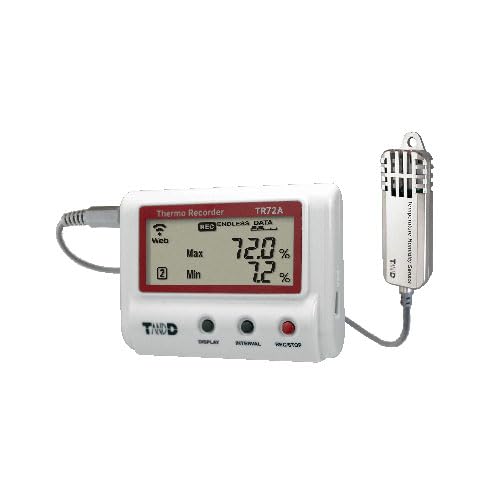
Figura 1: TandD TR72A2-S data logger unit with external temperature and humidity sensor. The main unit features an LCD display showing current readings, maximum and minimum values, and status indicators for web connectivity and recording. Control buttons for display, interval, and record/stop are visible below the screen. The external sensor is a small, cylindrical device designed for accurate environmental measurements.
2. Contingut del paquet
Verifiqueu que tots els elements que s'enumeren a continuació siguin presents al vostre paquet:
- TandD TR72A2-S Data Logger Unit
- Humidity and Temperature Sensor (SHA-3151)
- Piles alcalines AA (x2)
- Manual d'usuari (aquest document)
- T&D PC Software (available as a download)
3. Configuració
3.1. Instal·lació de la bateria
- Locate the battery compartment cover on the back of the TR72A2-S unit.
- Feu lliscar la coberta oberta.
- Introduïu dues piles alcalines AA, assegurant-vos de la polaritat correcta (+/-).
- Tanqueu bé la tapa del compartiment de la bateria.
3.2. Connexió del sensor
Connect the SHA-3151 humidity and temperature sensor to the sensor input port on the side of the TR72A2-S unit. Ensure the connector is fully inserted.
3.3. Initial Power On and Display Check
Once batteries are installed and the sensor is connected, the device will power on automatically. The LCD will display current temperature and humidity readings. If the display remains blank, check battery installation.
3.4. Software and App Installation
- Aplicació mòbil: Download the "T&D Thermo" app from your device's app store (iOS/Android). This app is used for initial setup, Bluetooth communication, and viewing dades.
- Programari de PC: The T&D PC software can be downloaded from the official TandD website. This software provides advanced configuration and data management options.
3.5. Network Configuration (WiFi and Bluetooth)
The TR72A2-S supports both WiFi for cloud connectivity and Bluetooth for local device communication.
- Configuració de Bluetooth: Open the T&D Thermo app on your mobile device. Follow the in-app instructions to pair with your TR72A2-S via Bluetooth. This connection is primarily used for initial WiFi setup and direct data access.
- Configuració WiFi: Using the T&D Thermo app (connected via Bluetooth), configure your TR72A2-S to connect to your local WiFi network. Enter your network SSID and password when prompted. Once connected, the "Web" icon on the device's LCD will illuminate, indicating successful cloud connectivity.
4. Instruccions de funcionament
4.1. LCD Display Overview
The LCD provides real-time information about the device's status and readings:
- Current Values: Displays the live temperature and humidity readings from the external sensor.
- Màxim/mínim: Shows the maximum and minimum recorded values for temperature and humidity during the current logging session. Press the VISUALITZACIÓ button to cycle through current, max, and min values.
- REC: Indicates that data recording is active.
- ENDLESS DATA: Appears when the device is configured for endless recording, overwriting the oldest data when memory is full.
- Web Icona: Illuminates when the device is successfully connected to a WiFi network and can upload data to the cloud.
- ALM Icon: Flashes when an alarm condition (e.g., temperature or humidity exceeding set limits) is detected.
4.2. Funcions del botó
- MOSTRA: Cycles through current, maximum, and minimum readings on the LCD.
- INTERVAL: Used to set the data recording interval. Press and hold to enter interval setting mode, then use VISUALITZACIÓ to select the interval and INTERVAL de nou per confirmar.
- GRAVACIÓ/ATURADA: Starts or stops data recording. Press and hold to toggle recording status.
4.3. Data Logging and Cloud Service
The TR72A2-S automatically uploads recorded data to the free TandD WebStorageService cloud at set intervals when connected to WiFi. If WiFi or Bluetooth access is unavailable, data is stored internally as a backup. You can view your recorded readings anytime, anywhere, through the WebStorageService portal or the T&D Thermo app.
4.4. Funcions d'alarma
Alarm thresholds for temperature and humidity can be configured via the T&D Thermo app or PC software. If readings exceed these thresholds, the ALM icon will flash on the device. Email notifications for alarm excursions can also be set up through the WebStorageService.
5. Manteniment
5.1. Substitució de la bateria
When the battery indicator on the LCD shows low power, replace both AA alkaline batteries promptly to ensure continuous operation and data integrity. Follow the steps outlined in Section 3.1.
5.2. Sensor Care
Keep the SHA-3151 sensor clean and free from dust or debris. Avoid exposing the sensor directly to water or extreme physical shock. Handle the sensor cable carefully to prevent damage.
5.3. Actualitzacions de firmware
Periodically check the official TandD website for available firmware updates. Updates can improve performance, add features, or resolve issues. Follow the instructions provided with the firmware update package for proper installation.
6. Solució De Problemes
| Problema | Causa possible | Solució |
|---|---|---|
| El dispositiu no s'encén. | Piles gastades o instal·lades incorrectament. | Substituïu les piles per piles alcalines AA noves, assegurant-vos de la polaritat correcta. |
| No hi ha lectures a la pantalla. | Sensor not connected or faulty. | Ensure the SHA-3151 sensor is securely connected. If problem persists, the sensor may need replacement. |
| No es pot connectar a la xarxa Wi-Fi. | Incorrect WiFi credentials, out of range, or network issues. | Verify SSID and password using the T&D Thermo app. Move the device closer to the WiFi router. Check router settings. |
| Data not uploading to cloud. | No WiFi connection, or WebStorageService account issue. | Check WiFi connection (Web icon on display). Verify your TandD WebStorageService account status. |
| Lectures inexactes. | Sensor contamination or damage, or environmental interference. | Clean the sensor carefully. Ensure the sensor is not exposed to direct sunlight, drafts, or extreme conditions. |
7. Especificacions
| Característica | Detall |
|---|---|
| Número de model | TR72A2-S |
| Rang de mesura (temperatura) | -25 °C a +70 °C (-13 °F a +158 °F) |
| Rang de mesura (humitat) | 10% a 99% HR |
| Precisió (temperatura) | ±0.5 °C |
| Accuracy (Humidity) | ±5% HR |
| Connectivitat | Bluetooth, Wi-Fi |
| Font d'alimentació | 2 piles alcalines AA |
| Sensor extern | SHA-3151 (Humidity and Temperature Sensor) |
| Pes de l'article | 90.2 grams (aproximadament 3.18 unces) |
| Fabricant | TandD |
8. Garantia i Suport
For warranty information and technical support, please refer to the official TandD website or contact your authorized TandD distributor. Keep your purchase receipt for warranty claims.