
1. Introducció
This manual provides detailed instructions for the assembly, operation, and maintenance of your DEVAISE AMGZ 60 Inch L-Shaped Gaming Desk. Please read this manual thoroughly before assembly and use to ensure proper function and safety. Keep this manual for future reference.

Figure 1.1: The DEVAISE AMGZ 60 Inch L-Shaped Gaming Desk in a typical setup, showcasing its monitor stand, LED lighting, and integrated storage.
2. Informació de seguretat
Observeu les següents precaucions de seguretat per evitar lesions o danys al producte:
- Llegiu atentament totes les instruccions abans del muntatge.
- Assegureu-vos que totes les peces estiguin presents i que no estiguin danyades abans de començar el muntatge.
- Munta l'escriptori sobre una superfície suau i neta per evitar ratllades.
- No estrenyeu massa els cargols durant el muntatge, ja que això podria danyar el material.
- Mantingueu les peces petites allunyades dels nens per evitar perills d'asfixia.
- Do not exceed the maximum weight capacity of the desk (100 lbs).
- Ensure the power cord for the integrated outlets is properly routed and not pinched.
- Avoid spilling liquids directly onto the power outlets or LED light strip.
- Reviseu periòdicament totes les connexions i elements de fixació per assegurar-vos que es mantinguin segurs.
3. Configuració i muntatge
Assembly typically requires two people and takes approximately 1-2 hours. All necessary tools are usually included. Follow the numbered steps provided in your packaging for detailed assembly instructions.
3.1 Desembalatge i identificació de peces
Carefully unpack all components and lay them out on a protected surface. Refer to the parts list in your package to identify each piece. Ensure all hardware (screws, bolts, etc.) is accounted for.
3.2 Muntatge del marc
Begin by assembling the metal frame components. Attach the main support beams to the leg frames using the provided screws. Do not fully tighten screws until all frame pieces are loosely connected.
3.3 Desktop Panel Installation
Once the frame is stable, carefully place the desktop panels onto the frame. Secure them using the designated screws. Ensure the L-shape orientation is correct for your desired setup.

Figure 3.1: The assembled DEVAISE L-Shaped Desk, ready for use in a home office environment.
3.4 Monitor Stand and Storage Shelf Attachment
Attach the monitor stand to the main desktop panel. Install the open storage shelves on the side frame. The headphone hook can be attached to the side of the desk as desired.

Figure 3.2: Detail of the iron hook for headphones and the open storage shelf for CPU or other items.
3.5 Drawer Unit Assembly
Assemble the fabric drawers according to the instructions. Insert the drawers into the designated cabinet space. The bottom drawer is designed to hold A4/legal files.
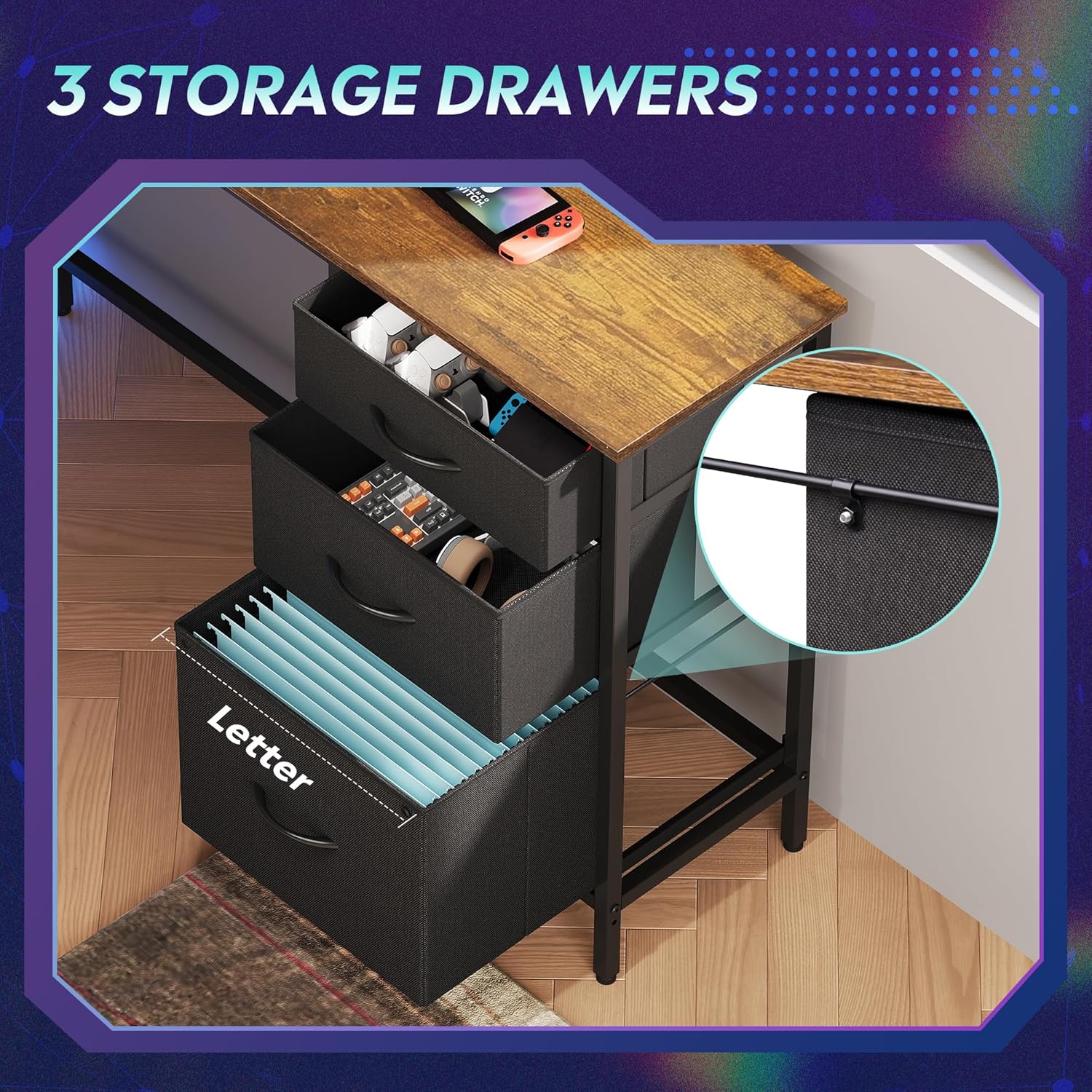
Figure 3.3: The three fabric storage drawers, illustrating their capacity for various items, including file folders in the bottom drawer.
3.6 Power Outlet and LED Light Installation
Integrate the recessed power strip into its designated slot on the desktop. Connect the LED light strip to its power source and route the cables neatly. Ensure all electrical connections are secure before plugging into a wall outlet.

Figure 3.4: The recessed power strip, featuring two AC outlets and two USB ports for convenient device charging.
3.7 Ajustaments finals
Once fully assembled, tighten all screws. Adjust the non-slip footpads at the bottom of the desk legs to ensure stability on uneven floors.

Figure 3.5: Detail showing the desk's durable board material and the adjustable footpads for stability.
4. Instruccions de funcionament
Sistema d'il·luminació LED 4.1
The integrated LED lighting system offers various modes and colors. It can be controlled via a smart controller or a dedicated app (if applicable, refer to specific instructions in your package for app details).
- Encès/apagat: Single short press the controller button to turn on. Long press for 3 seconds to turn off.
- Change Light Color/Mode: Single short press (again) to cycle through 31 light modes and colors.
- Sincronització de música: Some models support music rhythm synchronization. Refer to the specific LED controller instructions for activation.
- Funcions del temporitzador: Some models include timer functions for automatic shut-off. Refer to the specific LED controller instructions.

Figure 4.1: The smart controller for the LED lighting system, indicating features like 31 light modes, color palette switch, music rhythm, and timer.

Figure 4.2: Instructions for operating the smart controller for the LED lights.
4.2 Power Outlets
The desk includes a recessed power strip with 2 AC outlets (125V/12A) and 2 USB ports (5V/2.1A). Plug the desk's main power cord into a wall outlet. You can then plug your devices directly into the desk's integrated outlets for convenient power access.
- Do not overload the power strip. Ensure the total wattage of connected devices does not exceed the strip's capacity.
- Use the USB ports for charging compatible devices.
4.3 Storage Drawers and Shelves
Utilize the three fabric drawers for organizing office supplies, gaming accessories, or personal items. The bottom drawer is designed with rails for hanging A4/legal size file folders. The open storage shelves provide space for a CPU tower, books, or decorative items. The headphone hook keeps your headset easily accessible.
5. Manteniment
- Neteja: Netegeu les superfícies de l'escriptori amb un drap suau iamp drap. Eviteu productes químics agressius o netejadors abrasius que puguin danyar l'acabat.
- Pols: Regularly dust the desk and LED light strip to maintain optimal appearance and function.
- Elements de fixació: Periodically check all screws and bolts to ensure they are tight. Retighten if necessary to maintain desk stability.
- Components elèctrics: Keep the power outlets and LED light strip dry. If any electrical component appears damaged, discontinue use and contact support.
6. Solució De Problemes
6.1 Desk is Wobbly
- Assegureu-vos que tots els cargols de muntatge estiguin completament apretats.
- Adjust the non-slip footpads on the bottom of the legs to compensate for uneven flooring.
6.2 Els llums LED no funcionen
- Comproveu si el cable d'alimentació principal de l'escriptori està ben connectat a una presa de corrent que funcioni.
- Ensure the LED light strip's connector is properly attached to its power source.
- Verify the smart controller is functioning correctly and not damaged.
- Try pressing the power button on the controller.
6.3 Power Outlets Not Providing Power
- Confirm the desk's main power cord is securely plugged into a functional wall outlet.
- Check if the wall outlet itself is working by plugging in another device.
- Ensure the power strip is properly seated in its desktop slot and its internal connections are secure.
- Eviteu sobrecarregar la regleta amb massa potènciatagdispositius e.
6.4 Drawers Do Not Slide Smoothly
- Ensure the fabric drawers are correctly assembled and inserted into their slots.
- Check for any obstructions within the drawer cabinet.
7. Especificacions
| Marca | DEVAISAR |
| Número de model | AMGZ |
| Dimensions del producte (P x A x A) | 46.5" x 59" x 29.4" |
| Color | Marró Rústic |
| Material | Fusta dissenyada, Metall |
| Pes de l'article | 55.8 lliures |
| Característiques especials | LED Lights, Power Outlets (2 AC, 2 USB), Monitor Stand, Storage Drawers, Headphone Hook, Open Storage Shelf, Adjustable Footpads |
| Capacitat de pes màxim | 100 lliures |
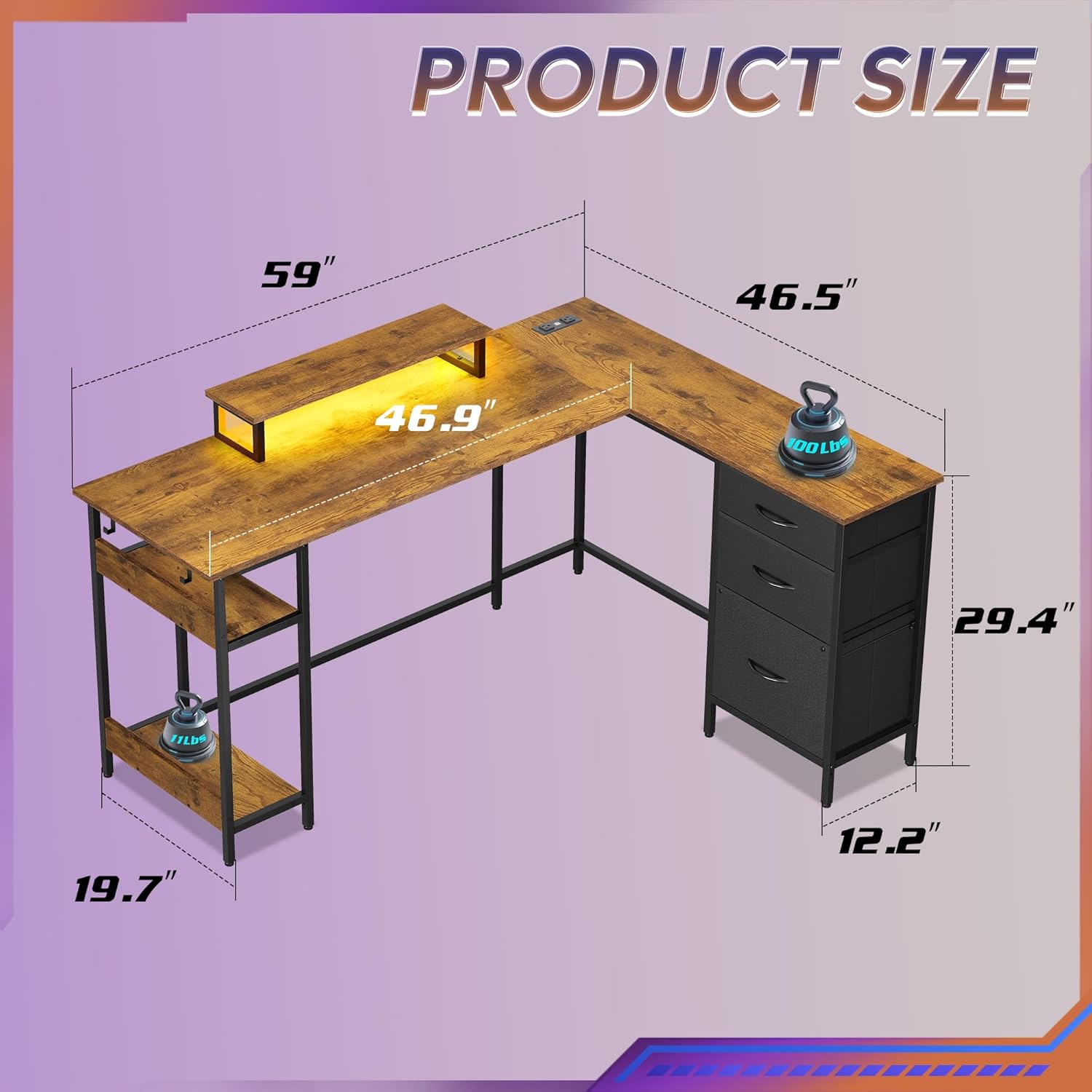
Figure 7.1: Detailed product dimensions of the DEVAISE AMGZ 60 Inch L-Shaped Gaming Desk.
8. Informació de la garantia
For detailed warranty information, please refer to the warranty card included with your product packaging or visit the official DEVAISE weblloc web. Conserveu el rebut de compra com a comprovant de compra per a qualsevol reclamació de garantia.
9. Atenció al client
If you encounter any issues or have questions regarding your DEVAISE AMGZ 60 Inch L-Shaped Gaming Desk, please contact DEVAISE customer support through the following channels:
- Correu electrònic: Refer to your product packaging or the official DEVAISE weblloc web per al correu electrònic de contacte.
- Weblloc: Visit the official DEVAISE weblloc web amb preguntes freqüents, recursos d'assistència i formularis de contacte.
- Telèfon: Check your product documentation for a customer service phone number.
When contacting support, please have your model number (AMGZ) and purchase information ready.